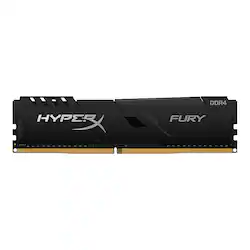
HyperX - FURY HX426C16FB4/16 16GB 2666MHz DDR4 DIMM Desktop Memory
- Key Specs
- Type of Memory (RAM): DDR4
- Speed: 3466 megahertz
- Latency: 16-18-18 (Refers to the amount of time between the moment a memory request is initiated and the moment the request is retrieved by a processor, commonly written as a series of 4 numbers, or timings. Each timing measures the performance of the module according to a specific parameter. Generally, the lower the numbers, the faster the RAM can respond to requests.)
- CAS Latency: 16 (Column Address Strobe (CAS) Latency refers to the number of clock cycles (for synchronous DRAM) or nanoseconds (for asynchronous DRAM) between the moment an instruction or command is initiated and the moment the data result is available. Generally, the lower the numbers, the better.)
- Memory Capacity (per Module): 16 gigabytes (Refers to the maximum amount of data that can be stored on the memory module.)
- Memory Capacity (Total): 16 gigabytes (Refers to the maximum total amount of data that can be stored on all included memory modules.)
- General
- Product Name: FURY HX426C16FB4/16 16GB 2666MHz DDR4 DIMM Desktop Memory
- Brand: HyperX
- Memory Capacity (per Module): 16 gigabytes (Refers to the maximum amount of data that can be stored on the memory module.)
- Memory Capacity (Total): 16 gigabytes (Refers to the maximum total amount of data that can be stored on all included memory modules.)
- Model Number: HX426C16FB4/16
- Compatibility
- Type of Memory (RAM): DDR4
- Speed
- Speed: 3466 megahertz
- Latency: 16-18-18 (Refers to the amount of time between the moment a memory request is initiated and the moment the request is retrieved by a processor, commonly written as a series of 4 numbers, or timings. Each timing measures the performance of the module according to a specific parameter. Generally, the lower the numbers, the faster the RAM can respond to requests.)
- CAS Latency: 16 (Column Address Strobe (CAS) Latency refers to the number of clock cycles (for synchronous DRAM) or nanoseconds (for asynchronous DRAM) between the moment an instruction or command is initiated and the moment the data result is available. Generally, the lower the numbers, the better.)
- Features
- Memory Channels: Triple (Multi-channel memory increases the rate of data transfer between the DRAM memory and memory controller by adding more channels of communication. The more channels, the more memory bandwidth.)
- Other
- UPC: 740617308501
HyperX FURY DDR4 features an updated heat spreader and speeds up to 3466MHz for a stylish performance boost. FURY DDR4’s XMP-ready and available in 2400MHz–3466MHz speeds, CL15–16 latencies, 8GB and 16GB single module capacities, and 16GB–64GB kit capacities. It features Plug N Play automatic overclocking at 2400MHz and 2666MHz speeds and is compatible with the latest Intel and AMD CPUs.
- Processor Compatibilty: Featuring Intel XMP-ready profiles optimized for Intel's latest chipsets
- Capacity: Offers 16GB with 2x8GB
- Operation Speed: HyperX FURY DDR4 features an updated heat spreader and speeds up to 3466MHz for a stylish performance boost.
- Memory Type: High speed, low latency DDR4 performance in UDIMM form
- Overclocking: It features Plug N Play automatic overclocking at 2400MHz and 2666MHz speeds and is compatible with the latest Intel and AMD CPUs.
Q: Is this a 1 16GB stick or 2 8GB sticks
A: It is one 16gb stick.
Q: What are the timings and latency of this ram?
A: Hi, Thomas! The timing is 16-18-18 at 1.2V. Sidney | HyperX
A: I mean, I *wouldn't recommend* severely mixing and matching extremely different RAM speeds (2666 vs. 3466). *In theory,* they *might* work together, but if they did, your existing faster RAM stick would have to down-clock to match it, so you'd get higher capacity, but lower speed (2666). And that's leaving aside any differences in brand, quality, latency differences, timings, etc., which could potentially cause instability in some situations. Like, I'd go for something as close to what's already in your system as possible. Another stick of similar size, frequency, latency [CL17, etc.], etc. Or get a matched pair that are designed to work together [dual-channel, etc.], and fully swap out the 1 stick for a matched pair... (Then resell the old stick to recoup some of the cost of the new sticks, once the new sticks are in an running reliably for a bit.)
A: Any new motherboard that is compatible with DDR4 and socket 1200
Q: Is this compatible with the GMA5000BST cyberpowerpc model ?
A: It is gonna fit in your motherboard, but as far as I know your "GMA5000BST cyberpower pc model" uses DDR4 3000 MHZ, and this stick is 2666MHZ. It is gonna work if you install it on the lower speed which is 2666 MHZ and you are not gonna see much of performance after the upgrade. All memory sticks should be with the same MHZ speed. My advice: Open your PC, take out the memory stick, see what's on the label and buy exactly the same for maximum compatibility and performance.
Q: will this work on a cyberpower pc
A: Hello! You will need to find out what specifications your motherboard has for memory compatibility. Visit the MOBO's brand's website for further information. If you have any other questions, please reach out to us directly and we'll be happy to help! Find us on Facebook, Twitter, or Instagram. Thank you.



















