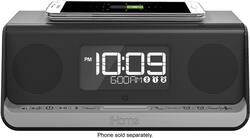
iHome - Dual-Alarm Clock with Wireless Qi Charging - Gunmetal
- General
- Product Name: Dual-Alarm Clock with Wireless Qi Charging
- Brand: iHome
- Model Number: IBN350GC
- Color: Gunmetal
- Other
- Product Width: 4.73 inches (The out of box width of the item. Width is measured as the horizontal distance from one side of the item to the other as it would be primarily used or placed.)
- Product Height: 3.39 inches (The out of box height of the item. Height is measured as the vertical distance from the bottom of the item to the top as it would be primarily used or placed.)
- Product Depth: 3.39 inches (The out of box depth of the item. Depth is measured as the distance from the front of the item to the back as it would be primarily used or placed.)
- Product Weight: 2.05 pounds (The out of box weight of the item.)
- Display Type: Digital
- Batteries Included: true (Indicates whether the product comes with the required batteries for its operation.)
- Battery Backup: true (Provides power if the main power source is unavailable.)
- Power Source: Battery-powered/Plug-in
- Rechargeable Battery: false
- Battery Size: Button (The battery size required for operation.)
- Number of Batteries Required: 1
- Tuner Type(s): None
- Input(s): 3.5mm audio, USB
- Snooze Function: true
- App Compatible: true (The product can be connected to a program or software application on a mobile device, which then receives collected data from the product.)
- UPC: 047532910551
Stay on schedule and charge a range of devices with this innovative iHome dual-alarm clock. Place your compatible smartphone on top of the Qi-certified device for swift wireless charging, or plug your phone into the clock’s handy powered USB port. This iHome dual-alarm clock incorporates NFC technology, so you can connect an array of Bluetooth-enabled devices with a quick touch.
- Bluetooth technology: Along with a built-in microphone, enables use as a hands-free speakerphone for most Bluetooth-enabled mobile phones.
- NFC (Near Field Communication) technology: Allows NFC-capable devices to connect to Bluetooth instantly just by touching.
- Dual alarms: To suit your needs. A 2-, 5- or 7-day alarm helps you wake up on your schedule.
- Snooze function: Lets you catch a few extra minutes of sleep.
- Auxiliary input: Allows simple connection of a host of portable audio devices.
- 1-amp powered USB port: Provides a rapid charge for most USB-powered devices. Gives you opportunity to charge compatible devices wirelessly.
- Qi-certified wireless charging: Gives you opportunity to charge compatible devices wirelessly.
- Battery backup: Helps you stay on schedule in the event of a power outage.
Whats Included
- iHome Dual-Alarm Clock with Wireless Qi Charging
- CR2450 battery
- 100V-240V AC adapter
- Owner's manual
Q: Will this wirelessly charge a phone that has a phone case on it?
A: It wirelessly charges my Note 5 while the phone is in my Otter aBox Defender.
Q: Does this only charge Apple iPhones, or does it charge Android phones as well? I have Samsung S8+
A: Yes, it charges my Samsung phone very nicely. I have my clock on the nightstand next to my bed so my phone is within easy reach.
Q: Does the built-in alarm crescendo like the older IHome systems, or does it come on full blast?
A: Yes it does crescendo over 4-5 rings.
Q: Does this clock automatically change for day light savings time?
A: This unit has a DST switch on the back of the unit to adjust the time for daylight saving time and standard time. By default, it is set to Auto and will automatically adjust the time at the start and end of daylight saving time. If you are located in an area that does not observe daylight saving time or otherwise wish to adjust manually, slide the switch to +1 to add one hour or to –1 to subtract an hour.
A: No, the clock does not have a radio.
A: My impression is that yes, you can do both at the same time from what I read in the instructions.
Q: Will it work with Apple Watch - on the charging pad?
A: No. The manual to the iHome regarding the charging pad doesn’t mention the Apple Watch for items compatible. I checked the manual to the Apple Watch and it doesn’t mention it either. BUT, the USB port in the rear of the iHome does support the charger for the Apple Watch. SEE PHOTOS. I hope this helps.
A: Yes, you can set two different alarms for each day.



















