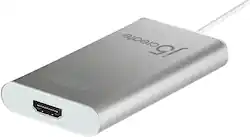
j5create - USB 2.0 HDMI Display Adapter - Silver
- Key Specs
- Connector Type (End 1): USB Type A
- Gender (End 1): Male
- Connector Type (End 2): HDMI Type A
- Gender (End 2): Female
- Jacket Material: Aluminum
- General
- Product Name: USB 2.0 HDMI Display Adapter
- Brand: j5create
- Compatibility: Microsoft Windows XP - 10 (32-bit or 64-bit). macOS X 10.6 / 10.7 / 10.8 / 10.9 / 10.10. Available USB 2.0 port
- Model Number: JUA250
- Color: Silver
- Connectivity
- Cable Type: USB
- Product Type: Adapter
- Connector Type (End 1): USB Type A
- Gender (End 1): Male
- Connector Type (End 2): HDMI Type A
- Gender (End 2): Female
- Material
- Jacket Material: Aluminum
- Other
- UPC: 847626000058
The USB 2.0 HDMI Display Adapter acts as an external video card for your Mac or PC. It allows you to add an additional HDMI monitor/display through any available USB 2.0 port. There is no need to open up the computer to add an expensive video card. With the JUA250 you simply load the drivers, plug in the adapter to the USB port, then plug in the HDMI monitor cable into the adapter and you are ready. The adapter supports three viewing modes and HDMI audio. Primary and Extended Mode allow you to have individual applications open on each monitor, vastly improving productivity and extending your desktop across multiple displays, which is great for spreadsheets. Mirroring Mode is used to clone one screen onto another, which is ideal for presentations. In addition, you can plug-and-play between your computer and a second monitor or projector, to create new visual environments in seconds.
Whats Included
- JUA250 USB HDMI Display Adapter
- Quick Installation Guide
Product Manuals
Q: Can this Usb adapter take my usb webcam output and convert it to a HDMI input of ATEM Mini?
A: Unfortunately, this device will not work in this configuration.
Q: Can I use this to watch tv from my iPhone 15 to my Toshiba 65” (Newer TV)
A: No. the USB 2.0 HDMI Display Adapter needs to connect to an available USB 2.0 Type-A port and an installation is required on Windows and Mac only. The iPhone 15 supports a USB-C connector. The JCC153G or JCC155G are some examples you can you for the iPhone 15 device.
Q: WILL IT WORK WITH WINDOWNS 11
A: Yes, it will work on Windows 11 computers with Intel processors, not ARM. Please download and install the driver, which are located on j5create.com under the "Support" tab > "Downloads/Drivers". Once completed, connect the HDMI Adapter to a USB 2.0 Type-A port. If you have a USB 3.0 port, please go with JUA354, JUA355 or JUA254. Thank you.
A: Unfortunately, the JUA250 requires drivers. We do offer PnP devices. Please contact j5create support team so they may get a little more information from you. Thank you.
A: JUA250 is compatible with macOS versions 10.7-10.12 and 10.14-11.1 Big Sur. Installation instructions/assistance can be obtained by contacting support printed on the packaging and a specialist will be ready to help. If you are attempting to use a laptop as a display for another laptop, that will not work, it has to be a sole monitor, TV, or projector.
Q: Could this cable provide HDMI capability for an Android Alcatel 9024W?
A: No, because the JUA210 requires driver installation to function as intended and they are only for Windows and Mac OS', it will not. If you wish to simply mirror the phone to the TV, the JUA165C will get the job done - simply download an app on your phone and done.
Q: Can I use this device to mirror my samsung galaxy j3 prime smartphone to a Vizio MC50 smart TV.?
A: In order for this device to work it requires that your phone supports a feature called DisplayPort Alternate Mode over USB Type C. This feature allows your phone to output a display over its USB Type C port. In your case your phone does not support this feature, so unfortunately this device will not work with your phone.
A: Yes, you will be able to utilize this device to extend to an additional display, through a USB port on you MacBook Air.


















