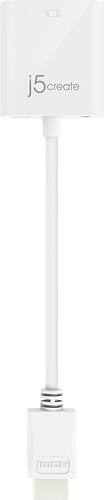
j5create - HDMI to VGA Video Adapter Converter with Audio - White
- Key Specs
- Connector Type (End 1): HDMI Type A
- Connector Type (End 2): VGA
- Connector Finish: Other
- General
- Product Name: HDMI to VGA Video Adapter Converter with Audio
- Brand: j5create
- Model Number: JDA213
- Color: White
- Connectivity
- Cable Type: HDMI, VGA
- Product Type: Adapter
- Connector Type (End 1): HDMI Type A
- Connector Type (End 2): VGA
- Material
- Connector Finish: Other
- Other
- UPC: 847626000935
The HDMI to VGA Video Adapter Converter with Audio allows you to connect the HDMI output from your laptop, Desktop, Tablet, Blue ray DVD, Digital set-top box, Player, Digital camera , Video camera or Gaming console equipment to the VGA input of a monitor or projector by converting the HDMI video signal from the output device into a VGA output and separate 2-channel analog audio. The adapter supports resolutions including high definition 1080p, up to 1920x1200, which eliminates the expense of upgrading a VGA display for the sake of compatibility. The Adapter can also increase your productivity by extending your computer's desktop onto a secondary monitor, doubling available workspace.
- Increase Efficiency: Let your Mac or Windows computer easily expand the second display device to extend the desktop work space.
- Display resolution and refesh rate: With conversion of the HDMI output to a VGA signal, this device will support up to 1920x1200 @60Hz (WUXGA) and HDTV resolutions up to 1080p @60Hz.
- Reserved Micro-B power Input: Connect optional power adapter for power hungry devices via Micro-B port to ensures maximum performance if you are using a high-powered device.
- Easy to install Plug and Play: No installation of a driver is needed.
Q: I want to connect my MacBook Pro (no HDMI port) to my large screen TV. What adapter do I need?
A: Not this one, as I assume you don't have a vga connection either. You likely want a USB to HDMI adapter. Laptops have a USB to plug into. Then you'll also need a HDMI cable to plug into the adapter and then the other end into the TV.
A: undefined
Q: Can I use this to connect my android phone to my tv
A: If the Android phone has a built in HDMI port and you wish to make the conversion from HDMI to VGA, then, yes, this should work.
A: No, this device is used for connecting to a computer and a monitor, TV, gaming console, etc. Unfortunately, we do not have a device that will do that.
Q: Is this compatible to an iPhone XR?
A: No. This has a c type input you will need one with a lightning conmector.
Q: Can I use this adapter to connect my new Microsoft Surface Pro to my ACER desktop monitor?
A: If your ACER desktop monitor only has VGA connectors then yes you can use it.
Q: Will this work to connect a Nintendo Switch to a monitor so my son can play on a big screen monitor?
A: It should as it worked fror my laptop to connect to a monitor.
Q: Am I able to connect my monitor to my ps4 with this
A: If your monitor is VGA & your ps4 is HDMI then yes you can use it.



















