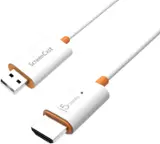
j5create - ScreenCast 4K Wireless Display Adapter - White
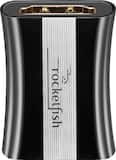 Rocketfish™ - 8K HDMI Coupler - Black$19.99

More Buying Options
Related Item

About This Item
- General
- Brand: j5create
- Model Number: JVAW76
- Product Name: ScreenCast 4K Wireless Display Adapter
- Color: White
- Dimensions
- Product Height: 0.5 inches (The out of box height of the item. Height is measured as the vertical distance from the bottom of the item to the top as it would be primarily used or placed.)
- Product Length: 3.8 inches (The out of box length of the item. Length is measured as the longest dimension of the item.)
- Product Width: 0 inches (The out of box width of the item. Width is measured as the horizontal distance from one side of the item to the other as it would be primarily used or placed.)
- Product Weight: 0.5 pounds (The out of box weight of the item.)
- Warranty
- Warranty - Parts: 1 year limited
- Warranty - Labor: 1 year limited
- Other
- Battery Chemistry: Not battery powered
- Battery Size: Not Applicable (The battery size required for operation.)
- Number of Batteries Required: 0
- UPC: 847626005695
Wirelessly display content from a phone, tablet, or laptop onto a bigger screen with the ScreenCast 4K Wireless Display Adapter. With its support of multiple wireless display standards (Miracast, AirPlay, and Chromecast), this wireless display adapter is compatible with devices and TVs you already own, including Windows, macOS, iOS, Android and other cast compatible laptops, tablets, and mobile phones. In addition to its compact design, the ScreenCast 4K Wireless Display Adapter features an external antenna for enhanced signal coverage, making it perfect for home use and travel.
- Turn Your TV into a Smart TV: Cast video directly from your phone, tablet, or laptop to a TV and enjoy the entertainment you love in up to 4K.
- Stunning 4K Picture Quality: Enjoy a crystal clear resolution up to 4K and lifelike colors optimized for your TV.
- Smooth Wireless Streaming: Dual-band (2.4G & 5G) ensures a faster wireless performance and smooth streaming experience, even with multiple devices connected to your network.
- Easy Setup with Reliable Connection: Just plug in the adapter, power, and connect to the ScreenCast 4K (Wireless transmission distance of up to 50 ft./15m in an open environment) to start casting.
- Native Support for AirPlay, Miracast, & Chromecast (Google Cast): Wirelessly share content from your compatible device without connecting the ScreenCast to the Internet.
- Cross-Platform Compatibility: With its support of multiple wireless display standards, the ScreenCast 4K is compatible with multiple cast-compatible devices and operating systems, including Windows, macOS, Chrome OS, Android, and iOS.
Whats Included
- 1 - JVAW76 ScreenCast 4K Wireless Display Adapter
- 1 - External antenna with USB Type-A power cable (39”)
- 1 - HDMI extension cable (5.11")
- 1 - Quick Installation Guide (QIG)
Q: How does the dual-band feature benefit this adapter?
A: The dual-band (2.4G & 5G) feature ensures faster wireless performance and smoother streaming, even with multiple devices connected to your network.
Q: What is the maximum wireless transmission distance of this adapter?
A: The wireless transmission distance is up to 15 meters, but it can vary depending on the WiFi environment.
Q: Can I use this adapter to stream content from my phone to my TV without internet?
A: Yes, the adapter natively supports AirPlay, Miracast, & Chromecast, allowing you to share content from compatible devices without an internet connection.
Q: Which operating systems are compatible with this wireless display adapter?
A: The ScreenCast 4K Wireless Display Adapter is compatible with macOS, Windows, Android, Chrome OS, and iOS.
Q: Does this adapter support 4K resolution?
A: Yes, the ScreenCast 4K Wireless Display Adapter supports up to 4K resolution for stunning picture quality.
Q: Can I connect two TVs with this device and transmit pictures and sound from TV1 to TV2?
A: No, this Wireless Display works with a phone, tablet, or laptop to a TV. Will not work from (1) TV to another.
Q: will this device transfer video from android phone to tv on honda odyssey 2022?
A: The TV in the Odyssey must have a HDMI connection and a USB-A port. Turn on your TV to power up the ScreenCast and select your TV's input/source until you see the setup screen. If the Odyssey has a built-in 4G/5G LTE Wi-Fi hotspot, then you will be able to do the setup connection. If not. this device will not work. You may be able to only mirror the phone by opening the control center (swipe down on phone) and start screen mirroring by selecting the screencast's device name. If the Android phone has a USB-C port and supports DisplayPort Alt Mode for video out through it's USB-C connection, then the other option is the JCC155G or JCC153G. Please refer to the manufacturer of your hardware for more information on your device.
A: Unfortunately, I have not tested this ScreenCast 4K Wireless Display Adapter on a Linux computer. I recommend getting in contact with our Technical Support Team. If possible, they may test it on an Linux platform or someone may have some experience in trouble shooting on a computer running Linux. Their information can be found on our website under the "Support" tab and a specialist will be ready to assist you. Thank you.
Reviews
Customers are saying
Customers enjoy the ScreenCast 4K Wireless Display Adapter for its ease of use, overall performance, and simple setup. However, some customers have experienced connectivity issues, compatibility problems with certain apps, lag, and occasional signal drops. While the resolution and HDMI connectivity are appreciated, the audio quality may be compressed due to bandwidth limitations. Overall, the device offers excellent screen mirroring capabilities, but users should be aware of potential connectivity and performance drawbacks.
Customer Images
The vast majority of our reviews come from verified purchases. Reviews from customers may include My Best Buy members, employees, and Tech Insider Network members (as tagged). Select reviewers may receive discounted products, promotional considerations or entries into drawings for honest, helpful reviews.



Compare similar products
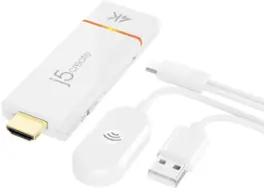
Wirelessly display content from a phone, tablet, or laptop onto a bigger screen with the ScreenCast 4K Wireless Display Adapter. With its support of multiple wireless display standards (Miracast, AirPlay, and Chromecast), this wireless display adapter is compatible with devices and TVs you already own, including Windows, macOS, iOS, Android and other cast compatible laptops, tablets, and mobile phones. In addition to its compact design, the ScreenCast 4K Wireless Display Adapter features an external antenna for enhanced signal coverage, making it perfect for home use and travel.

The DMX wireless receiver controls vibrant stage lighting with a 656 ft/200 m range and a 2.4G frequency band. Compatible with various lighting devices, its 126 channels give minimal interference and quick response. The 7 independent networks allow separate control of different lighting effects.

Aluratek iStream Universal Bluetooth Audio Receiver: Easily add Bluetooth capability to your existing stereo system or speaker dock using this receiver, which lets you wirelessly stream audio from your Bluetooth-enabled device from up to 33 feet away. Built-in battery provides up to 12 hours of wireless use.
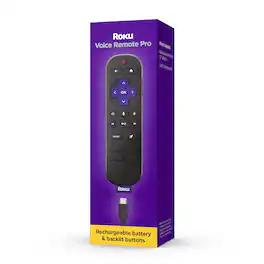
Roku Voice Remote Pro (2nd edition) is the ultimate Roku remote. Enjoy convenient USB-C charging with 50% more battery life that lasts three months on a single charge. Easy-to-see backlit buttons make movie night navigation a breeze. And using your voice to search and control your streaming is as simple as saying, “Hey Roku.” There’s even a voice-activated lost remote finder for when it plays hard to get. Roku Voice Remote Pro (2nd edition) works with most Roku players and all Roku TV models.
| Pros for j5create - ScreenCast 4K Wireless Display Adapter - White | |||
|---|---|---|---|
| Ease of use, Overall Performance, Setup, Screen Mirroring, Resolution | There were no pros for this product— | Ease of use, Battery Life, Bluetooth, Sound Quality, Range | Overall Performance, Battery Life, Backlit Buttons, Voice Control, Ease of Use |
| Cons for j5create - ScreenCast 4K Wireless Display Adapter - White | |||
| Compatibility, Connectivity, Lag, Audio Quality, Signal | There were no cons for this product— | Pairing | Compatibility, Charging, Headphone Jack |