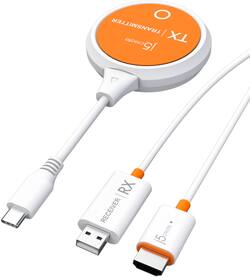
j5create - ScreenCast USB-C® Wireless Display HDMI™ Extender - White
- General
- Product Name: ScreenCast USB-C® Wireless Display HDMI™ Extender
- Brand: j5create
- Model Number: JVAW62
- Color: White
- Other
- Output(s): USB Type C
- Battery Size: N/A (The battery size required for operation.)
- Number of Batteries Required: 0
- UPC: 847626005688
Eliminate the need and expense for cables by wirelessly sendingwhat’son your laptop, tablet,or mobile phone to your HDTV with this HDMI™ Extender. It transmits audio and video signal from a USB-C®equipped device to anHDMI™ enabled TV, projector,ormonitor, creating a dedicated AV connection without an existing network.Enjoy a large screen experience by simply connectingthe USB-C®transmitter to your compatible device and then connect the HDMI™ receiverto your TV.
- 2.4G/5G dual band: A stable connection is always ensured.
- Resolution support: Up to 1080P.
- Wide compatibility: USB Type-C male works with macOS®, Windows®, Android™, iOS®(iPad Pro) and Chrome OS.
- RX supports ScreenCast: The wireless display receiver can wirelessly mirror the entire screen of your smartphone, tablet or laptop to an 4K TV or 4K projector.
- Plug and Play: Without any installation, mirror your device’s content in seconds.
Q: How, exactly, does this operate? does it plug into the phone itself or am I able to Bluetooth to it?
A: The USB-C transmitter must be connected to a USB-C port that supports DisplayPort alternate mode for video out (via your phone). Please contact our Customer Service Department, so that they can get more information from you. Their information can be found on our website under the "Support" tab. Thank you.
Q: Do I have to connect to a Wifi Connection for this product? or is it self sustained like bluetooth?
A: With its built-in wireless access point, the ScreenCast USB-C Wireless Display HDMI Extender can be used in any environment regardless of whether there is internet access. Please make sure that the device that will be connected to supports DisplayPort Alt Mode for video out. Please refer to the manufacturer of your computer for more information about your device. Thank you.
A: The ScreenCast USB-C Wireless Display HDMI Extender has a wireless range of up to 50 ft and requires an available USB-C port that supports DisplayPort Alt Mode.













