j5create - ULTRADRIVE Kit USB-C Multi-Display Modular Dock - Silver, White
- Key Specs
- Maximum Number of Displays Supported: 3
- Maximum Supported Resolution: 4K (2160p), Full HD (1080p)
- Number of DisplayPort Outputs (Total): 0
- Passthrough Power: true (Indicates whether the device allows power to passthrough, possibly with some loss, to another device, typically to charge that other device.)
- General
- Product Name: ULTRADRIVE Kit USB-C Multi-Display Modular Dock
- Brand: j5create
- Model Number: JCD389
- Display
- Maximum Number of Displays Supported: 3
- Maximum Supported Resolution: 4K (2160p), Full HD (1080p)
- Maximum Supported Refresh Rate: 30Hz (The number of frames per second the device can support, expressed as a frequency. Higher rates help produce smooth, seamless pictures.)
- Ports
- Number of DisplayPort Outputs (Total): 0
- Number of HDMI Ports (Total): 2
- Number of VGA Ports: 1 (VGA (Video Graphics Adapter or Video Graphics Array) is a display standard that transmits via analog signals. This type of interface is typically used to connect a computer to a display device such as a monitor, projector, or TV.)
- Number Of Ethernet Ports: 1
- Number of USB Ports (Total): 4
- Memory Card Slot: true
- Memory Card Type: Secure Digital, microSD
- Power
- Powered: true
- Power Supply Included: false
- Power Supply Input: USB Type C
- Maximum Input Power: 100 watts (The maximum amount of power allowed to come into the device.)
- Passthrough Power: true (Indicates whether the device allows power to passthrough, possibly with some loss, to another device, typically to charge that other device.)
- Power Supply Output: USB Type C (The connector type(s) used by the device to send electrical power to another device.)
- Maximum Output Power: 100 watts (The maximum amount of power produced or allowed to flow through the device.)
- Compatibility
- Maximum Data Speed: 5000 megabits per second
- System Requirements: Available USB-C port that supports DisplayPort Alt Mode and USB Power Delivery 2.0 or 3.0. (The software that a product must have for it to be able to integrate with another product.)
- Brand Compatibility: Apple. Available USB-C port that supports DisplayPort Alt Mode and USB Power Delivery 2.0 or 3.0.
- Model Compatibility: MacBook Pro 2016-2019 / MacBook Air 2018-2019 / 12" MacBook 2015 or later. Available USB-C port that supports DisplayPort Alt Mode and USB Power Delivery 2.0 or 3.0.
- Features
- Material: Main Body: Aluminum. Magnetic Kits: ABS Plastic
- Dimensions
- Product Height: 7.7 inches (The out of box height of the item. Height is measured as the vertical distance from the bottom of the item to the top as it would be primarily used or placed.)
- Product Length: 1.6 inches (The out of box length of the item. Length is measured as the longest dimension of the item.)
- Product Width: 4.9 inches (The out of box width of the item. Width is measured as the horizontal distance from one side of the item to the other as it would be primarily used or placed.)
- Product Weight: 1.6 ounces (The out of box weight of the item.)
- Other
- UPC: 847626003431
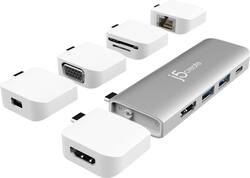
The award-winning USB-C Multi-Display Modular Dock is a versatile mini docking station featuring 5 detachable magnetic kits along with the main body for 12 combinations of configurations for video, data storage and charging. With the JCD389, you can easily create a triple display setup from your MacBook Pro. The 5 detachable magnetic kits are stand-alone mini adapters that allow you to expand even further with additional functions. This modular dock is a perfect all-in-one solution for you to connect your USB-C laptops to any device whether in the office, at home or on the road by switching the modules accordingly. A hard-shell carrying case is also included to eliminate the hassle of carrying and sorting multiple adapters and cables, making the modular dock a perfect travel accessory.
- 12 Combinations for 11-in-1 Functions: Each module can work separately as a stand-alone mini adapter or be magnetically attached to the main body for use together.
- 5 Magnetic Kits: USB-C to HDMI supports up to 3840 x 2106 @ 60 Hz. USB-C to mini DisplayPort supports up to 3840 x 2160 @ 60 Hz. USB-C to VGA supports up to 1920 x 1080 @ 60 Hz. USB-C to Gigabit Ethernet. USB-C to SD/microSD supports up to 2 TB.
- USB-C Power Delivery 100W Pass-through: Charge your MacBook Pro & MacBook Air for maximum efficiency.
- USB-C to Gigabit Ethernet: Compatible with 10/100/1000 Mbps network connection. Connect to the LAN port on either side.
- Dual or Triple Monitors: When the main body and USB-C to 4K HDMI, USB-C to 4K mini DisplayPort or HDMI to VGA are used at the same time, a MacBook Pro can be used with triple monitors.
- Main Body of Dock: USB-C to 4K @ 30 Hz HDMI. USB Type-A 3.1 Gen 1 port x2 supports 5 Gbps data transfer. USB-C Power Delivery 3.0 charging up to 100W. USB-C 3.1 Gen 1 supports 5 Gbps data transfer.
Whats Included
- 1 - JCD389 ULTRADRIVE Kit USB-C Multi-Display Modular Dock
- 1 - Hard Carrying Case
- 1 - Quick Installation Guide
Product Manuals
A: Depending on whether it is an M1 or Intel - if it is an Intel based; then yes, you can add additional monitors with the JCD389. if it is an M1, then the Mac is limited to only 1 video output totaling 2 screens total - this is a limitation on the Mac and not the JCD389 unfortunately.
Q: How many of the detachable magnetic kits can be attached at once? One or two? Thank you!
A: That depends how many USB-C/Thunderbolt 3 or 4 ports you have on the computer. Please note, computers with older M1 or ARM processors will only allow (1) external display. That is the hardware limitation for those computers.
Q: Will this work on Mac Book Pro 2020 16" with a shell on the computer?
A: Shell or protective covers may impede proper connectivity and therefore may not work. We recommend removing the shell and making a direct connection. Alternately, models such as the JCD383, JCD384 may work better for you as they would not require the removal of the shell.
Q: Will this product work with other laptops with a USB-C port? Like Dell XPS systems.
A: The JCD389 is intended for mostly Mac users, but it is also compatible with Windows computers as long as the computer's USB-C port supports Thunderbolt 3. Otherwise, the Technical Support team on the packaging can recommend a device that will work better for you.
Q: Will my Macbook Pro need to be open to use connected monitors?
A: You will be able to close your laptop lid if: you are connected to an external monitor, there is power connected to your Mac, and you have an external mouse and keyboard.
Q: Is this compatible with PC laptops or only macs.
A: The ULTRADRIVE Kit USB-C Multi-Display Modular Dock is perfect for MacBook, MacBook Air, MacBook Pro due to the spacing of the (2) Thunderbolt ports. However, it can be used on a non-Mac computer for stand-alone mini adapters or the main body with or without a mini adapter attached. Just make sure the if you have (2) USB-C ports that they are not too close nor too far apart if you would like to connect the main body with a mini adapter attached. This device will require DisplayPort Alt Mode and USB Power Delivery 2.0 or 3.0 features from a computer. Thank you.
A: You will need to purchase a Hub or adapter made by HYPERDRIVE to make this work. There are 2 that will allow 2 displays to be viewed simultaneously using an M1 MacBook. One is a Dual 4K HDMI 10-in-1 USB C hub the other is a Dual 4K HDMI 3-in-one adapter.
A: Can plug in iPad pro as sidecar/additional screen to MacBook pro, either wirelessly or with usb-c cable, iPad can be an extra screen or operate independently.