j5create - USB 3.0 Mini Dock - Silver
FREE shipping to
More Buying Options

About This Item
- Key Specs
- Maximum Number of Displays Supported: 2
- Maximum Supported Resolution: Full HD (1080p)
- Number of DisplayPort Outputs (Total): 0
- General
- Brand: j5create
- Model Number: JUD380
- Product Name: USB 3.0 Mini Dock
- Color: Silver
- Display
- Maximum Number of Displays Supported: 2
- Maximum Supported Resolution: Full HD (1080p)
- Maximum Supported Refresh Rate: 60Hz (The number of frames per second the device can support, expressed as a frequency. Higher rates help produce smooth, seamless pictures.)
- Ports
- Display Connector(s): 1 x HDMI, 1 x VGA (The number and type of connectors used to connect to an external display.)
- Number of DisplayPort Outputs (Total): 0
- Number of HDMI Ports (Total): 1
- Number of VGA Ports: 1 (VGA (Video Graphics Adapter or Video Graphics Array) is a display standard that transmits via analog signals. This type of interface is typically used to connect a computer to a display device such as a monitor, projector, or TV.)
- Number Of Ethernet Ports: 1
- Number of USB Ports (Total): 2
- USB Ports: 2 x USB-A 3.1 (The number and type of USB ports the product has.)
- Headphone Jack: false (The device features an interface that allows for the connection of headphones.)
- Power
- Powered: false
- Compatibility
- Maximum Data Speed: 5 megabits per second
- System Requirements: Microsoft Windows 7 or later (32-bit or 64-bit). macOS 10.8 or later. Available USB 3.0 port. CPU: Intel Core i5 - I7 Quad Core, or AMD equivalent. RAM: 4 - 8 GB memory or higher. GPU: Intel HD Graphics 5000 - 620 or AMD equivalent (The software that a product must have for it to be able to integrate with another product.)
- Brand Compatibility: Windows 7 or later (32-bit or 64-bit. macOS 10.8 – 10.13.3. macOS 10.14 or later.
- Model Compatibility: Windows 7 or later (32-bit or 64-bit). macOS 10.8 – 10.13.3. macOS 10.14 or later.
- Features
- Cable Lock Slot: None
- Material: Aluminum
- Indicator Light(s): false
- Dimensions
- Product Height: 0.56 inches (The out of box height of the item. Height is measured as the vertical distance from the bottom of the item to the top as it would be primarily used or placed.)
- Product Length: 1.69 inches (The out of box length of the item. Length is measured as the longest dimension of the item.)
- Product Width: 4.71 inches (The out of box width of the item. Width is measured as the horizontal distance from one side of the item to the other as it would be primarily used or placed.)
- Product Weight: 2.88 ounces (The out of box weight of the item.)
- Warranty
- Warranty - Parts: 2 year limited
- Warranty - Labor: 2 year limited
- Other
- UPC: 847626001932
This dual-monitor USB 3.0 mini docking station features two USB 3.0 Type-A ports for connecting extra peripherals, an HDMI & VGA output port, providing up to 2048 x 1152 resolutions, as well as an integrated RJ45 Ether port for a reliable wired network connection.
- Dual-Monitor Setup: Easily add 2 additional displays with HDMI and VGA outputs and together with your laptop display, you can have a maximum of 3 displays.
- Reliable Network Connectivity: Instantly add a network connection through a USB Type-A port.
- SuperSpeed USB 3.0 Ports: Provides up to 5 Gbps transfer rates, which is 10x faster than USB 2.0.
- Connect Multiple Peripherals Simultaneously: Optional micro USB Power In port helps supply additional power when using with high-powered USB devices or with multiple peripherals at once.
- Supports 4 Display Modes: Mirroring mode is used to clone one screen onto another. Extended mode allows you to extend your desktop across multiple displays. Primary mode allows you to have individual applications open on each monitor. Display Rotation allows you to view an image or report vertically.
- Aluminum enclosure: Provides additional durability and a stylish look.
- Slim and compact design: Perfectly suits your laptop.
- Environmentally Friendly: Made with non-toxic aluminum that is safe and recyclable.
- Dual-Monitor Setup: Easily add 2 additional displays with HDMI and VGA outputs and together with your laptop display, you can have a maximum of 3 displays.
- Reliable Network Connectivity: Instantly add a network connection through a USB Type-A port.
- SuperSpeed USB 3.0 Ports: Provides up to 5 Gbps transfer rates, which is 10x faster than USB 2.0.
- Connect Multiple Peripherals Simultaneously: Optional micro USB Power In port helps supply additional power when using with high-powered USB devices or with multiple peripherals at once.
- Supports 4 Display Modes: Mirroring mode is used to clone one screen onto another. Extended mode allows you to extend your desktop across multiple displays. Primary mode allows you to have individual applications open on each monitor. Display Rotation allows you to view an image or report vertically.
- Aluminum enclosure: Provides additional durability and a stylish look.
- Slim and compact design: Perfectly suits your laptop.
- Environmentally Friendly: Made with non-toxic aluminum that is safe and recyclable.
Whats Included
- 1 - JUD380 USB 3.0 Mini Dock
- 1 - Quick Installation Guide
- 1 - JUD380 USB 3.0 Mini Dock
- 1 - Quick Installation Guide
Q: How many displays can I connect to this docking station?
A: You can connect up to two additional displays to this docking station, allowing for a total of three displays including your laptop screen.
Q: What type of USB ports are on this docking station?
A: This docking station has two USB 3.0 Type-A ports.
Q: Does this docking station require external power?
A: No, this docking station is not powered and does not require an external power source.
Q: What is the maximum resolution supported by this docking station?
A: The HDMI and VGA connectors on this docking station support a maximum resolution of 2048 x 1152.
Q: Does this docking station have a built-in ethernet port?
A: Yes, the docking station includes an integrated RJ45 Ethernet port for a reliable wired network connection.
Q: What material is the docking station made of?
A: The docking station is made of aluminum for durability and a stylish look.
Q: What is the maximum data speed of the USB ports on this docking station?
A: The USB 3.0 ports on this docking station offer transfer rates up to 5 Gbps.
Q: How do you connect dual monitors to this docking station?
A: For me it was easy. My laptop has one HDMI port, so one monitor plugs into that. Then I plugged this mini dock into my laptop USB 3.0 port, and plugged my second monitor into the mini port HDMI port. No set up or configuration was needed. It just worked. No sluggishness, no slow-down, no disadvantages that I've noticed so far. Perfect for adding a second monitor!
Reviews
Customers are saying
Customers are pleased with the USB 3.0 Mini Dock's ease of use, USB connectivity, overall performance, and compact size. Compatibility and the variety of ports are also appreciated, especially considering the affordable price and monitor support. However, some customers have noted that the device tends to heat up during use. Despite this, the mini dock's connectivity is generally seen as a positive attribute.
Customer Images
The vast majority of our reviews come from verified purchases. Reviews from customers may include My Best Buy members, employees, and Tech Insider Network members (as tagged). Select reviewers may receive discounted products, promotional considerations or entries into drawings for honest, helpful reviews.
Compare similar products
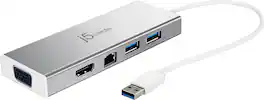
This dual-monitor USB 3.0 mini docking station features two USB 3.0 Type-A ports for connecting extra peripherals, an HDMI & VGA output port, providing up to 2048 x 1152 resolutions, as well as an integrated RJ45 Ether port for a reliable wired network connection.

Connect your laptop to a 4K monitor, projector, and other devices with our USB-C 4-in-1 Multiport Adapter. This compact USB-C adapter is the perfect solution for home, the office, or in-between workstations. It features two USB-A ports to charge and connect your smartphone, tablet, keyboard, thumb drive, mouse, or other high consumption device while its HDMI port connects your MacBook Pro, Chromebook, or other USB-C laptop to a display with up to 4K resolutions. This Belkin USB-C Hub supports pass-through charging up to 100W so you don’t have to choose between port expansion and power. Gain up to 5 Gbps of bandwidth between connected devices, for quick data transfer between computer and peripheral devices. This computer docking station also supports high-definition display resolutions up to 4K through the HDMI Port. Encased in a sleek aluminum finishing that matches popular devices, this compact USB port hub is a stylish addition for your work, study, or play setup.

Streamline your on-the-go workspace with Targus USB-C Universal Dual HD Docking Station with 80W PD Pass-Thru. Its stow-away host cable, compact, lightweight design makes it easy to slip into the pocket of your backpack or luggage, and ensures it doesn’t take up valuable working real estate if you’re working remotely. A rubber-padded bottom provides grip so the dock stays in one place. Equipped with DisplayLink technology, this tiny dock offers compatibility with most laptop brands and supports single 2K 2560 x 1440 video or dual HD 2048 x 1152 video via HDMI. Additionally, it comes with a USB-A host adapter so you can use it with new or legacy laptops.

The USB-C Dual HDMI Mini Dock provides extra connectivity for your USB-C computer, featuring data transfer, power delivery and video displays. Easily add two additional USB computer peripherals, two HDMI monitors, and a Gigabit Ethernet connection through your USB-C port. When connected to a power source, the USB-C input charging port allows you to continue charging your laptop or smartphone. Its compact and lightweight design, making it great for use on the go.
| Pros for j5create - USB 3.0 Mini Dock - Silver | |||
|---|---|---|---|
| Ease of use, Overall Performance, Size, USB, Compatibility | Overall Performance, Ease of use, HDMI, Size, Connectivity | Overall Performance | Ease of use, HDMI, Overall Performance, Size, Price |
| Cons for j5create - USB 3.0 Mini Dock - Silver | |||
| Heat | Cable Length, Heat, Price | There were no cons for this product— | Heat, Cable Length, Compatibility, Connectivity |