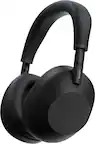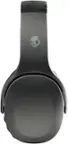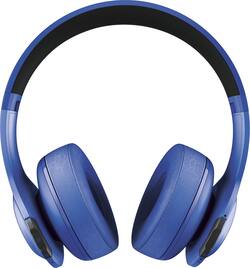
JBL - Everest 300 Wireless On-Ear Headphones - Blue
- Key Specs
- Sound Mode: Stereo
- Connection Type: Wireless
- Wireless Connectivity: Bluetooth (The manner in which a device sends data to another device over a short distance without the use of wires or cables.)
- True Wireless: false (These headphones not only lack wires between the device and headphones, they also lack wires between the headphones themselves. (true wireless is really only possible with in-ear headphones))
- Water Resistant: false (Resists some degree of water penetration.)
- Built-In Microphone: true
- Carrying Case: false
- Headphone Fit: On-Ear
- Adjustable Headband: true
- General
- Brand: JBL
- Model Number: V300BTBLU
- Product Name: Everest 300 Wireless On-Ear Headphones
- Color: Blue
- Audio
- Sound Isolating: false
- Minimum Frequency Response: 10 hertz (Describes the maximum range of frequencies or musical tones a product can reproduce, from very low tones to very high treble tones. The minimum frequency or musical tone the speaker can reproduce. High treble tones have higher frequencies while low tones and deep bass have lower frequencies.)
- Maximum Frequency Response: 22 kilohertz (Describes the maximum range of frequencies or musical tones a product can reproduce, from very low tones to very high treble tones. The maximum frequency or musical tone the speaker can reproduce. High treble tones have higher frequencies while low tones and deep bass have lower frequencies.)
- Sensitivity: 100 decibels adjusted
- Sound Mode: Stereo
- Driver Size: 40 millimeters
- Connectivity
- Connection Type: Wireless
- Wireless Connectivity: Bluetooth (The manner in which a device sends data to another device over a short distance without the use of wires or cables.)
- True Wireless: false (These headphones not only lack wires between the device and headphones, they also lack wires between the headphones themselves. (true wireless is really only possible with in-ear headphones))
- Bluetooth Version: 4.1 (The Bluetooth specification formalized by the Bluetooth Special Interest Group. All versions of the Bluetooth standard are backwards compatible with previous versions.)
- Features
- Water Resistant: false (Resists some degree of water penetration.)
- Built-In Microphone: true
- Carrying Case: false
- Maximum Talk Time: 20 hours
- Design
- Headphone Fit: On-Ear
- Adjustable Headband: true
- Dimensions
- Product Height: 6.4 inches (The out of box height of the item. Height is measured as the vertical distance from the bottom of the item to the top as it would be primarily used or placed.)
- Product Width: 2.8 inches (The out of box width of the item. Width is measured as the horizontal distance from one side of the item to the other as it would be primarily used or placed.)
- Product Weight: 0.54 pounds (The out of box weight of the item.)
- Other
- UPC: 050036335799
Listen to music wirelessly with these JBL Everest Bluetooth headphones. The sculpted ear cushions provide a comfortable fit, and the rechargeable battery lasts up to 20 hours for extended gaming and binge watching. These JBL Everest Bluetooth headphones have a built-in microphone, so you can use them during phone calls.
- Bluetooth 4.1 interface: Enables simple wireless pairing with your Bluetooth-enabled device. Supports HFP, HSP, A2DP and AVRCP Bluetooth profiles.
- On-ear design: For comfort during extended listening sessions.
- ShareMe 2.0 technology: Allows you to pair your headphones with other Bluetooth headphones to share your music, videos, and games wirelessly.
- 40mm drivers: Deliver powerful sound.
- 10Hz - 22kHz frequency response: For faithful sound reproduction.
- Built-in microphone with echo cancellation technology: For crystal clear, hands-free calls.
- Rechargeable 610 mAh battery: Provides up to 20 hours of playing time, with quick recharge in 2.5 hours.
- Detachable remote cable with 3.5mm connector: For flexible connection options.
- Bluetooth 4.1 interface: Enables simple wireless pairing with your Bluetooth-enabled device. Supports HFP, HSP, A2DP and AVRCP Bluetooth profiles.
- On-ear design: For comfort during extended listening sessions.
- ShareMe 2.0 technology: Allows you to pair your headphones with other Bluetooth headphones to share your music, videos, and games wirelessly.
- 40mm drivers: Deliver powerful sound.
- 10Hz - 22kHz frequency response: For faithful sound reproduction.
- Built-in microphone with echo cancellation technology: For crystal clear, hands-free calls.
- Rechargeable 610 mAh battery: Provides up to 20 hours of playing time, with quick recharge in 2.5 hours.
- Detachable remote cable with 3.5mm connector: For flexible connection options.
Whats Included
- Aha radio information sheet
- Audio cable with 3.5mm jack
- JBL Everest 300 Wireless On-Ear Headphones
- MicroUSB charging cable
- Quick start guide
- Warranty and safety note
- Aha radio information sheet
- Audio cable with 3.5mm jack
- JBL Everest 300 Wireless On-Ear Headphones
- MicroUSB charging cable
- Quick start guide
- Warranty and safety note
Q: How do I know when it's fully charged??
A: When the red light goes off, Does not take long to charge.
Q: how long does it take it to fully charge ? For JBL Everest 300
A: completely dead it took about 2 hours to charge. Last for 6 hours with constant listening.
Q: Can I use these to watch TV?
A: If ur tv is bluetooth capable yes, if not, u will need a bluetooth adapter which is around $20 to $30 n sold mostly everywhere including Best Buy.
Q: Will these work with a VIZIO Mod. VO32L HDTV
A: It would sort of depend on your system. If your TV supports Bluetooth speakers you can just pair them like any other Bluetooth speaker. If not, you could run analog audio directly out of your TV to the headphones, though you would probably need a very long cable. Same goes for if you want to run audio out of a receiver.
A: What you are experiencing with the EVEREST 300 is not normal. To isolate the issue, please try to use a different charging cable and an alternate power source. If you are still having issues, please submit a case at JBL.com/contactus and our Customer Service Team will be glad to assist you.
Q: Do these have noise canceling technology?
A: The active noise-canceling feature is only available in ELITE models and is not present in the EVEREST 300.
Q: How do I charge the battery and connect device to my Android tablet
A: The EVEREST 300 can be charged via any USB ports on a computer/laptop. It can also be charged directly on a wall outlet using the provided USB charging cable with any wall adapter. The power button is located on the back of the right ear cup on the top. It helps to have the headphones on in order to hear the audible voice stating, "powering on" continue to hold down the power button until the audible voice states, "JBL Everest is ready to pair". Search Bluetooth devices from your source device and connect to EVEREST 300. Play music and enjoy.