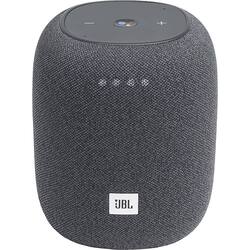
JBL - Link Music Smart Wi-Fi and Bluetooth Speaker with Google Assistant - Gray
- Key Specs
- Voice Assistant Built-in: Google Assistant (A digital assistant built into the device that uses voice commands to answer questions and control smart devices.)
- Number of Microphones: 2
- Wireless: false
- General
- Product Name: Link Music Smart Wi-Fi and Bluetooth Speaker with Google Assistant
- Brand: JBL
- Model Number: JBLLINKMUSICGRYAM
- Audio
- Woofer Size: 2.52 inches
- Peak Power Handling: 20 watts (The maximum amount of power an electronic device, like a speaker, can handle without damage. This refers to short bursts of power, while root mean square (RMS) power handling indicates the amount of continuous power a device can sustain. Higher levels of distortion can also occur at peak power levels when the device is powered beyond its recommended usage.)
- Minimum Frequency Response: 60 hertz (Describes the maximum range of frequencies or musical tones a product can reproduce, from very low tones to very high treble tones. The minimum frequency or musical tone the speaker can reproduce. High treble tones have higher frequencies while low tones and deep bass have lower frequencies.)
- Maximum Frequency Response: 20000 hertz (Describes the maximum range of frequencies or musical tones a product can reproduce, from very low tones to very high treble tones. The maximum frequency or musical tone the speaker can reproduce. High treble tones have higher frequencies while low tones and deep bass have lower frequencies.)
- Voice
- Voice Assistant Built-in: Google Assistant (A digital assistant built into the device that uses voice commands to answer questions and control smart devices.)
- Built-In Microphone: true
- Number of Microphones: 2
- Connectivity
- Wireless: false
- Bluetooth Version: 4.2 (The Bluetooth specification formalized by the Bluetooth Special Interest Group. All versions of the Bluetooth standard are backwards compatible with previous versions.)
- Network Connectivity: Bluetooth, Wi-Fi (The manner in which a device sends data to another device over a long distance using a cellular network.)
- Headphone Jack: false (The device features an interface that allows for the connection of headphones.)
- Auxiliary Input: false
- Features
- Control Button(s): Microphone, Volume
- Controls: Volume, Google Assistant, Bluetooth pairing, Mic mute/unmute
- Digital Display: false
- Other
- UPC: 050036362610
Easy music streaming. Powerful JBL sound. From your kitchen to your living room, JBL Link Music delivers bold, dynamic JBL 360-Degree Pro Sound. With the Google Assistant, play and control your favorite music, access Spotify, YouTube Music and Apple Music and listen without interruptions. Just say "Hey Google" to get started. Pick the JBL Link Music that is perfect for you, with a choice of six stylish colors (varies by region).
- JBL 360-Degree Pro Sound: Its cylindrical design delivers immersive, stereo audio, which radiates evenly in all directions.
- Integrated Google Assistant for voice control: Use voice commands with the speaker to play music, set the temperature, order products, or control lights and more. Separate voice assistant not required.
- Connect wirelessly from distance: Pair this speaker with your smartphone, tablet, other Bluetooth- or Wi-Fi-enabled device.
- Integrated AirPlay 2 and Chromecast: Stream all your favorite music stations, audiobooks, and podcasts.
- 20W RMS power: JBL offers a crisp, robust tone to complement any music.
- 60Hz - 20kHz frequency response: Ensures a wide range of accurately reproduced sound.
- 80dB signal-to-noise ratio: Provides clear audio.
Whats Included
- JBL Link Music Smart Wi-Fi and Bluetooth Speaker with Google Assistant
- Owner's manual
- Power cable
Product Manuals
A: You need to setup our JBL Link Music to Google Home App before pairing it through Bluetooth. If you need more help, please contact us here: https://bit.ly/2zwFkYM
Q: Where's the power button? How do you turn this on when it's not plugged in?
A: Our JBL Link Music doesn't have battery and needs to ALWAYS be plugged in for it to work.
A: Our JBL Link Music is not waterproof. It needs to be always plugged in to a wall outlet as it has no batteries. You could pair two Link Music together in the Google Home App by creating a speaker group.
Q: How to factory reset, or how to get it out of locked mode
A: undefined
Q: What type of cord does the jbl link music take
A: undefined
Q: Can I stereo pair two jbl link music?
A: Yes, you can pair as stereo speaker. So your device will see it as one speaker setup. But the sound is still mono.
Q: Can I just pair it to a PC with bluetooth and use it as a PC speaker?
A: JBL Link Music can be paired with your devices via Bluetooth once it has been set up through the Google Home App. You can connect it with your devices like phones, tablets, and laptops. Although, please be advised that you may experience audio-video delays since the speaker doesn't support Bluetooth AptxHD Low latency audio codecs.




















