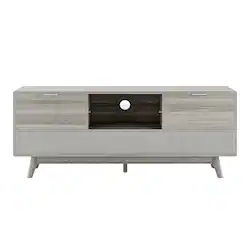
Larsen Smart TV Stand with Built-in Sound Bar
Sit back and unwind with the Larsen, a distinct Scandi-inspired TV unit designed to take your entertainment experience and comfort to the next level. This striking credenza is offered in four unique finishes–ash, black, oak, and walnut. With angled feet and a wide base frame, the Larsen will compliment any interior-design style, from victorian to modern. This unit is not only beautifully crafted, but its two well-sized drawers offer practical solutions for storage. The Larsen combines effortless living and ambiance with immersive, connected technology. It features dual wireless charging ports which are located on each rear corner. The integrated front includes a built-in audio bar system which produces faultless, clean sound The Larsen incorporates premium Bluetooth speakers, on/off LED mood lighting, HDMI, optical and auxiliary ports on the underside. Also included is a wireless remote that controls all inputs–volume, power, and mood lighting.
- Wireless charging: Dual-integrated wireless charging
- Speakers & audio: Bluetooth connected speakers, 5" low frequency driver and two 3" mid-range high frequency drivers
- Mood lighting: ON/OFF LED mood lighting underneath
- Storage: 2x Drawer Storage
- TV connectivity: HDMI cable included for TV connectivity. Inputs include: Bluetooth, HDMI, Optical, and Auxiliary. Wireless Remote controle included for all inputs, power, and mood lighting
- TV connectivity: HDMI cable included for TV connectivity. Inputs include: Bluetooth, HDMI, Optical, and Auxiliary. Compatible with TV's up to 65". Wireless Remote control included for all inputs, power, and mood lighting
- Assembly: Partial assembly required
Whats Included
- TV Stand
- Remote Control
- Power Cable
- HDMI Cable
- User Manual
Q: Can this stand be used with a tv that is not a smart tv?
A: undefined




















