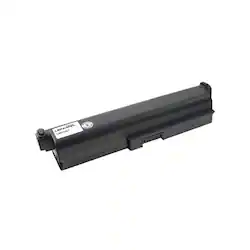
Lenmar - Lithium-Ion Battery for Toshiba Satellite A660 and A660/07 Laptops
- General
- Product Name: Lithium-Ion Battery for Toshiba Satellite A660 and A660/07 Laptops
- Brand: Lenmar
- Model Number: LBZ329T
- Power
- Battery Size: Other (The battery size required for operation.)
- Battery Chemistry: Lithium-ion
- Number Of Batteries Included: 1
- Voltage: 10.8 volts (Amount of power needed to support an electrical current.)
- Rechargeable: true
- Capacity: 8800 milliampere hours
- Battery Type: Laptop Batteries
- Internal Or External: Internal
- Compatibility
- Replaces Battery Type(s): Other
- Brand Compatibility: Toshiba
- Model Compatibility: Toshiba Satellite A660, A660/07, A665, C650, C660, L630, L630/00, L630/037, L630/063, L645, L650, L655, L670, L675, L750/03, L750/052, L755, L775, P750/02, P750/05, P755, T110, T130, T130/01, T130/03, Satellite Pro L650/00, L650/02, L650/042
- Features
- Overload Protection: true (Features intended to protect the product from damage and overheating caused by overload.)
- Other
- UPC: 029521833409
Switch out your battery with this Lenmar Toshiba laptop battery, and ensure you've got power when you can't get to an outlet. The 8800-mAh battery extends your computer's capabilities, and the slim design doesn't add a lot of bulk. This Lenmar Toshiba laptop battery is compatible with a range of Toshiba computers.
- Compatible with Toshiba Satellite laptops: Including A660, A660/07, A665, C650, C660, L630, L630/00, L630/037 and L630/063 models.
- 10.8V of power: Along with a 8800 mAh capacity deliver reliable power to your laptop.
- Lithium-ion chemistry: Ensures reliable operation.
Whats Included
- Lenmar Lithium-Ion Battery for Toshiba Satellite A660 and A660/07 Laptops
A: Thank you for your inquiry. When charging your laptop battery for the first time, you will need to charge it completely to 100%, unplug it and use it down to zero. Repeating this process a few times allows the battery to reach its full capacity. If you have any further questions, please let us know!
Q: what battery do i need for Toshiba laptop PSK FUU 011004 satilite series L855-S5113??? THANK YOU
A: undefined
Q: How much cells battery inclueds?
A: 6 cells on this one and it replaced a 3 cell one
Q: HOW MANY HOURS OF BATTERY LIFE
A: Battery life varies considerably depending on the model of device you have and your usage. The best way to compare a new battery is to compare it to your old battery by the mAh or Wh, which indicate how powerful the capacity of a battery is. Even though this does not give you a run time, at least you know if you are getting a battery that is comparable. If you have any further questions, please let us know!