Lenovo - Smart Frame 21.5" - Gray
- General
- Brand: Lenovo
- Model Number: ZA6G0006US
- Product Name: Smart Frame 21.5"
- Color: Gray
- Dimensions
- Product Width: 14.8 inches (The out of box width of the item. Width is measured as the horizontal distance from one side of the item to the other as it would be primarily used or placed.)
- Product Height: 23.01 inches (The out of box height of the item. Height is measured as the vertical distance from the bottom of the item to the top as it would be primarily used or placed.)
- Product Depth: 1.43 inches (The out of box depth of the item. Depth is measured as the distance from the front of the item to the back as it would be primarily used or placed.)
- Product Weight: 10.25 pounds (The out of box weight of the item.)
- Imaging
- Image Resolution (Display): 1920 x 1080 (Refers to the number of pixels, both horizontally and vertically, used to either capture an image or display it. The higher the resolution the finer the image details.)
- Compatibility
- Memory Card Compatibility: None (The type of memory card(s) recommended for use with the product.)
- Interface(s): None (Refers to the types of connections that devices use to interact and communicate with each other.)
- Minimum System Requirements: Apple iOS, Android
- Wireless Connectivity: Wi-Fi (The manner in which a device sends data to another device over a short distance without the use of wires or cables.)
- Operating System Compatibility: Android, Apple iOS
- Features
- Screen Size: 21.5 inches (Size of the screen, measured diagonally from corner to corner.)
- Built-in Storage: 2 gigabytes
- Other
- UPC: 194778668606
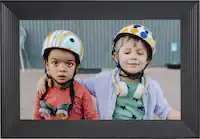
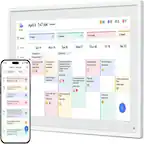
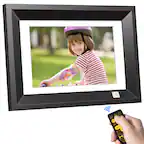
A digital photo frame in a contemporary design, the Lenovo Smart Frame is customized to blend seamlessly into your home's interior. It's your household's entry point to your favorite memories, re-lived directly from your cloud collection. The Lenovo Smart Frame can also transform into live wall art that's customizable to your taste and surroundings, letting you choose from world-famous pieces to display on a brilliant screen. Whether mounted on a wall, placed on an easel or perched on a shelf, the display looks gorgeous from any angle. Easy to install, set up and navigate, the Lenovo Smart Frame delights each and every time you catch a glimpse.
- Screen Features: 21.5" Anti-glare IPS Display with 1920 x 1080 resolution
- Wireless Capability : WLAN: WiFi 802.11 ac/a/b/g/n; 2.4/5GHz, Bluetooth®: Bluetooth® 5.0
- Horizontal/vertical viewing angles: The frame can be flipped from portrait to landscape easily with the included bracket
- Gesture Control: With gesture control, you can change photos by waving your hand
- Easy to use App: The companion app has hundreds of famous paintings for you to choose from - for free.
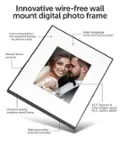
- Designed for the modern home: Hung on a wall, perched on a table, or set on an easel. Wherever the Lenovo Smart Frame lives, it’s sure to take pride of place. The exterior frame can be swapped to best match any room for a cleaner, minimalist look.
- Stroll down memory lane, everyday: By syncing with your Google Photos and your phone, Smart Frame lets you showcase your favorite photos, quickly and easily. And if you can’t decide on a photo, our AI-based algorithm can generate a photo collage of your best shots—with everything the right way up.
- Everything's so life-like: The Lenovo Smart Frame is a breeze to set up and install. As well as a simple snap-on mounting system, it comes with a built-in level and secure cable device. And to showcase your Google Photos, simply download the companion app and sign into your Google account.
- Because life's complicated enough: The Lenovo Smart Frame is a breeze to set up and install. As well as a simple snap-on mounting system, it comes with a built-in level and secure cable device. And to showcase your Google Photos, simply download the companion app and sign into your Google account
- Innovation meets simplicity: Due to its intuitive design, the frame can be flipped from portrait to landscape easily to best fit an image. There's also a child-proof clip to secure the power cable to the wall. You can also ask the Google Assistant or Amazon Alexa to help you choose a photo
- Screen Features: 21.5" Anti-glare IPS Display with 1920 x 1080 resolution
- Wireless Capability : WLAN: WiFi 802.11 ac/a/b/g/n; 2.4/5GHz, Bluetooth®: Bluetooth® 5.0
- Horizontal/vertical viewing angles: The frame can be flipped from portrait to landscape easily with the included bracket
- Gesture Control: With gesture control, you can change photos by waving your hand
- Easy to use App: The companion app has hundreds of famous paintings for you to choose from - for free.
- Designed for the modern home: Hung on a wall, perched on a table, or set on an easel. Wherever the Lenovo Smart Frame lives, it’s sure to take pride of place. The exterior frame can be swapped to best match any room for a cleaner, minimalist look.
- Stroll down memory lane, everyday: By syncing with your Google Photos and your phone, Smart Frame lets you showcase your favorite photos, quickly and easily. And if you can’t decide on a photo, our AI-based algorithm can generate a photo collage of your best shots—with everything the right way up.
- Everything's so life-like: The Lenovo Smart Frame is a breeze to set up and install. As well as a simple snap-on mounting system, it comes with a built-in level and secure cable device. And to showcase your Google Photos, simply download the companion app and sign into your Google account.
- Because life's complicated enough: The Lenovo Smart Frame is a breeze to set up and install. As well as a simple snap-on mounting system, it comes with a built-in level and secure cable device. And to showcase your Google Photos, simply download the companion app and sign into your Google account
- Innovation meets simplicity: Due to its intuitive design, the frame can be flipped from portrait to landscape easily to best fit an image. There's also a child-proof clip to secure the power cable to the wall. You can also ask the Google Assistant or Amazon Alexa to help you choose a photo
Whats Included
- Lenovo Smart Frame
- Metallic Grey Decorative Frame
- Wall Mounting Kit
- DC Adapter
- Lenovo Smart Frame
- Metallic Grey Decorative Frame
- Wall Mounting Kit
- DC Adapter
Q: How many photos can you download and have on a circulation?
A: Unlimited photos available because you are only limited by the number of albums Google Photos will let you make, but you can only do a slide show of 500 at a time. Here's why: This works through your Internet network and your Google Photos account. When you use the app for the Lenovo Smart Frame, you enter your Google account email and password. Then, whenever you look on your Lenovo app, it shows you all of your Google Photo Albums. So the best way to make this work is to make albums on Google Photos. Lenovo lets you show up to 5 albums in a Slide Show. Even though Google Photos lets you put up to 27,000 photos in each album, Google will only stream the first 100 photos of each album to other devices, including this frame. So I am making all of my albums with exactly 100 photos or less in each album with up to 5 albums or less per subject matter, and labeled them accordingly. So for example, our trip to Italy has 5 albums and 100 photos in each album. I labeled the albums Italy 01, Italy 02, etc. I also have an album labeled Italy All because it has all of 1250 of my vacation photos from that trip in it. I made sure to arrange the photos in each album so that it didn't matter the order in which the albums appeared. (I didn't have Venice photos at the end of one album and continue with more Venice photos at the beginning of another album because Lenovo shows the albums in random order.) I did notice that Lenovo is making updates to their software that will help make it a better product. For example, the last update lets you either automatically crop your photos or not. It used to crop them automatically which could cut off the tops of people's heads. Now you can turn that off and it shows the entire photo with a nice gausse effect on either side. The next thing I hope they fix in their software update is the limit of 5 albums per slideshow. Also I wish I could choose the order that it shows the albums. They can't fix things that are Google's fault, such as only streaming the first 100 photos of each album.
A: The Lenovo Smart Frame model number ZA6G0006US, does not have an internal battery. It will need to be plugged in to a wall electrical socket to function.
A: Q1: I don't know why Lenovo posted that you can't add local photos as I am not using Google Photos to stream to the display. On the Levono Smart-Frame app, you can edit the channels to display (3 at a time) one of them being local photos. I don't know how many pictures you can store but it seems like it is 4GB as the device settings show 4G for photos and 4G for videos. Screenshot attached. Q2: It depends on the ratio as I have mine set up as a 16x9 screen and 4x3 photos show up side by side and anything wider shows up as a single picture with a blurred version of the picture in the background filling the rest of the screen.
A: The hardware reset buttons do not work. I had this frame for a while and when I had to switch the wifi, the frame got unresponsive as well. I tried resetting the device and it did not work. There is no support from the company as well. To fix this, I took the frame back to the place I initially setup, once it connected to the old wifi, I reset it and brought it to a new place and was able to set the wifi up again. Since you are now in UK, this might not be an option.
Q: What is the overall dimensions and the display area dimensions?
A: The Lenovo Smart Frame model number ZA6G0006US, ships with a 21.5 inch (screen size measured diagonally) viewable screen. Total Smart Frame Dimensions (W x H x T) - With frame: 376.3mm x 584.56mm x 36.5mm / 14.8 inches x 23.01 inches x 1.43 inches. Without frame: 353.15mm x 561.43mm x 28.6mm / 13.9 inches x 22.1 inches x 1.12 inches.
Q: Will this frame play animated gif file formats?
A: No. The Lenovo Smart Frame, model number ZA6G0006US, will only display still images.
Q: My frame won't change from one album to another
A: undefined
Q: Will there be an update allowing for .gif and videos?
A: undefined