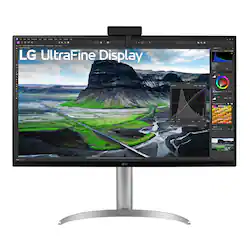
LG - 32" IPS LED 4K UHD FreeSync Monitor with HDR (DisplayPort, HDMI, USB) - Black
- Key Specs
- Refresh Rate: 60Hz (The number of frames per second the device can produce natively without enhancement. Higher rates help produce smooth, seamless pictures.)
- Maximum Resolution: 3840 x 2160 (Maximum resolution refers to the highest number of pixels that a screen can process and display. Higher resolution signals produce more detailed images.)
- Panel Type: IPS (Technology that affects response time and image quality.)
- Synchronization Technology: FreeSync (AMD Adaptive Sync) (Generally, these technologies allow syncing between a computer/console game's frame rate and the device's refresh rate for a smoother display without tearing.)
- Screen Size: 32 inches (Size of the screen, measured diagonally from corner to corner.)
- Display Connector(s): 2 x HDMI, 1 x DisplayPort (The number and type of connectors used to connect to an external display.)
- General
- Product Name: 32" IPS LED 4K UHD FreeSync Monitor with HDR (DisplayPort, HDMI, USB)
- Brand: LG
- Operating System Compatibility: Not Applicable
- Model Number: 32UQ85R-W
- Color: Black
- Display
- Refresh Rate: 60Hz (The number of frames per second the device can produce natively without enhancement. Higher rates help produce smooth, seamless pictures.)
- Maximum Resolution: 3840 x 2160 (Maximum resolution refers to the highest number of pixels that a screen can process and display. Higher resolution signals produce more detailed images.)
- Native Resolution: 3840 x 2160 (Native resolution of a screen refers to its single, fixed resolution. Sometimes screens must scale an image up or down in order to fit the native resolution. This can cause a loss of resolution or detail.)
- Contrast Ratio: 2000:1 (Measured difference between a displayed image's brightest whites and darkest blacks. The larger the first number, the more detail and color that can be displayed.)
- Display Type: LED
- Panel Type: IPS (Technology that affects response time and image quality.)
- Synchronization Technology: FreeSync (AMD Adaptive Sync) (Generally, these technologies allow syncing between a computer/console game's frame rate and the device's refresh rate for a smoother display without tearing.)
- Aspect Ratio: 16:9 (The measurement of the width of a screen compared to the height of a screen, expressed as a ratio.)
- Curved Screen: false
- Brightness: 400 candela per square meter (A measure of the total light output.)
- Screen Size: 32 inches (Size of the screen, measured diagonally from corner to corner.)
- High Dynamic Range (HDR): true (An HDR-compatible 4K TV or other HDR-compatible product displays HDR video content when it's available from sources like 4K Ultra HD Blu-ray Discs and 4K streaming services.)
- Touch Screen: false (Touch-screen devices make navigating more intuitive. Using a touch-screen display, you can do things such as tap to select, hold and drag to move items, swipe to scroll, and pinch to zoom.)
- On-Screen Display Languages: English (The available language options for displayed text.)
- Connectivity
- Number of HDMI Inputs (Total): 2
- Display Connector(s): 2 x HDMI, 1 x DisplayPort (The number and type of connectors used to connect to an external display.)
- Compatibility
- Wall Mountable: true (The product is able to be secured to a wall. Some products are designed ready to mount, while others may require additional hardware/accessories for installation.)
- Features
- Adjustable Stand Height: false
- Built-In Webcam: false
- Integrated Speaker(s): true
- Dimensions
- Product Height With Stand: 24.7 inches
- Product Height Without Stand: 17.7 inches
- Product Width: 28.1 inches (The out of box width of the item. Width is measured as the horizontal distance from one side of the item to the other as it would be primarily used or placed.)
- Product Weight: 15.4 pounds (The out of box weight of the item.)
- Stand Included: true
- Certifications Listings & Approvals
- ENERGY STAR Certified: false (Devices carrying the ENERGY STAR service mark, such as computer products and peripherals, kitchen appliances, and other products, generally use 20% to 30% less energy than required by federal standards.)
- EPEAT Qualified: false (The Electronic Product Environmental Assessment Tool (EPEAT) was designed to provide an environmental assessment tool for purchasers. In order to qualify for EPEAT, a product must meet all 23 required criteria.)
- Warranty
- Manufacturer's Warranty - Parts: 1 year limited
- Manufacturer's Warranty - Labor: 1 year limited
- Other
- UPC: 195174035160
Photo and video editors and graphic designers need the best tools to have their creative visions brought to life. And LG’s 32UQ85R-W UltraFine UHD monitor is designed with creative professionals in mind. From the large 32 inch UHD 4K IPS display to the impeccable color expression and deeper blacks from Nano IPS Black and VESA DisplayHDR 400 with DCI-P3 98% (Typical),¹ creators’ imaginations can come to life right on the screen. The monitor comes with a detachable, color calibrator sensor² to help ensure color is consistent and precise according to the needs of the creative professional Beyond the display’s impressive performance, the screen is also tilt, height, and pivot adjustable with 3-side, virtually borderless design that looks great on a creative pros desktop.
- A Monitor Made for Creators: The LG UltraFine offers an efficient workstation setup for creators to perfect their work with every detail in mind.
- Contrast Ratio: The Nano IPS Black display with a 2000:1 contrast ratio; which is twice as high as a conventional monitor and provides deeper blacks of IPS, giving you the opportunity to produce your creative work in even more detail.
- Color Calibration Made Easy: Connect the included color calibrator sensor to your monitor and use it with monitor calibration software.³ Together, the calibrator and software can enable monitor color settings and color adjustments.
- Versatile Connectivity: LG UltraFine is compatible with various types of devices by providing USB Type-C (PD 90W), DisplayPort, HDMI port (x2), and two USB ports.
- Built-in Speakers: Comes with two built-in 5W stereo speakers equipped with Waves MaxxAudio to make your sound bigger and bolder.
- OnScreen Control⁴: Easier User Interface. You can customize the workspace by splitting the display or adjusting basic monitor options with just a few mouse clicks.
- Ergonomic Design: Easy and Comfortable. The ergonomic stand makes it easy to flexibly adjust the height, tilt, and pivot of the screen in the optimal position for you.



















