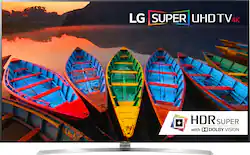
LG - 75" Class - (74.6" Diag.) - LED - 2160p - Smart - 3D - 4K Ultra HD TV - with High Dynamic Range
- Key Specs
- Display Type: LED
- Resolution: 4K (2160p) (Refers to the number of pixels, both horizontally and vertically, used to capture video/images. The higher the resolution the finer the detail that can be seen.)
- Screen Size Class: 75 inches (The group size measurement of a screen. This differs from a screen size measured diagonally from corner to corner.)
- High Dynamic Range (HDR): true (An HDR-compatible 4K TV or other HDR-compatible product displays HDR video content when it's available from sources like 4K Ultra HD Blu-ray Discs and 4K streaming services.)
- LED Panel Type: NanoCell LED
- Backlight Type: Full Array Local Dimming (Edge-lit: lights are on the edges of the display with ~10 zones of vertical LEDs. Direct-lit: lights are on the edges and behind the screen for more light uniformity than Edge-lit. Full array: direct-lit with local dimming for greater contrast with up to 100 zones of LEDs.)
- Refresh Rate: 120Hz (The number of frames per second the device can produce natively without enhancement. Higher rates help produce smooth, seamless pictures.)
- Motion Enhancement Technology: TruMotion 240 (Proprietary technologies produced in addition to the Refresh Rate that smooth out faster moving pictures to reduce blur and pixelation.)
- Smart Platform: webOS (Just like a computer, a smart TV needs an operating system (also called a smart platform) in order to access the Internet, connect with entertainment apps, and play streaming content. Some common TV smart platforms are; Roku TV, Android TV, and Chromecast.)
- Featured Streaming Services: Netflix, YouTube (Streaming services and other programs are available on this device. Keep in mind, there may be more services supported than just those shown here.)
- Number of HDMI Inputs (Total): 3
- Voice Assistant Built-in: Other (A digital assistant built into the device that uses voice commands to answer questions and control smart devices.)
- General
- Product Name: 75" Class - (74.6" Diag.) - LED - 2160p - Smart - 3D - 4K Ultra HD TV - with High Dynamic Range
- Brand: LG
- Model Number: 75UH8500
- Model Year: 2017
- Dimensions
- Product Height With Stand: 40.2 inches
- Product Width: 66.1 inches (The out of box width of the item. Width is measured as the horizontal distance from one side of the item to the other as it would be primarily used or placed.)
- Product Depth With Stand: 13.4 inches
- Product Height Without Stand: 37.8 inches
- Product Depth Without Stand: 2.2 inches
- Product Weight With Stand: 110.9 pounds
- Product Weight Without Stand: 103.2 pounds
- Adjustable Stand Width: false (Whether the stand can adjust to have more than one measurement either between the legs or the base itself.)
- Display
- Display Type: LED
- Resolution: 4K (2160p) (Refers to the number of pixels, both horizontally and vertically, used to capture video/images. The higher the resolution the finer the detail that can be seen.)
- Screen Size: 74.6 inches (Size of the screen, measured diagonally from corner to corner.)
- Screen Size Class: 75 inches (The group size measurement of a screen. This differs from a screen size measured diagonally from corner to corner.)
- High Dynamic Range (HDR): true (An HDR-compatible 4K TV or other HDR-compatible product displays HDR video content when it's available from sources like 4K Ultra HD Blu-ray Discs and 4K streaming services.)
- Picture Quality Enhancement Technology: 4K Active HDR
- LED Panel Type: NanoCell LED
- Backlight Type: Full Array Local Dimming (Edge-lit: lights are on the edges of the display with ~10 zones of vertical LEDs. Direct-lit: lights are on the edges and behind the screen for more light uniformity than Edge-lit. Full array: direct-lit with local dimming for greater contrast with up to 100 zones of LEDs.)
- Curved Screen: false
- Refresh Rate: 120Hz (The number of frames per second the device can produce natively without enhancement. Higher rates help produce smooth, seamless pictures.)
- Motion Enhancement Technology: TruMotion 240 (Proprietary technologies produced in addition to the Refresh Rate that smooth out faster moving pictures to reduce blur and pixelation.)
- Features
- Remote Control Type: Standard
- Smart Capable: true (Smart, or smart-capable devices are able to connect directly to your home network in order to stream content from the Internet, run Internet-based apps, or connect to other smart devices.)
- Smart Platform: webOS (Just like a computer, a smart TV needs an operating system (also called a smart platform) in order to access the Internet, connect with entertainment apps, and play streaming content. Some common TV smart platforms are; Roku TV, Android TV, and Chromecast.)
- Featured Streaming Services: Netflix, YouTube (Streaming services and other programs are available on this device. Keep in mind, there may be more services supported than just those shown here.)
- TV Tuner: Digital (The ATSC TV Tuner is a component built into conventional TV sets or other devices for receiving over-the-air broadcast TV without a cable/satellite box. Digital tuners may be purchased separately and connected to a device if it does not have one built in.)
- Connectivity
- Number of HDMI Inputs (Total): 3
- RF Antenna Input: true (This input is used to connect devices such as antennas or cable boxes to a TV via a coaxial cable.)
- Number Of USB Port(s) (Total): 3 (The total number of USB ports including all generations and versions.)
- Compatibility
- VESA Wall Mount Standard: 600mm x 400mm (VESA wall mount standards refer to the spacing of screw holes built into a TV in order to fit with standard TV wall mounts. These standards are implemented into most TVs and monitors.)
- Voice Assistant Built-in: Other (A digital assistant built into the device that uses voice commands to answer questions and control smart devices.)
- Audio
- Built-In Speakers: true
- Surround Sound Supported: Other (Surround sound systems use multiple audio channels and speakers to create an immersive sound experience for the listener. There are also various proprietary technologies that imitate this kind of sound via a device's built-in speakers or soundbar.)
- Speaker Output: 60 watts
- Power
- ENERGY STAR Certified: true (Devices carrying the ENERGY STAR service mark, such as computer products and peripherals, kitchen appliances, and other products, generally use 20% to 30% less energy than required by federal standards.)
- EPEAT Qualified: false (The Electronic Product Environmental Assessment Tool (EPEAT) was designed to provide an environmental assessment tool for purchasers. In order to qualify for EPEAT, a product must meet all 23 required criteria.)
- Estimated Annual Operating Cost: 26 United States dollars (Predicted cost of operating the product under average conditions for one year.)
- Estimated Annual Electricity Use: 215 kilowatt hours (Predicted amount of electricity needed to operate the product under average conditions for one year.)
- Included
- Stand Included: true
- Warranty
- Manufacturer's Warranty - Parts: 1 year
- Manufacturer's Warranty - Labor: 1 year
- Box Dimension
- Height: 43.1 inches
- Width: 71.1 inches
- Depth: 8.5 inches
- CubicDimension: 26047 inches
- Other
- UPC: 719192603660
Enjoy streaming your favorite content with this 75-inch LG 4K LED smart TV. This television can reproduce more than one billon colors to provide you with a lifelike picture, thanks to the IPS 4K quantum display technology. Ultra-luminance boosts the brightness levels to give you an even more dynamic picture on this LG 4K LED smart TV.
- 74.6" screen (measured diagonally from corner to corner): Large enough to provide an immersive experience for everyone in the room.
- Smart TV delivers a huge world of entertainment: Stream movies, videos, music and more.
- 2160p resolution for breathtaking HD images: Watch 4K movies and TV shows at 4x the resolution of Full HD, and upscale your current HD content to gorgeous, Ultra HD-level picture quality.
- High dynamic range (HDR) creates a more realistic picture: HDR technology expands the contrast and color range of the existing pixels on your TV to reveal a brighter and more colorful image. The picture quality is noticeably more natural.
- TruMotion 240: Enjoy high-speed action with good motion clarity.
- LED TVs perform well in all lighting conditions: They also deliver plasma-like deep blacks and rich colors.
- 3 HDMI inputs for the best home theater connection: High-speed HDMI delivers up to 2160p picture and digital surround sound in one convenient cable. HDMI cable not included.
- Theater-like 3D: Uses the same passive 3D technology found in movie theaters.* 2 pairs of 3D glasses are included. Additional pairs sold separately.
- 3 USB inputs: Easily connect your digital camera, camcorder or other USB device.
Whats Included
- LG 75UH8500
- Remote control
- 3D glasses (2pcs)
- Stand
- LG Magic Remote control
Product Manuals
Q: How does the LG 75UH8500 compare to the Sony X940D? What are the differences?
A: I went thru exactly the same comparison, and ended up going for the LG. I have had it for a week now and absolutely love it. the picture quality is amazing and the 3D is the best I have ever seen on a TV. I was told by the rep why the Sony was a far better TV technically, but from the comparisons I did when I went for demo of these 2 TV's, the LG won hands down. I used to be a big fan of Sony, but in the last few years their customer service has gotten from bad to worse. By comparison, it is early days yet, but I have received excellent customer service from LG. They just walked me thru how to connect my Sony bluetooth headphones to the TV. The LG is feature rich and extremely easy to use and configure. If you are in any doubt, do what I did..go to your nearest Best Buy armed with a couple of your favorite Blu Rays. Take some 3D ones if have any (I took Avatar). Take both TV's for a spin, and I bet you will find that the LG more than holds its own against the Sony, whilst being around $1000 to $1500 cheaper!
A: After I had previously answered this question, I did some research, and found out that you can connect bluetooth headphones to this TV! I have a pair of Sony bluetooth headphones (MDRXB950) and was able to easily connect these to the LG 75UH8500 TV. Go to the SOUND settings, select the SOUND OUT option, Then select "LG Sound Sync / Bluetooth" option. Select "DEVICE SELECTION". then make sure that your headphones are in pair or discovery mode. Once the TV detects it, select it, let it pair, and enjoy the sound! Once the headphones have been paired, I found that if I want to use them again I just turn them on and the TV detects this and asks me if I want to switch to this sound mode. I already love this TV, and this makes me love it even more!
A: I believe it is well worth getting the larger screen. Awesome tv.
A: I bought a 2 ft RCA piggy back audio cable. If you can see the picture, it lets you turn one connection into two connections. I took the main red and white connection, and plugged it into the female plugs of the piggy back cable. It turned one connection into two. That's how I hooked it up to a system selector for some consoles I have that run Composite video and Component video. Works like a charm. Good luck.
Q: Are the nlacknlevels really that bad. Some reviews really slashed it.
A: Dear TVnoob, I find the black level to be okay. No problem at all in my opinion. I guess the what people may be referring to is the "edge-lit" screen. Because the screen is lit from the edges, if for example there is an image on the top left corner of the screen, and the rest of the screen is black, you will see the light hazing out of the entire left side, from the top to the bottom of the screen where the image is. This is even more noticeable when you are using the magic remote and the screen is black. But be that as it may, this is an incredible TV!!! I bought this 75inch LG and returned the 70inch samsung model N70KU6300FXZA I had initially bought. Believe me, the difference was night and day. I don't know how they make both TV's picture quality look similar in the BB store but the LG beats the samsung hands down!!! I hope this helps!.
Q: What are the dimensions of the stand for this TV length X width in inches?
A: The stand measures: 12" x 37.5".



















