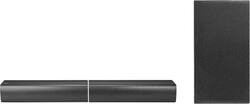
LG - SJ7 Sound Bar Flex 4.1 Channel Speaker System with Wireless Subwoofer and Bluetooth Streaming - Black
- Key Specs
- Wireless Connectivity: Bluetooth (The manner in which a device sends data to another device over a short distance without the use of wires or cables.)
- Dialogue Enhancement: true (Improves clarity of dialogue in audio playback. This is typically achieved with dedicated speakers and/or technology that separates dialogue from the rest of the audio in order to make it clearer.)
- General
- Product Name: SJ7 Sound Bar Flex 4.1 Channel Speaker System with Wireless Subwoofer and Bluetooth Streaming
- Brand: LG
- Model Number: SJ7
- Audio
- Surround Sound Supported: Other (Surround sound systems use multiple audio channels and speakers to create an immersive sound experience for the listener. There are also various proprietary technologies that imitate this kind of sound via a device's built-in speakers or soundbar.)
- Connectivity
- Wireless Connectivity: Bluetooth (The manner in which a device sends data to another device over a short distance without the use of wires or cables.)
- Wireless Multi-Room Audio: false (Technology that allows multiple speakers and/or soundbars to be connected wirelessly and play audio in separate rooms.)
- Number of HDMI Inputs (Total): 1
- Number of HDMI Outputs (Total): 1
- Features
- Dialogue Enhancement: true (Improves clarity of dialogue in audio playback. This is typically achieved with dedicated speakers and/or technology that separates dialogue from the rest of the audio in order to make it clearer.)
- Speaker
- Tweeter Size: 0.79 inches
- Tweeter Material: Polymer
- Driver Size: 2.3 inches
- Woofer Size: 2.3 inches
- Woofer Material: Silk
- Dimensions
- Product Height: 2.1 inches (The out of box height of the item. Height is measured as the vertical distance from the bottom of the item to the top as it would be primarily used or placed.)
- Product Width: 19.7 inches (The out of box width of the item. Width is measured as the horizontal distance from one side of the item to the other as it would be primarily used or placed.)
- Product Depth: 4.1 inches (The out of box depth of the item. Depth is measured as the distance from the front of the item to the back as it would be primarily used or placed.)
- Product Weight: 3.1 pounds (The out of box weight of the item.)
- Included
- Remote Control Included: true
- Cable(s) Included: None
- Warranty
- Manufacturer's Warranty - Parts: 1 year
- Manufacturer's Warranty - Labor: 1 year
- Other
- UPC: 719192610132
LG’s SJ7 Sound Bar Flex offers endless entertainment from a versatile dual-speaker design: The two main speakers can be placed in front of the TV, or to the left/right vertically or in front of and behind the listener for an even more cinematic experience. Both speakers are Bluetooth, and the right unit has a built-in battery, so it can work independently just about anywhere.
- 4.1-channel speaker system: More channels ensure better sound separation for an all-round experience.
- Wireless Subwoofer: With 12.6" subwoofer to deliver a movie theater experience in your own home.
- Rear Surround Sound: This sound bar is actually two separate speakers, and when configured in rear speaker mode, one can be placed behind the listener to provide real front-and-back surround audio.
- Adaptive Sound Control: For maximum enjoyment of various types of programming (movies, sports, games, etc.), LG's Adaptive Sound Control can automatically detect what’s playing and then enhance the clarity and impact of the audio.
- Flexible Design - Home Theater Versatility: Dual-speaker design of the LG Sound Bar Flex enables the system to be configured in a variety of ways. However you like to enjoy movies and music, this audio package delivers.
- Portable Bluetooth: For even greater versatility, one of the speakers in this LG sound system is equipped with a built-in rechargeable battery, allowing it to be placed and enjoyed just about anywhere.
- Inputs: HDMI and Optical inputs.
- Bluetooth portable provides more ways to connect with the music you love: One of the speakers in this LG sound system is Bluetooth-enabled with its own built-in rechargeable battery, allowing it to be placed and enjoyed anywhere.
- Vertical Positioning: The two independent speaker units can be stood vertically on either side of the TV, with stabilizing speaker pads. Audiophiles prefer such separation of stereo channels, which allows optimal dispersion of the soundwaves.
Whats Included
- LG SJ7 Sound Bar Flex 4.1 Channel Speaker System with Wireless Subwoofer and Bluetooth Streaming
A: Keep in mind the sounds coming out of each speaker can be different depending on the surround sound settings of the program and the speakers themselves. And you can't make it a front/rear setup because then most of the voices would mainly be heard by TV speaker. So bottom line, it would work, but it may not be ideal with "what" they hear vs what's heard from the other speaker. I recommend getting some RF headphones in addition to an external speaker. Most people can listen to the sound bar while a person that has a hard time hearing can use headphones and increase the volume without affecting others. My father-in-law currently has to use this setup so he doesn't blast everyone out of the room using the sound bar. A 3.5mm audio splitter is required for that kind of setup though.
Q: Can the LED display on speaker be turned off?
A: It can't be turned completely off; however, it is brighter after a key touch... then 15 seconds later, it dims automatically until a key is pressed again. You can always put electrical tape over that area if needed.
A: its a junk system they knew it was junk and sold it for cheap about two years ago, there is a software update on LGs website but it don't help much buy a different system bud that's the real answer
Q: Can i use the sj7 as rears for the sj9?
A: Hello, you can not connect a soundbar to a soundbar. ^CP
Q: how to secure bluetooth or how to set password on bluetooth?
A: undefined
Q: My lg sj(8c) speakers turn up and down by themselves without warning, how do i fix this
A: undefined
A: Hi Horse. What audio connections do you have on your 2013 Plasma TV? The LG SJ7 Sound Bar Flex 4.1 Channel Speaker System with Wireless Subwoofer and Bluetooth Streaming - Black, Model # SJ7 has an HDMI 1,4 Out port and an Optical Digital Audio Out and an HDMI 1.4 In as connection ports. If your TV has an Optical Digital Audio Output on it, you can simply connect that port to the Optical Digital Audio Input on the soundbar using an optical (Toslink) cable if you have one. You might need to go into the audio settings in your TV to specify what path to output the audio through. Check the instruction in your owner's manual for your TV for instructions on that. It should be TV setting menu [ [Sound] [ [TV Sound output] [ [External speaker (Optical)] or something similar. You can use the HDMI 1.4 Out if your TV has an HDMI port that supports ARC functionality. ARC functionality allows you to send audio upstream or downstream through the same HDMI cable when it is supported on both your TV and on the Soundbar. Again, you'll have to get into the audio settings in your TV's menu settings to specify an audio output path. That should look something like TV setting menu [ [Sound] [ [TV Sound output] [ [External speaker (HDMI ARC)]. Details of the TV settings menu may vary depending on the model of your TV...^IFV



















