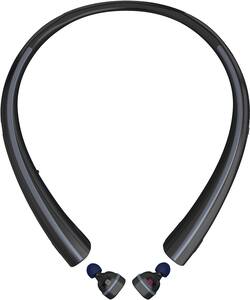
LG - TONE Free HBS F110 True Wireless In-Ear Headphones - Black
- Key Specs
- Sound Mode: Stereo
- Connection Type: Wireless
- Wireless Connectivity: Bluetooth (The manner in which a device sends data to another device over a short distance without the use of wires or cables.)
- True Wireless: true (These headphones not only lack wires between the device and headphones, they also lack wires between the headphones themselves. (true wireless is really only possible with in-ear headphones))
- Maximum Wireless Range: 33 feet
- Water Resistant: false (Resists some degree of water penetration.)
- Built-In Microphone: true
- Headphone Fit: In-Ear
- General
- Product Name: TONE Free HBS F110 True Wireless In-Ear Headphones
- Brand: LG
- Ear Cushions: true
- Model Number: HBS-F110.ACBBBKI
- Audio
- Sound Isolating: false
- Sound Mode: Stereo
- Connectivity
- Connection Type: Wireless
- Wireless Connectivity: Bluetooth (The manner in which a device sends data to another device over a short distance without the use of wires or cables.)
- True Wireless: true (These headphones not only lack wires between the device and headphones, they also lack wires between the headphones themselves. (true wireless is really only possible with in-ear headphones))
- Bluetooth Version: 4.2 (The Bluetooth specification formalized by the Bluetooth Special Interest Group. All versions of the Bluetooth standard are backwards compatible with previous versions.)
- Maximum Wireless Range: 33 feet
- Features
- Water Resistant: false (Resists some degree of water penetration.)
- Built-In Microphone: true
- Controls: Call, Volume
- Body Metrics Measured: Not Applicable
- Bone Conducting Technology: false
- Design
- Headphone Fit: In-Ear
- Other
- UPC: 815425022243
Listen to music hands-free with this LG wireless headset. It lets you answer or ignore a call with voice commands, and the wireless earbuds charge when they're resting inside the neckband, ensuring they're ready for use. The neckband of this LG wireless headset provides vibration alerts for incoming calls and texts, so you'll never miss a message.
- In-ear design: Fits securely and directs music into your ears for full, uninterrupted audio.
- Bluetooth 4.2 interface: Enables simple wireless pairing with your Bluetooth-enabled device. Supports HFP, HSP, A2DP and AVRCP Bluetooth profiles.
- Rechargeable battery: Offers up to 3 hours of use and lasts up to 82 hours on standby mode.
- In-line microphone: Lets you enjoy hands-free calls.
- Stereo design: Delivers crisp tones.
Whats Included
- LG TONE Free HBS-F110
- 2 EarGels ear tips (small), charging neckband
A: Calls are not for the right ear bud only the left Left ear bud is your dominant ear bud.
A: 1. Fully charge the TONE Free unit with both earbuds attached. 2. Before removing the earbuds, turn the neckband switch ON then wear it around your neck. 3. Detach each earbud and insert them in the appropriate ear. 4. Hold the LEFT earbud's button until you get a tone and audio queue that its ready for pairing... 5. Go to your Bluetooth settings on the target device and look for "HBSF110 Master" and follow the prompts. ONLY PAIR THE MASTER! 6. Follow all of the prompts then you should be able to use it as an audio output device as with any other bluetooth connected peripheral (different based on the type of device you have. Enjoy!
A: We hate to hear you are having an issue staying connected. Please reach out to us on Twitter at @LGUSSupport or on Facebook www.facebook.com/LGSupportUSA so we can get more info and see what we can do. ^CP
Q: Do these headphone work for any and all Lg phones
A: This should work for the phones that have bluetooth.
A: The neckband does not have to be on your body during operation. We would recommend keeping the neckband within 30 feet of the earbuds and your phone. ^CP
A: Go into your phones settings and make sure you don’t have your audio set to the left side only.






















