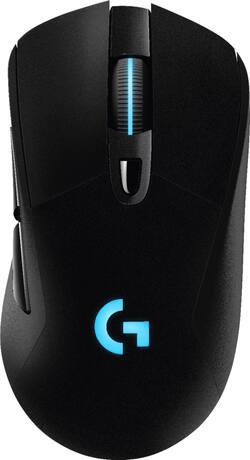
Logitech - G703 Wireless Optical Gaming Mouse with RGB Lighting - Black
- Key Specs
- Maximum Sensitivity: 12000 dots per inch (Mouse sensitivity is measured in dots per inch (DPI). The higher the DPI, the more sensitive the mouse is and may be more useful for high-density pixel screens. Lower DPI typically means more precision and accuracy in mouse movement.)
- General
- Product Name: G703 Wireless Optical Gaming Mouse with RGB Lighting
- Brand: Logitech
- Model Number: 910-005091
- Features
- Mouse Type: Gaming
- Performance
- Mouse Operation: Other
- Handedness: Ambidextrous
- Tracking Method: Optical (There are several types of computer mice, optical and laser being among the most common. Optical mice detect less detail and provide more precise and accurate movement. Laser mice detect more detail and can be used on a wider variety of surfaces, but are more sensitive to small movements.)
- Maximum Sensitivity: 12000 dots per inch (Mouse sensitivity is measured in dots per inch (DPI). The higher the DPI, the more sensitive the mouse is and may be more useful for high-density pixel screens. Lower DPI typically means more precision and accuracy in mouse movement.)
- Minimum Sensitivity: 200 dots per inch (Mouse sensitivity is measured in dots per inch (DPI). The higher the DPI, the more sensitive the mouse is. Lower DPI typically means more precision and accuracy in mouse movement, but higher DPI may be useful for high-density pixel screens.)
- Number of Programmable Buttons: 6
- Connectivity
- Wireless Connectivity: Radio Frequency (RF) (The manner in which a device sends data to another device over a short distance without the use of wires or cables.)
- Operating System Compatibility: Windows
- Power
- Mouse Power Source: Battery-powered
- On/Off Switch: false
- Rechargeable Battery (Mouse): true
- Wireless Charging: true
- Dimensions
- Product Height: 1.69 inches (The out of box height of the item. Height is measured as the vertical distance from the bottom of the item to the top as it would be primarily used or placed.)
- Product Width: 2.68 inches (The out of box width of the item. Width is measured as the horizontal distance from one side of the item to the other as it would be primarily used or placed.)
- Other
- UPC: 097855130983
Take gaming up a notch with this Logitech gaming mouse. The LIGHTSPEED wireless technology provides a 1ms report rate and optimized connectivity to prevent lag, and six programmable buttons let you create a custom experience. This Logitech gaming mouse uses an ergonomic design and advanced button tensioning for comfortable, effortless gameplay.
- LIGHTSPEED wireless technology: With a 1ms report rate and Logitech end-to-end optimized wireless connectivity, this mouse delivers incredible responsiveness for competition-level twitch targeting.
- Programmable RGB lighting: Choose from a palette of colors and different brightness levels to match your style, system or environment. Download Logitech Gaming Software to get access to over 300 game profiles and intelligent illumination.
- Optical technology: LED lights scan the surface beneath the mouse to detect movement with a fair amount of accuracy, suitable for everyday computing and browsing.
- 6 programmable buttons: Let you map out game commands and multicommand macros for personalized control.
- Scroll wheel: Enables smooth, fast movement.
- Adjustable weight system: The included 10g removable weight module gives you options when it comes to tuning the mouse exactly to your preferences.
- Maximum of 12000 dpi: Lets you find the perfect sensitivity.
- Compatible with most versions of Windows: Works with most PCs.
Whats Included
- Logitech G703 Wireless Optical Gaming Mouse with RGB Lighting
- Charging/data cable
- Wireless USB adapter
- 10g optional weight
- Owner's manual
Q: G703 vs g903
A: I chose the G703 because it's right-handed and fits my hand better. The G900 and G903 are a bit longer and flatter than my previous mice (G502, DeathAdder, Myonix NAOS). While the G900 and G903 have more buttons, some of them are there just to facilitate ambidexterity. I also prefer the LED patterning on the G703 with its lit scrollwheel. Technology-wise they are at the same level (same sensor, same LightSpeed tech, PowerPlay compatible), so pick the one that feels better.
Q: Will this mouse work on an iMac? Or is it only compatible with Windows?
A: Yep it's universal.
A: Im pretty sure.. as long as you connect the wireless chip usb into your xbox, it should register.
A: Lighting settings. Bottom right of screen on desktop click on the up arrow (win 10, maybe something different for a earlier windows) Click on it then click on Logitech icon. Logitech will open up and on the bottom of the Logitech window, click on third icon from the left which is lighting settings. Then Put logo and wheel to off.
A: Certain products need to be carried in store for stock and other items are sometimes for sale online only. It just depends on the products and the current market. Looks like this product is only sold in Best Buy stores.
Q: Is this new one right? Nobody use it? Or not refurbish?
A: this is the new powerplay version of the g603.
Q: Why is this exact mouse only $49.99 on Amazon?
A: If it is, you will not regret the purchase.


















