
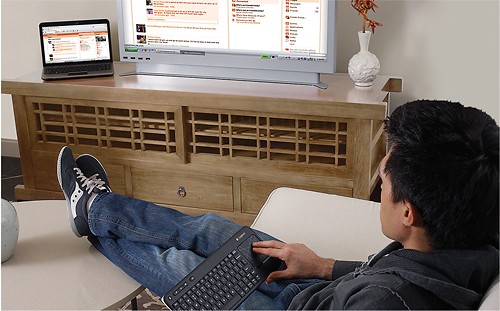
Logitech - K400 Wireless Keyboard - White
This item is no longer available in new condition.
See similar items below.
Description
Features
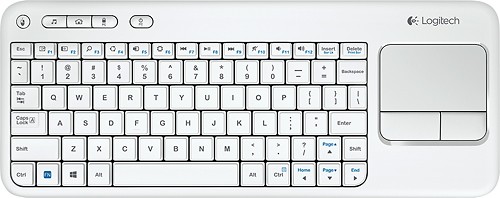
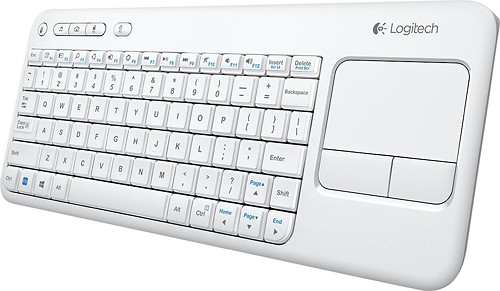
86 sleek, low-profile keys
Ensure quiet typing and feature bold, easy-to-read characters. Multimedia keys provide quick access to entertainment.
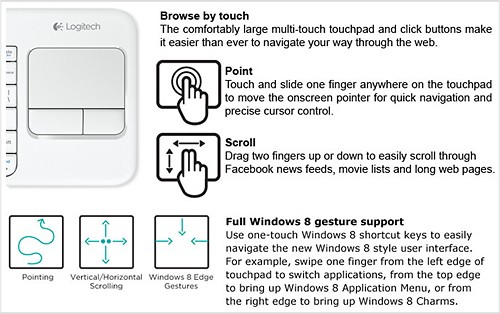
Built-in 3.5" multitouch touchpad
Facilitates Web navigation.
USB connectivity
For simple plug-and-play connection.
Up to 33' wireless range
Offers convenient control when your laptop is connected to your TV.
Windows-based laptop compatible
For use with your existing laptop with Windows 8, 8 RT, Vista, 7 or XP.
What's Included
Logitech k400 Wireless Touch Keyboard for Windows-Based Laptops
USB receiver
2 AA batteries (pre-installed)
Owner's manual
Other
- Keyboard DesignWireless USB
- Keys (Number of)86
- Multimedia KeysYes
- Cordless/WirelessYes
- Palm RestNo
- Batteries NeededYes
- Battery TypeAA
- Battery Quantity2
- Battery IncludedYes
- Port ConnectionUSB
- CompatibilityPC
- Mac CompatibleNo
- Mouse IncludedNo
- System RequirementsWindows 8, 8 RT, Vista, 7 or XP
- Color CategoryWhite
- UPC097855098979
Customer reviews
Rating 4.4 out of 5 stars with 1979 reviews
(1,979 customer reviews)Rating by feature
- Value4.6
Rating 4.6 out of 5 stars
- Quality4.5
Rating 4.5 out of 5 stars
- Ease of Use4.3
Rating 4.3 out of 5 stars
Rated 5 out of 5 stars
Great Keyboard for use with a smart TV
||Posted .This reviewer received promo considerations or sweepstakes entry for writing a review.I purchased a Samsung Ultra HD TV from Best Buy. I found out that when using it to access the internet or other areas that needed info added, the on screen input method was cumbersome. I decided to purchase a wireless keyboard to make the process a little easier. I looked at the Samsung model which seemed a little pricey for occasional use. I then looked at the Logitech K400 which was on sale and decided to take a chance, and I have been quite pleased with it. It does not have some of the dedicated function keys that the Samsung has, but I do not find this to be a problem. And the touch pad works great also. All in all I find it to be perfect for use with my smart TV. I would highly recommend it to anybody looking to purchase a wireless keyboard.
This review is from Logitech - K400 Tenkeyless (TKL) Wireless Membrane Keyboard - Black
I would recommend this to a friendRated 4 out of 5 stars
Good LITTLE Keyboard
||Posted . Owned for 1 month when reviewed.This reviewer received promo considerations or sweepstakes entry for writing a review.The keyboard is just the right size for me. I'm a 2 finger typer so it's easier for me to get used to the reduced size than it would be for someone trained in typing. The mouse pad works good also. There was no documentation on how to use the special buttons at the top so reduced the rating to 4 stars.
This review is from Logitech - K400 Tenkeyless (TKL) Wireless Membrane Keyboard - Black
I would recommend this to a friendRated 5 out of 5 stars
Live Changing!
||Posted .This reviewer received promo considerations or sweepstakes entry for writing a review.It has changed my life! I can't stop using it. I carry it with me everywhere and go and share it with friends and family members. I have finally found my true love!
This review is from Logitech - K400 Tenkeyless (TKL) Wireless Membrane Keyboard - Black
I would recommend this to a friendRated 2 out of 5 stars
Pretty good wireless KB
||Posted .This reviewer received promo considerations or sweepstakes entry for writing a review.The keyboard is usable, small and has a built-in mouse pad. The weak part of this KB seems to be twofold: if you don't have direct line-of-sight or nearness between the KB and blu-tooth fob, the mouse pad is not very accurate and sometimes non-functional.
This review is from Logitech - K400 Tenkeyless (TKL) Wireless Membrane Keyboard - Black
No, I would not recommend this to a friendBrand response from Logitech
Posted .Hello, we are sorry to hear about your poor experience with the K400. At Logitech, it is our goal to ensure you are completely satisfied with your Logitech purchase. We take pride in the products and services we offer, and want our customers to enjoy them just as much as we do. If you ever experience any issues with our products, please reach out to us on our Logitech support website so we can help out. Hope you have a great day!
Rated 3 out of 5 stars
Logitech Wireless K400
||Posted .This reviewer received promo considerations or sweepstakes entry for writing a review.The product picture shows a K400, however, when opened the box, it was actually a K400R- working ok on PC but not on my Samsung TV. and Nano Transceiver dongle is difficult to plug into USB port on TV
This review is from Logitech - K400 Tenkeyless (TKL) Wireless Membrane Keyboard - Black
I would recommend this to a friendRated 4 out of 5 stars
Great keyboard for bluetooth devices
||Posted .This reviewer received promo considerations or sweepstakes entry for writing a review.This is a compact Keyboard for easy use on all Samsung bluetooth compatible equipments
This review is from Logitech - K400 Tenkeyless (TKL) Wireless Membrane Keyboard - Black
I would recommend this to a friend- Pros mentioned:Wireless
Rated 4 out of 5 stars
Decent, compact keyboard/touchpad combo
||Posted .This reviewer received promo considerations or sweepstakes entry for writing a review.I purchased this for use in my basement recording/rehearsing studio for remote input to a DAW PC. Wireless range seems adequate in my 20'x12' space, although I have not tried it from every corner of the room. I am still using the original batteries, so I am happy with the battery life so far. Keyboard is small, but usable. My only complaint is the right Shift key, which is easy to confuse with other adjacent keys. Touchpad is responsive and very usable. The portability and convenience of the keyboard/touchpad combo more than compensates for the familiar and comfortable functionality of a conventional mouse and full-size keyboard.
This review is from Logitech - K400 Tenkeyless (TKL) Wireless Membrane Keyboard - Black
I would recommend this to a friend Rated 4 out of 5 stars
Very handy keyboard
||Posted .This reviewer received promo considerations or sweepstakes entry for writing a review.The Logitech K400 wireless keyboard is very handy and easy to use, reliable so far and only $20 at Best Buy in Dec '14. Arrived quickly, insert batteries, follow instructions, and it works! Remembers password so no need to input it again whenever you start it up again. Have used Rocketfish and lesser-name keyboards in past that didn't work or disconnected constantly; don't have those problems here. Only odd thing here is you have to hit Function key and End (or Home or Page) if you want to go there; if you want to select a bunch of emails to delete, for example, you hold down 3 keys (shift-fn-end) whereas normal keyboard only needs shift-end. Also remember to turn if OFF when you walk away for long time or batteries won't last. But keyboard is light, mobile, slim and working great with my Dell laptops.
This review is from Logitech - K400 Tenkeyless (TKL) Wireless Membrane Keyboard - Black
I would recommend this to a friend
Q: Questionis k400 compatible with samsung smart tv 5500Will k400 keyboard work directly with samsung smart tv 5500scarlets
Asked by scarlets.
- A:Answer Am using it with Samsung 50HU8550 Smart TV. Right click on Mouse pad brings Tools where you can select Smart Hub, Search, Input Source, OnScreen remote, Power Off. Once you select Smart hub then you can select app using arrow keys and hit enter to open the application. The keyboard can't be used inside apps (YouTube, Netflix) to type. I use Search option to search videos which lists videos of YouTube, etc. Venkatx5
Answered by venkatx5
Q: QuestionAny way to get the keyboard to work within the Samsung Smart apps?Is there any way to get the keyboard on the K400r to work within the Samsung Smart TV apps? The function keys work within the Smart aps and both the function keys and the keyboard work in the open web browser but I can't get the keyboard to work within the Smart Hub apps (Amazon, Netflix, etc.). Would be nice rather than using the remote to type in info since it takes so long, I wasn't sure if there was any kind of software update that would let me use the keyboard to type within Smart apps or if I'm stuck using keyboard only in the browser. Thank you!
Asked by Anonymous.
- A:Answer Unfortunately no the keyboard wont work with the apps. The apps are there own system and designed to work off the remote not the keyboard. If you do a google search you will find that hundreds of people have the same issue no matter what keyboard you use including the Samsung one.
Answered by Anonymous
Q: QuestionIs this keyboard compatible with Chromebox?
Asked by TopCat.
- A:Answer I'm using it with a chromebook. Since the chrome box uses chrome OS, I think you should be good.
Answered by jkSaabh
Q: QuestionWill this keyboard work for a laptop with Windows 10? Thanks!
Asked by Win10.
- A:Answer Yes, I use my K400r with an HP EliteBook running Windows 10 1909. Also works on Windows 7. No issues with either OS, and keyboard has been great.
Answered by 007s
Q: Questionwill this keyboard work with an apple ipad?
Asked by Anonymous.
- A:Answer No, it cannot. This keyboard isn't Bluetooth, and requires you to plug in a USB receiver to the host computer. As the ipad has no USB ports, you can't plug in the receiver.
Answered by DocSane
Q: QuestionDoes this come with an on and off button to shut off the keyboard?On/Off button
Asked by jv.
- A:Answer Yes it does have an off and on button. Very handy. I only use mine on the weekend. and you don't lose connectivity or need to reset it when you turn it off and on.
Answered by careycat
Q: QuestionIs there an indicator light for the caps lock?
Asked by KMS2458.
- A:Answer No indicator light for CAPS LOCK.
Answered by PeterK2
Q: QuestionWill it work with windows 10?
Asked by Walt.
- A:Answer Windows 10, 8.1, 8, 7, Vista as well as most Linux Distros, and I think Mac too. I've used it on those versions of Windows and a few Linux Distros personally.
Answered by KellyAnn
Most viewed
- $129.99Your price for this item is $129.99$149.99The comparable value for this item is $149.99
- $299.00Your price for this item is $299.00$349.00The comparable value for this item is $349.00
- $799.00Your price for this item is $799.00$999.00The comparable value for this item is $999.00
- $399.99Your price for this item is $399.99$499.99The comparable value for this item is $499.99
- $799.00Your price for this item is $799.00
- $219.99Your price for this item is $219.99$729.99The comparable value for this item is $729.99
- $44.99Your price for this item is $44.99
- $549.99Your price for this item is $549.99
- $499.99Your price for this item is $499.99
- $1,799.99Your price for this item is $1,799.99
- $160.99Your price for this item is $160.99
- $349.99Your price for this item is $349.99$529.99The comparable value for this item is $529.99
- $1,299.99Your price for this item is $1,299.99$1,869.99The comparable value for this item is $1,869.99
- $449.99Your price for this item is $449.99$649.99The comparable value for this item is $649.99
- $699.99Your price for this item is $699.99$1,049.99The comparable value for this item is $1,049.99
- $129.00Your price for this item is $129.00$319.00The comparable value for this item is $319.00
- $1,379.00Your price for this item is $1,379.00
- $99.00Your price for this item is $99.00$129.00The comparable value for this item is $129.00
- $329.00Your price for this item is $329.00$429.00The comparable value for this item is $429.00