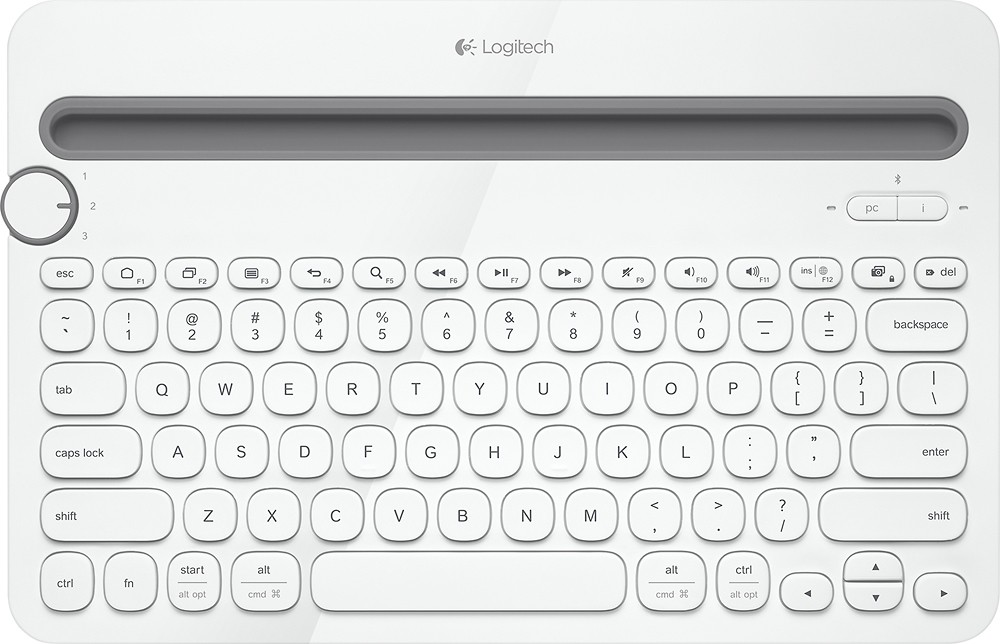


Logitech - K480 Bluetooth Multidevice Keyboard - White
This item is no longer available in new condition.
See similar items below.
Description
Features
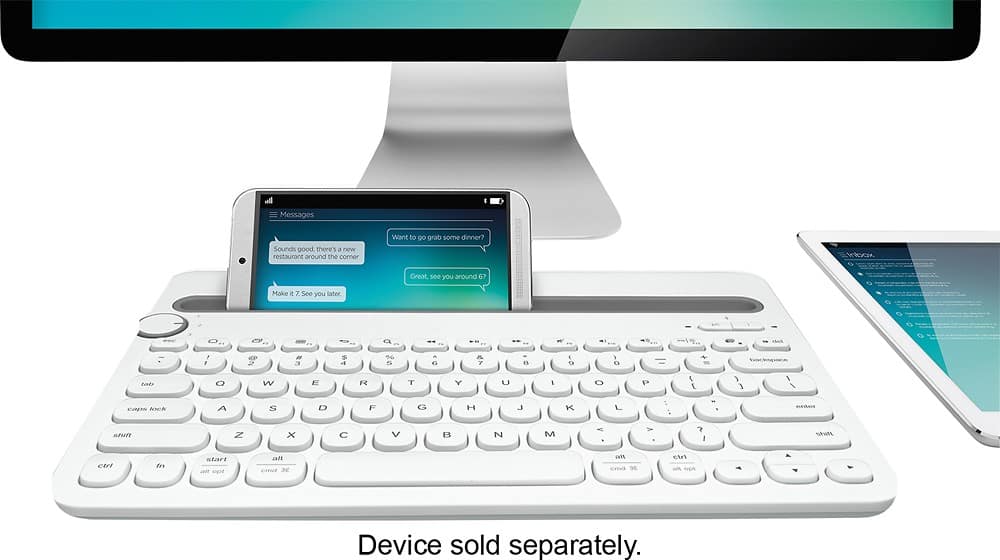
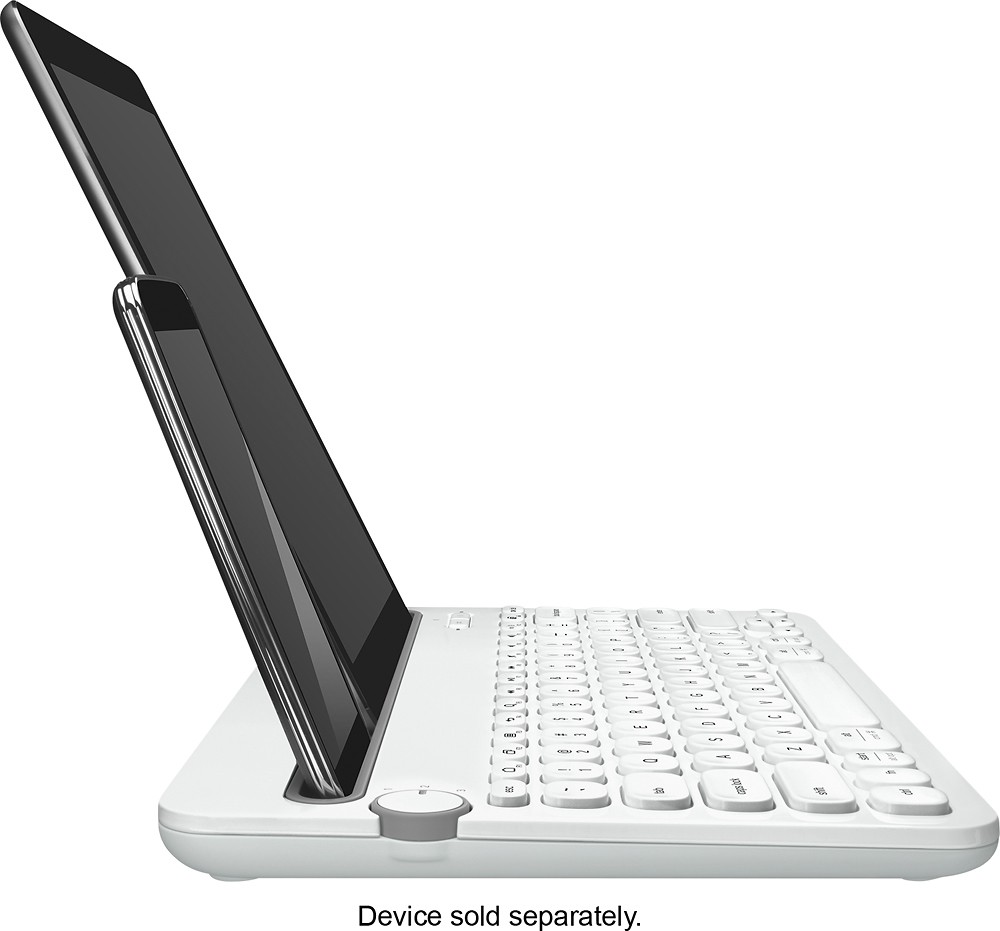
Integrated cradle
Holds most phones and tablets at an optimum angle for reading while you type.
Easy-Switch dial
Lets you move seamlessly between 3 connected Bluetooth-enabled devices.
Windows, Mac, Chrome, Android and iOS compatible
For versatile use.
Apple, the Apple logo and iTunes are trademarks of Apple Computer, Inc., registered in the U.S. and other countries. iPod is a trademark of Apple Computer, Inc.
Bluetooth technology
Allows you to wirelessly connect to your compatible devices.
iPad is a trademark of Apple Inc., registered in the U.S. and other countries
What's Included
Logitech K480 Bluetooth Multidevice Keyboard
2 AAA batteries
Owner's manual
Other
- Keyboard DesignWireless
- Multimedia KeysNo
- Cordless/WirelessYes
- Palm RestNo
- Batteries NeededYes
- Battery TypeAAA
- Battery Quantity2
- Battery IncludedYes
- CompatibilityPC, Mac, Chrome, Android, iOS
- Mac CompatibleYes
- Mouse IncludedNo
- System RequirementsPC: Windows 7, 8 or later; Mac: OS X or later; Chrome OS; iPad® or iPhone®: iOS 5 or later; Android tablet or smartphone: Android 3.2 or later
- UPC097855107572
Customer reviews
Rating 4.5 out of 5 stars with 4914 reviews
(4,914 customer reviews)Rating by feature
- Value4.6
Rating 4.6 out of 5 stars
- Quality4.6
Rating 4.6 out of 5 stars
- Ease of Use4.6
Rating 4.6 out of 5 stars
Customers are saying
Customers enjoy the ease of use, Bluetooth connectivity, and multi-device capabilities of the K480 Tenkeyless keyboard. Many appreciate its compatibility with various operating systems and find it offers good value for its price. However, some find the keyboard's size and weight to be drawbacks. A few users also noted that the key feel could be improved, and the lack of a number pad is a common complaint.
This summary was generated by AI based on customer reviews.
- Pros mentioned:Ease of useCons mentioned:Size, Weight
Rated 4 out of 5 stars
Great Keyboard
||Posted . Owned for 1 month when reviewed.This reviewer received promo considerations or sweepstakes entry for writing a review.This is a really nice keyboard. I'm actually typing this review using it. The only reason I gave it four stars instead of five is because of its size. By looking at it you wouldn't guess it is as large as it is. But it takes up a good size of computer desk, not leaving me as much space to jot a note down on a Post-It. Otherwise, I like how it can switch between devices by turn the knob to two or three (like an iPad or iPhone). One is set for use for my computer. This keyboard can be used with either a PC or MAC. The buttons feel nice and I like the clicking it makes when I press each key. While it may be portable because it connects via Bluetooth, just remember the size is larger than expected - which means it's heavier than you might want. As of today, the product is on sale for $35 but I got it for the regular price of $50.
This review is from Logitech - K480 Tenkeyless (TKL) Bluetooth Membrane Multidevice Keyboard - Black
I would recommend this to a friend - Pros mentioned:Ease of useCons mentioned:Key feel
Rated 5 out of 5 stars
Great keyboard!
||Posted .This reviewer received promo considerations or sweepstakes entry for writing a review.I use this keyboard when I travel. I do some of my best writing in a moving vehicle. This small wireless bluetooth enabled keyboard connects quickly to my galaxy note 4. I am writing my second book and this is allowing me to be much more productive. I am getting 1/3 more done then before!The keys make the light klackity-klack sound and feel that I like. If you don't want to make any noise because say your partner is asleep beside you. Well then I press the keys lighter and you can't hear it anymore. It also has a slot for my phone to stand so I can view my screen and it allows me to type hands free which is great!I definitely would recommend this product. Something to take note of is it takes AAA batteries I haven't had to change them yet and ive used it about 40 hours so far.
This review is from Logitech - K480 Tenkeyless (TKL) Bluetooth Membrane Multidevice Keyboard - Black
I would recommend this to a friend - Pros mentioned:Bluetooth
Rated 4 out of 5 stars
Best solution for a keyboard for tablets & phones.
||Posted .This reviewer received promo considerations or sweepstakes entry for writing a review.Actually, I didn't buy just one! I have been using one of these little jewels for several months now... paired to my phone and a couple of iPads. As we age, manual dexterity sometimes begins to go away and those tiny on-screens are difficult. I just bought several of these K480 keyboards for Christmas presents... great product!
This review is from Logitech - K480 Tenkeyless (TKL) Bluetooth Membrane Multidevice Keyboard - Black
I would recommend this to a friend - Cons mentioned:Size
Rated 4 out of 5 stars
Used with IPhone during travel
||Posted .This reviewer received promo considerations or sweepstakes entry for writing a review.I wanted to blog and do emailing while traveling internationally, but did not wish to carry a bulky and expensive laptop. The keyboard worked very well with my phone and it would not have been expensive to replace if lost or stolen.
This review is from Logitech - K480 Tenkeyless (TKL) Bluetooth Membrane Multidevice Keyboard - Black
I would recommend this to a friend - Pros mentioned:MultideviceCons mentioned:Weight
Rated 4 out of 5 stars
Very Good for the Price, Surface Pro Almost Fits
||Posted . Owned for less than 1 week when reviewed.This reviewer received promo considerations or sweepstakes entry for writing a review.I have seen reviews that say the Surface Pro fits in the tablet slot and I've seen reviews that say it does not. If you want to use the Surface Pro in portrait mode, it fits. If you want to use it in landscape mode, it does not (see the attached photos). Besides that, here are the pros and cons from my perspective. Pros: uses standard AAA batteries; setup was super easy; feels sturdy for the price; the keys click rather than having a mushy feel like the surface type cover; ability to sync and switch between 3 devices. Cons: Surface Pro does not fit in landscape mode; keyboard is heavy. All in all this was a good purchase. No regrets.
This review is from Logitech - K480 Tenkeyless (TKL) Bluetooth Membrane Multidevice Keyboard - Black
I would recommend this to a friendBrand response from Logitech
Posted .Hi Billinkeywest,
Thank you for your four-star review! It is greatly appreciated. Continue to enjoy your device. If you ever need assistance, please contact Logitech Support on the website.
LaShonda from Logitech
- Pros mentioned:Compatibility
Rated 5 out of 5 stars
great keyboard
||Posted .This reviewer received promo considerations or sweepstakes entry for writing a review.love this product due to the fact that i can feel the keys from the flat keys on my laptop or the fact that when at home i can use it on my iPad an iPhone with texting an emails.. also like the fact that i can place phone an pad upright an text.. i will let family & friends know bout this...thumbs up
I would recommend this to a friend - Pros mentioned:Bluetooth, Multidevice
Rated 5 out of 5 stars
Logitech Multi purpose keyboard a GEM
||Posted . Owned for 9 months when reviewed.This reviewer received promo considerations or sweepstakes entry for writing a review.Another Logitech Gem. I am telling you I needed a battery powered, Blue tooth multiple function keyboard and I got it. It has a little turn wheel to choose the connection and quickly connects. It also has the logitech software that allows me to simply span two computers without having to turn the wheel. Means the mouse is on one screen and then can move to the next computer. I don't ide that cause I prefer the wheel. You just have to pair with each computer. It can handle 3 computers too. or an Ipad or Iphone too. It has a slot to fit the tablet.
This review is from Logitech - K480 Tenkeyless (TKL) Bluetooth Membrane Multidevice Keyboard - Black
I would recommend this to a friend - Pros mentioned:Bluetooth
Rated 5 out of 5 stars
Great value!
||Posted .This reviewer received promo considerations or sweepstakes entry for writing a review.The keyboard works excellently with my iPad. You can connect up to three devices, even your phone. To change the device you just have to switch to the number assigned to the device. The cradle holds the device at a perfect angle. It is very comfortable. For the price, this is a great product!
I would recommend this to a friend
Q: Questionwhere do i find instructions to hook up my logitechk480?
Asked by Anonymous.
- A:Answer Initially I went online to the Logitech website, but it also comes with an instruction sheet. It's easy. In the upper right of the keyboard are two buttons. The one marked with "i" is for pairing to anything Apple. The one marked "pc" is for Android or anything that's not Apple. Choose a number on the device selector on the upper left of the keyboard. Enable Bluetooth on your device and start it scanning. Press and hold the "pc" or "i" button on the keyboard until the blue light flashes rapidly and then let go. The device should show the K480 in the scan list. Select it and they should pair up and you're good to go.
Answered by Enigman
Q: QuestionWill this device work with Samsung Smart TV?
Asked by MsV.
- A:Answer Yes
Answered by Maserob93
Q: QuestionWill this keyboard work with the 6th generation (2018) IPad?
Asked by Tmc31.
- A:Answer It works with my 2017 I Pad Air, and I phone, should work with your I Pad as well.
Answered by Ronarico
Q: QuestionI just bought this keyboard and the keys are sticky, like they have a catch in them and is very difficult to type. Is this normal or did I get a bad keyboard? I really like the layout of the keyboard but the keys catch and is impossible to type.
Asked by Anonymous.
- A:Answer Mine don't stick, but I type really slow. Also I just noticed when I tried to speed up, the keys do seem a bit clunky. I'm coming off an apple keyboard where the keys are much more flush than these. All in all, I don't find myself getting annoyed at the keys. If your keys are not popping back up, you may have gotten a bad one-but if you try slowing down that may help. Good Luck.
Answered by sugarman
Q: QuestionWill this keyboard work with Samsung Tab A device
Asked by Anonymous.
- A:Answer Yes. I've used it with several Galaxy Tabs, no issues.
Answered by smthng
Q: QuestionSince this is Bluetooth can it be used without the device being in the slot?
Asked by K9erthlvr.
- A:Answer Yes, it can. The slot is just for convenience to hold a tablet while typing.
Answered by Alfred
Q: QuestionWhat is the green bar at the top of the keyboard? Does it do something or is it just decoration? Thanks.
Asked by Hazeltoez.
- A:Answer It's really hard to tell from pictures but the green bar actually has some depth to it. It serves as a dock for your phone and tablets (or anything else you'd like to fit inside it).
Answered by JmhKhn
Q: QuestionCaps lock appIs there an app to shown if capslock is on/off
Asked by Vico.
- A:Answer I haven't seen an option for that. But if you download the Logitech "Options" software you can set it so the capslock is always off, so you don't accidentally hit it. :)
Answered by sashimineko
Most viewed
- $299.00Your price for this item is $299.00$349.00The comparable value for this item is $349.00
- Year End Deal$799.00Your price for this item is $799.00
- $399.99Your price for this item is $399.99$499.99The comparable value for this item is $499.99
- $99.99Your price for this item is $99.99$129.99The comparable value for this item is $129.99
- $531.68Your price for this item is $531.68
- $599.99Your price for this item is $599.99
- $929.99Your price for this item is $929.99$1,099.99The comparable value for this item is $1,099.99
- $499.99Your price for this item is $499.99
- $799.00Your price for this item is $799.00
- Year End Deal$249.99Your price for this item is $249.99
- $249.00Your price for this item is $249.00$299.00The comparable value for this item is $299.00
- Year End Deal$329.99Your price for this item is $329.99
- Year End Deal$199.99Your price for this item is $199.99
- $349.89Your price for this item is $349.89$469.89The comparable value for this item is $469.89
- $599.99Your price for this item is $599.99$899.99The comparable value for this item is $899.99
- $679.99Your price for this item is $679.99$979.99The comparable value for this item is $979.99
- $199.99Your price for this item is $199.99
- $499.99Your price for this item is $499.99$849.99The comparable value for this item is $849.99
- $649.99Your price for this item is $649.99$1,049.99The comparable value for this item is $1,049.99



















