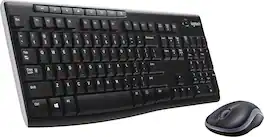
Logitech - MK470 Full-size Wireless Scissor Keyboard and Mouse Bundle for Windows with Quiet clicks - Black/Gray
Color
Black/Gray Logitech - Brio 100 1080p Full HD Webcam for Meetings and Streaming - Graphite$29.99$39.99
More Buying Options
Related Item

Specifications
- Lighting TypeNoneAdjustable Weight SystemNoForm FactorFull-sizeKeyboard TechnologyScissorConnection TypeWireless
- Key Specs
- Lighting Type: None
- Adjustable Weight System: false (Customize the mouse by adding or removing weights to find the optimal balance, control, and flexibility.)
- Form Factor: Full-size (The size, arrangement, and physical configuration of the product.)
- Keyboard Technology: Scissor (Type of technology that detects a key press.)
- Connection Type: Wireless
- General
- Brand: Logitech
- Model Number: 920-009437
- Product Name: MK470 Full-size Wireless Scissor Keyboard and Mouse Bundle for Windows with Quiet clicks
- Color: Black/Gray
- Features
- Lighting Type: None
- Numeric Keypad: true
- Touchpad: false
- Keyboard Type: Keypad
- Palm Rest: false
- Spill Resistant: false (Designed to resist some degree of accidental liquid spill. The level of spill-resistance is indicated by the product manufacturer, but the degree of protection may not be guaranteed after normal wear of the product.)
- Keyboard Features: Slim, minimalist design, wireless, space-saving
- Foldable: false
- Adjustable Weight System: false (Customize the mouse by adding or removing weights to find the optimal balance, control, and flexibility.)
- Keycap Material: ABS
- Maximum Number of Memory Profiles: 0
- Functions
- Form Factor: Full-size (The size, arrangement, and physical configuration of the product.)
- Number Of Keys: 101
- Keyboard Technology: Scissor (Type of technology that detects a key press.)
- Dedicated Macro Keys: false (Perform shortcuts of key sequences to carry out commands with a single key. Key sequences may include key strokes, mouse actions, and/or menu actions.)
- Adjustable Tilt Function: false
- Multimedia Keys: false
- Internet Keys: false
- Number Of Programmable Keys: 0
- Connectivity
- Connection Type: Wireless
- Wireless Connectivity: Radio Frequency (RF) (The manner in which a device sends data to another device over a short distance without the use of wires or cables.)
- Maximum Wireless Range: 33 feet
- Number Of USB Port(s): 1 (The total number of USB ports including all generations and versions.)
- Number of Devices Connectable Simultaneously: 1
- Compatibility
- Operating System Compatibility: Windows, Chrome
- Plug and Play Operation: true
- System Requirements: Available USB port, Windows 10, 11 or later, ChromeOS, Works with Surface (The software that a product must have for it to be able to integrate with another product.)
- Power
- Rechargeable Battery: false
- Battery Size: AAA (The battery size required for operation.)
- Number of Batteries Required: 2
- Battery Chemistry: Alkaline
- Batteries Included: true (Indicates whether the product comes with the required batteries for its operation.)
- On/Off Switch: true
- Dimensions
- Product Height: 0.84 inches (The out of box height of the item. Height is measured as the vertical distance from the bottom of the item to the top as it would be primarily used or placed.)
- Product Width: 14.7 inches (The out of box width of the item. Width is measured as the horizontal distance from one side of the item to the other as it would be primarily used or placed.)
- Product Depth: 5.6 inches (The out of box depth of the item. Depth is measured as the distance from the front of the item to the back as it would be primarily used or placed.)
- Product Weight: 19.7 ounces (The out of box weight of the item.)
- Product Height (Mouse): 4.21 inches (The out of box height of the item. Height is measured as the vertical distance from the bottom of the item to the top as it would be primarily used or placed.)
- Product Length (Mouse): 1.04 inches (The out of box length of the item. Length is measured as the longest dimension of the item.)
- Product Width (Mouse): 2.32 inches (The out of box width of the item. Width is measured as the horizontal distance from one side of the item to the other as it would be primarily used or placed.)
- Product Weight (Mouse): 3.53 grams (The out of box weight of the item.)
- Mouse
- Mouse Included: true
- Mouse Operation: Scroll wheel, Button(s)
- Mouse Type: Compact
- Connection Type (Mouse): Wireless
- Wireless Connectivity (Mouse): Radio Frequency (RF) (The manner in which a mouse sends data to another device over a short distance without the use of wires or cables.)
- Maximum Sensitivity: 1000 dots per inch (Mouse sensitivity is measured in dots per inch (DPI). The higher the DPI, the more sensitive the mouse is and may be more useful for high-density pixel screens. Lower DPI typically means more precision and accuracy in mouse movement.)
- Minimum Sensitivity: 1000 dots per inch (Mouse sensitivity is measured in dots per inch (DPI). The higher the DPI, the more sensitive the mouse is. Lower DPI typically means more precision and accuracy in mouse movement, but higher DPI may be useful for high-density pixel screens.)
- Number of Buttons: 3
- Number of Thumb Buttons: 0
- Number of Programmable Buttons: 0
- Handedness: Ambidextrous
- Rechargeable Battery (Mouse): false
- Battery Chemistry (Mouse): Alkaline
- Battery Size (Mouse): AA (The battery size required for operation.)
- Warranty
- Warranty - Parts: 1 year
- Warranty - Labor: None
- Other
- UPC: 097855153326
The slim profile and minimalist design transform your keyboard and mouse into a visual statement that elevates your desk setup. A slim profile and compact design make typing and mousing a pleasure. Low-profile keys give you that laptop-like typing experience you know and love. Whisper-quiet keys and a 90% noise-reduced mouse let you power through in near-silence. Long battery life and an easy plug-and-play 2.4GHz USB receiver ensure a reliable, hassle-free experience.
- Compact keys with numpad: Logitech MK470 cordless combo features a compact modern designed keyboard with low-profile scissor keys, a number pad and a layout optimized for Windows.
- Ultra slim duo: This wireless keyboard and mouse set also features a comfortable, ambidextrous 3-button mouse with high precision optical tracking and mechanical scroll wheel.
- Ultra quiet: Whisper quiet keyboard and lab-tested, noise-reduced mouse means an ultra quiet work experience for you and those around you both in the office and at home.
- Reliable wireless connectivity: Simple plug-and-play USB nano receiver offers a strong reliable 2.4 GHz wireless connection with 33ft of range.¹
- Extended autonomy: Auto-sleep feature saves battery life, allowing for 36 months of keyboard use and 18 months of mouse use.²
- Customizable keys: Unlock a full range of possibilities and customize this combo to fit your personalized needs; set up and assign shortcuts to the 12 customizable FN keys with Logi Options+ software.
- Compact keys with numpad: Logitech MK470 cordless combo features a compact modern designed keyboard with low-profile scissor keys, a number pad and a layout optimized for Windows.
- Ultra slim duo: This wireless keyboard and mouse set also features a comfortable, ambidextrous 3-button mouse with high precision optical tracking and mechanical scroll wheel.
- Ultra quiet: Whisper quiet keyboard and lab-tested, noise-reduced mouse means an ultra quiet work experience for you and those around you both in the office and at home.
- Reliable wireless connectivity: Simple plug-and-play USB nano receiver offers a strong reliable 2.4 GHz wireless connection with 33ft of range.¹
- Extended autonomy: Auto-sleep feature saves battery life, allowing for 36 months of keyboard use and 18 months of mouse use.²
- Customizable keys: Unlock a full range of possibilities and customize this combo to fit your personalized needs; set up and assign shortcuts to the 12 customizable FN keys with Logi Options+ software.
Whats Included
- Keyboard
- 2 AAA batteries (pre-installed)
- Mouse
- 1 AA battery (pre-installed)
- USB receiver
- User documentation
- Keyboard
- 2 AAA batteries (pre-installed)
- Mouse
- 1 AA battery (pre-installed)
- USB receiver
- User documentation
Q: Is there an on/off switch on the keyboard?
A: The keyboard for the MK470 doesn't have an on/off switch. There is a sleep mode that the keyboard goes into when not in use that helps preserve battery life.
Q: Will this work with a Mac and Windows?
A: yes it will
A: If it is a PC keyboard paired with a Mac laptop, try the "Windows" key instead of the Ctrl key, i.e., Windows C, Windows V. The Windows key is usually equivalent to the Command key.
Q: What are the dimensions of this device
A: Very small profile. 14 3/4 x 5 3/4 Love my keyboard! Joe
A: The red light you refer to is the light for the optical sensor system. Newer mice use infrared light which allows better tracking accuracy on different surfaces. If the mouse is doing its thing, it's working as intended.
A: OPEN the SILVER Full Width "Plastic Strip" at the TOP of the Keyboard. Kinda hard to open. Must SLIDE this Silver Strip FORWARD and AWAY From the Keys. Takes some fiddling to get the "hang of it". Found instructions on Logitech Website ... because I could not figure it out. Keep pressing forward on Silver Strip (with "logi" in center) ... NOT LIFTING UP ... you will get nowhere ... then SUDDENLY the stupid things slides open. DUH!
A: Hello solisflores! You can definitely use the mouse on its own without using the keyboard if you want to when it comes to the MK470 Slim Wireless Mouse and Keyboard Combo. The one USB receiver that comes with the combo will pair both peripherals to your computer, so you can simply put the keyboard aside if you're not using it (it wakes up when you touch any of the keys), but if you want to make sure the keyboard is fully turned off, you can simply remove the batteries under the top cover if need be.
A: No caps lock indicator on this one.
Compare similar products

The slim profile and minimalist design transform your keyboard and mouse into a visual statement that elevates your desk setup. A slim profile and compact design make typing and mousing a pleasure. Low-profile keys give you that laptop-like typing experience you know and love. Whisper-quiet keys and a 90% noise-reduced mouse let you power through in near-silence. Long battery life and an easy plug-and-play 2.4GHz USB receiver ensure a reliable, hassle-free experience.
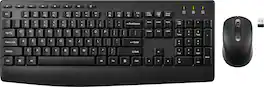
Ditch the cords and upgrade your computer setup with the Best Buy essentials Full-size Wireless Membrane Keyboard and Mouse Bundle with USB Receiver. The adjustable kickstand allows you to position the keyboard between three different heights to find the perfect angle to type across all 112 keys. Smoothly track across your desk with the 6-button, right-handed red light optical mouse. One AA battery for the mouse and two AAA batteries for the keyboard are included in the bundle, allowing you to use the product straight out of the box. Now let’s get typing!
Meet all of your computer accessory needs with the Logitech MK270 Wireless Combo. A reliable wireless combo with a tiny Logitech plug-and-forget receiver. This keyboard and mouse combo features Logitech Advanced 2.4 GHz wireless, delivering the reliability of a cord with wireless convenience. Long-lasting battery life eliminates the hassle of frequently changing batteries.

MK540 Advanced is an instantly familiar wireless keyboard and mouse combo built for precision, comfort and reliability. The full-size keyboard features a familiar key shape, size, and feeling – optimized for precision and noise reduction. The palmrest and adjustable tilt legs keep you comfortable for long stretches and the contoured mouse is designed to fit perfectly into either palm. Plug and play your keyboard and mouse with one tiny USB receiver with Logitech Unifying technology. You’ll get a reliable – and encrypted – wireless connection up to 32.8 ft away with virtually no delays or dropouts.
| Pros for Logitech - MK470 Full-size Wireless Scissor Keyboard and Mouse Bundle for Windows with Quiet clicks - Black/Gray | |||
|---|---|---|---|
| Keyboard Quality, Ease of use, Size, Design, Weight | Price, Size, Overall Performance, Ease of Use, Connectivity | Keyboard Quality, Ease of use, Price, Wireless, Battery Life | Keyboard Quality, Ease of use, Wireless, Price, Battery Life |
| Cons for Logitech - MK470 Full-size Wireless Scissor Keyboard and Mouse Bundle for Windows with Quiet clicks - Black/Gray | |||
| Caps Lock Indicator, Compatibility | Mouse Performance, Button Layout | Lag, Connection | Connection, Lag |
Specs
Reviews
Customers are saying
Customers express satisfaction with the MK470 keyboard's quality, ease of use, and suitable size for desks. Its design and lightweight nature are also appreciated, along with the potential for good battery life and reasonable price. However, some customers desire a Caps Lock indicator and have reported compatibility issues. The wireless functionality is seen as a positive aspect, adding to its versatility.
Customer Images
The vast majority of our reviews come from verified purchases. Reviews from customers may include My Best Buy members, employees, and Tech Insider Network members (as tagged). Select reviewers may receive discounted products, promotional considerations or entries into drawings for honest, helpful reviews.
- Rated 4 out of 5 stars
Lightweight and Portable
Sleek and lightweight design. The mouse is very flat, which makes it a little challenging ergonomically, so it's not recommended for every day, but great for travel and portability
Posted by StefaniH
- Rated 5 out of 5 stars
Good, but lacks a few features you may need. Read
The keyboard and mouse both have a good weight and quality feel to them. It's not by any means a cheap plasticky feel. It's more like a quality built, mid-range priced keyboard/mouse combo. It was worth $50 to me. No Caps or Num LED indicator. You will have to set up your audible caps indicator within Microsoft Windows if that is what you are using. For a full keyboard with a numbers pad, this is ergonomic and feels nonintrusive as far as space goes. Of course, it's on a large desk in our office. The mouse is different. This is not a mouse that you can rest your palm upon. With your wrist rested on the mouse pad, you'll be using your fingers to move this one around. This was not a deal breaker for us. I'm happy with the purchase because it serves well as a front office desk peripheral for checking in and out customers. It seems like I can rely on this compared to other combos we've had in the past. I have always had good results from Logitech keyboard/mouse combos. I have five of them for our computer repair shop bench and have been using them for 5 years now with no failures.
Posted by ComputerRepairTechnician
- Rated 5 out of 5 stars
Definately buy this KB.
Really nice keyboard. I use it for my Mini PC connected to my Epson projector in my room to watch TV and using Windows 11 on a huge 400 inch screen is amazing. The keyboard is light weight and the keys are very easy to type on. The mouse is low profile and works great on like bed sheets or any surface really. You can control the volume and other function from the keyboard.
Posted by NapervilleIT







