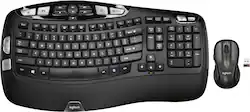
Logitech - MK550 Ergonomic Full-size Wireless Keyboard and Mouse Bundle for PC - Black
- Key Specs
- Lighting Type: None
- Adjustable Weight System: false (Customize the mouse by adding or removing weights to find the optimal balance, control, and flexibility.)
- Form Factor: Ergonomic, Full-size (The size, arrangement, and physical configuration of the product.)
- Keyboard Technology: Membrane (Type of technology that detects a key press.)
- Connection Type: Wireless
- General
- Product Name: MK550 Ergonomic Full-size Wireless Keyboard and Mouse Bundle for PC
- Brand: Logitech
- Model Number: 920-002555
- Color: Black
- Features
- Lighting Type: None
- Numeric Keypad: true
- Touchpad: false
- Keyboard Type: Keypad
- Palm Rest: true
- Spill Resistant: false (Designed to resist some degree of accidental liquid spill. The level of spill-resistance is indicated by the product manufacturer, but the degree of protection may not be guaranteed after normal wear of the product.)
- Keyboard Features: ADVANCED 2.4 GHZ WIRELESS CONNECTIVITY, 128-BIT AES ENCRYPTION
- Foldable: false
- Adjustable Weight System: false (Customize the mouse by adding or removing weights to find the optimal balance, control, and flexibility.)
- Functions
- Form Factor: Ergonomic, Full-size (The size, arrangement, and physical configuration of the product.)
- Number Of Keys: 119
- Keyboard Technology: Membrane (Type of technology that detects a key press.)
- Dedicated Macro Keys: false (Perform shortcuts of key sequences to carry out commands with a single key. Key sequences may include key strokes, mouse actions, and/or menu actions.)
- Adjustable Tilt Function: false
- Multimedia Keys: true
- Internet Keys: true
- Number Of Programmable Keys: 0
- Connectivity
- Connection Type: Wireless
- Wireless Connectivity: Radio Frequency (RF) (The manner in which a device sends data to another device over a short distance without the use of wires or cables.)
- Maximum Wireless Range: 33 feet
- Number Of USB Port(s): 1 (The total number of USB ports including all generations and versions.)
- Number of Devices Connectable Simultaneously: 1
- Compatibility
- Operating System Compatibility: Windows
- Plug and Play Operation: true
- System Requirements: Windows 10, 11 or later (The software that a product must have for it to be able to integrate with another product.)
- Power
- Rechargeable Battery: false
- Battery Size: AA (The battery size required for operation.)
- Number of Batteries Required: 0
- Battery Chemistry: Alkaline
- Batteries Included: true (Indicates whether the product comes with the required batteries for its operation.)
- On/Off Switch: true
- Dimensions
- Product Height: 1.18 inches (The out of box height of the item. Height is measured as the vertical distance from the bottom of the item to the top as it would be primarily used or placed.)
- Product Width: 16.54 inches (The out of box width of the item. Width is measured as the horizontal distance from one side of the item to the other as it would be primarily used or placed.)
- Product Depth: 9.84 inches (The out of box depth of the item. Depth is measured as the distance from the front of the item to the back as it would be primarily used or placed.)
- Product Weight: 29.98 ounces (The out of box weight of the item.)
- Product Height (Mouse): 4.76 inches (The out of box height of the item. Height is measured as the vertical distance from the bottom of the item to the top as it would be primarily used or placed.)
- Product Length (Mouse): 1.6 inches (The out of box length of the item. Length is measured as the longest dimension of the item.)
- Product Width (Mouse): 2.68 inches (The out of box width of the item. Width is measured as the horizontal distance from one side of the item to the other as it would be primarily used or placed.)
- Product Weight (Mouse): 3.07 grams (The out of box weight of the item.)
- Mouse
- Mouse Included: true
- Mouse Operation: Button(s), Scroll wheel
- Mouse Type: Standard
- Connection Type (Mouse): Wireless
- Wireless Connectivity (Mouse): Radio Frequency (RF) (The manner in which a mouse sends data to another device over a short distance without the use of wires or cables.)
- Maximum Sensitivity: 1000 dots per inch (Mouse sensitivity is measured in dots per inch (DPI). The higher the DPI, the more sensitive the mouse is and may be more useful for high-density pixel screens. Lower DPI typically means more precision and accuracy in mouse movement.)
- Number of Buttons: 6
- Number of Thumb Buttons: 2
- Number of Programmable Buttons: 0
- Handedness: Right-handed
- Rechargeable Battery (Mouse): false
- Battery Chemistry (Mouse): Alkaline
- Battery Size (Mouse): AA (The battery size required for operation.)
- Warranty
- Warranty - Parts: 3 years limited hardware warranty
- Warranty - Labor: None
- Other
- UPC: 097855066701
Logitech Wireless Wave Combo MK550. A mouse-and-keyboard combo that gives you a comfort curve without a learning curve. The keyboard’s Wave design with Constant Curve layout guides hands into just the right position and conforms naturally to your fingers, helping you type with ease and confidence in a familiar layout. The laser mouse is a joy to hold and use.
- Wave design with Constant Curve layout: The Wave design with Constant Curve layout guides hands into just the right position and conforms naturally to your fingers, helping you type with ease and confidence—without having to relearn typing on an unfamiliar layout.
- Cushioned palm rest: A cushioned palm rest helps position hands comfortably and properly on the keyboard—and offers a comfortable place to rest your palms when you’re not typing.
- Precise laser mouse with soft rubber side grips: The mouse is a joy to hold—and use—thanks to the soft rubber side grips and laser tracking. You can say good-bye to the frustrations of uncomfortable mice and tricky touchpads.
- Long battery life: Up to three-year keyboard and two-year mouse battery life. Better power management practically eliminates the need to replace batteries.*
- Reliable wireless connection: The tiny Logitech Unifying receiver is small enough to stay in your laptop and connects both the included mouse and keyboard, so both are ready to use whenever you need them.
- More sustainable: Certified carbon neutral: the carbon impact of the product and packaging has been reduced to zero.
Whats Included
- Logitech MK550 Wireless Wave Keyboard and Mouse
- Receiver
- 4 AA batteries
- Owner's manual
Q: Will this combo Keyboard and Mouse only require one USB port?
A: Yes, only one USB port is necessary. It uses the Logitech Unified Receiver, which can have a few devices connected to it simultaneously.
Q: does it have light indicators for num lock and cap lock?
A: No, it does not.
Q: what is the cord for that came with my new Logitech - MK550 Wireless Wave Keyboard and Mouse - Black
A: This is an extender for the usb receiver that plugs into the computer. Originally I had my usb receiver plugged directly into my computer, but it was behind the couch I was using the keyboard from and I was having all sorts of problems with the keyboard not picking up keyboard strokes properly. I then used the extender cord which allow me to move the receiver closer to the front of my couch and it works great. Even without physically moving the receiver, the extender cable boosts the signal of the receiver and greatly increases the range. If you don't currently have any problems, probably no need to use it, but I would definitely save it in case you encounter problems later.
A: The MK570 has the M705 Marathon mouse instead of the M510. The M705 Marathon mouse would be the upgrade, with a right hand sculpted curve and more. The M705 mouse is one of my absolute favorites.
Q: Does the key board have the capabilities to be tilted at an angle?
A: Yes, in fact you can tilt it up 4 degrees by using the gray tabs, or by 8 degrees using the black tabs.
Q: Does it have an Actual USB port on the keyboard?
A: there is not one on mine
Q: Will it work with a laptop (Dell Latititude)
A: Yes this will work for your laptop. once you plug in the small USB device it will automatically download the necessary drivers and will work just fine. Being in IT we have used this with several other laptops and have had no complaints.
Q: Is this compatible with Windows 10?
A: Absolutely. I just set one up for a client using Windows 10, and it worked as soon as I plugged in the USB receiver.














