Logitech - MX Keys S Combo Advanced Full-size Wireless Scissor Keyboard and Mouse Bundle with Palm-rest - Black
FREE shipping to
More Buying Options
Related Item

Specifications
- Form FactorFull-sizeKeyboard TechnologyScissorConnection TypeWireless
- Key Specs
- Form Factor: Full-size (The size, arrangement, and physical configuration of the product.)
- Keyboard Technology: Scissor (Type of technology that detects a key press.)
- Connection Type: Wireless
- General
- Brand: Logitech
- Model Number: 920-012274
- Product Name: MX Keys S Combo Advanced Full-size Wireless Scissor Keyboard and Mouse Bundle with Palm-rest
- Color: Black
- Features
- Customizable Lighting: false
- Numeric Keypad: true
- Touchpad: false
- Keyboard Type: Programmable
- Palm Rest: true
- Spill Resistant: false (Designed to resist some degree of accidental liquid spill. The level of spill-resistance is indicated by the product manufacturer, but the degree of protection may not be guaranteed after normal wear of the product.)
- Keyboard Features: Spherically dished keys, smart illumination, programmable keys, Smart Keys layout, Easy Switch to pair with up to 3 devices
- Functions
- Form Factor: Full-size (The size, arrangement, and physical configuration of the product.)
- Keyboard Technology: Scissor (Type of technology that detects a key press.)
- Adjustable Tilt Function: false
- Multimedia Keys: true
- Connectivity
- Connection Type: Wireless
- Wireless Connectivity: Radio Frequency (RF - 2.4 Ghz/Low Latency), Bluetooth (The manner in which a device sends data to another device over a short distance without the use of wires or cables.)
- Maximum Wireless Range: 33 feet
- Number of Devices Connectable Simultaneously: 3
- Compatibility
- Operating System Compatibility: Windows, Mac, Apple iPadOS, Chrome, Android, Linux
- Plug and Play Operation: true
- System Requirements: Via Bluetooth Low Energy technology: Windows 10, 11 or later, macOS 10.15 or later, Linux, Chrome OS, iPadOS 14 or later, Android 8.0 or later. Via Logi Bolt USB Receiver: Windows 10, 11 or later, macOS 10.15 or later, Linux, Chrome OS (The software that a product must have for it to be able to integrate with another product.)
- Power
- Rechargeable Battery: true
- Battery Chemistry: Lithium
- On/Off Switch: true
- Dimensions
- Product Height: 0.81 inches (The out of box height of the item. Height is measured as the vertical distance from the bottom of the item to the top as it would be primarily used or placed.)
- Product Width: 16.94 inches (The out of box width of the item. Width is measured as the horizontal distance from one side of the item to the other as it would be primarily used or placed.)
- Product Depth: 5.18 inches (The out of box depth of the item. Depth is measured as the distance from the front of the item to the back as it would be primarily used or placed.)
- Product Weight: 28.57 ounces (The out of box weight of the item.)
- Product Height (Mouse): 4.92 inches (The out of box height of the item. Height is measured as the vertical distance from the bottom of the item to the top as it would be primarily used or placed.)
- Product Length (Mouse): 2.01 inches (The out of box length of the item. Length is measured as the longest dimension of the item.)
- Product Width (Mouse): 3.32 inches (The out of box width of the item. Width is measured as the horizontal distance from one side of the item to the other as it would be primarily used or placed.)
- Product Weight (Mouse): 4.97 grams (The out of box weight of the item.)
- Mouse
- Mouse Included: true
- Mouse Operation: Button(s), Scroll wheel
- Mouse Type: Standard
- Connection Type (Mouse): Wireless
- Wireless Connectivity (Mouse): Bluetooth, Radio Frequency (RF) (The manner in which a mouse sends data to another device over a short distance without the use of wires or cables.)
- Maximum Sensitivity: 8000 dots per inch (Mouse sensitivity is measured in dots per inch (DPI). The higher the DPI, the more sensitive the mouse is and may be more useful for high-density pixel screens. Lower DPI typically means more precision and accuracy in mouse movement.)
- Minimum Sensitivity: 200 dots per inch (Mouse sensitivity is measured in dots per inch (DPI). The higher the DPI, the more sensitive the mouse is. Lower DPI typically means more precision and accuracy in mouse movement, but higher DPI may be useful for high-density pixel screens.)
- Number of Buttons: 7
- Number of Thumb Buttons: 3
- Handedness: Right-handed
- Rechargeable Battery (Mouse): true
- Battery Chemistry (Mouse): Lithium
- Warranty
- Warranty - Parts: 1 year
- Warranty - Labor: None
- Other
- UPC: 097855189936
Master your flow with the MX Keys S Combo Wireless Mouse and Keyboard — the ultimate combo that combines the power of the fluid, fast precision typing of MX Keys S Wireless Keyboard with the precise, fast scrolling experience of MX Master 3S Wireless Mouse.
- Keyboard and mouse combo engineered for speed and precision: MX Keys S Wireless Keyboard features fast fluid laptop-like typing combined with the fast, precise scrolling of MX Master 3S Wireless Mouse.
- Fluid typing experience: Laptop-like profile with spherically-dished keys shaped for your fingertips delivers a fast, fluid, precise and quieter typing experience.
- Scroll 1000 lines per second: With MagSpeed, Logitech’s fastest and most precise scroll wheel, and an 8K DPI sensor, this Logitech Mouse tracks anywhere – even on glass.¹
- Automate repetitive tasks: Easily create and share time-saving Smart Actions shortcuts that perform multiple actions with a single keystroke with the Logi Options+ app.²
- Advanced wireless keyboard with smarter illumination: Backlit keyboard keys light up as your hands approach and adapt to the environment; now with more lighting customizations on Logi Options+.²
- More comfort, deeper focus: Mouse and keyboard engineered for hours of work; stable keyboard with an optimum angle, and mouse sculpted for your hand for better wrist posture.
- Multi-device, multi OS combo: Pair with up to 3 devices on nearly any operating system (Windows, macOS, Linux) via Bluetooth Low Energy or included Logi Bolt USB receiver.³
- Made with recycled plastic: Both MX Keys S and MX Master 3S include certified post consumer recycled plastic — 27% for MX Master 3S (Black) and 15% for MX Keys S (Black).⁴
- 1-month of Adobe Creative Cloud on us (a value of $59.99)*: Pair two of the world’s top creative tools. Buy one MX Keys S and claim your free 1-month Adobe Creative Cloud membership. *Value calculated based on Adobe Creative Cloud All Apps monthly value of $59.99 valid on Adobe.com on Sept 12, 2024. Terms & Conditions apply.¹ ² ³
- Keyboard and mouse combo engineered for speed and precision: MX Keys S Wireless Keyboard features fast fluid laptop-like typing combined with the fast, precise scrolling of MX Master 3S Wireless Mouse.
- Fluid typing experience: Laptop-like profile with spherically-dished keys shaped for your fingertips delivers a fast, fluid, precise and quieter typing experience.
- Scroll 1000 lines per second: With MagSpeed, Logitech’s fastest and most precise scroll wheel, and an 8K DPI sensor, this Logitech Mouse tracks anywhere – even on glass.¹
- Automate repetitive tasks: Easily create and share time-saving Smart Actions shortcuts that perform multiple actions with a single keystroke with the Logi Options+ app.²
- Advanced wireless keyboard with smarter illumination: Backlit keyboard keys light up as your hands approach and adapt to the environment; now with more lighting customizations on Logi Options+.²
- More comfort, deeper focus: Mouse and keyboard engineered for hours of work; stable keyboard with an optimum angle, and mouse sculpted for your hand for better wrist posture.
- Multi-device, multi OS combo: Pair with up to 3 devices on nearly any operating system (Windows, macOS, Linux) via Bluetooth Low Energy or included Logi Bolt USB receiver.³
- Made with recycled plastic: Both MX Keys S and MX Master 3S include certified post consumer recycled plastic — 27% for MX Master 3S (Black) and 15% for MX Keys S (Black).⁴
- 1-month of Adobe Creative Cloud on us (a value of $59.99)*: Pair two of the world’s top creative tools. Buy one MX Keys S and claim your free 1-month Adobe Creative Cloud membership. *Value calculated based on Adobe Creative Cloud All Apps monthly value of $59.99 valid on Adobe.com on Sept 12, 2024. Terms & Conditions apply.¹ ² ³
Whats Included
- MX Keys S Combo (Keyboard, Mouse, Palmrest)
- Logi Bolt USB receiver
- USB-C charging cable (USB-A to USB-C)
- User documentation
- MX Keys S Combo (Keyboard, Mouse, Palmrest)
- Logi Bolt USB receiver
- USB-C charging cable (USB-A to USB-C)
- User documentation
Q: Does this keyboard have a number pad?
A: Yes, this is a full-size keyboard and includes a numeric keypad.
Q: What type of scroll wheel does the mouse have?
A: The MX Master 3S Mouse features Logitech's MagSpeed scrolling, which allows you to scroll 1000 lines per second.
Q: How many devices can I pair this keyboard and mouse combo with?
A: You can pair this combo with up to 3 devices.
Q: What is the maximum wireless range of this keyboard and mouse?
A: The maximum wireless range is 33 feet.
Q: Is this keyboard and mouse combo compatible with Mac?
A: Yes, it is compatible with macOS 10.15 or later.
Q: Does this use a USB receiver or does it connect to bluetooth on its own?
A: Both are available, so you can use whatever you want.
Q: Is the keyboard and mouse silent ?
A: Keyboard wasn't very quiet. Mouse was very quiet.
Compare similar products
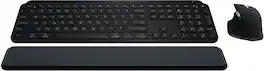
Master your flow with the MX Keys S Combo Wireless Mouse and Keyboard — the ultimate combo that combines the power of the fluid, fast precision typing of MX Keys S Wireless Keyboard with the precise, fast scrolling experience of MX Master 3S Wireless Mouse.

The next generation of Logitech MX Keys Combo for Business delivers a high performance experience with new feature upgrades for more productivity. The MX Master 3S mouse features Quiet Click technology that keeps noise distractions to a minimum and an 8000 DPI optical sensor that tracks virtually anywhere–even on glass. This Logitech wireless keyboard and mouse combo includes a comfort keyboard wrist pad, providing a fluid typing experience with great tactile response. Backlit keys shine bright with smarter power management, automatically adjusting brightness to preserve the wireless backlit keyboard’s battery life. The rechargeable plug-and-play Logitech MX keyboard and mouse are compatible with the Logi Options+ software, for easy product customization and application-based presets to optimize workflow and increase efficiency.
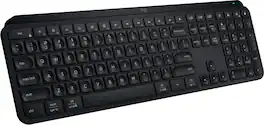
MX Keys S Logitech Wireless Keyboard — a low-profile full-size keyboard that offers a fluid, precise typing experience and customizable, time-saving Smart Actions that automate your most repetitive tasks with a single keystroke. The backlit keyboard features smart backlighting that lights up when your hands approach it and automatically adjusts to suit the time of day.

Defy Boring with Pebble Keys 2 K380s minimalist keyboard made with recycled plastic. Its minimalist, streamlined shape and sleek curves make it as iconic as you and super portable. Hop across 3 devices with the Easy-Switch buttons on the Bluetooth keyboard and work faster with the Fn shortcut keys like screen capture, search, and more. Customize the 10 keyboard Fn shortcut keys to work how you want and save time with shortcuts in Logi Options+ App.
| Pros for Logitech - MX Keys S Combo Advanced Full-size Wireless Scissor Keyboard and Mouse Bundle with Palm-rest - Black | |||
|---|---|---|---|
| There were no pros for this product— | Feel | Keyboard Quality, Battery Life, Key Feel, Ease of use, Compatibility | Keyboard Quality, Battery Life, Portability, Size, Connectivity |
| Cons for Logitech - MX Keys S Combo Advanced Full-size Wireless Scissor Keyboard and Mouse Bundle with Palm-rest - Black | |||
| There were no cons for this product— | There were no cons for this product— | Price, Size | Number Pad |
Specs
Reviews
Customer Images
The vast majority of our reviews come from verified purchases. Reviews from customers may include My Best Buy members, employees, and Tech Insider Network members (as tagged). Select reviewers may receive discounted products, promotional considerations or entries into drawings for honest, helpful reviews.
- Rated 4 out of 5 stars
The Team up!..or just sidekick?
Best Keyboard and mouse I’ve bought! The MX Keys for my use is perfect, from the key switches, to the auto backlighting, 100% keyboard with numb pad is amazing! The ease of use in macos is undefeated. The shortcuts & gestures with the mouse are seamless in Macos and in windows 10 (emulated). Using the dongle over 2.4ghz wifi couldn't be better and smoother.. but, It still emulated feels like some areas were cut short; the bluetooth lag is unbearable making it difficult to be able to just grab the mouse and keyboard then go, but instead you have to unplug the receiver from the USB port if you expect to be productive with the combo. (Two receivers would be nice to switch from on the interface instead of just 1 option being a receiver and the other 2 fast switch options being bluetooth) The Mx Mouse Overpowers the keys easily, The MX keys are obviously not the superhero of the Team-up, the keys were cut short only given good switches, good mobility, and good connectivity, but in practice, it just lags behind the mouse. The mouse offers so many more features encouraging you to keep your hand on the mouse when every operating system encourages the opposite, The keys work perfectly, giving you an amazing experience, being able to see the keyboard light up before your hands even touch the keyboard is amazing, But the minimalistic options and customizations you have for the keyboard seems discouraging only being able to customize the top row and a few other things limit the capacity of this amazing keyboard. In this combo, it’s obvious the MX keys is the sidekick, the MX mouse offers unparalleled customizations features and uses that still blow my mind after owning it for over a month. The MX mouse offers A horizontal and vertical scroll wheel,a DPI button, two thumb buttons, and a gesture button. Using all of these buttons on macOS seemed like muscle memory in seconds, but the MX keys needed way more adjusting to get used to. with that, I would like to finish by saying the integration system within both the MX keys and MX Mouse are amazing. Better bluetooth, And more features for the keyboard would bring more people to get the combo and see the big picture, instead of just concentrating on the mouse pad.
This review is from Logitech - MX Keys S Combo Advanced Full-size Wireless Scissor Keyboard and Mouse Bundle with Palm-rest - Black
Posted by legitleoo
- Rated 5 out of 5 stars
Wonderful keyboard for work or games
This keyboard is amazing. The weight is surprising for such a slim design and really adds to the ease of use. I grew up primarily using a laptop computer and this keyboard made the transition to a desktop a breeze. Everything just “feels good” while typing. Mouse is great as well a with the customizable options really assisting the user. I use this keyboard monday-Friday for work and weekends for PC gaming; and the battery last throughout this use.
This review is from Logitech - MX Keys S Combo Advanced Full-size Wireless Scissor Keyboard and Mouse Bundle with Palm-rest - Black
Posted by TaylorC
- Rated 5 out of 5 stars
Logitech MX Series S Combo – Absolute Rockstar
Logitech MX Series S Combo – Absolute Rockstar! This isn’t just a keyboard and mouse—it’s a productivity powerhouse. Setup was effortless, Bluetooth switching between devices is instant, and the battery life feels like NASA designed it. The keyboard is smooth, quiet, and comfortable, making every keystroke feel professional. The mouse is equally brilliant—fast, precise, and the scroll wheel is so smooth it’s worth the price alone. Whether I’m at my desk, on the couch, or traveling, this combo delivers. It’s the perfect blend of style, comfort, and performance. If you want ease of use and serious productivity, this is the rockstar combo to beat. Hats off to Logitech—this one’s grand-prize good!
This review is from Logitech - MX Keys S Combo Advanced Full-size Wireless Scissor Keyboard and Mouse Bundle with Palm-rest - Black
Posted by PhilipS