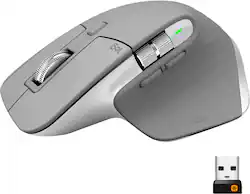
Logitech - MX Master 3 Advanced Wireless USB/Bluetooth Laser Mouse with Ultrafast Scrolling - Wireless - Mid Gray
- Key Specs
- Lighting Type: None
- Maximum Sensitivity: 4000 dots per inch (Mouse sensitivity is measured in dots per inch (DPI). The higher the DPI, the more sensitive the mouse is and may be more useful for high-density pixel screens. Lower DPI typically means more precision and accuracy in mouse movement.)
- Number of Buttons (Total): 7
- Connection Type: Wireless
- General
- Product Name: MX Master 3 Advanced Wireless USB/Bluetooth Laser Mouse with Ultrafast Scrolling
- Brand: Logitech
- System Requirements: Windows 10, 11 or later, Linux, Chrome OS, macOS, iPadOS, Android (The software that a product must have for it to be able to integrate with another product.)
- Model Number: 910-005692
- Color: Mid Gray
- Features
- Mouse Type: Standard
- Lighting Type: None
- Performance
- Mouse Operation: Button(s), Scroll wheel
- Mouse Grip Style: Ergonomic, Standard, Palm grip (In comparison to many palm and claw grips, ergonomic grip mice are designed for a specific handedness and put the hand and wrist in a position to promote comfort. Customizable grips feature buttons/keys that can be configured to perform specific actions and may also have customizable calibration and sensitivity settings.)
- Handedness: Right-handed
- Tracking Method: Laser (There are several types of computer mice, optical and laser being among the most common. Optical mice detect less detail and provide more precise and accurate movement. Laser mice detect more detail and can be used on a wider variety of surfaces, but are more sensitive to small movements.)
- Maximum Sensitivity: 4000 dots per inch (Mouse sensitivity is measured in dots per inch (DPI). The higher the DPI, the more sensitive the mouse is and may be more useful for high-density pixel screens. Lower DPI typically means more precision and accuracy in mouse movement.)
- Minimum Sensitivity: 200 dots per inch (Mouse sensitivity is measured in dots per inch (DPI). The higher the DPI, the more sensitive the mouse is. Lower DPI typically means more precision and accuracy in mouse movement, but higher DPI may be useful for high-density pixel screens.)
- Number of Buttons (Total): 7
- Number of Thumb Buttons: 2
- Number of Programmable Buttons: 7
- Adjustable Weight: false
- Connectivity
- Connection Type: Wireless
- Wireless Connectivity: Bluetooth, Radio Frequency (RF) (The manner in which a device sends data to another device over a short distance without the use of wires or cables.)
- Maximum Wireless Range: 32.8 feet
- Operating System Compatibility: Linux, Mac, Windows, Chrome, Apple iPadOS, Android
- Plug and Play Operation: true
- Power
- Mouse Power Source: Battery-powered
- On/Off Switch: true
- Rechargeable Battery (Mouse): true
- Wireless Charging: false
- Charging Interface(s): USB-C (The connection for transmitting power to charge the device.)
- Battery Chemistry: Lithium-polymer
- Included
- Mouse Pad Included: false
- Dimensions
- Product Height: 2 inches (The out of box height of the item. Height is measured as the vertical distance from the bottom of the item to the top as it would be primarily used or placed.)
- Product Width: 3.3 inches (The out of box width of the item. Width is measured as the horizontal distance from one side of the item to the other as it would be primarily used or placed.)
- Product Weight: 141 grams (The out of box weight of the item.)
- Other
- UPC: 097855151568
MX Master 3 is instant precision and infinite potential. Designed for designers and engineered for coders, it’s our most advanced Master Series mouse yet. App-specific button customizations speed up your workflow in the apps you use most and the electromagnetic MagSpeed wheel enables fast noiseless scrolling. Your hand rests perfectly on the sculpted form and allows you to work comfortably for hours across multiple computers and operating systems in one fluid workflow. Ready for video calls - predefined settings for Microsoft Teams and Zoom let you instantly mute and Start/Stop your video call. With MX Master 3, you can truly master what you make.
- Ultrafast MagSpeed scrolling: Remarkable speed, precision & quietness of electromagnetic scrolling with all new MagSpeed Wheel - up to 90% faster (1), 87% more precise (2) & ultra quiet.
- Wireless Bluetooth connectivity: Connect the way you want up to 3 devices via Bluetooth or the included USB receiver on Windows, Mac or Linux.
- Darkfield 4000 dpi sensor: Hit the right pixel every time with Darkfield 4000 dpi sensor.Faster and 5x more precise than the basic mouse.(1)
- Track on any surface: The 4000 DPI sensor means you can track virtually anywhere –even on glass. (4)
- Seven buttons: Provide access to frequently used commands and functions for powerful control. Speed up your workflow with predefined app-specific profiles and numerous customization options. (3)
- Flow cross-computer control: Work seamlessly on three computers. Seamlessly transfer cursor, text, and files - between Windows & macOS, desktop & laptop. (3)
- Comfort shape and intuitive controls: Work comfortably with perfectly sculpted shape and ideally placed thumb wheel and controls.
- USB-C rechargeable: Full charge lasts up to 70 days, quick 1 min charge gives 3 hrs of use.
- Compatible with most Windows, Mac and Linux computers: Works across a wide array of computers.
- More sustainable: Uses FSC-certified paper for responsible packaging. Certified carbon neutral: the carbon impact of the product and packaging has been reduced to zero.
Whats Included
- MX Master 3 Wireless Laser Mouse
- USB wireless receiver
- USB-C charging cable
- User documentation
Product Manuals
A: Hello, the MX Master 3 has an on/off switch on the bottom. We advise to turn off the mouse manual when it is not in use, to better conserve the battery life.
Q: Can I use it on a macbook without the USB A bluetooth receiver?
A: I have connected to my MBP using the inbuilt Bluetooth. I use mine across 3 devices and I have not taken the unifying receiver out of the box. I don’t notice any lag with Bluetooth either.
A: you wont get all of the great features, such as logitech flow or customization of the different buttons and inputs, but most pre-programmed button shortcuts are the ones you will need. left click, right click, horizontal scroll wheel, back/forward buttons and desktop view button (under the thumb)
Q: Did you buy the warranty for this mouse?
A: I have and do own many, many Logitech devices. I've never had an issue with any of them over the years. This mouse replaced my original MX Master, which still works perfectly after years of dependable service. So, I don't feel there is a need to purchase the extended warranty through Best Buy. But, if you are overly demanding of your electronic equipment and have had issues in the past, then a warranty may benefit you. Zip~
Q: I prefer to use a mouse with my left hand. Is that a problem with this product?
A: Unfortunately, the MX Master 3 is only right handed.
A: Hello Ollie, both the MX Master 3 and the MX Master 3 for Mac will work with iOS. You'll just have to connect via Bluetooth versus the USB dongle that the mouse comes with. That's the beauty about having a multi-device mouse. You can connect in different ways to different devices. Hope this helps. Check out our Logitech site for more info on the MX Master 3 for Mac and MX Master 3. Have a great day. https://www.logitech.com/en-us/mice
Q: Can the scroll wheel on the mouse be configured to control the volume on the PC.
A: Yes, using the free Logitech Options Software you can customize the top or side scroll wheel to control volume on your PC. You can download that free software from us at Logitech here https://support.logi.com/hc/en-us/articles/360050549994-Download-Stub-MX-Master-3-for-Mac





















