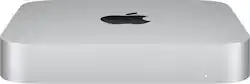
Mac mini Desktop - Apple M1 chip - 8GB Memory - 512GB SSD - Silver
- Key Specs
- Processor Model: Apple M1 (Your computer's processor is like its brain. Working in combination with system memory, the power of the processor determines the complexity of software you can run, how many programs you can have open at the same time, and how fast those programs will run. Most computers feature an AMD, Intel or Snapdragon processor.)
- Storage Type: SSD
- Total Storage Capacity: 512 gigabytes
- System Memory (RAM): 8 gigabytes (Random-access memory (RAM) is a computing device's short-term data storage, which allows active information to be accessed quickly. The size and type of RAM determines how efficiently the device can handle large amounts of information at one time. For example, gaming or video editing requires more RAM for optimal performance.)
- Graphics Type: Integrated (Dedicated graphics uses a separate graphics card for processing video images. Because it does not use memory from the system's RAM, there is no extra burden on the CPU and graphics are processed more efficiently. Integrated graphics shares system RAM to process video images.)
- Graphics: Apple M1 8-core (Often referred to as a "graphics processing unit" (GPU), this device is responsible for displaying image content and decoding/encoding video content in programs and games.)
- General
- Product Name: Mac mini Desktop - Apple M1 chip - 8GB Memory - 512GB SSD
- Brand: Apple
- Model Number: MGNT3LL/A
- Year of Release: 2020
- Color: Silver
- Processor
- Processor Brand: Apple
- Processor Model: Apple M1 (Your computer's processor is like its brain. Working in combination with system memory, the power of the processor determines the complexity of software you can run, how many programs you can have open at the same time, and how fast those programs will run. Most computers feature an AMD, Intel or Snapdragon processor.)
- Processor Model Number: Apple M1
- Storage
- Storage Type: SSD
- Total Storage Capacity: 512 gigabytes
- Solid State Drive Capacity: 512 gigabytes (The amount of data that can be stored on the device's solid state drive (SSD). SSD is a flash-based storage with faster speeds than a hard disk drive (HDD).)
- Memory
- System Memory (RAM): 8 gigabytes (Random-access memory (RAM) is a computing device's short-term data storage, which allows active information to be accessed quickly. The size and type of RAM determines how efficiently the device can handle large amounts of information at one time. For example, gaming or video editing requires more RAM for optimal performance.)
- Type of Memory (RAM): DDR4 SoDIMM (Each type of RAM delivers a different level of speed, bandwidth, energy efficiency and performance.)
- Graphics
- Graphics Type: Integrated (Dedicated graphics uses a separate graphics card for processing video images. Because it does not use memory from the system's RAM, there is no extra burden on the CPU and graphics are processed more efficiently. Integrated graphics shares system RAM to process video images.)
- GPU Brand: Apple
- Graphics: Apple M1 8-core (Often referred to as a "graphics processing unit" (GPU), this device is responsible for displaying image content and decoding/encoding video content in programs and games.)
- Compatibility
- Operating System: Mac OS (The operating system manages all software and hardware, including files, memory and connected devices. Most importantly, it lets you interact with your device and your programs in a visual way; otherwise, you'd be typing computer code to get anything done.)
- Connectivity
- Number of HDMI Outputs (Total): 1
- Number of DisplayPort Outputs (Total): 0
- Number of Thunderbolt Ports (Total): 2
- Number of USB Ports (Total): 2
- Wireless Connectivity: Bluetooth, Wi-Fi (The manner in which a device sends data to another device over a short distance without the use of wires or cables.)
- Ethernet Card: 10/100/1000 (Also known as an Ethernet adapter, this card plugs into a computer's motherboard and enables it to access an Ethernet network. Ethernet data transmission speeds are measured in Mbps (megabits per second) and Gbps (gigabits per second). For example, a 10/100 Ethernet port transmits 10 and 100 Mbps, while a 10/100/1000 Ethernet port transmits 10 and 100 Mbps and has a maximum speed of 1000 Mbps (1 Gbps).)
- Number Of Ethernet Ports: 1
- Network Connectivity: None (The manner in which a device sends data to another device over a long distance using a cellular network.)
- Features
- Audio Technology: Built-in speaker
- Mac Features: Siri
- Dimensions
- Product Height: 1.4 inches (The out of box height of the item. Height is measured as the vertical distance from the bottom of the item to the top as it would be primarily used or placed.)
- Product Width: 7.7 inches (The out of box width of the item. Width is measured as the horizontal distance from one side of the item to the other as it would be primarily used or placed.)
- Product Depth: 7.7 inches (The out of box depth of the item. Depth is measured as the distance from the front of the item to the back as it would be primarily used or placed.)
- Product Weight: 2.6 pounds (The out of box weight of the item.)
- Certifications Listings & Approvals
- ENERGY STAR Certified: true (Devices carrying the ENERGY STAR service mark, such as computer products and peripherals, kitchen appliances, and other products, generally use 20% to 30% less energy than required by federal standards.)
- EPEAT Qualified: true (The Electronic Product Environmental Assessment Tool (EPEAT) was designed to provide an environmental assessment tool for purchasers. In order to qualify for EPEAT, a product must meet all 23 required criteria.)
- EPEAT Level: Gold (The Electronic Product Environmental Assessment Tool (EPEAT) was designed to provide an environmental assessment tool for purchasers. In order to qualify for EPEAT, a product must meet all 23 required criteria. Products are rated Bronze, Silver or Gold based on how many of 28 optional criteria they meet (below 50%, 50%, 75%).)
- Included
- Included Software: Photos, iMovie, GarageBand, Pages, Numbers, Keynote, Siri, Safari, Mail, FaceTime, Messages, Maps, News, Stocks, Home, Voice Memos, Notes, Calendar, Contacts, Reminders, Photo Booth, Preview, Books, App Store, Time Machine, TV, Music, Podcasts
- Optical Drive Type: None (An optical disk drive (ODD) uses a laser light to read data from or write data to an optical disc. These discs include CDs, DVDs, and Blu-ray Discs. This allows you to play music or watch movies using prerecorded discs.)
- Keyboard Included: false
- Mouse Included: false
- Other
- UPC: 194252092163
The Apple M1 chip takes Mac mini, the most versatile, do-it-all Mac desktop, to a whole new level of performance. With up to 3x faster CPU performance, up to 6x faster graphics, a powerful Neural Engine with up to 15x faster machine learning, and superfast unified memory — all in an ultracompact design.* So you can create, work, and play on Mac mini with speed and power beyond anything you ever imagined.
Q: How many USB, ethernet, and/or printer ports are there on the back of the Mac Mini
A: 2 USB ports, 1 ethernet port, printers get connected via wifi or via USB. What I did was add a USB 7 port hub to the back of the computer where one of the 2 USB ports are and that extended my usb ports. It also has 2 thunderbolt (USB-C) ports in the back.. This is for the the Mac mini with the M1 chipset.
A: It looks like it’s not possible. I have a late 2013 iMac and want to do the same thing. I got this from Macrumors forums, Connecting Mac mini to iMac as display “ I have an older 2011 iMac running High Sierra that I still use for Target Display Mode. Works fine on my Intel (2019 16") MacBook Pro running Big Sur with a TB3->TB2 adapter, does *NOT* work on my new M1 Mac Mini. Cmd-F2 never switches to TDM, although System Information does show the Mini connected (I didn't test if Thunderbolt networking worked, but I don't know why it wouldn't.)” “Same as mine - worked on 2015 MBP/Big Sur, but not on M1 Mini. So, it must be an M1 Apple decision - not Big Sur.” Maybe an apple tech at Best Buy could confirm it.
Q: Can the Apple credit for return of an older Mac Mini be extended to Best Buy customers?
A: This seems unlikely given that Apple and Best Buy are two distinct and unrelated companies.
Q: Can you add 8gb of your own RAM?
A: Since the late 2014 edition of the Mac Mini ram is not upgradable. That includes the new M1 Mac Mini. What you buy it with is what you are stuck with.
Q: can you use any monitor for the M1 OF DOES IT HAVE TO APLLE?
A: I'm using a 27" Acer. Editing photography.
Q: what monitor's are compatible with a mac mini desktop?
A: Any monitor with HDMI connection
A: The Mac-Mini with the M1 chip can only control 1 monitor via the USB-C and the docking station - This is a change from prior Mac-Minis with Intel Chips. To have a 2nd monitor, it must be hooked up to the Mac-Mini directly via the Mac-Mini HDMI port. No clue how you would setup a 3rd monitor






















