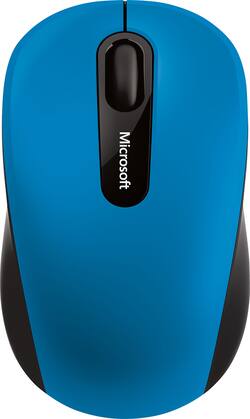
Microsoft - Bluetooth Mobile Mouse 3600 - Blue
- Key Specs
- Lighting Type: None
- General
- Product Name: Bluetooth Mobile Mouse 3600
- Brand: Microsoft
- System Requirements: PC: Windows 8 or 10; Mac: OS X 10.10.3; Android 4.4.2 or 5.0; Bluetooth 4.0 or higher (The software that a product must have for it to be able to integrate with another product.)
- Model Number: PN7-00021
- Features
- Mouse Type: BlueTrack
- Lighting Type: None
- Performance
- Handedness: Ambidextrous
- Tracking Method: Optical (There are several types of computer mice, optical and laser being among the most common. Optical mice detect less detail and provide more precise and accurate movement. Laser mice detect more detail and can be used on a wider variety of surfaces, but are more sensitive to small movements.)
- Connectivity
- Wireless Connectivity: Bluetooth (The manner in which a device sends data to another device over a short distance without the use of wires or cables.)
- Operating System Compatibility: Windows
- Plug and Play Operation: true
- Power
- Mouse Power Source: Battery-powered
- Rechargeable Battery (Mouse): true
- Battery Size: AA (The battery size required for operation.)
- Number of Batteries Required: 1
- Batteries Included: true (Indicates whether the product comes with the required batteries for its operation.)
- Dimensions
- Product Height: 1.60 inches (The out of box height of the item. Height is measured as the vertical distance from the bottom of the item to the top as it would be primarily used or placed.)
- Product Length: 3.75 inches (The out of box length of the item. Length is measured as the longest dimension of the item.)
- Product Width: 2.25 inches (The out of box width of the item. Width is measured as the horizontal distance from one side of the item to the other as it would be primarily used or placed.)
- Product Weight: 3.2 ounces (The out of box weight of the item.)
- Warranty
- Manufacturer's Warranty - Parts: 3 years limited
- Manufacturer's Warranty - Labor: 3 years limited
- Other
- UPC: 885370993721
Microsoft Bluetooth Mobile Mouse 3600: Designed to track on a variety of surfaces, this mouse wirelessly connects to Windows, Mac and Android computers and tablets via the Bluetooth 4.0 interface. Navigate your device's screen using the 4-way scroll wheel and keep tabs on the battery life with the power indicator.
- With BlueTrack technology, your mouse works on a variety of surfaces: This mouse's blue beam is 4 times larger than a standard laser, and it captures a high-contrast image of whatever surface it's on for precise accuracy.
- Connects wirelessly to your computer: Bluetooth 4.0 makes it easy to pair the mouse with your laptop or tablet.
- 4-way scroll wheel: Scroll wheel allows you to navigate up, down, left and right across your device's screen.
- Compact, ambidextrous design: Comfortably use the mouse whether you're left- or right-handed.
- Power indicator: Easily see when it's time to replace the battery. Operates on a AA battery (included).
- Compatible with most Windows and Mac computers and Android devices: Works across a wide array of computers and tablets.
Whats Included
- Bluetooth Mobile Mouse 3600
- AA battery
- Owner's manual
Q: Does the mouse have an on/off switch on the mouse itself?
A: Yes it does. And it's much better/easier than other mice. The mouse uses one AA battery versus two AAA batteries for other mice. The on/off switch is under the mouse and is a button you press that is very easy to access. Press the button to turn it on, press again to turn it off. It is not a switch. The mouse performs excellently. I plan on buying two more.
A: If your iPad has bluetooth, it should connect just fine.
A: It's hard to answer a computer hardware compatibility question when you don't provide the model number of the laptop and the operating system. If your Lenovo laptop supports Bluetooth v4.0 or higher, this mouse should be recognised. The 4.1 BT protocol is supposed to be backward compatible with earlier versions. I have no devices with BT older than 4.0 . The key question is: Have you previously been able to pair a Bluetooth mouse to this laptop - not a wired mouse or one with a wi-fi adapter, a Bluetooth mouse? If not the internal Bluetooth adapter, its antenna, or the basic driver provided with the OS may not be good. (The OS must provide a generic driver for Bluetooth devices, and may not have one that is fully compatible.) If you have been using a Bluetooth mouse successfully, the most common pairing issue is low battery. I have had this this model mouse for several years, used it with Android tablets, Windows laptops and Chromebooks without problems. The warning sign that the battery is near end of life is not the flashing indicator, but that my device doesn't see it, and it cannot be re-paired. Don't trust the battery that came with the mouse to be good. This model has been distributed since before 2017. It could have been sitting in a warehouse at the back of a shelf. Try using a brand new fresh name brand AA alkaline battery.
Q: will this work with a Microsoft Surface Pro 6?
A: Yes, it will work with a Microsoft Surface Pro 6.
Q: can this be used with a Macbook pro 2017
A: I have not used this particular mouse. But I have used Bluetooth mice made by logitech, Microsoft and HP on several different MacBook pros. They all work. The mouse you have should work. However if there are special buttons and features, they may not work in 0S X. But You can count on normal mouse features such as the scroll wheel, right and left clicking and pointing. You can also look up That mouse on the manufacturers website and see if there is any downloadable software for Mac to enable any special features. But that is unnecessary for the most common mouse functions.
A: I have Dell XPS 9360, works perfect with this mouse


















