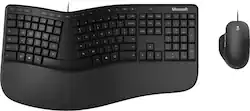
Microsoft - Ergonomic Full-size Wired Mechanical Keyboard and Mouse Bundle - Black
- Key Specs
- Lighting Type: None
- Adjustable Weight System: false (Customize the mouse by adding or removing weights to find the optimal balance, control, and flexibility.)
- Form Factor: Ergonomic, Full-size (The size, arrangement, and physical configuration of the product.)
- Keyboard Technology: Mechanical (Type of technology that detects a key press.)
- Key Switch Behavior: Linear (Refers to the mechanisms under the keycaps on a keyboard that enable you to type faster and more precisely. Linear switches move straight up and down without any sound or bump. Tactile switches provide a noticeable bump in the key press, and no sound. Clicky switches provide a bump in the key press and "clicky" sound.)
- Connection Type: Wired
- General
- Brand: Microsoft
- Model Number: RJU-00001
- Product Name: Ergonomic Full-size Wired Mechanical Keyboard and Mouse Bundle
- Color: Black
- Features
- Lighting Type: None
- Numeric Keypad: true
- Touchpad: false
- Keyboard Type: Keypad
- Palm Rest: true
- Spill Resistant: false (Designed to resist some degree of accidental liquid spill. The level of spill-resistance is indicated by the product manufacturer, but the degree of protection may not be guaranteed after normal wear of the product.)
- Keyboard Features: Dedicated Office 365, search, emoji and media controls
- Foldable: false
- Adjustable Weight System: false (Customize the mouse by adding or removing weights to find the optimal balance, control, and flexibility.)
- Functions
- Form Factor: Ergonomic, Full-size (The size, arrangement, and physical configuration of the product.)
- Number Of Keys: 126
- Keyboard Technology: Mechanical (Type of technology that detects a key press.)
- Dedicated Macro Keys: false (Perform shortcuts of key sequences to carry out commands with a single key. Key sequences may include key strokes, mouse actions, and/or menu actions.)
- Adjustable Tilt Function: false
- Key Switch Behavior: Linear (Refers to the mechanisms under the keycaps on a keyboard that enable you to type faster and more precisely. Linear switches move straight up and down without any sound or bump. Tactile switches provide a noticeable bump in the key press, and no sound. Clicky switches provide a bump in the key press and "clicky" sound.)
- Multimedia Keys: true
- Internet Keys: false
- Connectivity
- Connection Type: Wired
- Wired Connectivity: USB-A (USB 2.0 Gen1)
- Number Of USB Port(s): 0 (The total number of USB ports including all generations and versions.)
- Compatibility
- Operating System Compatibility: Windows
- Plug and Play Operation: true
- System Requirements: Windows 11/10 (The software that a product must have for it to be able to integrate with another product.)
- Dimensions
- Product Height: 2.92 inches (The out of box height of the item. Height is measured as the vertical distance from the bottom of the item to the top as it would be primarily used or placed.)
- Product Width: 19.1 inches (The out of box width of the item. Width is measured as the horizontal distance from one side of the item to the other as it would be primarily used or placed.)
- Product Depth: 11.79 inches (The out of box depth of the item. Depth is measured as the distance from the front of the item to the back as it would be primarily used or placed.)
- Product Weight: 36 ounces (The out of box weight of the item.)
- Mouse
- Mouse Included: true
- Mouse Operation: Button(s), Scroll wheel
- Mouse Type: Standard
- Connection Type (Mouse): Wired
- Wired Connectivity (Mouse): USB-A (USB 2.0 Gen1)
- Maximum Sensitivity: 1000 dots per inch (Mouse sensitivity is measured in dots per inch (DPI). The higher the DPI, the more sensitive the mouse is and may be more useful for high-density pixel screens. Lower DPI typically means more precision and accuracy in mouse movement.)
- Minimum Sensitivity: 0 dots per inch (Mouse sensitivity is measured in dots per inch (DPI). The higher the DPI, the more sensitive the mouse is. Lower DPI typically means more precision and accuracy in mouse movement, but higher DPI may be useful for high-density pixel screens.)
- Number of Buttons: 5
- Number of Thumb Buttons: 2
- Number of Programmable Buttons: 2
- Handedness: Right-handed
- Warranty
- Warranty - Parts: 1 year
- Warranty - Labor: 1 year
- Other
- UPC: 889842589696
Microsoft Ergonomic Keyboard reduces fatigue and delivers a slim, refined design with split keyboard, improved cushion and palm rest, and time-saving dedicated shortcut keys, including a new Snipping key for fast screen captures. Durable and lightweight, Microsoft Ergonomic Mouse delivers exceptional control, with ultra-smooth tracking on a variety of surfaces, optimized scrolling wheel for precise web and document navigation, and two programmable1 buttons.
- Exceptional comfort: Work all day, with reduced risk of fatigue and injury, on our ergonomist-approved design.
- Excellent support: Improved keyboard cushion and ergonomically tested palm rest covered in premium fabric provides all day comfort and promotes a neutral wrist posture.
- Designed to last: Microsoft Ergonomic Desktop is wired for reliable speed and accuracy.
- Be more productive with built-in keyboard shortcuts: Include dedicated keys for Microsoft 365,* emojis, search, easy access to media controls and more.¹
- Crunch numbers fast: With a dedicated integrated numbers pad.
- Precise mouse tracking sensor: Use on a variety of desk surfaces.
- Multitask your way: Two programmable mouse buttons¹ let you customize for the actions you use most.
- Exceptional control: The optimized mouse scrolling wheel allows precise web and document navigation.
Whats Included
- Microsoft Ergonomic Wired Keyboard and Mouse Bundle
A: The keyboard has the option of adding a plastic frame that attaches to the bottom. This frame thus angles the top of the keyboard downward and that alleviates pressure on the wrists to produce a more natural and ergonomic feel. Without the frame, it’s a flat keyboard, but does have a raised mid section for a more natural feel. It’s one of the bettter ergo keyboards for the money.
Q: Are there pull out legs on the back of this keyboard?
A: No, there is not.
Q: how quiet are the keys on the keyboard
A: pretty quite. No clicking.
A: You can program this keyboard with the Mouse and Keyboard Center App. https://support.microsoft.com/en-us/topic/mouse-and-keyboard-center-download-f5b10905-7887-eedb-2f1c-d0737a36a3b2 Best, Tom Microsoft Customer Care
Q: Is this keyboard compatible with chrome?
A: Yes it is compatible as long as it is plugged in.
Q: Is this keyboard compatible with Macs?
A: I use mine with my Macbook. It works great - but I recommend going into settings -> keyboard -> modifier keys and setting Option=>Command, Command=>Option. This swaps Alt and the windows key. By default, mac maps the windows key as command and alt as option. This switch means command is now beside the space bar like on the mac keyboard, control is where it normally is out the outside, and now option is the windows key. If you use option a lot - I also mapped caps lock to option - so it's a second, easy to reach option key.
Q: Is this keyboard compatible with windows 7?
A: Microsoft Ergonomic Wired Keyboard requires your PC to host Microsoft Windows 10/8.1 in order to properly install and operate.
Q: Can the mouse be used for left handed people?
A: Not ideal for lefties. There is a thumb rest on the left side that you would have to put your pinky in for a lefthanded use. It is shaped for a right hand.