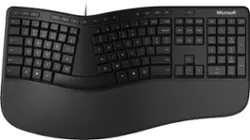
Microsoft - Ergonomic Full-size Wired Mechanical Keyboard - Black
- Key Specs
- Lighting Type: None
- Form Factor: Ergonomic, Full-size (The size, arrangement, and physical configuration of the product.)
- Keyboard Technology: Mechanical (Type of technology that detects a key press.)
- Key Switch Behavior: Linear (Refers to the mechanisms under the keycaps on a keyboard that enable you to type faster and more precisely. Linear switches move straight up and down without any sound or bump. Tactile switches provide a noticeable bump in the key press, and no sound. Clicky switches provide a bump in the key press and "clicky" sound.)
- Connection Type: Wired
- General
- Product Name: Ergonomic Full-size Wired Mechanical Keyboard
- Brand: Microsoft
- Model Number: LXM-00001
- Color: Black
- Features
- Lighting Type: None
- Numeric Keypad: true
- Touchpad: false
- Keyboard Type: Keypad
- Palm Rest: true
- Spill Resistant: false (Designed to resist some degree of accidental liquid spill. The level of spill-resistance is indicated by the product manufacturer, but the degree of protection may not be guaranteed after normal wear of the product.)
- Keyboard Features: Dedicated Office 365, search, emoji and media controls
- Foldable: false
- Functions
- Form Factor: Ergonomic, Full-size (The size, arrangement, and physical configuration of the product.)
- Number Of Keys: 126
- Keyboard Technology: Mechanical (Type of technology that detects a key press.)
- Dedicated Macro Keys: false (Perform shortcuts of key sequences to carry out commands with a single key. Key sequences may include key strokes, mouse actions, and/or menu actions.)
- Adjustable Tilt Function: true
- Key Switch Behavior: Linear (Refers to the mechanisms under the keycaps on a keyboard that enable you to type faster and more precisely. Linear switches move straight up and down without any sound or bump. Tactile switches provide a noticeable bump in the key press, and no sound. Clicky switches provide a bump in the key press and "clicky" sound.)
- Multimedia Keys: true
- Internet Keys: false
- Connectivity
- Connection Type: Wired
- Wired Connectivity: USB Type A (USB 2.0 Gen1)
- Number Of USB Port(s): 0 (The total number of USB ports including all generations and versions.)
- Compatibility
- Operating System Compatibility: Windows
- Plug and Play Operation: true
- System Requirements: Windows 10, Limited functionality Windows 8.1/7 (The software that a product must have for it to be able to integrate with another product.)
- Dimensions
- Product Height: 2.4 inches (The out of box height of the item. Height is measured as the vertical distance from the bottom of the item to the top as it would be primarily used or placed.)
- Product Width: 10.3 inches (The out of box width of the item. Width is measured as the horizontal distance from one side of the item to the other as it would be primarily used or placed.)
- Product Depth: 19.2 inches (The out of box depth of the item. Depth is measured as the distance from the front of the item to the back as it would be primarily used or placed.)
- Product Weight: 35.98 ounces (The out of box weight of the item.)
- Mouse
- Mouse Included: false
- Other
- UPC: 889842437805
Work in comfort all day. This Microsoft ergonomic keyboard reduces fatigue and delivers a slim, refined design with a split keyboard and improved cushion and palm rest - plus, time-saving integrated number pad and dedicated shortcut keys. It also features a wired design for reliable speed and accuracy over the long haul. Optimize your ergonomic workspace by pairing with the Microsoft ergonomic mouse.*
- Exceptional comfort: Work all day with reduced risk of fatigue and injury on this ergonomist-approved design.
- Excellent support: The improved cushion and ergonomically tested palm rest covered in premium fabric provides all-day comfort and promotes a neutral wrist posture.
- Be more productive with built-in shortcuts: Include dedicated keys for Office 365,* emojis, search, easy access to media controls and more.¹
- Designed to last: Comes wired for reliable speed and accuracy.
- Crunch numbers fast: With a dedicated integrated numbers pad.
- Optimize your ergonomic workspace: Pair with the Microsoft ergonomic mouse.*
Whats Included
- Microsoft Ergonomic Keyboard - Black
- Owner's manual
A: The legs at the back are not a good ergo solution and they finally realized that. The general ergo practice now is to lift the front of keyboard for a more relaxed wrist position and this keyboard has the front lift attachment.
Q: Is this a wireless or does it have a cord?
A: It is NOT wireless; it has a cord.
Q: Can the palm rest be removed?
A: No the palm rest is part of the keyboard. It has 'legs' which allow you to 'lift' the angle of the keyboard, but it's a complete unit.
A: I think the new version is quieter. It is worth the upgrade.
Q: Does this keyboard have gel membrane keys?
A: Despite what others are saying. This is 100% membrane keys. No mechanical switches or anything like that. Not sure why folks are saying otherwise.
Q: My new laptop has nothing but the little USB C ports on it, can I still use this keyboard?
A: Thank you for your question. This keyboard may be connected using a USB-A to USB-C adapter.
A: Soft - very comfortable
A: 1. I do not think Microsoft fixed the durability of the letters on the keyboard. I replaced my previous MS ergonomic keyboard because several letters worn out or hard to see after a few years of use. 2. Yes, MS removed the zoom switch. I would love to speak to the people who make these unnecessary changes, they are not making the keyboard any better by removing useful items. 3. Also, look at the numbers area of the keyboard, MS changed location of the "Numeric lock, etc. and keyboard layout seems a lot tighter or closer together.