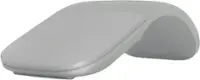
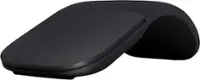
Microsoft - Surface Arc Bluetooth BlueTrack Ambidextrous Mouse for PC - Wireless - Violet
Microsoft - Surface Arc Bluetooth BlueTrack Ambidextrous Mouse for PC - Wireless - Violet
Color
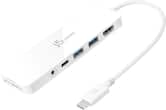
Violet- j5create - USB-C Multi-Port Hub with Power Delivery for Mac, PC and More - White$39.99
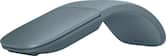
More Buying Options
Related Item

Specifications
- Lighting TypeNoneMaximum Sensitivity1000 dots per inchNumber of Buttons (Total)2Connection TypeWireless
- Key Specs
- Lighting Type: None
- Maximum Sensitivity: 1000 dots per inch (Mouse sensitivity is measured in dots per inch (DPI). The higher the DPI, the more sensitive the mouse is and may be more useful for high-density pixel screens. Lower DPI typically means more precision and accuracy in mouse movement.)
- Number of Buttons (Total): 2
- Connection Type: Wireless
- General
- Brand: Microsoft
- Model Number: EP2-32831
- Product Name: Surface Arc Bluetooth BlueTrack Ambidextrous Mouse for PC
- Color: Violet
- Features
- Mouse Type: Standard
- Lighting Type: None
- Maximum Number of Memory Profiles: 1
- Performance
- Mouse Operation: Button(s), Touch scroll
- Mouse Grip Style: Palm grip (In comparison to many palm and claw grips, ergonomic grip mice are designed for a specific handedness and put the hand and wrist in a position to promote comfort. Customizable grips feature buttons/keys that can be configured to perform specific actions and may also have customizable calibration and sensitivity settings.)
- Handedness: Ambidextrous
- Tracking Method: BlueTrack (There are several types of computer mice, optical and laser being among the most common. Optical mice detect less detail and provide more precise and accurate movement. Laser mice detect more detail and can be used on a wider variety of surfaces, but are more sensitive to small movements.)
- Maximum Sensitivity: 1000 dots per inch (Mouse sensitivity is measured in dots per inch (DPI). The higher the DPI, the more sensitive the mouse is and may be more useful for high-density pixel screens. Lower DPI typically means more precision and accuracy in mouse movement.)
- Minimum Sensitivity: 400 dots per inch (Mouse sensitivity is measured in dots per inch (DPI). The higher the DPI, the more sensitive the mouse is. Lower DPI typically means more precision and accuracy in mouse movement, but higher DPI may be useful for high-density pixel screens.)
- Number of Buttons (Total): 2
- Number of Thumb Buttons: 0
- Number of Programmable Buttons: 0
- Adjustable Weight: false
- Connectivity
- Connection Type: Wireless
- Wireless Connectivity: Bluetooth (The manner in which a device sends data to another device over a short distance without the use of wires or cables.)
- Maximum Wireless Range: 32.8 feet
- Operating System Compatibility: Windows
- Plug and Play Operation: true
- Number of Devices Connectable Simultaneously: 1
- Power
- Mouse Power Source: Battery-powered
- On/Off Switch: true
- Rechargeable Battery (Mouse): false
- Battery Size: AAA (The battery size required for operation.)
- Number of Batteries Required: 2
- Batteries Included: true (Indicates whether the product comes with the required batteries for its operation.)
- Included
- Mouse Pad Included: false
- Dimensions
- Product Height: 0.56 inches (The out of box height of the item. Height is measured as the vertical distance from the bottom of the item to the top as it would be primarily used or placed.)
- Product Length: 5.17 inches (The out of box length of the item. Length is measured as the longest dimension of the item.)
- Product Width: 2.17 inches (The out of box width of the item. Width is measured as the horizontal distance from one side of the item to the other as it would be primarily used or placed.)
- Product Weight: 2.8 grams (The out of box weight of the item.)
- Warranty
- Warranty - Parts: 1 year
- Warranty - Labor: 1 year
- Other
- UPC: 196388542949
The perfect travel companion. Slim, light, and ready to travel, Surface Arc Mouse is designed to conform to your hand and snaps flat to fit easily in your bag. Connects via Bluetooth. Available in a choice of rich colors to complement your style [1]
- Surface Arc Mouse: Slim, light, and ready to travel, designed specifically for Surface devices
- Available in four rich colors [1]: Black, Platinum and new Violet and Ocean.
- Sleek, ultra-slim design: Slim, smooth and soft to the touch, Surface Arc Mouse fits discreetly within your workspace and is designed to sit comfortably in your hand. Connects wirelessly to your Surface device via Bluetooth.
- Snaps flat for travel: Surface Arc Mouse goes anywhere without the weight or bulk of traditional mice. What’s more, you can snap it flat and easily slip it into your pocket or bag for travel.
- Power up or down with a snap: Simply snap Surface Arc Mouse into its curved position to power up, and snap again to flatten and power down.
- Scrolls in every direction: Surface Arc Mouse allows for vertical and horizontal scrolling for easier, more intuitive navigation. Plus, enjoy precise tracking with optimized left and right click.
Whats Included
- Microsoft Surface Arc Mouse - Violet
- 2 AAA Batteries
Disclaimers
- [1] Available colors may vary by market.
Q: Does with work with Apple laptops? If it does, is it easy to connect?
A: Yes it works on my Macbook pro 15 inch and it's easy to connect via bluetooth. Down side is it does not have the full trackpad gesture - like if you swipe three fingers up for "mission control" it wouldn't work. Just a basic mouse scrolling/clicking mouse.
Q: Does this mouse work when it's flat or does it only work in "arc" position?
A: It only works in its arcd position because flattening it is what turns it off.
A: It uses two AAA batteries in a small compartment on the bottom side. Be careful putting batteries in. This is the only device I ever saw where two batteries are inserted in the same orientation. Usually one positive and one negative in each direction. On this one both of each are on the same side. Odd.
Q: Does this mouse work with hp and Sony notebooks
A: Def does, I purchased to which I use with my Microsoft Surface tablet and my SONY VAIO 14" touch screen and it works flawlessly! As long as you have Bluetooth I don't see any reason why this wouldn't work with an BT device.
Q: Does it Have a Back Button on the Side ? & Does it Work with a PC ?
A: No back button. The only button on this Microsoft mouse is the main button. It does have the standard Left/right button functionality though. No back button, no scroll wheel. You can scroll by sliding your finger up/down the big main button. It is designed for the Surface Pro. Built in Bluetooth, so I suspect it'll work with a Bluetooth-enabled PC.
Q: Does it have a middle button option?
A: No middle button or scroll wheel, but the entire pad of this mouse that covers the left, and right click buttons, functions as a scroll wheel. Simply use two fingers, placed on the pad, and move in any direction to scroll!
Q: Does the touchpad only scroll or can it control the cursor as well?
A: You can both scroll and control the cursor. Mouse has left and roght click functionality as well as scroll.
Q: Anyone know if this will work with an Android tablet?
A: Yes. It is enabled with Bluetooth. However, if you need to change settings like scroll behavior, DPI, and three finger gestures, you will need the Microsoft Mouse and Keyboard Center app for Windows. Some of these settings may be changed in Android settings.
Compare similar products

The perfect travel companion. Slim, light, and ready to travel, Surface Arc Mouse is designed to conform to your hand and snaps flat to fit easily in your bag. Connects via Bluetooth. Available in a choice of rich colors to complement your style [1]
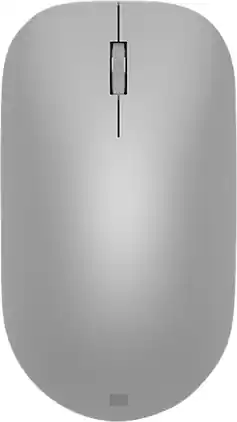
Maintain steady control over your internet browsing and other computing tasks with this Microsoft Surface mouse. It's ergonomically sculpted for comfort, and it has a metal scroll wheel for accurate navigation. This Microsoft Surface mouse is suitable for both left-handed and right-handed users, and Bluetooth connectivity lets you connect wirelessly to your computer.

Marketing Information from the Manufacturer
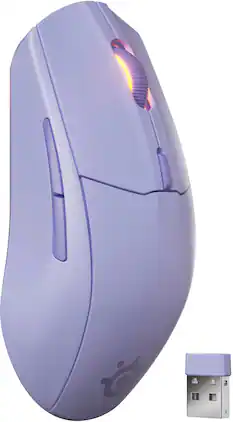
Outclass your opponents with the improved Rival 3 Wireless Gen 2 featuring near-instant response times thanks to greatly lowered latency. Effortlessly switch between gaming-grade 2.4GHz connection and Bluetooth. TrueMove Air 18K DPI Optical Sensor ensures precision, while your clicks remain snappy due to hyper-durable switches. Play for up to 200 hours on 2.4GHz and up to 450 hours on Bluetooth connection with a AAA battery.
| Pros for Microsoft - Surface Arc Bluetooth BlueTrack Ambidextrous Mouse for PC - Wireless - Violet | |||
|---|---|---|---|
| Design, Battery Life, Portability, Comfort, Size | Design, Battery Life, Ease of use, Bluetooth, Compatibility | There were no pros for this product— | Battery Life, Overall Performance, Connectivity, Weight, Glide Smoothness |
| Cons for Microsoft - Surface Arc Bluetooth BlueTrack Ambidextrous Mouse for PC - Wireless - Violet | |||
| Scrolling, Price, Right Click | Connection, Scroll Wheel | There were no cons for this product— | There were no cons for this product— |
Specs
Reviews
Customers are saying
Customers consistently note the Surface Arc Bluetooth Mouse's portability and design as major selling points. Many appreciate its comfortable feel, convenient size, and long battery life. However, some customers have expressed concerns about the smoothness of scrolling, the price point, and difficulties with right-clicking functionality.
Customer Images
The vast majority of our reviews come from verified purchases. Reviews from customers may include My Best Buy members, employees, and Tech Insider Network members (as tagged). Select reviewers may receive discounted products, promotional considerations or entries into drawings for honest, helpful reviews.
- Rated 5 out of 5 stars
Love the Microsoft Surface Arc Mouse
I really like my new Microsoft Surface Arc mouse. It is very easy to use and ergonomically designed. The mouse also is very easy to fit in my thin travel bag making it ideal for traveling.
This review is from Microsoft - Surface Arc Bluetooth BlueTrack Ambidextrous Mouse for PC - Wireless - Ocean
AndrebJ Posted
- Rated 5 out of 5 stars
Mircosoft Surface Mouse
The Microsoft Surface Mouse is amazing and fits my needs perfectly. It’s comfortable, responsive, and sleek, making everyday work easy and efficient. The smooth scrolling and precise tracking improve productivity, and the design pairs beautifully with my Surface device. I’m very satisfied with its performance and reliability.
This review is from Microsoft - Surface Arc Bluetooth BlueTrack Ambidextrous Mouse for PC - Wireless - Violet
ColleenB Posted
- Rated 5 out of 5 stars
Great form & function!
Great form & function! Works well with both my dell & HP PC's. A little pricey, but worth it!
This review is from Microsoft - Surface Arc Bluetooth BlueTrack Ambidextrous Mouse for PC - Wireless - Black
BigRedDevil Posted