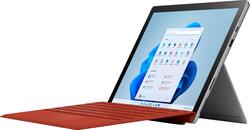
Microsoft - Surface Pro 7 - 12.3" Touch Screen - Intel Core i5 - 8GB Memory - 256GB SSD - Device Only (Latest Model) - Platinum
- Key Specs
- Screen Size: 12.3 inches (Size of the screen, measured diagonally from corner to corner.)
- Screen Resolution: 2736 x 1824 (Screens come in a range of resolutions (measured in pixels, horizontal x vertical). The higher the resolution, the greater the picture quality.)
- Processor Model: Intel 10th Generation Core i5 (Your computer's processor is like its brain. Working in combination with system memory, the power of the processor determines the complexity of software you can run, how many programs you can have open at the same time, and how fast those programs will run. Most computers feature an AMD, Intel or Snapdragon processor.)
- Total Storage Capacity: 256 gigabytes
- Operating System: Windows 10 Home (The operating system manages all software and hardware, including files, memory and connected devices. Most importantly, it lets you interact with your device and your programs in a visual way; otherwise, you'd be typing computer code to get anything done.)
- Voice Assistant Built-in: No (A digital assistant built into the device that uses voice commands to answer questions and control smart devices.)
- Wireless Connectivity: Bluetooth, Wi-Fi (The manner in which a device sends data to another device over a short distance without the use of wires or cables.)
- 2-in-1 Design: true (A laptop and a tablet combined in one lightweight, portable device. Sometimes referred to as "convertible" or "hybrid" laptops, these devices deliver the processing power and keyboard of a laptop. When you're ready to play, either detach the screen or fold your 2-in-1 into tablet mode to comfortably watch movies, play games, read an e-book and more.)
- Security Features: Facial recognition
- General
- Product Name: Surface Pro 7 - 12.3" Touch Screen - Intel Core i5 - 8GB Memory - 256GB SSD - Device Only (Latest Model)
- Brand: Microsoft
- Model Number: PUV-00001
- Model Family: Microsoft Surface Pro 7
- Year of Release: 2019
- Color: Platinum
- Display
- Screen Type: PixelSense
- Screen Size: 12.3 inches (Size of the screen, measured diagonally from corner to corner.)
- Screen Resolution: 2736 x 1824 (Screens come in a range of resolutions (measured in pixels, horizontal x vertical). The higher the resolution, the greater the picture quality.)
- Stylus Input: Built for Windows Ink (Active) (An active stylus/pen is able to communicate directly with a compatible device; active electromagnetic resonance (EMR) pens are powered via a device's screen and active electrostatic (AES) pens require an additional power source. A passive stylus does not have electronic features and is compatible with most capacitative touch screens.)
- High Dynamic Range (HDR): false (An HDR-compatible 4K TV or other HDR-compatible product displays HDR video content when it's available from sources like 4K Ultra HD Blu-ray Discs and 4K streaming services.)
- Processor
- Processor Brand: Intel
- Processor Model: Intel 10th Generation Core i5 (Your computer's processor is like its brain. Working in combination with system memory, the power of the processor determines the complexity of software you can run, how many programs you can have open at the same time, and how fast those programs will run. Most computers feature an AMD, Intel or Snapdragon processor.)
- Storage
- Total Storage Capacity: 256 gigabytes
- Memory
- System Memory (RAM): 8 gigabytes (Random-access memory (RAM) is a computing device's short-term data storage, which allows active information to be accessed quickly. The size and type of RAM determines how efficiently the device can handle large amounts of information at one time. For example, gaming or video editing requires more RAM for optimal performance.)
- Type of Memory (RAM): LPDDR4X (Each type of RAM delivers a different level of speed, bandwidth, energy efficiency and performance.)
- Expandable Memory Compatibility: microSD, microSDXC
- Compatibility
- Operating System: Windows 10 Home (The operating system manages all software and hardware, including files, memory and connected devices. Most importantly, it lets you interact with your device and your programs in a visual way; otherwise, you'd be typing computer code to get anything done.)
- Operating System Compatibility: Windows
- Voice Assistant Built-in: No (A digital assistant built into the device that uses voice commands to answer questions and control smart devices.)
- Connectivity
- Wireless Connectivity: Bluetooth, Wi-Fi (The manner in which a device sends data to another device over a short distance without the use of wires or cables.)
- Network Connectivity: None (The manner in which a device sends data to another device over a long distance using a cellular network.)
- Compatible Wireless Standard(s): Wireless-A, Wireless-AC, Wireless-B, Wireless-G, Wireless-N (The wireless networking standard(s) the device is backwards compatible with. This includes networking protocols based on the IEEE 802.11 standard (alphabetically ascending) and the Wi-Fi Alliance standard (numerically ascending), both of which provide high-throughput wireless local area networks (WLANs). Devices designed to work with specific standard(s) will be backwards compatible with previous versions but may not run at optimal performance when using earlier iterations.)
- Headphone Jack: true (The device features an interface that allows for the connection of headphones.)
- Bluetooth Version: 5.0 (The Bluetooth specification formalized by the Bluetooth Special Interest Group. All versions of the Bluetooth standard are backwards compatible with previous versions.)
- GPS Enabled: false
- Data Plan Required: false
- Power
- Charging Interface(s): Proprietary (The connection for transmitting power to charge the device.)
- Battery Life (up to): 10.5 hours (Battery life will vary depending on the product configuration, product model, applications loaded on the product, power management setting of the product and the product features used by the customer. As with all batteries, the maximum capacity of this battery will decrease with time and usage.)
- Camera
- Front-Facing Camera: true
- Front Facing Camera Megapixels: 5 megapixels (The more megapixels, the more detail that the camera facing the user can capture.)
- Front Facing Camera Video Resolution: 1080p (Refers to the number of pixels, both horizontally and vertically, used by the camera facing the user to capture video. The higher the resolution the finer the video detail that can be seen.)
- Rear-Facing Camera: true
- Rear Facing Camera Megapixels: 8 megapixels (The more megapixels, the more detail that the camera facing away from the user can capture.)
- Rear Facing Camera Video Resolution: 1920x1080 (1080p) (Refers to the number of pixels, both horizontally and vertically, used by the camera facing away from the user to capture video. The higher the resolution the finer the video detail that can be seen.)
- Features
- 2-in-1 Design: true (A laptop and a tablet combined in one lightweight, portable device. Sometimes referred to as "convertible" or "hybrid" laptops, these devices deliver the processing power and keyboard of a laptop. When you're ready to play, either detach the screen or fold your 2-in-1 into tablet mode to comfortably watch movies, play games, read an e-book and more.)
- Keyboard Included: false
- Security Features: Facial recognition
- Stylus Dock: None
- Certifications Listings & Approvals
- EPEAT Qualified: true (The Electronic Product Environmental Assessment Tool (EPEAT) was designed to provide an environmental assessment tool for purchasers. In order to qualify for EPEAT, a product must meet all 23 required criteria.)
- EPEAT Level: Gold (The Electronic Product Environmental Assessment Tool (EPEAT) was designed to provide an environmental assessment tool for purchasers. In order to qualify for EPEAT, a product must meet all 23 required criteria. Products are rated Bronze, Silver or Gold based on how many of 28 optional criteria they meet (below 50%, 50%, 75%).)
- Included
- Included Software: Microsoft Office 365 30-Day trial
- Stylus Included: false
- Other
- UPC: 889842477016
At your desk, on the couch, or out in the yard, Surface Pro 7 adapts to the way you work with laptop-to-tablet versatility. And now, it delivers more power than ever, with a laptop-class Intel Core processor, all-day battery¹, Instant On, and improved graphics — plus more multitasking connections, including both USB-C and USB-A ports. 
- Connect, create, get comfortable: Whatever your office looks like, be it a desk, couch, or dining table, Surface Pro 7 is your ultra-light, endlessly adaptable partner — now with faster processing and more connections — plus all-day battery life.¹
- More powerful in every way: Chase your dream and get seriously productive with mega-multitasking laptop power, all-day battery,¹ and plenty of memory and storage.
- Powered by a 10th Gen Intel Core processor: Surface Pro 7 keeps up with you — with multitasking speed, stunning entertainment, incredible Wi-Fi performance, and long battery life.¹
- Get back to work the moment inspiration strikes: With Fast Charging, all-day battery¹ and Instant On, you can get back to work right now, tonight, or tomorrow. Surface Pro 7 stands ready to take your ideas to the next level whenever you are.
- Built-in cameras that show your best side: 1080p HD video webcams are perfect for all your calls, meetings, virtual get togethers and more.
- Connect and keep up the way you want to: Video calls and meetings come to life with spectacular audio and video with far-field Studio Mics, Dolby Audiosound, and HD cameras that automatically adjust to indoor and outdoor lighting conditions.
- A brilliant display: The high-resolution 12.3” PixelSense Display with touchscreen automatically adjusts to lighting conditions.
- Make a statement with signature accessories: Personalize your Surface Pro 7 with the Surface Pro accessories you know. Choose from Platinum or Matte Black.⁴
- Be heard loud and clear: Whether in conference calls or using voice dictation in Office apps* with enhanced dual far-field Studio Mics. Plus, enjoy crisp, clear audio for music, podcasts, and movies with Dolby Audiosound.
- Do more with the Windows you know: Comes with Windows 10 Home, giving you familiar features, trusted security, and automatic updates.
Whats Included
- Microsoft Surface Pro 7
- Power supply
- Quick start guide
- Safety and warranty documents
Q: Does it come with a keyboard?
A: NO>>KEYBOARD OPTIONAL
A: Yes, the camera is pre-installed onthe surface. No need to purchase one. I use my camera on all my zoom calls
A: Microsoft Does not repair, you can Trade it in and They will give you a brand new one for $450 + tax
A: Wireless Display 1. Get a wireless display dongle, and use it as a HDMI video source of your projector. https://www.bestbuy.com/site/microsoft-wireless-display-adapter-v2-receiver-dark-titanium/4974200.p?skuId=4974200 2. Use your Surface Pro to mirror display wirelessly. [Windows Key] + [A] >>> Connect >> find the wireless display dongle and connect Wired Display 1. Get an adapter https://www.bestbuy.com/site/microsoft-surface-mini-displayport-to-hdmi-2-0-adapter-black/5921203.p?skuId=5921203 2. Use a HDMI cable from the adapter to your projector
A: Not sure about the 7+ but my docking station that I was using with my Surface Pro 3 works perfectly with my new Surface Pro 7.
A: Yes it has 1 USB Type A port and 1 USB Type C port. If your like me and like to occasionally use an external monitor with your surface pro7, then I highly recommend purchasing a J5create - UltraDrive Mini Dock for the Surface Pro 7 for $59.99. This dock plugs into the A and C ports on your surface pro and then provides 2 Type-A USB ports, 1 Type C port, an HDMI port (if you want to connect to an external monitor) and a MicroSD slot which is in addition to the MicroSD slot available on the Surface Pro 7.
A: Yes, just did the free upgrade to Windows 11 on my new Surface Pro 7. Works great.
Q: Does this come with a pen or does that need to be purchased separately?
A: It does NOT comes with a pen, mouse, or the keyboard type cover.














