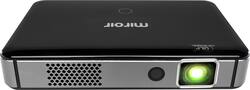
Miroir - SURGE SERIES Wireless Smart DLP Projector
- Key Specs
- Product Weight: 0.9 pounds (The out of box weight of the item.)
- Contrast Ratio: 400:1 (Measured difference between a displayed image's brightest whites and darkest blacks. The larger the first number, the more detail and color that can be displayed.)
- General
- Product Name: SURGE SERIES Wireless Smart DLP Projector
- Brand: Miroir
- Model Number: M300A
- Series: SURGE SERIES (Part of a group of the same product type with similar features.)
- Dimensions
- Product Height: 1.1 inches (The out of box height of the item. Height is measured as the vertical distance from the bottom of the item to the top as it would be primarily used or placed.)
- Product Width: 6 inches (The out of box width of the item. Width is measured as the horizontal distance from one side of the item to the other as it would be primarily used or placed.)
- Product Depth: 3.8 inches (The out of box depth of the item. Depth is measured as the distance from the front of the item to the back as it would be primarily used or placed.)
- Product Weight: 0.9 pounds (The out of box weight of the item.)
- Display
- Resolution (Native): 1280 x 720 (Native resolution of a screen refers to its single, fixed resolution. Sometimes screens must scale an image up or down in order to fit the native resolution. This can cause a loss of resolution or detail.)
- High Dynamic Range (HDR): false (An HDR-compatible 4K TV or other HDR-compatible product displays HDR video content when it's available from sources like 4K Ultra HD Blu-ray Discs and 4K streaming services.)
- Contrast Ratio: 400:1 (Measured difference between a displayed image's brightest whites and darkest blacks. The larger the first number, the more detail and color that can be displayed.)
- Aspect Ratio: 16:9 (The measurement of the width of a screen compared to the height of a screen, expressed as a ratio.)
- Throw Ratio Range: 1.12:1 (This measurement indicates what size of projected image can be produced from a certain distance. The smaller the ratio, the closer the projector can be to the screen while still producing a large image.)
- Digital Keystone Correction: true ("Keystone effect" refers to the distortion of an image when it is projected on an angled surface or when the projector is positioned too high or too low from the center of the display. Projectors with a digital keystone correction feature are able to scale the image as needed before it is projected, resulting in the correct image orientation no matter where it is displayed.)
- 3D Technology: false
- Viewing
- Maximum Projector Distance: 8.2 feet (Maximum distance that the projector can be placed from the screen to produce a display with acceptable visual performance.)
- Maximum Viewable Screen Size: 100 inches
- Features
- Remote Control Included: true
- TV Tuner: false (The ATSC TV Tuner is a component built into conventional TV sets or other devices for receiving over-the-air broadcast TV without a cable/satellite box. Digital tuners may be purchased separately and connected to a device if it does not have one built in.)
- Exposure Control
- Focus Adjustment: Powered (The method used to focus the device in order to view or display a sharper image.)
- Optical Zoom: None (The optical zoom uses a combination of lenses that magnify the image prior to it being registered at high resolution by the imaging sensor.)
- Digital Zoom Capability: false (Projectors with this feature allow for digital adjustment to the projected image size without changing the location of the projector.)
- Connectivity
- HDMI Audio Return Channel (ARC): false
- Audio
- Sound Mode: Stereo
- Integrated Speaker(s): true
- Speaker(s) Included: true
- Watts Per Channel: 2 watts
- Compatibility
- Voice Assistant Built-in: No (A digital assistant built into the device that uses voice commands to answer questions and control smart devices.)
- Certifications Listings & Approvals
- ENERGY STAR Certified: false (Devices carrying the ENERGY STAR service mark, such as computer products and peripherals, kitchen appliances, and other products, generally use 20% to 30% less energy than required by federal standards.)
- Warranty
- Manufacturer's Warranty - Parts: 1 year
- Manufacturer's Warranty - Labor: 1 year
- Other
- UPC: 887360000341
Take multilayer presentations along in your pocket with this Miroir mini projector, featuring built-in speakers for quality sound. Built-in streaming options let you share video from the internet, and autofocus delivers clear images. This lightweight Miroir mini projector slips easily into your bag or luggage so you can take it on the road.
- Wireless design: Eliminates the need for cables and cords.
- DLP image technology: Offers crisp visuals.
- ±40° vertical keystone correction: For distortion-free images.
- 400 lumens of brightness: Offer a highly visible display with clear on-screen images.
- 400:1 contrast ratio: Provides a multitude of shades between black and white for rich color saturation.
- 1280 x 720 resolution: Delivers crisp, detailed high-definition images.
- HDMI input: Makes it easy to connect to high-definition sources.
- Up to 100" viewable screen size: Allows everyone in the room to enjoy a clear view.
- 1.12:1 throw ratio range: Reproduces wide images in their correct proportions.
- Built-in 2W speakers: Provide crisp sound.
- 1.5 hours battery life: Usable in places with no access to power outlet.
- Remote: Enables operation from a distance.
Whats Included
- Miroir SURGE SERIES Wireless Smart DLP Projector
Q: Is it WiFi compatable with iPhone
A: Yes. WiFi on Miroir m300a is fully compatible with iPhone. Generally, you need to have both projector and iPhone connected to the same home or office wireless router/access point. The streaming quality is only good enough if you have strong WiFi signal in the place where your projector and iPhone are located. If you plan to use projector and iPhone outside of your home/office environment I would recommend to use lightning-to-HDMI adapter. It will cost you an extra $20, but your equipment will become fully self-sufficient. Good luck!
Q: Can I use the projector well it is charging so as to not use up the battery
A: Yes. I've had no issues using the projector while it's plugged in.
Q: can I use an Apple or Smartphone with this
A: I have had no issues with using my Samsung Galaxy S7 Active Android smartphone with the Miroir M300A mini projector. I connected through a "Screen Mirroring" wireless option on the projector. Additionally, there is an HDMI option for Android devices which requires a SlimPort to HDMI, or MHL to HDMI adapter, depending upon the model. I do not have Apple products, but the manual says the projector will connect to iPad, iPhone, and IPod touch devices using HDMI and an Apple digital AV adapter. It will also connect wirelessly to iOS (Apple) devices, but the contents are limited to certain file types, such as native video, photos, PPTX, and PDF files. Also, the projector can independently stream contents, such as Netflix with a wireless connection and a downloaded app.
A: Yes, it will be just like a monitor. It will show everything on your laptop. Is easy to use, just connect your laptop to your projector through HDMI and you are set to go.
Q: Will I be able to play all the content from my 4 tb hard drive if connected via USB port?
A: Yes, this model should be compatible with your uses.
A: Yes, they need to be on the same network.
Q: Can I use the Amazon Firestick with this projector?
A: I guess you could because it had a USB connection, but I am not sure you would need to since it essentially works like a fire stick with apps that’s you can stream right from the projector
A: I had the same problem so i connected a pc mouse and clicked on the settings and factory reset the projector. After resetting the projector i just folled the instructions and the remote paired and was fully functional.