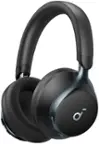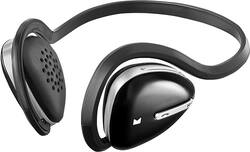
Modal™ - Over-the-Ear Bluetooth Wireless Headphones - Blue
- Key Specs
- Connection Type: Wireless
- Wireless Connectivity: Bluetooth (The manner in which a device sends data to another device over a short distance without the use of wires or cables.)
- True Wireless: true (These headphones not only lack wires between the device and headphones, they also lack wires between the headphones themselves. (true wireless is really only possible with in-ear headphones))
- Water Resistant: true (Resists some degree of water penetration.)
- Carrying Case: false
- Headphone Fit: Over-the-Ear
- Adjustable Headband: true
- General
- Product Name: Over-the-Ear Bluetooth Wireless Headphones
- Brand: Modal™
- Model Number: MD-HPBT01-BK
- Audio
- Sound Isolating: false
- Connectivity
- Connection Type: Wireless
- Wireless Connectivity: Bluetooth (The manner in which a device sends data to another device over a short distance without the use of wires or cables.)
- True Wireless: true (These headphones not only lack wires between the device and headphones, they also lack wires between the headphones themselves. (true wireless is really only possible with in-ear headphones))
- Features
- Water Resistant: true (Resists some degree of water penetration.)
- Carrying Case: false
- Design
- Headphone Fit: Over-the-Ear
- Style: Sports and Exercise
- Adjustable Headband: true
- Foldable Design: false
- Power
- On/Off Switch: No
- Other
- UPC: 600603167737
Enjoy crisp audio with these Modal MD-HPBT01-BK over-the-ear Bluetooth wireless headphones that feature sweatproof foam ear pads for comfort while you participate in sports. Echo cancellation and noise suppression technologies help ensure clarity.
- Over-the-ear design: For comfort during extended listening sessions.
- Bluetooth support: Along with voice prompts and easy pairing allows you to wirelessly listen to music and talk using your compatible device.
- Sweatproof foam ear pads: Help ensure comfortable listening at home or during sporting activities.
- Echo cancellation and noise suppression technologies: Support crystal-clear sound.
- Reflective headband: Promotes visibility and can be worn behind the neck for comfort.
- Long battery life: Delivers up to 12 hours of music playback or up to 14 hours of talk time.
- USB cable: Provide flexible charging options.
Whats Included
- Foam ear pads
- Modal Over-the-Ear Bluetooth Wireless Headphones
- Owner's manual
- USB cable
A: The headphones try to connect to the last device automatically. When you turn the headphones on keep holding the button after it says "Hello" until it says it is paring. Then you can look on your lumia for it.
Q: How do the foam pads install?
A: The online manual doesn't appear to be available yet. The way you swap to the foam pads is to rotate the black plastic cups counter-clockwise against the speaker itself. Don't force it, it doesn't take much effort, especially with the ones that are on there when you buy it. They'll turn about a eighth of an inch, then stop. Once they stop, you can pull the cup/pad directly away from the speaker, it'll come right off. Take care not to break the plastic ring inside the foam that secures the foam to the speaker, and make sure that when you put the new ones on that they're in the proper orientation, and that you don't mix left and right. Also, I noticed that the soft foam pads take a bit more effort to install, since the foam gets pinched inside the plastic and adds more friction. You'll now they're installed properly when you feel a slight click, and the triangular corners line up exactly.
Q: It's not turning on anymore
A: Try resetting the headphones. 1. Plug them in to charge. 2. Press and hold the Talk, Play and + buttons all at once. 3. Hold for 5 seconds or until you see the light on the side of the device flash. Then try pairing them again. I had this same symptom where they seemed completely dead. I found someone online had said how to reset them and this worked for me. It has worked on two pairs of these - mine and my wife's. Good luck!
Q: Modal headphones not discoverable
A: Make sure when you are scanning with your phone that you have the headset in paring mode. To do this, Press and hold the power/talk button for a few seconds and the LED should start blinking rapidly blue/red. Once it is blinking like this you will know that it is pairing mode and the phone should find it. If the phone asks for a pin, use 0000.
Q: I got a new iphone 6 and trying to get these earphones to conect
A: Hold the button in the middle of the side of the headphone on the forward with them on your ears, & it will say Hello, & if you hold the button it will say pairing. You then can turn the scan & the headphones will show up on the list oh your phone. tell your phone to connect to that device if it doesn't do it automatically.
Q: MD-HPBTO1 won't turn off, or get in pairing mode
A: Try resetting the headphones. 1. Plug them in to charge. 2. Press and hold the Talk, Play and + buttons all at once. 3. Hold for 5 seconds or until you see the light on the side of the device flash. Then try pairing them again. I had this same symptom where they seemed completely dead. I found someone online had said how to reset them and this worked for me. It has worked on two pairs of these - mine and my wife's. Good luck!
A: Try resetting the headphones. 1. Plug them in to charge. 2. Press and hold the Talk, Play and + buttons all at once. 3. Hold for 5 seconds or until you see the light on the side of the device flash. Then try pairing them again. I had this same symptom where they seemed completely dead. I found someone online had said how to reset them and this worked for me. It has worked on two pairs of these - mine and my wife's. Good luck!
Q: PARTS!!!!!!!!!!!!!!!!!!!!!!!!!!!!!!!!!!!!!!!!!!!!!!!
A: Unfortunately there aren't any replacement parts for this. I called customer service after losing the foam ear pads and was told try Walmart. Even the rep said she tried to get replacement foam ear covers. Good luck!!