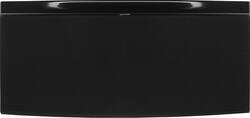
Monster - SoundStage S3 Medium Wireless Speaker - Black
Model: 129271 MSP SSTG S3 MED WW
SKU: 9426223
This item is no longer available in new condition. See similar items below
- Key Specs
- Wireless: true
- General
- Product Name: SoundStage S3 Medium Wireless Speaker
- Brand: Monster
- Model Number: 129271 MSP SSTG S3 MED WW
- Connectivity
- Wireless: true
- Warranty
- Manufacturer's Warranty - Parts: Not Available
- Manufacturer's Warranty - Labor: Not Available
- Other
- UPC: 050644728440
Only at Best Buy
Monster SoundStage S3 Wireless Speaker: Powerful enough for a large room, like a family room or master bedroom, the S3 wireless speaker brings booming bass and brilliant clarity to any listening experience. Connect your devices via Bluetooth or Wi-Fi and instantly stream your favorite apps or music library with the push of a button.
- More ways to connect with the music you love: Bluetooth and Wi-Fi capability for pairing wireless devices, plus a digital optical (Toslink) input to connect to a TV and 3.5mm stereo mini input for wide-ranging compatibility.
- Connect multiple devices, create playlists and share music: Download the free SoundStage app on Android and Apple smartphones and tablets, then compile and stream a playlist from libraries across devices, including network and cloud storage.
- Play different songs in different rooms, all from one device: Qualcomm AllPlay technology also lets you sync the same song to multiple speakers and stream more than one song at a time from music services like Spotify and Rhapsody.
- Sleek, compact design complements any décor: With leather accents, the speaker makes an attractive addition to any large room.
Whats Included
- 23V DC power adapter
- Owner's manual
- SoundStage S3 Medium Wireless Speaker
Q: How do i get it to work b.t.?
A: Tricky- when u turn it on the default is wifi. Touch panel - it will light up, use input button to change input to Bluetooth. Then go to phone - settings - make sure Bluetooth is on - u should be see the speaker name - select it and it should then pair up!!













