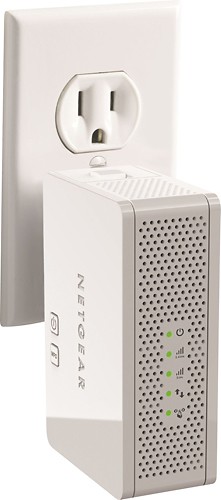
NETGEAR - Universal Wall-Plug Dual-Band Wi-Fi Range Extender with Ethernet Port
This item is no longer available in new condition.
See similar items below.
Description
Features
Wireless-N technology
Enhances signal range while eliminating drops and dead zones.
Up to 300 + 300 Mbps data transfer speed
For fast, efficient operation.
Compatible with most routers and gateways
With 802.11a/b/g/n wireless LAN for extending your wireless network, so you can easily connect an Apple® iPad®, laptop, Blu-ray player, smart TV and more.
FastLane technology
Utilizes the 2.4GHz and 5.0GHz bands simultaneously to ensure optimal wireless performance.
NETGEAR genie app
Allows simple DLNA streaming, so you can enjoy music stored on compatible devices (download required). Wireless printer sharing enables printing with most USB printers.
Wall-plug design
Enables flexible placement. The included desktop docking station offers additional versatility.
10/100 Ethernet port
With auto-sensing technology for quick and easy wired Web connection.
Dynamic LED indicators
Help you find the best location for optimal wireless coverage.
Push 'N' Connect secure setup
With WPS (Wi-Fi Protected Setup) ensures a fast, secure connection to your network. Supports WPA-PSK, WPA2-PSK, mixed mode and WEP security standards.
Plug-and-play design
Offers easy installation with no need for cables or CDs.
iPad is a trademark of Apple Inc., registered in the U.S. and other countries
What's Included
NETGEAR Universal Wall-Plug Dual-Band Wi-Fi Range Extender with Ethernet Port
AC plug, power cord, desktop docking station
Owner's manual
Other
- Energy Star CompatibleNo
- <a href="javascript:winopengld('1087340810700','pcmcat38200050027','cat12080')">Speed</a>Up to 300 + 300 Mbps
- <a href="javascript:winopengld('1087340810442','pcmcat38200050027','cat12080')">Interface Slot Type</a>Ethernet
- <a href="javascript:winopengld('1087340810408','pcmcat38200050027','cat12080')">Auto Sensing</a>Yes
- <a href="javascript:winopengld('1087340810565','pcmcat38200050027','cat12080')">Number of LAN Ports</a>1
- System RequirementsPC: Windows 2000, XP, Vista or 7; Mac: OS; Unix; Linux; Microsoft Internet Explorer 5.0, Firefox 2.0 or Safari 1.4 or later; 2.4GHz and/or 5.0GHz 802.11a/b/g/n wireless router or gateway
- <a href="javascript:winopengld('1087340810477','pcmcat38200050027','cat12080')">LAN Connection</a>Wireless/Ethernet
- <a href="javascript:winopengld('1087340810527','pcmcat38200050027','cat12080')">LEDs</a>Coverage indicators
- Number of Ports1
- Wireless StandardWireless-N
- <a href="javascript:winopengld('1218870374819','pcmcat38200050027','cat12080')">ENERGY STAR Certified</a>No
- Wireless N+Yes
- UPC606449087468
Customer reviews
Rating 4.3 out of 5 stars with 151 reviews
(151 customer reviews)Rating by feature
- Ease of Use4.3
Rating 4.3 out of 5 stars
Customers are saying
Customers frequently mention the ease of setup and the extended range as significant advantages. Many also praise the improved signal strength and overall performance. While some users experienced occasional connectivity issues, the positive feedback regarding ease of use and range significantly outweighs the negative comments. The small size of the device was also a plus for many users.
This summary was generated by AI based on customer reviews.
- Pros mentioned:SetupCons mentioned:Connectivity
Rated 4 out of 5 stars
Great Device, Doesn't Support Hidden Networks
||Posted .This reviewer received promo considerations or sweepstakes entry for writing a review.As a repeater, this device is obviously slower than the original network. It was a breeze to set up and get connected to but I did not like that it added an extension to the existing network name (I have used extenders that use the same name), the second problem which was the deal breaker was the lack of support for hidden networks. I did not want my network to be visible, and while the device connected fine to the existing hidden network, there is no option to turn of SSID broadcast for the extended signal. I ended up returning the device for this reason. If you don't mind the SSID being broadcast, this is a great dual-band extender! My situation was a little different.
I would recommend this to a friend - Pros mentioned:Range, Setup
Rated 5 out of 5 stars
No Fuss Range Extender
||Posted .This reviewer received promo considerations or sweepstakes entry for writing a review.Living in an older home has its perks - bigger rooms, taller ceilings, etc. - but the downside is the thickness of the walls. Ours are roughly six inches thick with heavy plaster and are not wi-fi friendly. In order to get wi-fi to the back part of the house, we have to use an extender. I've tried a few and the set-up/configuration is usually a migraine in the making. That's what impressed me the most about Netgear's Universal Wall-Plug Dual-Band Wi-Fi Range Extender ... the setup was super easy. I plugged it in, turned it on and pushed the button to make it find the router. They connected and work together well. The Universal Wall-Plug Dual-Band Wi-Fi Range Extender can also handle the load stress that comes from two laptops, Xbox Live, two smart phones and an iTouch with ease. Rarely see lag and with two teenage girls at home, it gets a lot of traffic running through it.
I would recommend this to a friend - Pros mentioned:Range, SetupCons mentioned:Connectivity
Rated 3 out of 5 stars
Works well most of the time...
||Posted .This reviewer received promo considerations or sweepstakes entry for writing a review.I bought this to extend the range of my ATT Uverse GW, which sits on my top floor, so my new Smart TV in my basement would have a better signal. it was quick to set up and connect to my GW, and it is easy to connect to from my devices. Some devices still see a better signal from the GW, but my TV is primarily using this unit to connect to the internet. It works 95% of the time quite well, but sometimes loses connectivity, so I have to restart it (easy - unplug, count to 20 and replug in to the wall). Also, the unit runs a bit warm. Overall it does the job.
I would recommend this to a friend - Pros mentioned:Ease of use, Performance
Rated 4 out of 5 stars
Nice dual band compact extender
||Posted .This reviewer received promo considerations or sweepstakes entry for writing a review.This was easy enough to set up with the same SSID so that I didn't have multiple wifi networks in my home. I wanted to be able to just extend my primary network and this device does this very well. For the price, it's one of the better dual band units available. The 5ghz band doesn't work well with iPhones and iPads so we've been using the 2.4ghz band to extend our Netgear WNDR3700 router. This works perfectly, we are very happy with the results. Once in a while it will show a red light on the 5ghz band meaning it is receiving a weak signal but that can be the band itself since its range isn't as good as 2.4. All in all, I can recommend this extender if you want your iDevices to be able to reach farther than your wireless router can serve.
I would recommend this to a friend - Pros mentioned:Performance, Range, Setup
Rated 4 out of 5 stars
BEST EXTENDER I HAVE USED
||Posted .This reviewer received promo considerations or sweepstakes entry for writing a review.This extender has made my whole house Wi-Fi friendly. I would recommend to anyone having problems with "dead spots" or low level reception areas in their home. It was easy to set up and is performing great. Wish I would have gotten it earlier. Keeps me from having to use my cellular data time while in parts of my house.
I would recommend this to a friend - Pros mentioned:Range, Setup
Rated 5 out of 5 stars
Awesome Performance and well worth the $$$
||Posted .This reviewer received promo considerations or sweepstakes entry for writing a review.I have this to extend my Netgear Dual Band Router, using a cable modem, with 54 Mbps upstream & 15 Mbps Downstream. I wanted to get a full signal for my Daughter in her room which is all the way on the other side of our home to where the router is placed. It was an extremely easy setup and I use it plugged it in an outlet and I use the WPS to attach to both the main router and to her PC, Tablet, Smart Phone & Media Player. Even with 14 WiFi devices in total for the whole family, it was well worth what I paid, which was $99.99. The range now is crazy far with the extender. It even was easy to setup on both to the dual band router and from the extender to multiple devices. Instructions are plain and simple and you should not have to be an expert in technology to set it up. I have not had one problem with it. It is great for our family because of the amount of WiFi devices and it frees the main router up from some of the WiFi signal to the devices not connected to the extender. I would recommend this to anyone search for a dual band extender.
I would recommend this to a friend - Pros mentioned:Signal strength
Rated 5 out of 5 stars
Used a little trick to setup...
Posted .This reviewer received promo considerations or sweepstakes entry for writing a review.Had lower than desired signal strength in the family room. Roku and XBox would stutter at times. This device had good reviews and is the same brand as my router (not that it matters). Followed the WPS setup and it worked. Could not make mywifiext.net connect. Used routerlogin.net to gather the ip of the extender, then entered that into the browser to connect. Easy after that. Changed over appropriate devices to new ext networks. Experiencing full signal now where i had 3 or sometimes 2 bars before.
I would recommend this to a friend - Pros mentioned:Performance, Setup
Rated 4 out of 5 stars
expands wifi to remote locations of home
||Posted .This reviewer received promo considerations or sweepstakes entry for writing a review.Very easy installation. Product performs exactly like it is suppose to. No problems after using for a couple months.
I would recommend this to a friend
Q: QuestionHow far away can I plug in and expect to have a connection to my main wi-fiI have a man cave shed that I have recently completed and I want to add tv. I have electricity in shed so if I were to plug in out back would it provide a signal strong enough for a smart tv to pick up off main house about 200' away?
Asked by Anonymous.
- A:Answer If you have power at the location, use a powerline extender, connected to one ethernet port on the main router. No drop outs with this configuration.
Answered by SteveWojo
Q: QuestionHow far will the extender transmit?How far from the extender can I expect to receive signal?
Asked by Kes.
- A:Answer depends on your environment, 100 feet
Answered by Willjackjuliscar
Q: QuestionWill this work with Netgear N300 WNR 2000 x3 and Windows 10? Also, TV is about 90 feet away but with plenty of walls and doors. Will this unit work?
Asked by dobiegillis.
- A:Answer Yes, this will work.
Answered by CommunityAnswer
Q: QuestionI have a Net Gear dual bandwidth router, but it does not have a WPS button. How would the range extender be set up ?I had purchased another range extender, and after following all of the instructions for a non WPS set up, it would not connect. I even watched videos on YouTube to make sure I wast not missing anything. I returned it.
Asked by JoelA.
- A:Answer You can view the Installation Guide for the instructions with a non_WPS router at http://www.netgear.com/home/products/networking/wifi-range-extenders/EX6200.aspx#tab-support There is also a link to the User Manual.
Answered by zany
Q: Questionhow to extend wifi rangeI manage RV park and offer free wifi. Adjacent cabin 250 feet from outside antenna gets reception on front porch in line of site to antenna. Inside reception not so good. Cabin has metal roof. What is best approach to boost signal in cabin: try to up xmit on wireless router, use booster near router, put extender in cabin... Don't want to spend a lot for just one tenant. Any advice?
Asked by Anonymous.
- A:Answer I have a wifi router and extender in my house. Problem is that wifi is near masonry chimney so I place the extender midway between router and distant pc I run off wifi. Work pretty well. That is the The same as mentioned in the instructions that came with my extender If you can get some signal with the regular router then it should work with a closer boosted source. If no signal then cabin might be too difficult to use this approach and may need to use a cable
Answered by Foxvalleybill
Most viewed
- $299.00Your price for this item is $299.00$349.00The comparable value for this item is $349.00
- $599.99Your price for this item is $599.99
- $249.99Your price for this item is $249.99
- $399.99Your price for this item is $399.99$499.99The comparable value for this item is $499.99
- $799.00Your price for this item is $799.00$999.00The comparable value for this item is $999.00
- $160.99Your price for this item is $160.99
- $929.99Your price for this item is $929.99$1,099.99The comparable value for this item is $1,099.99
- $499.99Your price for this item is $499.99
- $249.00Your price for this item is $249.00$299.00The comparable value for this item is $299.00
- $799.00Your price for this item is $799.00
- Year End Deal$199.99Your price for this item is $199.99
- $249.99Your price for this item is $249.99$449.99The comparable value for this item is $449.99
- $384.99Your price for this item is $384.99$399.00The comparable value for this item is $399.00
- Year End Deal$15.99Your price for this item is $15.99
- $199.99Your price for this item is $199.99
- $679.99Your price for this item is $679.99$979.99The comparable value for this item is $979.99
- $1,599.99Your price for this item is $1,599.99$1,899.99The comparable value for this item is $1,899.99
- $199.00Your price for this item is $199.00
- $59.99Your price for this item is $59.99$199.99The comparable value for this item is $199.99



















