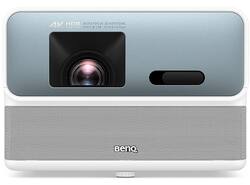
BenQ - GP500 4K HDR LED Smart Home Theater Projector, 360 Degree Sound Field, Android TV, 90% DCI-P3 - White
- Key Specs
- Product Weight: 11.9 pounds (The out of box weight of the item.)
- Light Source: LED
- Resolution: 4K (2160p) (Refers to the number of pixels, both horizontally and vertically, used to capture video/images. The higher the resolution the finer the detail that can be seen.)
- Contrast Ratio: 100,000:1 (Measured difference between a displayed image's brightest whites and darkest blacks. The larger the first number, the more detail and color that can be displayed.)
- Projector Use: Home Theater, Gaming
- Projector Throw Type: Standard Throw (The distance from the screen that the projector can be placed to project images. Standard throw projectors typically need to be at least 6 feet away while short throw and ultra short throw projectors can be placed closer to the screen for use in smaller rooms.)
- Portability: Portable (Fixed projectors are ideal when creating an authentic theater atmosphere in your home. Often designed to stay in one place they may require significant recalibration if moved. Portable projectors, weighing around 5 pounds, are easy to move, but will still require set-up calibration and often have technology to reduce the complexity. Ultra-portable projectors are very light, often battery-powered, and ideal for on-the-go use.)
- Smart Capable: true (Smart, or smart-capable devices are able to connect directly to your home network in order to stream content from the Internet, run Internet-based apps, or connect to other smart devices.)
- Power Source: AC/DC Power (plug-in)
- General
- Product Name: GP500 4K HDR LED Smart Home Theater Projector, 360 Degree Sound Field, Android TV, 90% DCI-P3
- Brand: BenQ
- Model Number: GP500
- Color: White
- Dimensions
- Product Height: 10.5 inches (The out of box height of the item. Height is measured as the vertical distance from the bottom of the item to the top as it would be primarily used or placed.)
- Product Width: 10.2 inches (The out of box width of the item. Width is measured as the horizontal distance from one side of the item to the other as it would be primarily used or placed.)
- Product Depth: 7.2 inches (The out of box depth of the item. Depth is measured as the distance from the front of the item to the back as it would be primarily used or placed.)
- Product Weight: 11.9 pounds (The out of box weight of the item.)
- Display
- Light Source: LED
- Display Technology: DLP (Denotes the product’s visual process, sometimes manufacturer specific, used to display an image.)
- Resolution: 4K (2160p) (Refers to the number of pixels, both horizontally and vertically, used to capture video/images. The higher the resolution the finer the detail that can be seen.)
- Resolution (Native): 3840 x 2160 (4K) (Native resolution of a screen refers to its single, fixed resolution. Sometimes screens must scale an image up or down in order to fit the native resolution. This can cause a loss of resolution or detail.)
- High Dynamic Range (HDR): true (An HDR-compatible 4K TV or other HDR-compatible product displays HDR video content when it's available from sources like 4K Ultra HD Blu-ray Discs and 4K streaming services.)
- High Dynamic Range Format: HDR 10, Hybrid Log-Gamma (HLG) (There are a few HDR formats that tell the TV or other HDR-compatible product how to best utilize its capabilities to display HDR content. HDR technology can support one or multiple formats, each with various benefits to picture quality.)
- Light Source Life (Economy Mode): 30000 hours (The light source's estimated length of operating time when economy mode is enabled.)
- Light Source Life (Normal Mode): 20000 hours (The light source's estimated length of operating time when normal operating mode is enabled.)
- Contrast Ratio: 100,000:1 (Measured difference between a displayed image's brightest whites and darkest blacks. The larger the first number, the more detail and color that can be displayed.)
- Aspect Ratio: 16:10 (The measurement of the width of a screen compared to the height of a screen, expressed as a ratio.)
- Throw Ratio Range: 1.0-1.3 (This measurement indicates what size of projected image can be produced from a certain distance. The smaller the ratio, the closer the projector can be to the screen while still producing a large image.)
- Digital Keystone Correction: true ("Keystone effect" refers to the distortion of an image when it is projected on an angled surface or when the projector is positioned too high or too low from the center of the display. Projectors with a digital keystone correction feature are able to scale the image as needed before it is projected, resulting in the correct image orientation no matter where it is displayed.)
- 3D Technology: true
- Viewing
- Minimum Projector Distance: 4.6 feet (Minimum distance that the projector can be placed from the screen to produce a display with acceptable visual performance.)
- Maximum Projector Distance: 10 feet (Maximum distance that the projector can be placed from the screen to produce a display with acceptable visual performance.)
- Minimum Viewable Screen Size: 55 inches
- Maximum Viewable Screen Size: 120 inches
- Features
- Projector Use: Home Theater, Gaming
- Projector Throw Type: Standard Throw (The distance from the screen that the projector can be placed to project images. Standard throw projectors typically need to be at least 6 feet away while short throw and ultra short throw projectors can be placed closer to the screen for use in smaller rooms.)
- Portability: Portable (Fixed projectors are ideal when creating an authentic theater atmosphere in your home. Often designed to stay in one place they may require significant recalibration if moved. Portable projectors, weighing around 5 pounds, are easy to move, but will still require set-up calibration and often have technology to reduce the complexity. Ultra-portable projectors are very light, often battery-powered, and ideal for on-the-go use.)
- Smart Capable: true (Smart, or smart-capable devices are able to connect directly to your home network in order to stream content from the Internet, run Internet-based apps, or connect to other smart devices.)
- Remote Control Included: true
- Featured Streaming Services: Disney+, HBO Max, Hulu, Prime Video, Apple TV+ (Streaming services and other programs are available on this device. Keep in mind, there may be more services supported than just those shown here.)
- Screen Mirroring: Mobile to screen (Casts the screen of one device onto another wirelessly, using a common protocol (typically Bluetooth).)
- Exposure Control
- Focus Adjustment: Auto (The method used to focus the device in order to view or display a sharper image.)
- Digital Zoom Capability: true (Projectors with this feature allow for digital adjustment to the projected image size without changing the location of the projector.)
- Connectivity
- Number of HDMI Inputs (Total): 2
- Bluetooth Version: 4.2 (The Bluetooth specification formalized by the Bluetooth Special Interest Group. All versions of the Bluetooth standard are backwards compatible with previous versions.)
- Audio
- Integrated Speaker(s): true
- Speaker(s) Included: true
- Watts Per Channel: 5 watts
- Compatibility
- Voice Assistant Built-in: Google Assistant (A digital assistant built into the device that uses voice commands to answer questions and control smart devices.)
- Certifications Listings & Approvals
- ENERGY STAR Certified: false (Devices carrying the ENERGY STAR service mark, such as computer products and peripherals, kitchen appliances, and other products, generally use 20% to 30% less energy than required by federal standards.)
- Power
- Power Source: AC/DC Power (plug-in)
- Voltage: 110 volts (Amount of power needed to support an electrical current.)
- Warranty
- Manufacturer's Warranty - Parts: 3 years
- Manufacturer's Warranty - Labor: 3 years
- Other
- UPC: 840046046569
True 4K HDR smart home projector. Ingeniously designed with smart technology, you can reimagine a whole new 4K home cinema experience
- Premium Home Cinema: True 4K HDR with 90% DCI-P3 CinematicColor and LED Auto Color Calibration
- Immersive Aural Experience: 360-degree sound field and sweet spot adjustment
- Smart Installation: Auto-focus, 2D Keystone, screen fit, object avoidance
- All-in-one Entertainment: Android TV Dongle grants access to the 5000+ apps on the Google Play store
- Chic Design: This projector is sure to fit in your living space thanks to its 4K Optimized lens, intuitive interface, and optical zoom.
Whats Included
- GP500
- Remote Control
- Android TV Dongle
- Power Cord
- 2 x AAA batteries
Product Manuals
Q: How far away does this need to be positioned to fill a 145" projection screen?
A: Hello. Thank you for your question about our GP500. To occupy a screen with a diagonal size of 145 inches, you should position yourself at a distance ranging from 10 feet and 6 inches to 13 feet and 8 inches. Warm Regards, BenQ Support
Q: Can I connect this projector to an external Bluetooth speaker?
A: Hello, Thank you for your question about our GP500 projector. Follow these simple steps to connect your external Bluetooth devices to the projector: 1. Ensure that the Android TV dongle is properly installed. 2. Turn on the projector. 3. Use the remote control or on-screen options to navigate to "Settings," then "Remotes & Accessories," and then "Add accessory." 4. Activate the Bluetooth pairing mode and select your desired Bluetooth device from the options displayed on the screen. 5. Click on "Pair" to complete the pairing process. Please note that only one Bluetooth device can be connected at a time. If you connect external Bluetooth speakers or headphones, you may experience a slight audio delay of approximately 300ms. While this delay is acceptable for listening to music, you may experience minor latency while watching movies. Warm Regards, BenQ Support






















