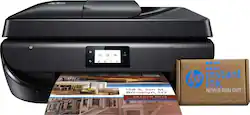
OfficeJet 5260 Wireless All-In-One Inkjet Printer with 2-year HP Instant Ink Subscription - Black
- Key Specs
- Networking: Wireless
- ENERGY STAR Certified: true (Devices carrying the ENERGY STAR service mark, such as computer products and peripherals, kitchen appliances, and other products, generally use 20% to 30% less energy than required by federal standards.)
- Printer Type: Copier, Fax, Printer, Scanner
- ISO Color Print Speed: 7 pages per minute (The number of color pages able to be printed per minute in the device's default single-side mode, as tested by the International Standards Organization (ISO).)
- ISO Mono Print Speed: 10 pages per minute (The number of black ink (grayscale) pages able to be printed per minute in the device's default single-side mode, as tested by the International Standards Organization (ISO).)
- Output Tray Capacity: 25
- Touch Screen: true (Touch-screen devices make navigating more intuitive. Using a touch-screen display, you can do things such as tap to select, hold and drag to move items, swipe to scroll, and pinch to zoom.)
- General
- Brand: HP
- Model Number: Z4B13A#B1H
- Product Name: OfficeJet 5260 Wireless All-In-One Inkjet Printer with 2-year HP Instant Ink Subscription
- Color: Black
- Display Screen: true
- Display Screen Size: 2.2 inches
- Dimensions
- Product Height: 7.52 inches (The out of box height of the item. Height is measured as the vertical distance from the bottom of the item to the top as it would be primarily used or placed.)
- Product Width: 17.5 inches (The out of box width of the item. Width is measured as the horizontal distance from one side of the item to the other as it would be primarily used or placed.)
- Product Weight: 14.4 pounds (The out of box weight of the item.)
- Features
- Automatic Document Feeder: true
- Photo Printing: true
- Monochromatic/Color: Color
- Automatic Two-Sided Printing: true
- Tray Capacity: 100
- Duty Cycle: Up to 1,000 (The maximum number of pages per month that the device can produce without failing, as specified by the manufacturer.)
- Scanner Info
- Scanner Type: Flatbed
- Scanner Resolution: Up to 1200 x 1200 (Refers to the number of pixels/dots, both horizontally and vertically, of the image produced by the scanner. Generally, the higher the resolution, the sharper and cleaner the produced image.)
- Fax Info
- Integrated Fax: true
- Ink
- Compatible Cartridges: F6U62A HP 63 Black Ink Cartridge, F6U61A HP 63 Tri-color Ink Cartridge, F6U64A HP 63XL Black Ink Cartridge, F6U63A HP 63XL Tri-color Ink Cartridge
- Ink Subscription Service Available: true (The printer monitors ink usage and alerts the subscription provider when levels are low. A purchased subscription provides refills of ink based on usage.)
- Memory
- Memory Card Slot: false
- Paper Info
- Automatic Document Feeder Capacity: 35 sheets
- Maximum Document Length: 14 inches
- Maximum Document Width: 8.5 inches
- Supported Paper Sizes: Letter, legal, 4 x 6 in, 5 x 7 in, 8 x 10 in, No. 10 envelopes
- Paper Feeder: Tray loader
- Paper Handling: 100-sheet input tray; 25-sheet output tray
- Compatible Media Types: Plain, photo, matte brochure or professional papers; matte presentation papers; glossy brochure or professional papers; light/recycled
- Performance
- Printer Resolution (Black): Up to 1200 x 1200 (Refers to the number of pixels/dots, both horizontally and vertically, of the image produced by the printer in black ink. Generally, the higher the resolution, the sharper and cleaner the produced image.)
- Printer Resolution (Color): Up to 4800 x 1200 (Refers to the number of pixels/dots, both horizontally and vertically, of the image produced by the printer in colored ink. Generally, the higher the resolution, the sharper and cleaner the produced image.)
- Copier Info
- Copier Resolution (Black): Up to 600 x 300 (Refers to the number of pixels/dots, both horizontally and vertically, of the image produced by the copier in black ink. Generally, the higher the resolution, the sharper and cleaner the produced image.)
- Copier Resolution (Color): Up to 600 x 300 (Refers to the number of pixels/dots, both horizontally and vertically, of the image produced by the copier in colored ink. Generally, the higher the resolution, the sharper and cleaner the produced image.)
- Connectivity
- Minimum System Requirements: Windows 7 or later: 1GHz 32-bit (x86) processor, 2GB HDD, CD-ROM or Internet connection; macOS 10.10 Yosemite or later, 1GB HDD, Internet connection; USB port
- Other
- UPC: 193424837281
Increased versatility comes with great connections - and up to 2 years of ink. Save on ink and get it automatically delivered to your door with HP Instant Ink. Count on a stable, reliable wireless connection with dual-band Wi-Fi, and get easy mobile printing with HP Smart, a mobile print app. Print, scan, copy, and fax with automatic features.
Prints up to 10 ISO ppm* in black, up to 7 ISO ppm* in color.
- Includes 2 years of HP Instant Ink in the box: Save on ink and always have it on hand. With this printer, receive up to 2 years of ink when you enroll in HP's Instant Ink service. Ink is automatically delivered to your door so you never have to shop for cartridges again1.
- Fast print speeds up to 10 ISO ppm* in black, up to 7 ISO ppm* in color: This printer lets you generate documents quickly.
- 2 Year Manufacturer Warranty Included: This model qualifies for extended coverage, providing you with additional peace of mind.
- Perfect for home or small business use: This inkjet printer offers excellent print quality for photos and documents and accepts a variety of paper types and sizes.
- New level of wireless connectivity you can rely on: Connect reliably with dual-band Wi-Fi, and get easy mobile printing and fast setup with HP Smart, a mobile print app.
- Apple® AirPrint enabled: Ideal for Apple iPad® and iPhone® printing.
- Customize your photos: The included HP Photo Creations software offers templates, custom fonts, borders, and photo editing tools. Create high-quality borderless photos and flyers - right in your home.
- Compatible with HP 63 Instant Ink-ready cartridges: Including HP 63 (black, tri-color) and HP 63XL (black, tri-color) models. Make an impression with Original HP ink cartridges - designed to deliver vivid color and crisp, sharp text.
- Up to 4800 x 1200 dpi (dots per inch) color resolution: High resolution allows producing incredible quality and detail in documents and photos.
- Standard paper handling: Features a 100-sheet input tray and a 25-sheet output tray. Easily copy, scan, or fax multiple pages with the 35-sheet automatic document feeder.
- 2.2" high-resolution monochrome LCD screen: Preview before you print. The 2.2" mono touch screen makes it quick and easy to print, scan, or copy.
- USB port for simple connectivity: One high-speed USB 2.0 port offers a standard connection to your PC.
- Get projects done with easy versatility: Easily print, scan, copy, and fax with a 35-page automatic document feeder and a mono touch screen.
Whats Included
- HP 63 setup black instant ink ready cartridge
- HP 63 setup tri-color instant Ink ready cartridge
- HP Instant Ink setup card
- HP OfficeJet 5260 Wireless All-In-One Instant Ink Ready Printer
- Ink caution flyer
- Instant ink flyer
- Owner's manual
- Power cord
- Setup poster
Product Manuals
Q: How many pages is included with the 2 year Instant Ink Subscription?
A: The value of the instant ink subscription is $120 which is $60 per year so on the medium plan which is $4.99 and provides 100 pages per month, so 2,400 pages over the 2 years. You can also subscribe to a different plan. Note that this printer also has a 2 year warranty from HP.
Q: What format does it scan to? PDF?
A: When you scan, you will be given the chance to save the document as jpeg (photo) or PDF. We recommend using the HP Smart App.
A: The OfficeJet 5260 will scan in color or black and white. Once you start a scan you can select if you want to scan in color or black and white.
Q: Does this have a scanner feed?
A: Yes it does, it is on top of the printer. The center section of the top is hinged to the right. When open it becomes part of the feeder tray. The paper is fed from the right.
A: No it does not, you have to select the paper size before printing.
Q: Does this printer work with/print&scan Mac OS Catalina, 10.15.4
A: Yes, the printer will print and scan with Mac OS Catalina.
A: Yes, you can still connect the printer to your computer using the USB A to B cable.
Q: When sending a fax, are the pages turned face up OR face down?
A: When placing the documents into the Auto feeder, you need to place the documents in the Face Up Position. When you Open the Cover, It shows this description on the Feeder. I hope this helps you.