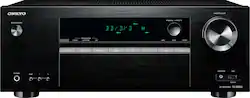
Onkyo - 700W 5.1-Ch. 4K Ultra HD and 3D Pass-Through A/V Home Theater Receiver - Black
- Key Specs
- Continuous Watts x Channel @ Ohms: 80 watts x 5 channels @ 6 ohms
- Number of Channels: 5.1 (The number of discrete channels of sound output. This can be a single number or multiple numbers separated by decimal(s). The first number is the primary, horizontally directed audio channels. The number after the first decimal, if applicable, is the number of subwoofer outputs or channels. The number after the second decimal, if applicable, is the number of height or atmospheric channels designed to immerse the listener by producing overhead sound effects.)
- Number of Audio Zones: 1 (Audio zones, typically designated by rooms in a home, are areas in which all speakers are dependent on the same sound source. Whether a zone encompasses one or multiple rooms, the receiver or preamp/processor is used to control all aspects of its audio and is able to select which zones receive sound.)
- Audio Only Inputs: 3 x Analog audio, 1 x Coaxial digital audio, 1 x Optical digital audio
- Audio/Video Inputs: 4 x HDMI (The number and type of HDMI inputs the product has.)
- Video Pass-through: 2160 (4K), 3D (Devices with this feature allow video signals to travel from their source to a target device without alteration. For example, a receiver with 4K pass-through would allow 4K video signal from a Blu-ray player to pass to a target TV with surround sound; without the pass-through ability, the receiver would not allow both 4K video and surround sound to be transmitted simultaneously.)
- Maximum Supported Resolution (Video Passthrough): 2160p (4K) (The highest video resolution supported by the device for passing through video to another device.)
- Audio/Video Outputs: 1 x HDMI (The number and type of HDMI outputs the product has.)
- Wireless Connectivity: Bluetooth (The manner in which a device sends data to another device over a short distance without the use of wires or cables.)
- General
- Product Name: 700W 5.1-Ch. 4K Ultra HD and 3D Pass-Through A/V Home Theater Receiver
- Brand: Onkyo
- Model Number: TX-SR353
- Color: Black
- Color Category: Black
- Audio
- Continuous Watts x Channel @ Ohms: 80 watts x 5 channels @ 6 ohms
- Number of Channels: 5.1 (The number of discrete channels of sound output. This can be a single number or multiple numbers separated by decimal(s). The first number is the primary, horizontally directed audio channels. The number after the first decimal, if applicable, is the number of subwoofer outputs or channels. The number after the second decimal, if applicable, is the number of height or atmospheric channels designed to immerse the listener by producing overhead sound effects.)
- High Resolution Audio: false (Hear music the way musicians and sound technicians intended it to be heard. Products that support hi-res audio deliver audio signals with a dynamic range and bandwidth far greater than that of a standard CD so you'll be able to enjoy pure music with outstanding sound quality. The device supports high-resolution audio signals, which more closely resemble the quality of music as it was originally recorded, with more texture and detail than can be heard via typical music streaming services or CDs.)
- Number of Audio Zones: 1 (Audio zones, typically designated by rooms in a home, are areas in which all speakers are dependent on the same sound source. Whether a zone encompasses one or multiple rooms, the receiver or preamp/processor is used to control all aspects of its audio and is able to select which zones receive sound.)
- Number of Audio Zone Source Outputs: 0 (Multiple source outputs from the receiver mean different speakers are able to receive different sound sources from the receiver or preamp/processor. For every output, a different sound source can be accessed simultaneously in different zones. For example, two source outputs could be a streaming media player in one room and a Blu-ray player in another.)
- Surround Sound Supported: DTS-HD Master Audio, Dolby TrueHD (Surround sound systems use multiple audio channels and speakers to create an immersive sound experience for the listener. There are also various proprietary technologies that imitate this kind of sound via a device's built-in speakers or soundbar.)
- Maximum Sampling Rate Supported: 2.8 MHz (Generally, the higher the sampling rate, the greater the quality of audio and/or video.)
- Speaker A/B Switching: false (Allows a user to select between one of two sets of primary speakers.)
- Supported File Formats: AAC, MP3, WMA
- Equalizer: false (Allows for the control of different frequencies within an audio signal, such as adjusting treble and bass levels.)
- Tuner Type(s): AM/FM
- Inputs
- Audio Only Inputs: 3 x Analog audio, 1 x Coaxial digital audio, 1 x Optical digital audio
- Video Only Inputs: 2 x Composite video (The number and type of video signal only inputs the product has.)
- Audio/Video Inputs: 4 x HDMI (The number and type of HDMI inputs the product has.)
- Front Facing Inputs: USB
- Number of HDMI Inputs (Total): 4
- Number of USB Inputs: 1
- Video
- Video Pass-through: 2160 (4K), 3D (Devices with this feature allow video signals to travel from their source to a target device without alteration. For example, a receiver with 4K pass-through would allow 4K video signal from a Blu-ray player to pass to a target TV with surround sound; without the pass-through ability, the receiver would not allow both 4K video and surround sound to be transmitted simultaneously.)
- Maximum Supported Resolution (Video Passthrough): 2160p (4K) (The highest video resolution supported by the device for passing through video to another device.)
- Outputs
- Video Only Outputs: 1 x Composite video (The number and type of video signal only outputs the product has.)
- Audio/Video Outputs: 1 x HDMI (The number and type of HDMI outputs the product has.)
- Speaker Connection Type: Spring clip
- Number of HDMI Outputs (Total): 1
- Headphone Jack: true (The device features an interface that allows for the connection of headphones.)
- Features
- Auto Calibration: true (Home theater systems and receivers with an autocalibration function can automatically determine basic settings like speaker volume, crossover point, equalization, and more.)
- Digital Content Protection: HDCP 2.2 (High-bandwidth Digital Content Protection (HDCP) is designed to prevent copying of digital audio and video content as it travels across connections. Newer versions of HDCP support more connection types, increase security, and resolve weaknesses of previous versions.)
- Remote Control Included: true
- Connectivity
- Wireless Multi-Room Audio: false (Technology that allows multiple speakers and/or soundbars to be connected wirelessly and play audio in separate rooms.)
- Wireless Connectivity: Bluetooth (The manner in which a device sends data to another device over a short distance without the use of wires or cables.)
- IP Control: false (Allows electronic devices to be controlled over a home network via a web-based interface. Typically refers to devices not traditionally controlled in this manner, such as A/V receivers.)
- Dimensions
- Product Height: 6.7 inches (The out of box height of the item. Height is measured as the vertical distance from the bottom of the item to the top as it would be primarily used or placed.)
- Product Width: 17.2 inches (The out of box width of the item. Width is measured as the horizontal distance from one side of the item to the other as it would be primarily used or placed.)
- Product Depth: 12.9 inches (The out of box depth of the item. Depth is measured as the distance from the front of the item to the back as it would be primarily used or placed.)
- Product Weight: 17.6 pounds (The out of box weight of the item.)
- Certifications Listings & Approvals
- ENERGY STAR Certified: false (Devices carrying the ENERGY STAR service mark, such as computer products and peripherals, kitchen appliances, and other products, generally use 20% to 30% less energy than required by federal standards.)
- Warranty
- Manufacturer's Warranty - Parts: 2 Years
- Manufacturer's Warranty - Labor: 2 years
- Other
- UPC: 889951000211
Build your home cinema system around this Onkyo 5.1-channel A/V receiver. It includes audio decoders that translate 5.1 sound for the perfect listening experience, and discrete amps ensure completely accurate audio control. Upconvert your video using HDMI, or use the integrated Bluetooth to stream to this Onkyo 5.1-channel A/V receiver directly from your smartphone.
- 700W total power: RMS Rating of 140W x 5 @ 6 ohms, 1 kHz, 1.0% THD, 1 channel driven for robust audio.
- Surround sound decoders: Include Dolby TrueHD and DTS-HD Master Audio for quality audio.
- AccuEQ room calibration: Ensures the sound is calibrated to your room's acoustics, including manual adjustments and presets.
- AM/FM digital tuner: 30 station presets lets you program your favorites for simple one-touch recall.
- Built-in Bluetooth: Stream virtually any audio from your smartphone, tablet, or PC to your home theater for clear and powerful sound.
- 4 HDMI inputs, 1 HDMI outputs: HDMI cable not included. High-speed HDMI cable is the only connection that can deliver a full high-definition experience with a full 1080p picture and digital surround sound.
- True power from discrete amplifiers: Deliver high instantaneous current to increase speaker control for accurate and dynamic audio reproduction.
- Easy connection diagrams: Connections to speakers and external source devices are illustrated and clearly labeled on the back panel.
Whats Included
- Onkyo 700W 5.1-Ch. 4K Ultra HD and 3D Pass-Through A/V Home Theater Receiver
- indoor FM antenna
- AM loop antenna
- remote controller
- AAA (R03) batteries (2 pcs)
- Owner's Manual
A: No phono input
A: Assuming you have 3 HDMI cords going to your TV. The receiver has 4 HDMI inputs and 1 HDMI output. The input slots are labeled (1)Blu-Ray/DVD, (2)cable/satellite, (3)streaming box, and (4)game. Unplug the 3 HDMI cords from your TV and plug them into the appropriate receiver input slots. Then connect a single HDMI cord from the receiver's single output slot to your TV. The signals from your 3 HDMI inputs will be channeled thru the receiver to the TV.
A: I cannot say for sure. However, 3 ohm simply means your speakers have less resistance and can therefore be powered more easily. I have never seen 3 ohm. It was always 8 ohm house and 4 ohm car. With 3 ohm speakers the receiver should easily push them, you will simply need to be extra careful not to blow them. This receiver will push a lot of power for those low resistance speakers and Okyo does not want to be held responsible for speakers less than 6 ohms being blown. Power them at your own risk.
A: Yes, there is a stereo 2 channel mode.
A: You should be able to program the receiver to your cable/sat receiver remote via the aux button or if you have the money I would get a Harmony remote to control everything.
A: I have my directv, bluray player, ps4 and amazon fire tv all connected directly to the receiver using 4K hdmi cables. From the receiver out one hdmi connected to my 4K TV. I just select the source I want to watch on my receiver remote. I also have my smart phone connected to receiver via bluetooth. They sell adapters for headphone jack for $5 at Best Buy. You can also connect devices to receiver using composite a/v cables. You can have everything connected to tv and only an optical cable running from tv to receiver for instance and get sound that way but the sound quality wont be as good.
Q: the range of the Bluetooth...
A: The range is 10 meters or 33 feet.
A: Make sure the "4K60P" setting is set to 4:4:4. The out of the box setting is 2:2:2 I think.






















