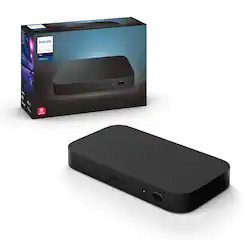
Philips - Hue Play HDMI Sync Box - Black
- Key Specs
- Works With: Amazon Alexa, Apple HomeKit, Google Assistant, Hue, SmartThings (Compatible with or able to be connected to other smart devices or applications.)
- General
- Product Name: Hue Play HDMI Sync Box
- Brand: Philips
- Model Number: 555227
- Color: Black
- Connectivity
- Product Group(s) Controlled: Lighting
- Compatibility
- Works With: Amazon Alexa, Apple HomeKit, Google Assistant, Hue, SmartThings (Compatible with or able to be connected to other smart devices or applications.)
- Voice Assistant Built-in: No (A digital assistant built into the device that uses voice commands to answer questions and control smart devices.)
- App Compatible: true (The product can be connected to a program or software application on a mobile device, which then receives collected data from the product.)
- Environmental
- Indoor Or Outdoor Use: Indoor (Indicates the appropriate environment product was designed to be used in.)
- Power
- Voltage: 120 volts (Amount of power needed to support an electrical current.)
- Dimensions
- Product Height: 0.9 inches (The out of box height of the item. Height is measured as the vertical distance from the bottom of the item to the top as it would be primarily used or placed.)
- Product Width: 3.9 inches (The out of box width of the item. Width is measured as the horizontal distance from one side of the item to the other as it would be primarily used or placed.)
- Product Depth: 7.2 inches (The out of box depth of the item. Depth is measured as the distance from the front of the item to the back as it would be primarily used or placed.)
- Product Weight: 0.5 pounds (The out of box weight of the item.)
- Other
- UPC: 046677555221
The Philips Hue HDMI Sync box adds premium surround lighting to your home theater by syncing your Hue smart lights with movies, music and video games. Watch, listen and play with more wonder and excitement as your lights dance, flash, dim and brighten with your screen. Requires Hue color capable lights and a Hue Bridge (sold separately).
- Sync your Philips Hue lights to your TV screen: Create an immersive media experience via the Philips Hue Play HDMI Sync Box, making your lights dance, flash, dim, and brighten in sync with the content on your screen.
- Fast and seamless light experience: Experience no delay as your lights sync to the content on your TV screen. The effects are always in sync because the sync box receives data before it reaches your screen, unlike devices that react to the screen itself.
- Sync up to 4 HDMI-connected devices: The sync box features four HDMI inputs that allow you to connect media devices like game consoles or streaming dongles. The sync box detects which device is actively playing on your TV screen and automatically switches to it.
- Won't block your screen: See all of the action on your screen. The Hue sync box can be placed on a TV cabinet or shelf without blocking any part of your screen.
- Easy to install, set up, and use: Easily connect to your Hue Bridge and use your sync box immediately with any TV and any HDMI device. Control your entertainment experience and sync box any way you want - via the app, on-product control button, or by programming your TV remote with custom commands.
- Personalize settings in the app: Make your entertainment media experience your own. Use the app to change your light settings, such as the brightness and speed of the effects, as well as define default start-up settings.
- Supports high-quality video formats: The Philips Hue Play HDMI sync Box is compatible with 4K, Dolby Vision, and HDR10+, letting you enjoy the highest quality picture you can get at home — all while your Philips Hue smart lights sync to give you surround lighting.
- Get started with Hue: To experience Philips Hue in your home with the Hue Play HDMI Sync Box connect to the Hue Bridge (required, sold separately), power your sync box and download the Philips Hue app to enjoy!
- Build a brighter home: Continue to light your home smarter and easily expand your Hue system with your choice of indoor or outdoor bulbs, lightstrips, fixtures and accessories.
- Do more with a Hue Bridge: Connect to a Hue Bridge to unlock the full power of Hue, including automations and out-of-home control, sold separately.
Whats Included
- Philips Hue Play HDMI Sync Box
- HDMI cable
- Power adapter and cable
A: I had the exact problem. I then found an article on Reddit that gave the fix. You cannot plug this device into a power strip. I highly recommend plugging this straight into the wall. It instantly fixed all our problems with our box. It works amazingly well!
A: No, unfortunately, it only works with sources plugged directly into the Sync Box that pass thought to the TV. Devices such as a streaming stick, game console, Blu-ray player... Streaming from wireless sources (smartcast, mirrorcast, smartview...) are not currently supported, but maybe Philips will add wireless sources down the road.
A: Works fine with my denon. I had 3 devices plugged in to my receiver (Xbox one X, Nvidia Shield and my LG TV for ARC). I plugged in my devices to the sync box then plugged in the HDMI out (from the hue) to my receiver. everything functions like it did before.included CEC.
A: It can be used with a PS5/Series X, but you would lose 120fps. The passthrough is only capable of 4K/60. You might be able to send a signal to the box using eARC from your CX though -- not sure on that. I run the sync box out of my AVR's second HDMI output and it works that way.
A: Full Dolby Vision support has been added in the firmware update as of May 2020.
A: You can't. You'll need to get a separate streaming device and use that instead of your Smart TV's built in apps. There's no way to make your TV output video to an external device over HDMI.
Q: Does it add latency in gameplay on consoles?
A: This does not add any noticeable latency to games as far as I can tell. If it does, I haven't noticed. I've played Fortnite on Nintendo Switch, PS4, and Xbox One, Overwatch on the Xbox One, and Black Ops 4 on the PS4.
A: If you are using your soundbar with a HDMI ARC connection from the TV, this product won’t work. This sync box wants you to plug in your cable box, gaming system, streaming box directly to the sync box, and send the output of the sync box to the tv. If your soundbar has multiple inputs and you are connecting your sources directly to your soundbar, put them in the sync box instead and use the 1 output of the sync box to the soundbar.