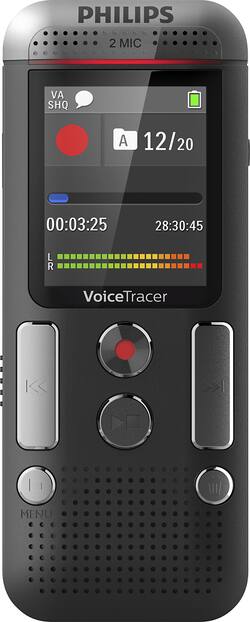
Philips - Voice Tracer Audio Recorder - Anthracite/chrome
- General
- Product Name: Voice Tracer Audio Recorder
- Brand: Philips
- Model Number: DVT2510
- Color: Anthracite/chrome
- Warranty
- Warranty - Parts: 1 Year
- Warranty - Labor: 1 Year
- Other
- Product Width: 1.77 inches (The out of box width of the item. Width is measured as the horizontal distance from one side of the item to the other as it would be primarily used or placed.)
- Product Height: 4.45 inches (The out of box height of the item. Height is measured as the vertical distance from the bottom of the item to the top as it would be primarily used or placed.)
- Product Length: 0.79 inches (The out of box length of the item. Length is measured as the longest dimension of the item.)
- Product Weight: 2.79 ounces (The out of box weight of the item.)
- Memory Card Compatibility: microSD (The type of memory card(s) recommended for use with the product.)
- Display Type: LCD
- Microphone Input: false (The device features an input for connecting an external microphone.)
- Language(s) Displayed: Chinese (simplified), English, French, German, Italian, Polish, Russian, Spanish (The available language options for displayed text or captions.)
- Batteries Included: true (Indicates whether the product comes with the required batteries for its operation.)
- Headphone Jack: true (The device features an interface that allows for the connection of headphones.)
- Maximum Recording Time: 2280 hours
- Battery Chemistry: Alkaline
- Battery Size: AAA (The battery size required for operation.)
- Number of Batteries Required: 2
- Integrated Microphone: true
- Computer Compatibility: Linux, Mac, Windows
- Internal Memory: 8 gigabytes (Data storage capacity for built-in memory circuits.)
- Integrated Speaker(s): true
- Memory Card Slot: true
- Supported File Formats: MP3, WAV
- USB Connectivity: true
- Recording Type: Voice recorders
- 1-Touch Recording: true
- Number Of Recording Modes: 5
- Audio Transcoding Software Included: false
- Calendar Search Function: true
- Internal Memory Type: Flash memory
- Voice-Activated Recording: true
- Operation: Digital
- Safety Lock: true
- Battery Indicator Light: false
- UPC: 855971006168
Record interviews with this Philips digital voice tracer. It has 8GB of onboard memory for up to 88 days' worth of audio recording, and time stamps help you know when something was put on record. This Philips digital voice tracer includes two microphones for optimal sound capture and is voice activated.
- Voice-activated recording: For hands-free recording. When enabled, recording will start automatically when you begin speaking. Recording pauses when you stop and resumes automatically when you begin speaking again.
- 8 GB internal memory: For up to 88 days of recording. MicroSD memory card slot supporting up to 32 GB of additional memory.
- Up to 2280 hours of recording time in LP mode: For reliable recording capacity.
- 5 recording modes: You can choose optimum recording settings according to specific scenes.
- Calendar search: A time stamp with the date and time is added to every recording, allowing you to easily navigate through your library and find files.
- Stereo recording: Two built-in stereo microphones are designed to deliver clear voice recordings and reduce background noise, even in loud environments.
- 110mW speaker output: For clear audio.
- 1.77" LCD color display: Offers sharp images, making it easier to see and read everything at first glance.
- Plug and play in Windows, Mac OS and Linux: The recorder is automatically displayed as a removable drive once connected to your computer via USB. It can also be used as a convenient way to store, back up and share files.
Whats Included
- Philips Voice Tracer Audio Recorder
- USB cable
- 2 x AAA batteries
- Owner's manual
Q: How do I adjust the volume their is no volume control button on this phillips dvt 2510
A: Must be playing a recorded voice memo then hold down the folder button and then quickly press the reverse button and the volume slider will pop on. You can increase and decrease with the reverse and forward buttons at this time
A: Hi, you can listen through the product as it has an integrated loudspeaker (on the front side).
Q: How is the sound quality. Is it good for hearing impaired person?
A: It picks up voice very well and you can adjust the sensitivity
Q: I need an inexpensive recorder the will record a class clearly in a room for 75 people around tables
A: I posted a reply to this question that was misleading. I'd have to say no it won't. 75 people is a lot of people.
Q: How do I get my computer to recognize my Voice Tracer when I connect it. I get nothing. Thank youl
A: I did not have to do anything it automatically recognized it and I downloaded the manual I have a Mac, not sure if that had anything to do with it
Q: What is the fastest way for the transcriber to receive the dictation?
A: You plug into the USB port on computer and it uploads the recording that you want. Then you can send the file anywhere you want
Q: Does this device make any audio signals to let you know it is recording
A: No it does not but it does light up with a red light and it shows clearly that it is working














