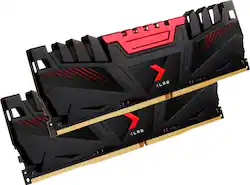
PNY - EXTREME PERFORMANCE XLR8 16GB (2PK 8GB) 2666MHz DDR4 C16 DIMM Desktop Memory - Black/Red
- Key Specs
- Type of Memory (RAM): DDR4
- Form Factor: Desktop (The type of computer the memory is configured to fit in.)
- Speed: 2666 megahertz
- Latency: 16-18-18-35 (Refers to the amount of time between the moment a memory request is initiated and the moment the request is retrieved by a processor, commonly written as a series of 4 numbers, or timings. Each timing measures the performance of the module according to a specific parameter. Generally, the lower the numbers, the faster the RAM can respond to requests.)
- CAS Latency: 16 (Column Address Strobe (CAS) Latency refers to the number of clock cycles (for synchronous DRAM) or nanoseconds (for asynchronous DRAM) between the moment an instruction or command is initiated and the moment the data result is available. Generally, the lower the numbers, the better.)
- Lighting Type: None
- Memory Capacity (per Module): 8 gigabytes (Refers to the maximum amount of data that can be stored on the memory module.)
- Memory Capacity (Total): 16 gigabytes (Refers to the maximum total amount of data that can be stored on all included memory modules.)
- General
- Product Name: EXTREME PERFORMANCE XLR8 16GB (2PK 8GB) 2666MHz DDR4 C16 DIMM Desktop Memory
- Brand: PNY
- Memory Capacity (per Module): 8 gigabytes (Refers to the maximum amount of data that can be stored on the memory module.)
- Number Of Modules: 2
- Memory Capacity (Total): 16 gigabytes (Refers to the maximum total amount of data that can be stored on all included memory modules.)
- Model Number: MD16GK2D4266616XR
- Color: Black/Red
- Compatibility
- Type of Memory (RAM): DDR4
- Pin Configuration: 288
- Memory Format: DIMM (Memory module size that determines what size device the memory stick will fit.)
- Form Factor: Desktop (The type of computer the memory is configured to fit in.)
- Operating System Compatibility: Windows
- Speed
- Memory Speed Rating: PC4-21300 (The RAM's bandwidth rating. The numbers refer to generation and transfer speed and are typically separated with a hyphen. For example, PC3-12800 would indicate that the module is 3rd generation and has a theoretical bandwidth of 12,800 megabytes per second (MBs). The higher the second number, the faster the speed.)
- Speed: 2666 megahertz
- Latency: 16-18-18-35 (Refers to the amount of time between the moment a memory request is initiated and the moment the request is retrieved by a processor, commonly written as a series of 4 numbers, or timings. Each timing measures the performance of the module according to a specific parameter. Generally, the lower the numbers, the faster the RAM can respond to requests.)
- CAS Latency: 16 (Column Address Strobe (CAS) Latency refers to the number of clock cycles (for synchronous DRAM) or nanoseconds (for asynchronous DRAM) between the moment an instruction or command is initiated and the moment the data result is available. Generally, the lower the numbers, the better.)
- Features
- Buffered or Registered: Unbuffered (Registered (buffered) memory modules are classified by the addition of a register between the memory controller and DRAM modules. When compared to conventional unbuffered (unregistered) memory, this type provides more stability with less electrical load on the controller, making it a common choice for use in robust applications, such as servers.)
- Data Integrity Check: Non-ECC (Error-correcting code (ECC) memory helps to maintain data integrity within a computer system, protecting it from potential crashes as well as losses or changes to data due to undetected errors. Systems that use ECC have an additional chip on the RAM that acts as the error check.)
- Memory Channels: Dual (Multi-channel memory increases the rate of data transfer between the DRAM memory and memory controller by adding more channels of communication. The more channels, the more memory bandwidth.)
- Lighting Type: None
- Fan Included: false
- Power
- Voltage: 1.2 volts (Amount of power needed to support an electrical current.)
- Other
- UPC: 751492626666
Upgrade system performance with this 16GB PNY desktop memory set. The two 8GB RAM sticks support dual channel mode for increased memory bandwidth. DDR4 technology offers reduced power consumption and fast data transfer rates for improved performance. This 2666MHz PNY desktop memory set has a black-and-red design for easy identification.
- Kit of two 8GB DDR4 SDRAM memory modules: For 16GB total memory.
- 288-pin DIMM: For capable system operation. DIMM is dual in-line memory module.
- Up to 2666MHz operating speed: For excellent multitasking capability.
- XLR8 heatspreaders: Keep memory cool for efficient operation.
Whats Included
- PNY XLR8 16GB (2PK 8GB) 2.666GHz PC4-21300 DDR4 DIMM Unbuffered Non-ECC Desktop Memory Kit
Product Manuals
Q: Would this work with a hp 15 laptop pc???
A: Nope, you'll need SO-DIMM RAM. I recommend downloading CPU-Z to find out what brand and speed your RAM is.
Q: Will this work with the HP Pavilion desktop model TG01-0023w?
A: Works in mine
Q: will this memory work in a dell tower with service tag 3L2SWR1 and service code 7804844749
A: hey i would search your computer model number find out what mother board it has then search what pin and format it has like 288pin ddr4,ddr3 and so on and so forth
Q: Do these work well with Dell Optiplex 5050 tower..?
A: If it's a full sized, probably. If it's the smaller desk unit, probably not .I installed in a 7xxx and I was only able to get a single stick installed .hard drive and CD ROM carrier was too large to allow two sticks to fit.
Q: Can I install this memory modules on iMac 27"?
A: No, this has too many pins. You need 260 pin RAM for the iMac.
A: Jason, I am not at "Geek" level. But, I will pass on the best guidance I gathered when I upgraded my Dell, Alienware Aurora9. Check all you can about your PCs mother board, regarding memory! There are so many "mhz" speeds, associated with memory density. For example; 1866, 2133, 2400, 2666, etc. I have also learned two important things.... even if you wind up replacing the existing RAM sticks, use each available physical memory slots. I was told that it is like a highway. Your memory performance is traveling down a "four lane highway, Vs a two lane or single lane highway. So whatever memory you can afford, divided the number by 4, if you have 4 slots. You must match your memory sticks, by manufacturer, and MHZ! There is minimum and maximum speed, regarding your mother board. Do not mix and match, even if other specs match. Visit YouTube to gather info. Finally, if you can, educate yourself on your PC, mother board, min/max RAM speed and MHZ, pick the set...then ask a Best Buy Geek Squad agent to "confirm" your item selection. You will have solid information on this aspect of upgrading your system. Good luck. On YouTube, check out; "How to REALLY check RAM Speed in Windows 10", the tech explains this topic pretty well. Bernie
Q: Will this work in an Asus Maximus Vlll motherboard? Thanks
A: undefined




















