A:AnswerHello,
I'm very sorry to hear that you cannot connect your 522GW to your MyNextbase Connect mobile app. The app has minimum compatibility requirements of Bluetooth 4.2, Android 6 or above and iOS 13 or above. Please ensure your phone meets these requirements.
If you still have any further issues, please contact the Nextbase Support Team at [email protected] and they can help get you up and running.
A:AnswerHello,
Yes, the 322GW and 622GW are fully inter-compatible. The same cabling, mount, rear camera and Nextbase SD card can be used between both cameras.
A:AnswerHello,
The 622GW will record at 4K, even with a rear camera. This will be 4K @30 FPS front camera and 1080 @ 30FPS rear camera.
If Image Stabilisation or Extreme Weather are being used, then this will lower the resolution to 1440P @30 FPS front camera & 1080P@ 60 FPS rear camera.
A:AnswerHi Tom, great question. While our 622GW does not have this capability our new iQ camera, releasing this fall, will have this capability. Let us know if you have any other questions at [email protected]. Thanks!
A:AnswerHello,
Thank you for your email, when Parking Mode is enabled, the Dashcam shuts down after 5 minutes of inactivity and goes into standby mode.
If the Dash Cam detects vibration, it wakes up and records a protected file for 30 seconds and then records normally for 5 minutes as long as nothing has happened will go back into standby mode.
Whilst in standby mode it will not draw power from your car battery.
I hope this helps
If we can be of any further assistance, please contact us on [email protected]
A:AnswerHello JL,
The camera will record continuously in small segments (1,2, or 3 minutes). It will record these segments consecutively until the SD card is full. Then the oldest piece of footage will be deleted and the newest will be saved in it's place. This will continue looping and is called Continuous Overwriting. The Dash Cam does this automatically to allow for more footage to be recorded and the old, unnecessary footage to be deleted without manual intervention.
However Protected Files are not overwritten in the same way as normal files. If you do not format regularly, these files can build up and reduce the capacity of storage available for normal footage. It is essential to format every two weeks to delete any protected files and clear the card ready for continued usage.
You can format the card on the dashcam by:
1) On the Dash Cam:
a) Turn on the Dash Cam
b) Stop it recording
c) Open Settings
d) Go into Setup
e) Click 'Format'
f) Follow the instructions.
Please be aware that formatting the SD card will delete all the data on the card, so if you wish to keep any footage, please copy this across to a computer before you start the formatting process.
A:AnswerI had my dash cam installed at best buy the 622gw the one issue we have had is freezing when left in the car in hot weather which is a major pain
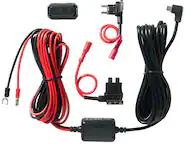
A:AnswerHello, our dash cams are designed to be powered using the provided 12V cigarette lighter cable, or a Nextbase hard wire kit.There's two different type of fuses in a vehicle- switch live fuses and permanently live fuses.
A Switch Live Fuse provides power to the ports only when the car's ignition is turned on. When the car is switched off, the ports will also be turned off and the camera will not receive power.
A Permanently Live Fuse will provide power to the ports at all times, whether the car's ignition is on, or off. You'll be able to identify this as the camera will be permanently on.
The Hard Wire Kit will allow the camera to draw nominal current from the car's battery, preventing the cam's battery from being drained. The Hard Wire Kit has an in-built voltage cut off which protects the car's battery from being drained below 11.2V.
If you want to use Parking Mode, we'd recommend using a Permanent Live fuse position, and then enabling Parking Mode on the camera.
Parking Mode will turn the camera off when there's no movement in the car (e.g. parked), and prevent the camera from unnecessarily using your car's battery power.
A:AnswerHello,
You need to enable Parking Mode on the 622GW. For Parking Mode, if the camera is completely still for five minutes (the car is parked), then the camera will 'hibernate' in Parking Mode. If your car is bumped and the G Force sensor registers movement then the dash cam will automatically turn on, record for 30 seconds and then shut back down again. If you are unlucky enough to be hit twice in a row then the dash cam would automatically record again and capture both events.
Here's some more information about Parking Mode:
https://www.nextbase.com/en-gb/dash-cam-features/parking-mode/
You can enable Parking Mode by:
1) Turn the Dash Cam on
2) Stop it recording (by pressing the red circle)
3) Go into Settings (the button in the top left)
4) Go into Setup settings
5) Scroll across to ‘Parking Mode’
6) Enable Parking Mode here
If you intend on using Parking Mode on your camera, then we'd recommend using a Hard Wire Kit on a permanently live fuse. The Hard Wire Kit has an in-built voltage cut off which protects the car's battery from being drained below 11.2V. If you are currently on a switch live fuse, then the camera will only receive power when the car is turned on.
If you need any further advice for your 622GW, please contact our Support Team at [email protected].
A:AnswerHello,
The 622GW has an internal Lithium Polymer battery and not a supercapacitor.
The Dashcam should be recording whenever the vehicle is turned on, however you can ask Alexa to stop/start a recording when in the car. Alexa will not be able to connect to the Dashcam if you are away from the Dashcam.
If you need any further help, please contact [email protected].
A:AnswerHello Bilgin,
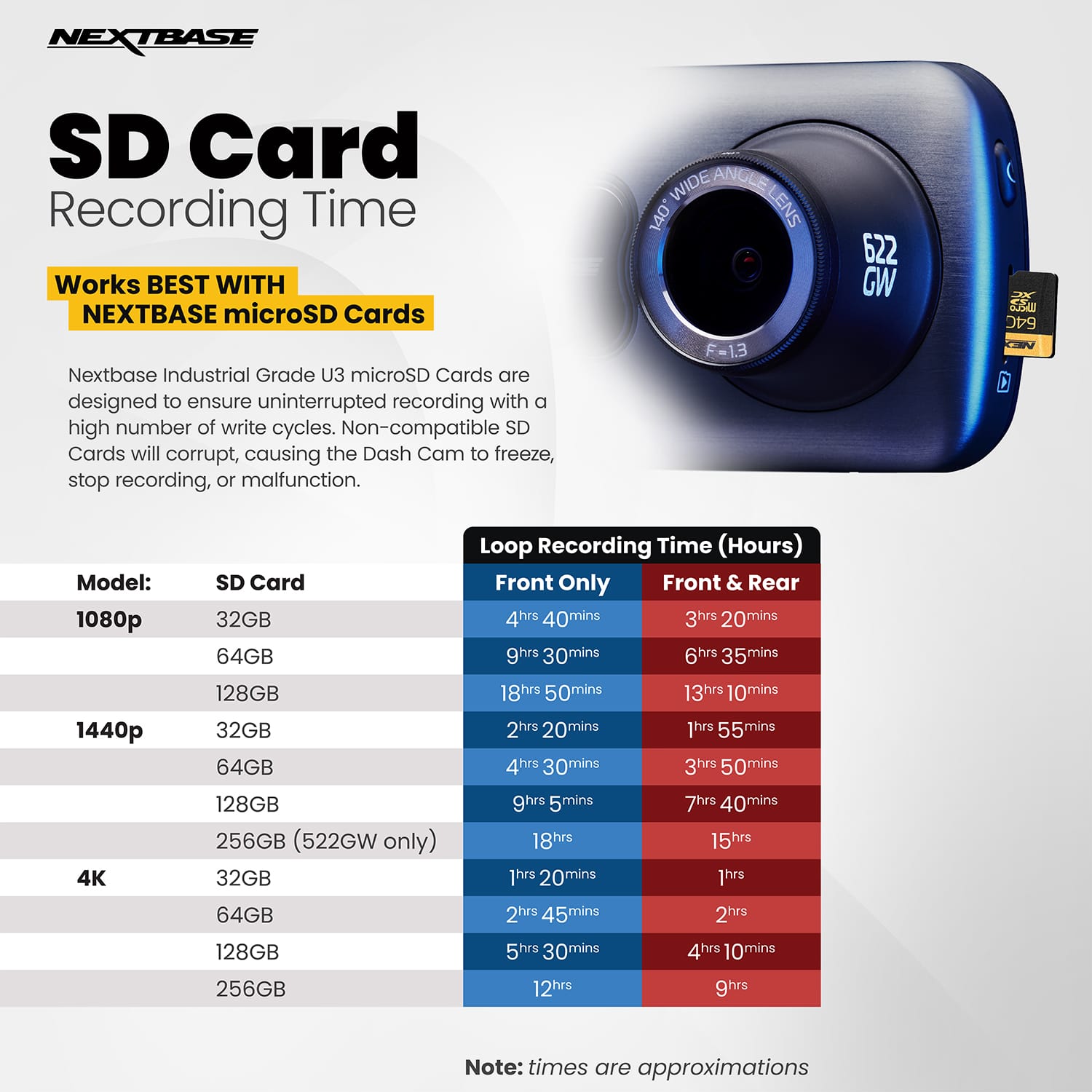
The maximum capacity of SD card that can be used in the 622GW is a 256GB Nextbase U3 SD card. If a third party card is being used, then the maximum recommend capacity is 128GB.
If you need any further assistance, please contact [email protected].
A:AnswerHello,
Our cameras are designed by our Nextbase engineers in England and Wales, and then manufactured in our factory in China.
If you have any further questions about our design and manufacturing process, please feel free to contact our Support Team at [email protected], or on Live Chat on our website nextbase.com.