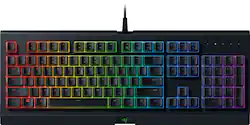
Razer - Cynosa Chroma Full Size Wired Membrane Gaming Keyboard with Chroma RGB Backlighting - Black
- Key Specs
- Lighting Type: RGB
- Form Factor: Full-size (The size, arrangement, and physical configuration of the product.)
- Keyboard Technology: Membrane (Type of technology that detects a key press.)
- Connection Type: Wired
- General
- Product Name: Cynosa Chroma Full Size Wired Membrane Gaming Keyboard with Chroma RGB Backlighting
- Brand: Razer
- Model Number: RZ03-02260200-R3U1
- Color: Black
- Features
- Lighting Type: RGB
- Customizable Lighting: true
- Numeric Keypad: true
- Touchpad: false
- Keyboard Type: Gaming, Programmable
- Palm Rest: false
- Spill Resistant: true (Designed to resist some degree of accidental liquid spill. The level of spill-resistance is indicated by the product manufacturer, but the degree of protection may not be guaranteed after normal wear of the product.)
- Keyboard Features: Soft cushioned keys with gaming-grade performance, 104 individually customizable backlit keys, Spill-resistant durable design, 10 key roll-over with anti-ghosting, Individually backlit key powered by Razer Chroma™
- Foldable: false
- Keycap Material: ABS
- Functions
- Form Factor: Full-size (The size, arrangement, and physical configuration of the product.)
- Number Of Keys: 104
- Keyboard Technology: Membrane (Type of technology that detects a key press.)
- Dedicated Macro Keys: false (Perform shortcuts of key sequences to carry out commands with a single key. Key sequences may include key strokes, mouse actions, and/or menu actions.)
- Adjustable Tilt Function: true
- Rollover: 10-key (Refers to the number of keys that can be correctly registered when pressed simultaneously. Rollover may be referred to as n-key rollover (KRO) or anti-ghosting.)
- Multimedia Keys: false
- Internet Keys: false
- Connectivity
- Connection Type: Wired
- Wired Connectivity: USB Type C
- Cable Length: 6 feet
- Detachable Cable: false
- Number Of USB Port(s): 1 (The total number of USB ports including all generations and versions.)
- Compatibility
- Operating System Compatibility: Windows, Mac, Linux
- Plug and Play Operation: true
- Dimensions
- Product Height: 1.3 inches (The out of box height of the item. Height is measured as the vertical distance from the bottom of the item to the top as it would be primarily used or placed.)
- Product Width: 18 inches (The out of box width of the item. Width is measured as the horizontal distance from one side of the item to the other as it would be primarily used or placed.)
- Product Weight: 2.09 ounces (The out of box weight of the item.)
- Mouse
- Mouse Included: false
- Other
- UPC: 814855024636
Use this Razer gaming keyboard to navigate your favorite games with precision. The soft cushioned keys offer a comfortable typing experience, and it lets you program individual keys and assign macros for quicker, more confident keystrokes. This Razer gaming keyboard has customizable backlit RGB lighting for playing in darker environments.
- Powered by Razer Chroma: The Razer Cynosa Chroma features individually programmable backlit keys with 16.8 million color options, all easily set through Razer Synapse.
- Cable connection: Offers stable and convenient USB connection to your PC, makes the keyboard perfect when traveling.
- Soft cushioned gaming-grade keys: Provide comfort with better housing support compared to rubber dome keyboards, so every keypress is solid.
- Anti-ghosting with 10-key rollover: Helps your commands and simultaneous keystrokes register the way you intended.
- Fully programmable keys with on-the-fly macro recording: Provide additional comfort during gaming sessions.
- Spill-resistant durable design: For every fist-pumping victorious moment, there's a chance of accidental water spillage on your keyboard. But thanks to the Razer Cynosa Chroma's resistance to spill, you can game with confidence, minus the damage.
- Windows and Mac compatible: For use with your existing computer.
Whats Included
- Cynosa Chroma Wired Gaming Membrane Keyboard with RGB Chroma Backlighting
- Owner's Manual
A: Yes I actually just got it for my ps4
Q: How do you change the colors and turn the lights off?
A: You have to install Razer synapse 3 to personalize the colors and light style of your keyboard. Also you can turn the brightness of the lights all the way down by holding the “fn” key and pressing “F11” to decrease the light, even to the point of no lights at all. “F12” to make the lights brighter while holding “fn”.
Q: is the "clicking" of the keys quiet or loud?
A: There is literally no sound from these keys, there are no mechanical switches on this keyboard. Anyone saying there is a sound does not use this model and likely owns an Ornata, which has membranes with "clickers" in them to feel mechanical.
Q: What does the usb mean isn’t it only 1 plug???
A: Yes, there is only one plug and it's a USB plug that goes in a USB port for example with a phone charger with a detachable block the part that the cord plugs into on the block is the usb port and the part on the not charging end of the cord is the usb plug, all computers and laptops have USB ports
Q: Can you use this gaming keyboard for a Xbox one
A: Yes, for certain games that allow playback on a keyboard, it works plug n play. Fortnite is a recent example of a game that supports the keyboard now.
A: Yes, this works for my Xbox so it should work for his ps4. As long as there is a USB it should work
Q: can you use this to play games for playstation
A: Only if the game supports mouse and keyboard input.
Q: Does it have a headphone jack
A: No this keyboard does not have any input jacks.




















