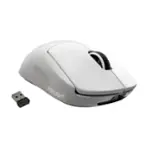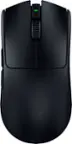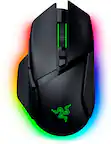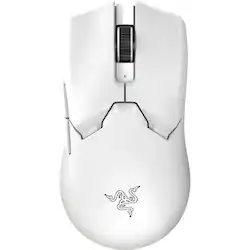
Razer - Viper V2 Pro Lightweight Optical Gaming Mouse with 80 Hour Battery Life - Wireless - White
- Key Specs
- Lighting Type: None
- Maximum Sensitivity: 30000 dots per inch (Mouse sensitivity is measured in dots per inch (DPI). The higher the DPI, the more sensitive the mouse is and may be more useful for high-density pixel screens. Lower DPI typically means more precision and accuracy in mouse movement.)
- Number of Buttons (Total): 5
- Connection Type: Wireless
- General
- Brand: Razer
- Model Number: RZ01-04390200-R3U1
- Product Name: Viper V2 Pro Lightweight Optical Gaming Mouse with 80 Hour Battery Life
- Color: White
- System Requirements: Apple MacOS, Microsoft Windows (The software that a product must have for it to be able to integrate with another product.)
- Features
- Mouse Type: Gaming
- Lighting Type: None
- Maximum Number of Memory Profiles: 1
- Performance
- Mouse Operation: Button(s), Scroll wheel
- Mouse Grip Style: Claw grip, Fingertip grip (In comparison to many palm and claw grips, ergonomic grip mice are designed for a specific handedness and put the hand and wrist in a position to promote comfort. Customizable grips feature buttons/keys that can be configured to perform specific actions and may also have customizable calibration and sensitivity settings.)
- Handedness: Right-handed
- Tracking Method: Optical (There are several types of computer mice, optical and laser being among the most common. Optical mice detect less detail and provide more precise and accurate movement. Laser mice detect more detail and can be used on a wider variety of surfaces, but are more sensitive to small movements.)
- Maximum Sensitivity: 30000 dots per inch (Mouse sensitivity is measured in dots per inch (DPI). The higher the DPI, the more sensitive the mouse is and may be more useful for high-density pixel screens. Lower DPI typically means more precision and accuracy in mouse movement.)
- Number of Buttons (Total): 5
- Number of Thumb Buttons: 2
- Number of Programmable Buttons: 5
- Designed for Game Genre: FPS, MOBA, RPG, RTS, FPS
- Adjustable Weight: false
- Connectivity
- Connection Type: Wireless
- Wireless Connectivity: Bluetooth, Radio Frequency (RF) (The manner in which a device sends data to another device over a short distance without the use of wires or cables.)
- Maximum Wireless Range: 10 feet
- Operating System Compatibility: Windows, Mac
- Plug and Play Operation: true
- Number of Devices Connectable Simultaneously: 1
- Power
- Mouse Power Source: Battery-powered
- On/Off Switch: true
- Rechargeable Battery (Mouse): true
- Wireless Charging: true
- Charging Interface(s): USB-A (The connection for transmitting power to charge the device.)
- Included
- Mouse Pad Included: false
- Dimensions
- Product Height: 1.49 inches (The out of box height of the item. Height is measured as the vertical distance from the bottom of the item to the top as it would be primarily used or placed.)
- Product Length: 4.98 inches (The out of box length of the item. Length is measured as the longest dimension of the item.)
- Product Width: 2.6 inches (The out of box width of the item. Width is measured as the horizontal distance from one side of the item to the other as it would be primarily used or placed.)
- Product Weight: 59 grams (The out of box weight of the item.)
- Warranty
- Warranty - Parts: 2 years
- Warranty - Labor: 2 years
- Other
- UPC: 840272901526
Esports has a new apex predator. As successor to the award-winning Razer Viper Ultimate, our latest evolution is nearly 22% lighter and armed with all-round upgrades for enhanced performance. With one of the lightest wireless gaming mice ever, there’s now nothing holding you back.
- 59g Ultra-lightweight Design: Nearly 22% lighter than the Razer Viper Ultimate, enjoy a level of speed and control favored by the world’s top esports pros with one of the lightest esports mice ever created.
- Razer Focus Pro 30K Optical Sensor: Razer’s brand-new sensor provides flawless tracking performance on a wider variety of surfaces including glass—supported by intelligent functions for enhanced aim and control.
- Razer Optical Mouse Switches Gen-3: From an improved 90-million click lifecycle with zero double-clicking issues, to a blistering 0.2ms actuation with no debounce delay, the mouse has the reliability and speed built for esports.
- Razer HyperSpeed Wireless: With a connection 25% faster than any other wireless tech available, enjoy high-performance, low-latency competitive play that remains smooth and stable even in noisy wireless environments.
- Up to 80 Hours of Battery Life: Our ultra-lightweight esports mouse can run for up to 80 continuous hours thanks to its improved wireless power efficiency.
- On-mouse DPI Controls: Capable of toggling between 5 DPI stages without the need for software, you’ll always be ready to compete anywhere with this highly portable, ultra-lightweight esports mouse.
- 59g Ultra-lightweight Design: Nearly 22% lighter than the Razer Viper Ultimate, enjoy a level of speed and control favored by the world’s top esports pros with one of the lightest esports mice ever created.
- Razer Focus Pro 30K Optical Sensor: Razer’s brand-new sensor provides flawless tracking performance on a wider variety of surfaces including glass—supported by intelligent functions for enhanced aim and control.
- Razer Optical Mouse Switches Gen-3: From an improved 90-million click lifecycle with zero double-clicking issues, to a blistering 0.2ms actuation with no debounce delay, the mouse has the reliability and speed built for esports.
- Razer HyperSpeed Wireless: With a connection 25% faster than any other wireless tech available, enjoy high-performance, low-latency competitive play that remains smooth and stable even in noisy wireless environments.
- Up to 80 Hours of Battery Life: Our ultra-lightweight esports mouse can run for up to 80 continuous hours thanks to its improved wireless power efficiency.
- On-mouse DPI Controls: Capable of toggling between 5 DPI stages without the need for software, you’ll always be ready to compete anywhere with this highly portable, ultra-lightweight esports mouse.
Whats Included
- Viper V2 Pro
- Grip Tape
- USB Dongle/USB Dongle Adapter
- USB-A to USB-C Speedflex Cable
- Product Manual
- Viper V2 Pro
- Grip Tape
- USB Dongle/USB Dongle Adapter
- USB-A to USB-C Speedflex Cable
- Product Manual
Q: Can it be used with xbox series x/s
A: yes it can, i use it with my xbox series x
Q: Can it be used with ps4/ps5
A: Yes. However, some of the Razer Viper V2 Pro features might not work with the said consoles.
Q: Does this mouse integrate well with macbook m3 pro
A: It doesn’t matter what device you use whether it’s a mac, dell, asus, desktops, etc. the mouse will work fine.
A: yes
Q: Can this mouse have 2,000Hz Polling Rate?
A: If you get the 4k dongle sold seperately on razer's website you can
Q: Does it work with xbox one s or x
A: it works wirelessly and/or wired with Xbox Series X/S. Been using it for months between PC and Xbox just by moving the dongle.
Q: does it come with the dock that the ultimate has?
A: No, it does not come with the dock the Razer Viper Ultimate has. As in order to cut weight they removed that from the mouse. It now uses a flexible USB-C cable to charge.
Q: What kind of USB cable does it use for charging?
A: It charges via a USB-C connection and plugs into your PC with the standard USB.