Customer Ratings & Reviews









- Model:
- ADO951800F207
- SKU:
- 6517208
to a friend
Customers are saying
Customers consistently note the ease of use and intuitive interface of Photoshop Elements 2023, making it accessible for both beginners and experienced photo editors. Many appreciate the powerful photo editing tools and the addition of new features in each version, while also praising its affordability compared to other software options. The software's performance is also highlighted as a positive aspect, with users reporting smooth operation and quick processing times.
This summary was generated by AI based on customer reviews.
- Pros mentioned:Features
Always count on Adobe!
||Posted . Owned for 1 week when reviewed.This reviewer received promo considerations or sweepstakes entry for writing a review.I ordered Adobe Photoshop Elements 2023. Its an upgraded edition to my 2021 version. It arrived promptly. Each new edition has more and more features. Highly recommend!
I would recommend this to a friend - Pros mentioned:Ease of use
Photoshop Delivers
||Posted . Owned for 2 weeks when reviewed.This reviewer received promo considerations or sweepstakes entry for writing a review.I use photoshop for creating cards, business cards, and editing photos. I always get compliments on the professional results with Photoshop.
I would recommend this to a friend - Pros mentioned:Interface, Price

Fun & Creativity Ahead with PSE 2023
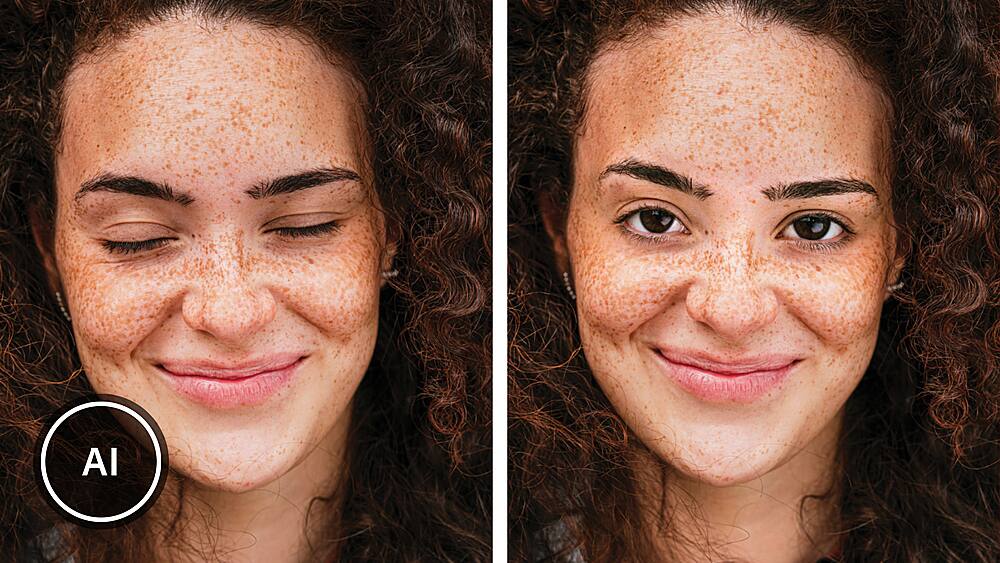
|Posted .This reviewer received promo considerations or sweepstakes entry for writing a review.Do you enjoy taking pictures with a digital camera or smartphone AND if would you like to revisit and manipulate existing digital photos? Then Adobe Photoshop Elements 2023 (Mac) is must-have software that is immediately downloadable upon purchase. Use the software to help get the most out of creative inspiration by adding elements, correcting a variety of image flaws and overall improving on the original, while retaining the original photo. PSE is the little sibling of the legendary, industry standard and industry leading Adobe Photoshop software. Though this is often described as Photoshop Lite, it is hardly that. Instead, its deep toolbox and friendly interface lower the intimidation factor to such a degree that users, myself included, can feel free to experiment creatively. An improvement over the 2022 version, and it is frequently sale priced. In other words, it represents value as well as performance, and who doesn’t like both of these? First, PSE 2023 takes advantage of MacOS and hardware improvements, including support for Apple’s M1 chip. I can see the difference immediately on a new MacBook Pro. PSE is so quick! For those who have PSE 2022, this might not be worth the upgrade, but think again. I think the new features and interface improvements make the upgrade advisable. Even if hardware is not new, so long as it can use the latest MacOS, currently Ventura, then performance will be better than with older MacOS versions. Note that the more RAM, the merrier. No software works as well with minimal RAM as with more. If you have PSE 2022, 2023 adds an improved interface to that excellent program that is also easier to use. Now it is possible to add motion to photos with Adobe Sensei Ai. The visuals are stunning when creating motion where there is none, and you can even decide the direction of the motion. Create collages and use slideshow templates. There are new Web and mobile companion apps, again, adding value. Use the Guided Edits OR wing it, but please start with Guided Edits, which include 61, yes, up to 61 steps! Within those Guided Edits are all sorts of adjustments and effects from which to choose. Go deep, that is, use the Guide to create the illusion of depth by layering in nature in the form of grass, leaves and flowers, and more. And then, resize and replace backgrounds to create a work of art from what might have been ordinary in the original photo. You know how background elements can otherwise ruin a photo? With PSE 2023, use its power to remove those distracting elements, including power lines, other people, clouds, plants and so much more. This feature was the most fun. I looked back over many, many photos that were throw aways. And then, presto, with the annoying backgrounds or people excised, the photos took on a positive aspect and became keepers. Impressive. As with anything, practice makes perfect or, in this case, practice makes you want to do more, explore more and explore the possibilities. Turn that frown upside down, fix closed eyes by opening them, correct skin tones or ever to slightly adjust a face’s position or tilt. Add text and textures, blurs for artistic effect and, it cannot be overemphasized, SO MUCH MORE. I am almost afraid to add to the above because readers might become intimidated. It is exactly the opposite, to restate what is above. Look at it two ways. On the one hand, the extensive guidance will assure success and add a level of confidence. On the other hand, feel free to free-form it and explore without the hand-holding. Either way, you can’t lose. Adobe has committed to updates throughout the year, so there will be more, better features and enhancements. With access to the finished product on a Mac as well as on a mobile phone, sharing could not be sweeter.¬¬ I appreciate all the personalization built into the application. Upon opening, users are jump-started with a small screen and a search window asking, “What would you like to do today?” At the bottom is a link to, “View All,” that opens to reveal more than 25 thought starters under the heading of Auto Creations. OR, instead, choose from approximately 74 suggestions. The 74-ish suggestions are options that include things that are part of integration within Photoshop Premiere Elements, an app that seamlessly includes video editing,, Adobe’s lightweight version of the full-blown Premiere app. Those links and suggestions are, in my view, misplaced and can introduce confusion. Adobe offers a combination app that includes both PSE and PS Premiere Elements. For those interested in both, check out the combo packae, also available for digital download from Best Buy. Over the past few days with this application, I have barely scratched the surface of the fun that is to come. The bottom line is this – Adobe Photoshop Elements 2023 for Mac (and also for Windows) is more than could be expected for its bargain price and will keep users engaged, satisfied and coming back for more. HIGHLY RECOMMENDED!
I would recommend this to a friend - Pros mentioned:Ease of use, Features
Powerful but Confusing
|Posted .This reviewer received promo considerations or sweepstakes entry for writing a review.I had not used Photoshop Elements in years, but was looking for some additional tools for creating creative prints. I take a lot of photos, both with a DSLR and phone, and am no stranger to editing photos. Specifically, I use Adobe's own Lightroom and am a big fan of that software. It's intuitive, modern, and has some truly great features. Getting your photos in and out of Lightroom is easy as can be whether I'm on my Mac or iPad. I know and understand that Photoshop is a different animal, but my expectation of Photoshop Elements based on past experience was that it was the lighter version of that software geared towards folks who want to make their photos look good, add some light fx/text/graphics/frames/etc. to them and be able to share those photos or make prints with minimal fuss. Well, in this regard I'm not sure Adobe has succeeded with this version of Elements. Take a look at the screenshots I attached because it's the start of the problems in my opinion. Photoshop Elements actually installs - as not one - but *three* different applications on your computer. Yep, three. There's Elements, Elements Editor, and Elements Organizer. Why is this necessary?? Who enjoys having their software divided this way? I don't get it at all. The best I can tell there's actually very little you can do in the Elements application itself. Most of what you bought the software for is in the Editor app. All the tools, filters, adjustments, etc. are in there. Granted, yes you can just open the Editor app and get to work. But then why isn't that one just called Elements? It's kind of baffling. It seems like the Elements app is there to have quick links to tutorials but here again I'd point Adobe to look at their own product line and see how much better they incorporate tutorials into Lightroom. It's so much more elegant. And speaking of elegant, sorry but this software does not look like it was made in 2023. The best looking thing about Elements is the icon. That's it. The rest seems like it was designed for an older version of Windows with zero regard given to modern Mac UI language. This is further frustrated by the fact that resizing the active window has proven buggy and unresponsive at times. Sometimes the app opens as if I have a 27" monitor instead of a 14" laptop. I can only see a quarter of the window and the rest is off-screen. So, all of that is just kind of disappointing and that's a shame because the features here are indeed useful and effective. I like the stylistic choices that are easily accessed, such as turning a single image into four panels, or using filters in the style of artists and paintings. That's not anything particularly new, but here you can choose to apply those filters to either the subject, the background, or both. And it works really, really well at defining and isolating the subject in these instances. The healing brushes are great for getting rid of dust and blemishes. You can create layers and add text. There's a slew of things you can do with this software and I'm just scratching the surface. Unfortunately, all these tools are still marred by simple curious decisions such as not including a "revert to original" button in all areas of the editing selections. Yes, you can use a keyboard shortcut but the button is there when selecting "artistic" fx options and not when in the "classic" fx tab. Why? The two tabs are literally right beside each other. One tab has the button, one doesn't. Go figure. Just one more example of some head scratching design and usability choices from a company that has far better products.
No, I would not recommend this to a friend - Pros mentioned:Ease of use
Easy to Use, Powerful Photo Editing Software
|Posted .This reviewer received promo considerations or sweepstakes entry for writing a review.Adobe Photoshop Elements is an easy-to-use photo editing software that will WOW you with it's extensive capabilities. Every year, Adobe reintroduces this product with features that elevate it to an even higher level than the previous year. This newly released 2023 edition is no exception. Rather than the all-too-common bloatware, Photoshop Elements 2023 improved the software, yet reduced the size by 30%, allowing it to load faster & take up less space on your computer. Designed to support the Apple M1 chip, this software performs 45% faster on Mac computers. One of my favorite capabilities is the ability to remove power lines, unwanted people & objects with the swipe of a brush. You click on the subject of your photo, then modify or replace the background with ease. Numerous guided edits simplify the editing process even further. However, you can choose to manually edit, if you prefer. CONCLUSION: Adobe Photoshop Elements 2023 sits firmly at the top of the editing software heap - not an easy accomplishment, by any means. It is affordably priced & is loaded with features, earning my highest recommendation.
I would recommend this to a friend - Pros mentioned:Ease of use
Easy way to clean up/tweak your photos!
|Posted .This reviewer received promo considerations or sweepstakes entry for writing a review.Photoshop elements is great software for a beginner or intermediate photo enthusiast who does not want to get deep into photo editing or the steep learning curve or cost associated with other photo editing software. I would consider myself techy, and I love to get good shots with my drone. Photoshop elements helps me take my drone shots to the next level, without taking much time. Using the “quick” mode, I’m able to make my photos “pop” within a few minutes. Keep in mind, my edits are obviously not professional, but if you have a better eye for photography, you could really have amazing results within a short amount of time. The quick mode is great, just going through each setting, and seeing the changes. I use the view drop down to show “before & after” (vertical/horizontal according to the picture I’m working on) I don’t use the “smart fix” option, I like to go through each side menu at a time. Usually I don’t mess with color, but the exposure and lighting options make a big difference. You toss in some sharpening and you can make a bland photo look great!
I would recommend this to a friend Great software for learning how to edit photos
|Posted .This reviewer received promo considerations or sweepstakes entry for writing a review.I’ll start my review by mentioning that I’m a long time “amateur” photographer. I’ve owned several cameras in my lifetime and way back in like 2006/2007 I used to use photoshop quite often. Not sure what version it was but I had learned quite a bit by chatting with people online about how to use it. Anyway, fast forward to 2022. I hadn’t used photoshop in years. I forgot how to use photoshop and even though there’s a plethora of information on the internet now and countless tutorials on YouTube on how to use various software. You still need to make time and research what exactly you wanna learn. This was my first try with photoshop elements and It didn’t take me long time find my way around the software. It gives you separate tabs and categories on types of edits which make it quick and easy. There is also a “pro” mode for those of you who want to edit a photo without using presets. I do find many of the presets to be kind of tacky and unreal looking. So having the ability to edit a photo and just tweak the exposure and contrast is nice. I didn’t find myself editing photos too often lately because it is so time consuming. I got into the habit of just pointing and clicking. “Probably my iPhones fault”. But I’m being honest when I say that playing around with photoshop elements this past few days has sparked my interest and creativity in photography again. I used to love to sit and edit photos, it was fun finding out new tricks with photoshop. So this version of elements kind of made photo editing fun for me again. My favorite function so far has to be the object removal feature. It is so smart and easy to use. I’ll share a photo below of a photo I used it with. There is so much stuff to do with the software that it would probably take me all night to mention it all. Would I recommend it? Im going to say yes. Especially if you are just starting to learn photoshop and would like to upgrade to full photoshop later. This is a great way to learn and get started. It has so many useful features as well as a organizer / gallery for going back and forth between edits.
I would recommend this to a friend- Pros mentioned:Photo editing
Great photo tool
|Posted .This reviewer received promo considerations or sweepstakes entry for writing a review.I recently installed the Adobe Photoshop Elements 2023 which was just released. I have had older versions on other PCs, but the Adobe Photoshop Elements 2023 has so much more to offer. After install in the program and launching it, Photoshop Elements goes through your library of pictures and locates duplicates and gives you the opportunity to combine and keep the better copy of each duplicate found. Within the application, you have a home or landing page that provides you with different tools for creating projects, organizing your photos and videos and an edit tool for photos and videos. Once you import your photos and videos, Photoshop organizes the photos and videos by date found on the photos meta data and allows you to fine tune or correct dates. When the Organizer tool is selected you have several different ways to organize your photos and videos. Under the Media selection, all your photos and videos are displayed in a grid from oldest to newest date. If you select a picture the program displays the date the picture was created, when it was imported and the source of the imported photo. When choosing the People selection, all faces are display from your media and once you start to name the faces on your pictures, Photoshop starts to recognize the people from other pictures and asks you to confirm the names. This is a great tool to identify who is in each photo. It works so well that it started to identify faces in pictures within a picture. There are two other selections, Places and Events that allow you to organize your pictures by location or types of events. These are great tools to group your photos by special occasions such as weddings, birthday parties, etc. The Photo and Video editor provide you with the ability to clean up pictures and videos which may need some form of correction. The home page provides tons of tools for projects and sharing on social media. I have been using Adobe Photoshop Elements 2023 for a couple of weeks and have been discovering new things daily. This is a great tool for anyone challenged by their person media library!
I would recommend this to a friend - Pros mentioned:Ease of use
Good photo editing
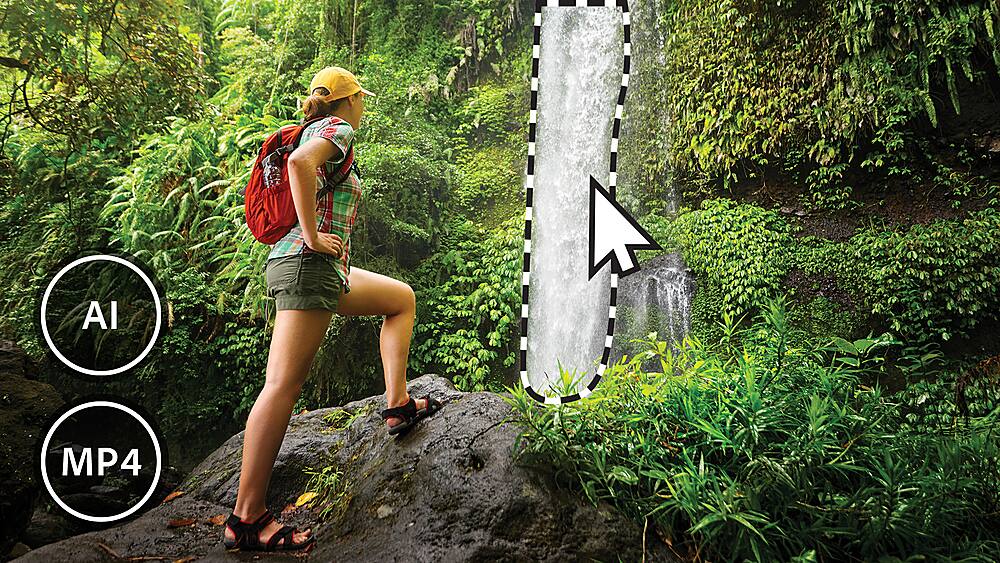
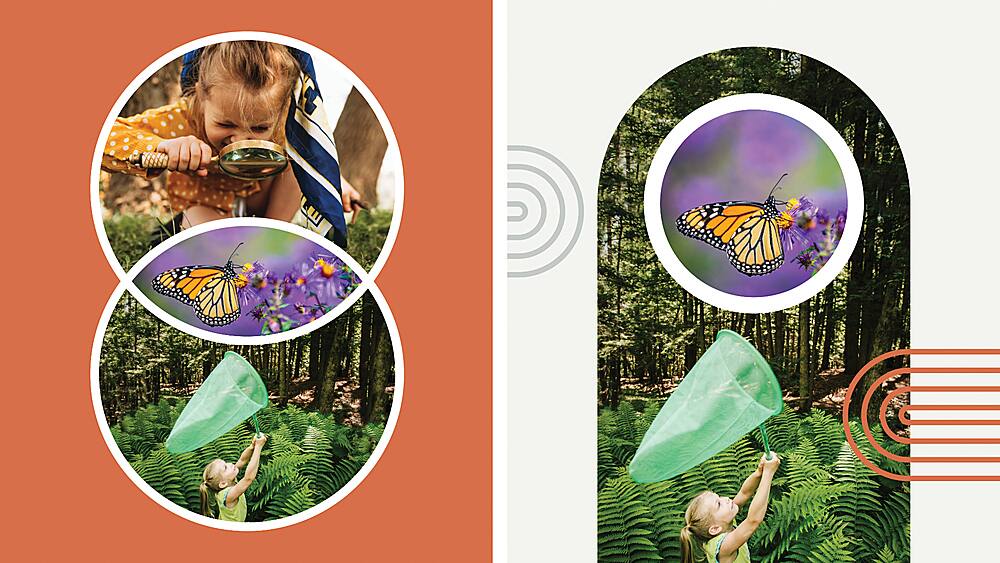
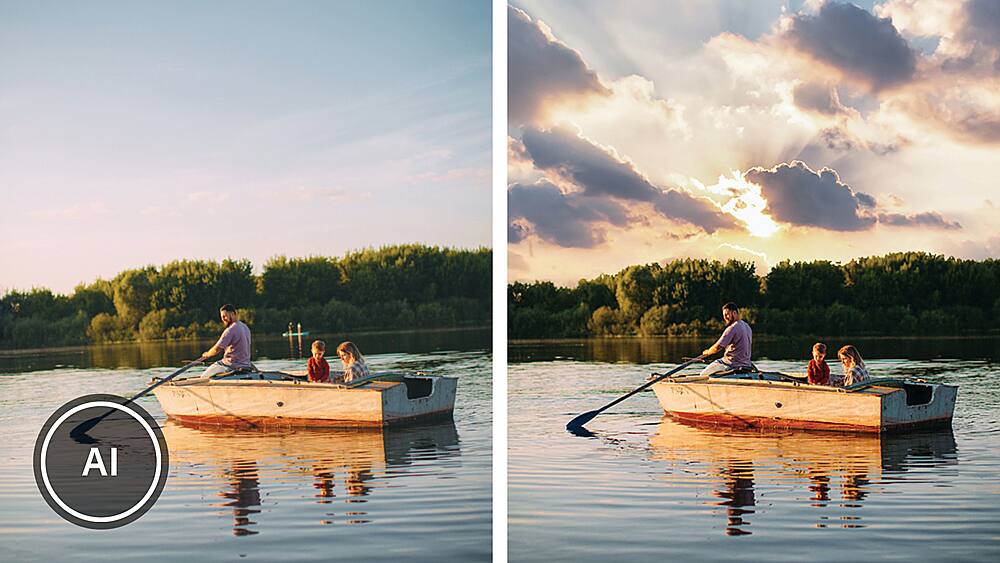
|Posted .This reviewer received promo considerations or sweepstakes entry for writing a review.It has been over 15 years since I used dedicated editing software, and I am glad I have now started editing photos again using Adobe Photoshop Element. I don’t need high-end photo editing, so this product works perfectly. I use it at work and for some school projects. It is straightforward to use, and you can learn more by watching online videos that teach how to use its editing tools/features. My favorite holiday season editing is the Guided edits, the “Peak Through Overlay,” in which one can add an illusion of depth of feel with a peak through the overlay. Some of the overlays in the program that can be added to two or more corners of your images are leaves, flowers, branches with snow, Christmas tree branches with covered snow, fall leaves, and string light. I edited one of my sample photos with fall leaves overlays on top corners, added a blur, and applied a vignette. A fun editing Guide is the “Pattern Effect,” which allows patterns to be added to images, such as hearts, stars, sparkles, swirls, leaves, clouds, clouds, and dog footprint clip art. A nice feature that I like is the moving elements, which allow the ability to do some animation in images. With just a few clicks, one selects an area to add motion, e.g., sky, background, or manual selection, the program does a good job selecting an area, but you might want to add some missed ones by refining the selection add or subtract. Lastly, you click and drag the cursor on the image to specify the desired direction of the motion. If you selected the sky/ cloud as the animation, the effect would be moving clouds. If you like the result, export the image as an MP4 video. Photoshop Element is excellent if you want a fast and easy editing program with many options. The program runs well and loads images reasonably fast. Overall, I am satisfied with this new editing software.
I would recommend this to a friend Well-rounded photo editor, new features, and bugs.
|Posted .This reviewer received promo considerations or sweepstakes entry for writing a review.Photoshop Elements has been a staple for users who are overwhelmed by the full Adobe Photoshop program, and after the introduction of Creative Cloud and the dreaded subscription model, for anyone who doesn't need all of the features and wants to pay ONCE for the software. Summary at the end (TLDR;) If you have never used Photoshop Elements before, don't let it intimidate you. If you are a trained Photoshop user that uses the program on an occasional basis and don't need it for professional work, this may be a better option for you. I have been using Photoshop (along with Illustrator, InDesign, and Dreamweaver) for years, and I like Photoshop Elements because it reduces a lot of the clutter but still has a lot of powerful tools at its disposal. If you are new to this application, you will like the way from the very start, you are presented with three different modes you can work in (at the top of the screen) - Quick, Guided, and Expert, and it will guide you to where you need to be depending on what you want to do. Expert is for the Photoshop users who still need access to layers, adjustment layers, and the toolbar. Quick is good place to start if you are new. It will present you with some various photo fixes on the right side. Even if you don't know what some of these adjustments are, each option has a few presets that you can hover (you don't even have to click) to see the effect on your photo. The left toolbar includes a few simple tools such as a text tool to type on top of your photo, fix red eye, whiten teeth, and crop your photo. The Guided mode will do much of the same, but has more adjustments, both "serious" and "fun" that you can make, and it will walk you through these step-by-step in the right panel. This is where you can do things like remove elements from your photo, such as a light pole or other people from your beach pic. There are a couple of new features introduced in this version of Photoshop Elements, most notably the Peak-Through Overlays and adding motion to part of your photo. Peak-Through Overlays lets you add elements, mostly nature such as leaves on a branch or flowers, on top of your photo to make it look like these elements are in the camera frame and closer than the subject of your photo, allowing you to "peak through" them at your subject. During a particularly warm week in my area this autumn, we had a good downpour, and as the rain pulled away, we had an incredible rainbow as I was driving around. Grabbed a couple of photos of this and used the peak-through feature to add the "autumn" look to my photo. The feature that allows you to add motion to your images is also new, and although a little gimmicky, might be fun to play with and create video backgrounds with it. Note that I said video backgrounds. The output of photos that you add motion to is an MP4 file, not a GIF (which supports animation), so you would have to take a step further in another application to turn this into an animated photo. This feature is in the Guided edits and walks you through the process of selecting the region to add motion to, and then click-and-drag an arrow to provide the direction of movement you want. Unfortunately, you cannot see this motion until you export it, so making finite adjustments is time consuming. This latest edition of Photoshop Elements seems to have a few bugs that will hopefully get worked out in future updates. I am running this program on Windows 10 with a Ryzen 7 processor and 16 GB of memory, plenty enough for this software. Like many of the previous version, when you first launch Photoshop Elements, it brings up a type of "start" screen with a search feature asking "What would you like to do today?". You can also click on some of the suggested projects, or simply click on what software you would like to launch - the Organizer (a photo and media organizer tool), Photo Editor, or Video Editor. This will appear regardless of which of these applications you have installed, although the organizer gets installed automatically. This is where I ran into a bug - when I clicked on Photo Editor, it loaded a bit off of my screen, with no title bar or any way of trying to re-center it on my monitor. It also did not spill into my second monitor, so this was definitely not just an issue of centering it on a single display. I had to right-click on the icon and close it out and try again. The only way I found I could get it to consistently open the application properly was to right-click on an existing file, select "Open With", and then select Photoshop Elements. After that, it would display properly on my monitor. After doing this, it was hit or miss as to whether I could open the application through the icon on my desktop and have it display correctly. I also had a couple of issues adding motion to a photo, where one time it crashed, and another time it seemed to hang. I rebooted the computer just in case, and was successful after that, although it was slow to render the MP4 file. As mentioned, these are bugs likely to get worked out in future updates, but definitely not a completely smooth experience on the first few uses. TLDR; Photoshop Elements is a happy medium between a very-easy-to-use photo editor for those with less experience, and a reasonable amount of tools for a more experienced user without the high cost of Photoshop CC, and it is NOT a subscription. If you have one of the last 2 versions of Photoshop Elements, this version offers a couple of new features, but unless one of these is enticing to you, you can probably stay with your current version. If you have a version of Photoshop Elements more than 2 versions back, this version will improve on the features you already have, along with adding a few new ones.
I would recommend this to a friend- Pros mentioned:Ease of use
So Much Fun To Create With, And Easy To Use.!
|Posted .This reviewer received promo considerations or sweepstakes entry for writing a review.While Photoshop Elements is not the same as Photoshop as Elements is said to be designed for beginners and non professionals, Its loaded with features I think even professionals can use and love. It has the same great features of previous versions of Photoshop Elements for great general use and photo editing and enhancement as well as some really cool new features, at least new to Photoshop Elements, but you may have experienced some of them on your phone. Adding motion to areas of a photo and converting it to a GIF or MP4 is a nice function when sharing photos online with a little dazzle and pizazz! Make that stream flow or a waterfall move and delight those you share them with. Various overlay frames can be used to create depth to you images and you can even blur what is desired or use a vignette feature along with it. Many new templates, backgrounds, collage and slideshow features add even more creativity for your photograph projects. It is very user friendly and you will grasp the basics very easily and the rest will come along to you with practice and experimentation. Have fun and create away with Adobe Photoshop Elements.
I would recommend this to a friend great software
|Posted .This reviewer received promo considerations or sweepstakes entry for writing a review.Photoshop Elements is the baby brother to Adobe Photoshop. Photoshop is considered a professional photographer's software. Photoshop elements is for the non-professional who wants to make great photos even better. The versions of the past don't have many of the great features available with this version, such as the motion feature, peek through overlays and also the object removal. There are three editing levels; quick, guided and expert. Quick will step you through all possible options listed on the right of the workspace. Guided will add a few more options. Expert includes layering that experienced photoshop users will know well as well as the toolbar. Guided has some great examples of all its options in the guided section. All are organized by type. Basics, color, black and white, fun edits, Special edits, and photomerge. It was fun to step through these and play. I'll need to dig up some old photos for the old photo restore option. There's still so many features to explore but it will be fun to work through them all.
I would recommend this to a friendGreat balance of features for the price
|Posted .This reviewer received promo considerations or sweepstakes entry for writing a review.Years ago, anyone who was interested in photography or design who wanted to do anything on the computer with it had to invest a lot of money in a full version of Photoshop or a similarly expensive program. It’s a one-for-most type of program, but was expensive and overwhelming for many who didn’t need every feature. They created a slimmed down version in time called “Photoshop Elements”, but the first versions of it were VERY slim on features, and didn’t have enough of the things many people wanted. Over time, Adobe turned full Photoshop into a monthly subscription, but also began to evolve Elements as well. Today, it’s much more feature rich than older versions. Each year, Elements is updated, and they are generally incremental updates, so (in my opinion) it’s not necessary to update yearly. But you can still buy this program outright, and since it goes on sale regularly, it’s affordable. Many hobbyists all the way to semi-pros and beyond have found that the newest versions of Elements has everything they need. After downloading and installing, you are presented with a welcome screen when you first activate the program. You can see tips on how to use it, and open Elements or Premier Elements (for video editing) if you also have that program. Elements opens in a novice “Guided” screen at first, which has some very basic adjustment tools as well as guided lessons to achieve a number of effects and adjustments. A good start for those new to the program. There is also an “Expert” mode you can flip to, with a greater variety of tools on the side so you can do a lot more like adjust tons of lighting and color levels, make selections and work with layers, and literally dozens of other adjustments, drawing tools, and more, including the ability to work with “RAW” (uncompressed) files from many cameras and phones for more advanced users. New to the 2023 version of the program, you have newly added collage templates for photo slideshows and collages. You can select a part of a photo and animate it (such as making water appear to flow, or a cloud to move, etc). Add elements to a photo to give greater depth. New companion apps are being added for mobile devices and web browsers, along with the usual yearly fixes if there are any bugs, and speed enhancements. All seem to work well – the element adding to the depth you need to tweak around as it can look a bit cheesy right out of the box on-screen, but with tweaking they look better. Animation won’t fool anyone into thinking it’s a video, but if done correctly and not overdone, can look neat. Overall, not a ton of added features over last year, but enough to keep the program updated. Photoshop Elements is a great program overall, and without breaking your budget, gives a wide range of people from novices to experienced users tools to do just about whatever they need to for photo and illustration needs. I use this now over the full version and it’s fine for my needs, and I do highly recommend it to many (especially again, if you look for sales!). Thumbs-up!
I would recommend this to a friend- Pros mentioned:Ease of use, Features
Great photo editor
||Posted . Owned for 6 months when reviewed.This reviewer received promo considerations or sweepstakes entry for writing a review.I've been using Photoshop Elements for over a decade. Amazing how each addition adds new features that make editing you photos a breaze. From the guided options to fully on pro like editing you always get great results. Great value for those not needing the full blown Adobe Photoshop.
I would recommend this to a friend - Pros mentioned:Ease of use, Features
New Version Worth the Upgrade
||Posted . Owned for 1 week when reviewed.This reviewer received promo considerations or sweepstakes entry for writing a review.Upgraded from 2015. Many new features. Lots of help for special features in the Guided tab. The quick tab is the one I use the most. Makes editing photos fast and easy. Happy I decided to upgrade. Highly recommend
I would recommend this to a friend Photo Elements 2023
||Posted . Owned for 3 weeks when reviewed.This reviewer received promo considerations or sweepstakes entry for writing a review.I purchased Photoshop Elements 2023 as a replacement for an old version of Adobe Lightroom 4. Elements 2023 has several key advantages: photo files are easier to access, there are abundant editing options, and file sizes are easier to manipulate. The downsides are that the auto-editing function for some photos is unsatisfactory, it can be difficult to adjust the horizon to level a photo, and removing bad spots from photos is cumbersome. All in all, I would recommend the product for standard or somewhat advanced photo editing.
I would recommend this to a friend- Pros mentioned:Ease of use
Good program
||Posted . Owned for 1 week when reviewed.This reviewer received promo considerations or sweepstakes entry for writing a review.I have been happy with all the Photoshop Elements, I was currently using 2020 and thought I would upgrade to 2023, was hoping to get a disc, but when you open the package, you realize you have to download it, a few steps to get it on the computer and get a serial number, but was able to get it on my desktop and laptop, so I am good. Been using it a lot to work with some school photos I shot and it seems to work well. A lot easier than photoshop, and does what I need it to do.
I would recommend this to a friend - Pros mentioned:Ease of use
Great new features
||Posted . Owned for 1 week when reviewed.This reviewer received promo considerations or sweepstakes entry for writing a review.Super easy to use and install, I'm glad they still offer Photoshop elements separate from the monthly subscription model.
I would recommend this to a friend - Pros mentioned:Interface, Photo editing
Upgrade from earlier versions
||Posted . Owned for 1 week when reviewed.This reviewer received promo considerations or sweepstakes entry for writing a review.Upgrading from Elements 15. Very similar interface which makes learning the new software easier, but more editing tools and affects available.
I would recommend this to a friend Photoshop Elemenst 2023
||Posted .This reviewer received promo considerations or sweepstakes entry for writing a review.photoshop and its reputation is pretty well known. Elements in particular is easy to use, and when in "expert" mode you can do most everything you need. My one problem is it won't auto save, and I've done hours of work, then PS crashes (it does crash on occasion) and I've lost all those hours of work and have to start over. You have to remember to keep saving manually.
I would recommend this to a friend