Customer Ratings & Reviews









- Model:
- ADO951800F207
- SKU:
- 6517208
to a friend
Customers are saying
Customers consistently note the ease of use and intuitive interface of Photoshop Elements 2023, making it accessible for both beginners and experienced photo editors. Many appreciate the powerful photo editing tools and the addition of new features in each version, while also praising its affordability compared to other software options. The software's performance is also highlighted as a positive aspect, with users reporting smooth operation and quick processing times.
This summary was generated by AI based on customer reviews.
Nothing yet
||Posted . Owned for 3 weeks when reviewed.This reviewer received promo considerations or sweepstakes entry for writing a review.so far Adobe seems to be blocking my attempts at installing this software.
No, I would not recommend this to a friend- Pros mentioned:Features, Photo editing

Solid update, but you may not need it
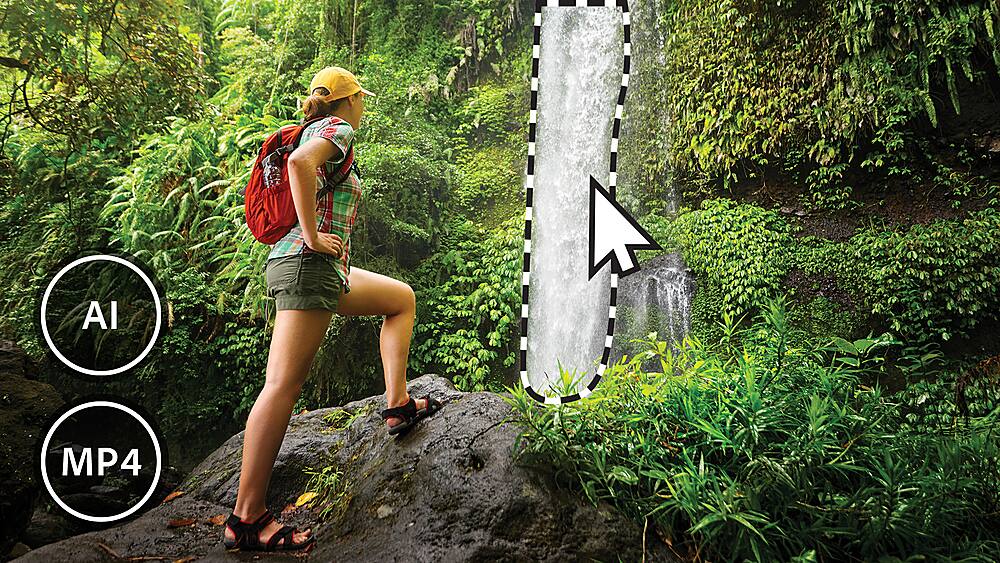
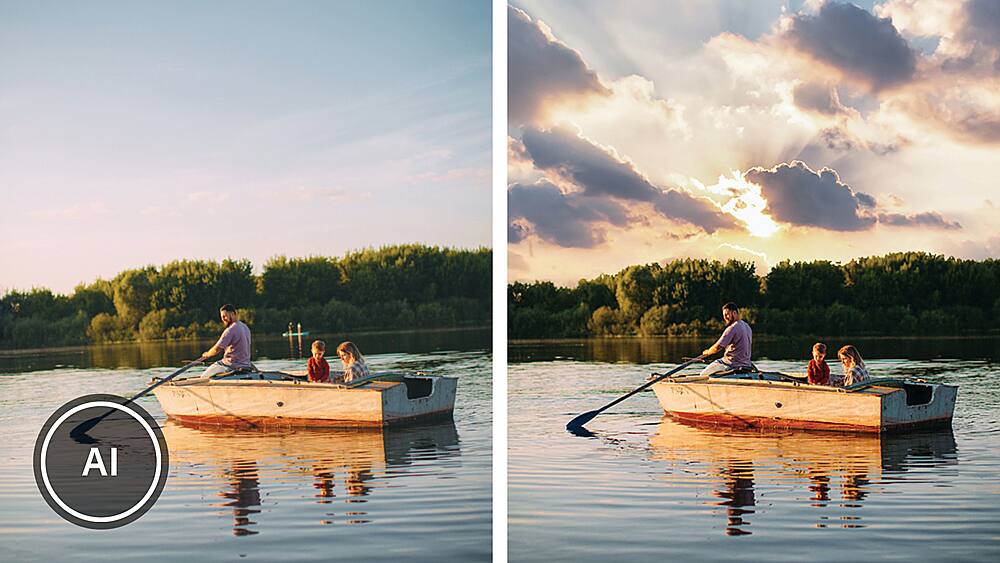
|Posted .This reviewer received promo considerations or sweepstakes entry for writing a review.Adobe has updated its Photoshop Elements software for 2023, and I decided to get this version. Like the yearly updates on other software packages, there aren’t always a lot of new additions each year, and thus I usually skip some of the upgrades, and maybe get the new version every other year. I think I must not have been thinking about that when I picked up the new 2023 version, as I’m currently using the 2022 version. So, this review will focus mainly on the differences between those versions. For those of you thinking about upgrading from the 2022 version, I hope this will be helpful. For those purchasing for the first time, your decision will be harder, since you have to compare Adobe’s offering to those from other companies, such as Luminar or Zoner Photo Studio or Paintshop Pro. Photoshop Elements is aimed at photo hobbyists, those of us who need to make a few changes to our photos to make them look better, while Adobe targets more advanced photographers with their full Photoshop package or the online tools in their Creative Commons subscription suite. I’m not a fan of the subscription model, so I’m very happy that Adobe still offers Elements for a one-time reasonable purchase price. Photoshop Elements includes much of what you’ll find in the full Photoshop package, but at a much better price point and without a subscription. Whether you need the higher-end features is what you must determine. Photoshop Elements 2023 retains the same look and feel as its predecessor. The main things added for this year’s version are: • Add motion to pictures – this allows you to make part of your photo, such as ocean waves or a waterfall, look like it’s moving. The effect is pretty good, and this is a fun effect. This one is fun to put in an electronic photo frame that can handle video. • Peek through overlay – adds a somewhat realistic foreground object, creating the illusion of depth. This is a pretty impressive and easy tool, but don’t expect particularly realistic results. If you’re shooting for something that could have actually been in the shot, you’ll find that the options are limited. Instead, I think this is more useful as a way to put a “frame” around your photo. • Guided edit search – this is a deceptively useful tool. Suppose you’re not sure what guided edit you want, but you know you don’t want to do it manually. The new search tool allows you to use key words to find the one you want out of the 61 guided edits that are available. In my usage of this new tool, it often brought up several possible options, which caused me to try things out I might not have otherwise tried. This is a great way to learn more about the power of Elements. In my opinion, this may be the best new feature this year, as it helps you discover ways to apply an edit that you may not have thought of on your own. I’m moving to shooting most of my shots in RAW, and this part of the program appears to be unchanged. The Camera Raw plugin lets you make some preliminary edits, but the heavy lifting is done in the Photoshope Elements editor. Elements has come a long way in allowing amateurs like me to make pretty sophisticated edits without a lot of work. That’s one of the things that I really like about Photoshop Elements: you can use powerful tools to make quick and easy (and impressive) changes, but you still have a full suite of very powerful, professional level editing tools at your disposal. This allows you to be in charge of how deep you want to go. I love that this is left up to the user, and not decided for you by software developers. Of course, you can’t do everything that the full Photoshop can do, but there is an awful lot that is available. The new features are nice, but not compelling for those who are using the 2022 version. Unless you specifically need one of the new features, I think you can safely wait to see what the next version brings. For those who are diving into photo editing for the first time, you really can’t go wrong with Photoshop Elements, but it’s worth taking a look at the competition. My experience with other tools is that they offer similar feature sets, but usually try to rope you into a subscription if you want to do anything of a more advanced nature. Other tools may offer easier ways to do the most common edits, but there is a wealth of helpful information available for Photoshop, since it’s been around so long and has become the de facto standard. In conclusion, I’m glad I picked up this version, and I’m enjoying the new features, but I don’t think I would have been too much worse off to have waited until next year. If you’re new to photo editing and willing to put in some effort, you’ll be happy with Photoshop Elements and the results you can get. If you have a recent version of Elements, you’ll need to weigh the value of the new features. Happy shooting!
I would recommend this to a friend Filters might not transfer
||Posted . Owned for 3 weeks when reviewed.This reviewer received promo considerations or sweepstakes entry for writing a review.Lots of new stuff but none of my older awesome paid for filters were able to transfer over to this new version. Buyer beware! Mostly same features and the new ones, well just wish some weren't so cartoon like.
No, I would not recommend this to a friendAdobe Photoshop
||Posted . Owned for 2 weeks when reviewed.This reviewer received promo considerations or sweepstakes entry for writing a review.The program is not as easy as it said a bit time consuming
I would recommend this to a friendGreat
||Posted . Owned for 1 week when reviewed.This reviewer received promo considerations or sweepstakes entry for writing a review.A great updated version of an old standard. A great find!
I would recommend this to a friendNot sure how to proceed
||Posted . Owned for 3 weeks when reviewed.This reviewer received promo considerations or sweepstakes entry for writing a review.I can’t say that it works because the salesperson didn’t really know what they were selling me. Turns out it’s not compatible with my computer and I spent $100 on a piece of paper.
No, I would not recommend this to a friendGood deal
||Posted . Owned for 2 weeks when reviewed.This reviewer received promo considerations or sweepstakes entry for writing a review.The product seems nice. I’m not really familiar with this kind of stuff. I bought it for my son who is a techie. I like the fact that it seems to be no subscription required for this version.
I would recommend this to a friend- Pros mentioned:Ease of use, Interface
Powerful photo editing tools made affordable, easy
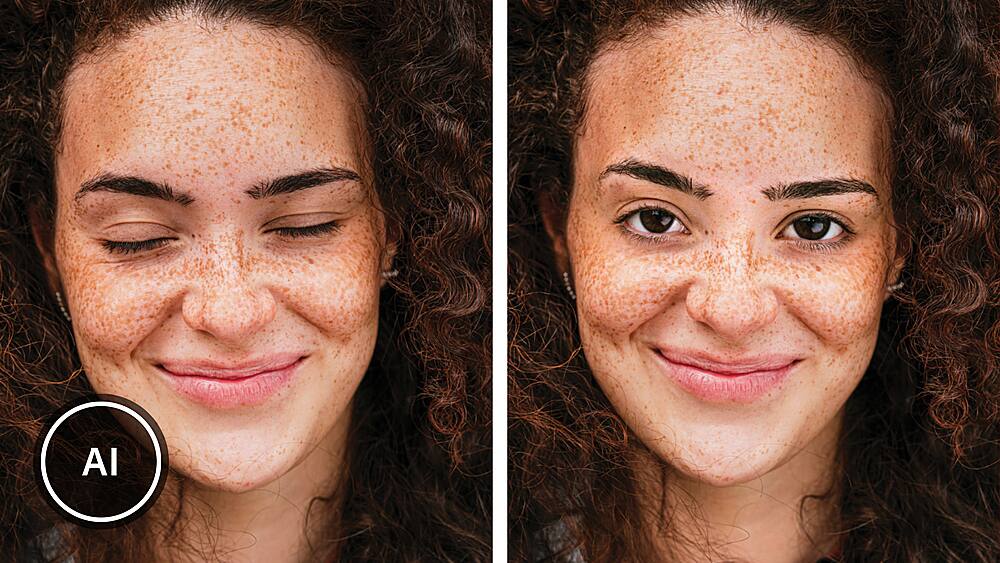
|Posted .This reviewer received promo considerations or sweepstakes entry for writing a review.Adobe Photoshop i(and here, Photoshop Elements, the lite version) is long the gold standard in photo editing tools. Admittedly, some of the basic functions of this class of tools have become available in low cost phone/tablet apps, or even in the tools bundled with those devices. Still, there are things only photoshop can do or do well. Adobe Photoshop Elements 2023 brings you most of the tools you’d want as a casual user from the full Photoshop. Even users of the full Photoshop Creative Cloud app (this includes me) may find this a nice alternative interface to accomplish select tasks in less time. Whereas the full (non-express) app expects you to know what you’re doing, this app can walk you through complicated edits in an easy way. When you open it you are presented with three “tabs” (depending on which one is selected, the displayed interface and options change): “Quick”, “Guided”, and “Expert”. “Expert” is closest to the regular photoshop experience, but can be more complicated to figure out if you’re new. “Quick” (the default view) gives easy options like “Smart Fix” (which makes adjustment to color and brightness/contrast automatically), and other options to adjust each of those manually. Quick mode also lets you insert text. The quick selection tools (used to select areas to limit edits) will smartly select objects based on object borders (For example, by dragging down a picture of our house which has a curved front walk, I was able to select the whole front walk and just the front walk. The eye tool is there is correct problems with eyes in photo (including pet eyes), I used this in an earlier version to fix a Christmas card where the dogs eyes were blank in original photo). There is a teeth whitening option for quick edit may be obvious what it does by name. The straightening quick tool lets you draw a line and it straightens out the picture to match that line (fixes crooked photos). The healing tool is used to remove imperfections from photos. The crop tool will let you reduce the image to just a portion (rectangle) of the original full image. "Guided" has a large number of walk-through easy edit that accomplish difficult things. Examples include: Object removal, Correct Skin Tone, Saturated Film Effect, Various Black and White effects, DuoTone Effects, Old Fashioned Photo edits, Partial Sketch, Puzzle Effect, Frame Creator, Scratches & Blemish correction, Replace Background, And Photomerges where you take objects from one photo and insert in another.
I would recommend this to a friend Adobe print shop
||Posted . Owned for 6 months when reviewed.This reviewer received promo considerations or sweepstakes entry for writing a review.This was kinda confusing to install I still haven’t used it. Purchased almost a year ago.
No, I would not recommend this to a friendNot what i wanted.
||Posted . Owned for less than 1 week when reviewed.This reviewer received promo considerations or sweepstakes entry for writing a review.Not what i was hoping for... just wanted aprogram to touch up photos.. to complex
No, I would not recommend this to a friendLook forward to mastering this program.
||Posted . Owned for 1 week when reviewed.This reviewer received promo considerations or sweepstakes entry for writing a review.Haven't had time to learn about everything this program can do but look forward to mastering it but like the basics like cropping a picture.
I would recommend this to a friendNo way!
||Posted . Owned for 1 week when reviewed.This reviewer received promo considerations or sweepstakes entry for writing a review.Missing some "elements" Don't waste your money!!!!
No, I would not recommend this to a friendExcellent option for editting
||Posted . Owned for 3 weeks when reviewed.This reviewer received promo considerations or sweepstakes entry for writing a review.Practice is proving this is a terrific option for editting and creating new images.
I would recommend this to a friendGreat!
||Posted . Owned for 1 week when reviewed.This reviewer received promo considerations or sweepstakes entry for writing a review.Sooo happy I got this during the Black Friday sale! Great software!
I would recommend this to a frienddont but
||Posted . Owned for 10 months when reviewed.This reviewer received promo considerations or sweepstakes entry for writing a review.Dont recommend worthless just buy the full adobe you cant do crap with just this waste of money.
No, I would not recommend this to a friendThe best of Photoshop and Lightroom Combined
|Posted .This reviewer received promo considerations or sweepstakes entry for writing a review.Back when I was doing web and graphic design, I could get lost in Photoshop for hours. It’s amazing what you can do; I once spent the better part of a day wrapping a penguin in a Hawaiian shirt for a self-promo piece! When I got into digital photography as a hobby, I discovered Lightroom as a great way of both organizing my images and doing routine post processing tasks like adjusting color balance, and contrast. If I had to do any heavy lifting, I could always open Photoshop again. But as I got away from images as a business and moved more towards photography as a part time hobby, this combo seemed a little overkill for the kinds of work I was commonly doing. I got less and less interested in it and kind of shelved it for a while. Elements could change that for me. It’s a great blend of the most useful features of Lightroom and the editing power of Photoshop all in one package. The download and installation went smoothly, and I was able to access the Organizer immediately. (Using the Editor required online activation, but that was also straightforward.) I was greeted with a nice welcome screen that felt well thought out, especially for new users. It offered tutorials and resources along with guided initial steps to get started. Importing my files into Organizer was easy and fast. Unfortunately, my older Canon RAW files were not imported which I found disappointing. (But rejections were explained in the dialog, at least!) I soon realized that I had to manually install support for RAW files via Add-On utilities. I guess RAW files aren’t as popular a format, so Adobe doesn’t add it in as a default. However, once I installed RAW support and Organizer restarted, any missed RAW files were immediately found and offered for import. Organizer can be set to watch folders and add any new files to the index so when you do your next camera transfer, everything will be waiting for you when you next open Organizer. Organizer will look familiar to anyone who has spent time with Lightroom and is a great way to catalog, sort – and most importantly, FIND all your image assets. You can add tags and captions and perform actions on multiple images at a time. The menu structure is simple and cleanly laid out so even if you’ve never used Lightroom, you’ll easily find your way around. It’s also easy to move from looking at an image in Organizer to editing in the Editor. Besides the routine image editing controls you’d expect (image size and cropping, formatting, color and lighting adjustments, etc.), Elements Editor includes some of the more useful Photoshop tools like advanced eraser and selection tools. You can even add some PS Plugins to the mix if you have them! But unlike Photoshop, Elements Editor adds guided methods to apply effects and edits to help you accomplish your tasks as well as Adobe Sensei AI technology to make it all easy. There are 61 different guided effects available and some of them are downright mind blowing. I added motion to an old pic I took of a waterfall and had it looking like it was really flowing in a matter of minutes. The other thing that I found impressive is that Elements will also automatically apply effects to photos that it thinks would work well based on the image. It presents these to you on the welcome screen as sort of a slideshow (which, by the way, is yet another thing you can do easily with Elements!) and you can choose if you want to apply those effects or not. The original image is never altered unless you save it to the same file name. I must admit that I really had fun reviewing this and it brought back a lot of great memories seeing pics I hadn’t looked at in years. After editing/enhancing a few of them, I ended uploading them to my digital picture frame so I could enjoy them. I think the Elements package is a great tool for anyone with any interest in organizing and enhancing images they’ve collected over the years and would highly recommend it to new users as well as people familiar with Lightroom and Photoshop like myself. A great value to get two powerful tools in one package!
I would recommend this to a friendDo your research
||Posted . Owned for 3 weeks when reviewed.This reviewer received promo considerations or sweepstakes entry for writing a review.I don’t like it and wish I had not bought it. It’s totally amateurish.
No, I would not recommend this to a friend- Pros mentioned:Interface
Great upgrade for Photoshop
|Posted .This reviewer received promo considerations or sweepstakes entry for writing a review.I have been using Adobe Photoshop Elements for the past 2 years now and have been extremely impressed with each new iteration. I do not consider myself to be a read "die hard photoshop expert" but greatly appreciate each new addition and improvement. From what I've noticed, Adobe Photoshop Elements 2023 edition focuses on the growing Social Media content creator with new guided edit tours, adding motion to stills, and automated selection tools. Many of the edit options revolve and creating photos that are meant for the multiple social media platforms out there. I enjoy the tutorials on how to help simple edits on your pictures (very much like the app-based ones on your smart phone) but with the whole photoshop arsenal available for you. Seeing it on a much wider screen is also very helpful to see more detail and precision for edits (using my Surface Pro 7 is better compared to using the photoshop on my iPhone). Like all the previous Elements I've used, the interface is divided into three sections: Quick, Guided and Expert. Quick features an adjustments panel that use simple fixes like color, sharpen, etc. Guided allows users to make more detailed edits to your photos with step-by-step tutorials. Expert is still the traditional Photoshop experience using layers features and others. I have watched several tutorials online to see how to use the Expert mode, and I am getting a grasp of it and you do get to do more with Expert once you know and understand how layers and masks work. The Guided section is the bread and butter of Elements 2023. I enjoy doing the .gif feature a lot, and creating my photos to look like revered painter schemes/colors/strokes (such as Monet, etc). Although the interface look hasn't changed much, the smaller changes and upgrades of Adobe Photoshop 2023 are great to have. If you are either an expert or newbie to Photohop, this is the best tool to have to expand and build on your creative side.
I would recommend this to a friend - Pros mentioned:Ease of use, Photo editing
Easy to Use Photo Editor and Project Creator
|Posted .This reviewer received promo considerations or sweepstakes entry for writing a review.Adobe Photoshop Elements is an advanced photo editor that you can use to manipulate your pictures in many ways. You can always resort to using the “auto” feature and typically you will be happy with the result but, there is so much more you can do with the tools within the application. Initially when you open the software for the first time it does a nice job of suggesting things to try. When using it, you quickly get the hang of it. It is very intuitive and easy to use. You can cut figures out and paste them into other pictures, move things around on your pictures to make things look closer together, less messy, etc. Other suggestions from basic color enhancements to more advanced filtering such as black and white, transforming something into what looks like a drawing and various other types of filters. The next part of the package is the Elements Organizer. This is where you import your media to have it all in one place for you to open items, manipulate them and save your creations for easy discovery when you are ready to reopen or otherwise work on your media. There are buttons on top that help you organize the files, sort by people, places, and events. This comes in handy when creating something for a person or group, a vacation or that tour you took in the city of old buildings, etc. In my opinion, the best feature is called “Fun Edits”. This is where the software helps you get very creative. Within photos you can do things like create interesting affects, add overlays, change from your typical style to an antique look or perhaps add text or frames, etc. Definitely need to spend time using that part. I don’t think you can go wrong with this software for photo editing. It does an excellent job of improving your photographs and helps you be a bit more creative with your end result.
I would recommend this to a friend - Pros mentioned:Ease of use
So many features - definitely not “light”
|Posted .This reviewer received promo considerations or sweepstakes entry for writing a review.I can remember the days long ago when “light” versions were more of a way to get people to buy the full application than it was to serve someone’s needs. That being said, I can tell you right out of the gate that Adobe Photoshop Elements is not light in any way. In fact, it has so many features that I’m still learning how to use all of them nearly a week after installing. One thing I really like is the way this platform caters to a variety of different users. In the “quick” screen you can import a picture and choose from a large list of filters to manipulate and enhance. This will feel a lot like social media apps and creates great results when you don’t know what you’re doing. In the “guided” section you can be walked through the steps of more intermediate to advanced actions. Finally, in the “expert” section you have all the tools you need to produce professional quality images. I will say that the learning curve for me as someone who hadn’t used Photoshop in a while was probably a bit more than most people who are regularly retouching and enhancing photos. I didn’t find it overwhelming and there is comprehensive help available within the app and enough tutorials online to get me through what I needed pretty easily. Bottom line - for a competitively low price, Photoshop Elements 2023 should be an excellent tool in your tool belt for creating great images and I highly recommend it.
I would recommend this to a friend