Customer Ratings & Reviews






- Model:
- ADO951800F232
- SKU:
- 6554537
to a friend
Customers are saying
Customers find value in Photoshop Elements 2024's ease of use and its enhanced photo editing capabilities, particularly the AI features and tools for background removal. Many appreciate the new creative features, such as stylized text and photo reel creation. However, some users experienced difficulties with code activation and product registration.
This summary was generated by AI based on customer reviews.
I would not buy it again
||Posted . Owned for 2 weeks when reviewed.This reviewer received promo considerations or sweepstakes entry for writing a review.I cant get it to work. I tried to get my redemption code and it gave me an error. I will have to take it back to best buy and see if they can either put it on my computer or get my money back.
No, I would not recommend this to a friendWorst place to buy anything
||Posted . Owned for 1 week when reviewed.This reviewer received promo considerations or sweepstakes entry for writing a review.This Best Buy location stolen my money for a non workable program. I purchased this program in good faith. They won't activate it or give me a refund. Manager won't talk to me.
No, I would not recommend this to a friendNot longer available
||Posted . Owned for 1 week when reviewed.This reviewer received promo considerations or sweepstakes entry for writing a review.Gave this 1 star because it would not install went to web site and not supported adobe not honoring no longer even though other stores are still selling
No, I would not recommend this to a friendADOBE Photo shop elements 2024
||Posted . Owned for less than 1 week when reviewed.This reviewer received promo considerations or sweepstakes entry for writing a review.no instructions on how to use the program and I cannot find or load the photo editor. Poor responce from ADOBE. I may have to call your GEEK squad!
No, I would not recommend this to a friendReturned for refund
||Posted . Owned for 1 week when reviewed.This reviewer received promo considerations or sweepstakes entry for writing a review.Try 3 different times to purchase in store an everytime id take it home the pin wouldnt work
No, I would not recommend this to a friendDisappointed
||Posted . Owned for 3 weeks when reviewed.This reviewer received promo considerations or sweepstakes entry for writing a review.This new version is so confusing that I haven't been able to use it yet.
No, I would not recommend this to a friend- Pros mentioned:Ai, Photo editing

Creation Made Easy
|Posted .This reviewer received promo considerations or sweepstakes entry for writing a review.Intuitive AI-Powered Editing After using Adobe Photoshop Elements 2024 for a considerable period, I've found the integration of Adobe Sensei AI to be a game-changer. The software's automated options make photo editing accessible, even for complex tasks like total transformations. Quick tweaks that used to take several minutes now only require a few clicks, which is a massive boon for productivity. Guided Edits for Learning The 62 Guided Edits are an exceptional feature for users like myself, who appreciate learning while doing. These step-by-step guides have enhanced my understanding of photo editing, allowing me to make basic adjustments and create custom designs confidently. The educational aspect of Elements is a standout that aids continuous skill development. Creative Presentation and Sharing Adobe Elements shines in presenting photos with creative templates. The automated Photo Reels, collages, and slideshows help create professional-looking wall art. The built-in prints and gifts service is also convenient, allowing me to order physical copies of my digital creations easily. Refreshing User Interface The user interface of Elements 2024 is a delight with its modern aesthetic. The choice between light and dark modes caters to different user preferences and working environments. The refreshed fonts, icons, and colors provide a comfortable editing experience that reduces eye strain during long editing sessions. Mobile and Web Companion Apps The availability of web and mobile companion apps that sync with the desktop version of Elements has greatly streamlined my workflow. I can start a project on my desktop and make quick edits on the go, ensuring that I'm not tethered to my workstation to continue my work. Organizational Ease and Creative Expansion Adobe's commitment to the organization is evident with features for automatic sorting, backup, and speedy photo retrieval through auto-tagging and face recognition. The ability to match color and tone with a click — and the convenience of automatic selections for targeted edits — is another aspect where Elements excels. Dynamic Text and Photo Reels Creating stylized text and fast-moving Photo Reels has never been easier. With Elements, I can add personalized text to my images and design engaging reels highlighting my favorite photos with custom effects and graphics. Access to Adobe Stock The access to free Adobe Stock photos directly within Elements broadens my creative scope, providing high-quality images for backgrounds, collages, and quote graphics without leaving the software. Quick Actions for Fast Editing The one-click Quick Actions save me time by providing popular edits in an instant, such as blurring backgrounds, smoothing skin, and photo colorization. These quick fixes are invaluable for enhancing my workflow. Conclusion Overall, Adobe Photoshop Elements 2024 is a robust and versatile photo editing software that caters to a wide range of users, from beginners to advanced enthusiasts. Its AI-driven tools, educational resources, and synchronization across devices make it a top-tier choice for anyone looking to elevate their photo editing skills and presentation. Whether I'm looking to organize, create, or share my work, Elements has proven to be an indispensable tool in my creative arsenal.
I would recommend this to a friend My favorite photo editor
|Posted .This reviewer received promo considerations or sweepstakes entry for writing a review.As a photography hobbyist, PS Elements has always been the perfect editor for me. I have used Photoshop for the past 21 years, switching to Elements from the full version 13 years ago, and I do not feel I have lost much in functionality. Nowadays phone camera editors are getting very good, but mostly just in what I call gimmicks, like stars and funny noses. If you really want to control lighting, contrast, hue, image size or resolution, you need a real photo editor like Elements. For 2024, there are more clever guided editing features that will be especially useful for those who post to social media. Innovations have also been made to add motion to static images, one-touch applications of filters, and of course, selection of individual parts of the picture. Expert mode is of course where there are all the editing features. Layers, histogram analysis, selection options and transformations are all there. Usually, there are several ways of performing the same task, because the result with one tool may be better than with another. You will want to use a computer with a fast CPU, at least 8gb RAM (16gb is even better), and the ability to input with a stylus is a definite plus, but not essential. If you already have PS Elements 2022 or 2023, you may want to look closely at the new features in 2023 to see if they are useful to you. On the other hand, anyone who has been working regularly with an older version of PS Elements would not go wrong with upgrading now to the latest version. PROS: - Full-featured photo editor, IMHO best in class for consumers - Fun and very satisfying to use - Multiple options for fine-tuning all aspects of the digital image - Excellent printing options - New features for 2024 work well and are useful, particularly for anyone who is posting photos to social media CONS: - With flexibility comes complexity, and it takes some time to learn the fine points - Works best on high-end computers; fast CPU, >8Gb RAM, hi-res display - May not work properly on computers with ARM processors
I would recommend this to a friend- Pros mentioned:Ease of use, Photo editing
Good photo editing software for PC.
|Posted .This reviewer received promo considerations or sweepstakes entry for writing a review.I like this software for cleaning up photos and editing them. You can remove moles and blemishes from photos on your desktop window pc very easily with this Adobe software. There's so many different options as well. From making the photograph darker, brighter, adding and removing grain. Making the color cooler or warmer, just endless options for tweaking your perfect or not so perfect photo. I really wish they offered a true editing app that works as the pc software does, last time the app was available was 2019 I believe. The app still works and is available just nothing new since. 2019. I mainly use this on photos and portraits taken on mine and my wife's smartphones, as we almost never use our dslr camera anymore due to its bulkiness and extra accessories required for it to work it best. This photo editing software in my opinion is awesome and the best option for ametuer photo editors like myself. I would highly recommend this PC photo editing software to anyone on the fence. Adobe is one of the best options in my opinion for photo editing, the price is fair as well.
I would recommend this to a friend - Pros mentioned:Ease of use
Great basic to mid-level photo editor.
|Posted .This reviewer received promo considerations or sweepstakes entry for writing a review.As a long time user of the full version of Photoshop, I had always been interested to see what this Elements program is all about. If it would be easier for doing simple tasks or not. Upon loading it up you get a bunch of different options based on what you want to do with your photos. If you are a user of the full Photoshop version, you will want to head over to the advanced tab. There you will see more of a classic Photoshop layout. Obviously you wont have access to a lot of the advanced features of Photoshop like curves and things like that. But you do have access to a lot of the basic features like the selection tools, some draw, paint, and text tools. You can also crop and things like that. It’s a very good basic photo editor If you don’t need a lot of advanced features and just need to do small tweaks to the picture. If you haven’t used Photoshop before, you might have a little bit of a learning curve to figure that all out. Thankfully there are a couple other options for quick editing mode, and guided editing mode. In the quick edit mode, its basically adding different filters to your pictures, kind of the way something like Instagram does. There are also what they call Quick actions which will let you do a lot of tasks with a few clicks of the mouse. You can do basic things like color correction or red eye fixes. There are also lots of more advanced things like auto selecting a background, removing the background. Some AI like effects of adding a blue sky, coloring a black and white photo, smoothing skin and things like that. There are tons of different options you can use. Then there is the guided mode which I highly recommend if you are new to Photoshop. You can choose from a bunch of different options from basic edits to special edits like extending a background, replacing the background, restoring old photos and things like that. It has a helpful step by step guide on the right that tells you step by step what you have to do to edit your picture. It’s a great way to have more control, while learning some more advanced techniques. With all of these things it really depends on the pictures you have. I always like the phrase, garbage in, garbage out. You won’t be able to work miracles with this program, but it will take good photos and make them amazing! One other thing I found really cool is the moving background. You can take a regular photo say you are standing in front of a waterfall or a sky. You can select those areas and have the clouds or water move and then save it as a little movie file. There really is a TON that you can do with this program. It is an amazing value, especially since there is no kind of subscription fee or anything. One other thing I forgot to mention is that you also get access to the companion mobile app for making quick edits on the go. Its not as full featured as the desktop app, but it works great for making quick edits or cropping. Definitely check it out if you want to take your pictures to the next level!
I would recommend this to a friend - Pros mentioned:Ai, Photo editing
Cool new features
|Posted .This reviewer received promo considerations or sweepstakes entry for writing a review.Adobe Photoshop Elements 2024 is a powerful photo editing software. If you’re a beginner or an intermediate in photo editing, this software is more than enough. This year’s version just got even better with its new features! Right off the bat, the interface looks more sleek though, pretty much, the same as last year’s so there’s not much of a learning curve which is great. One of the bigger differences is that there’s a light/dark mode. As far as the new features are concerned, I really like how AI helps with the quick select whenever you want to select either the subject or the background. I think it has this feature to help you with another new feature which is to be able to replace the background like the sky. With Adobe Stock Photos available, you can pretty much replace your background with another high quality background. Then, all you have to do is click color match to make it pop, and you’re done! I actually tried these new features, and messing around with them just makes editing so much quicker and fun! Another thing I like is that it added new features regarding adding text to the images. It added more creative ways to do this, and it’s just really nice how your ideas can be executed much faster than doing it manually. There’s another new feature that was added which is to create photo reels. I think this is a really cool feature especially if you’re into sending / sharing a lot of pictures. However, I’m not really into that so I don’t really know how much I would use this feature. Other than that, again, I think this is an excellent photo editing software. I think, if you’re really into photo editing, or even creating graphics, this would be a great software for you especially for its price point.
I would recommend this to a friend - Pros mentioned:Ease of use, Photo editing
Fast and simple, for beginners and power users
|Posted .This reviewer received promo considerations or sweepstakes entry for writing a review.Powered by AI and Photoshop, Elements 2024 brings fun back into pictures easily. Having used photo features found in new cell phones, I was anxious to bring that level of editing ease to my older photos as well. Starting with the install, it moves along quick and doesn’t have a large footprint. It installs with the most of the standard features, and downloads others as you need them. For example, the colorization feature will download that module when you use it the first time. In the past I’ve found programs such as this daunting. I’d learn how to use a feature, then have to relearn the next time I used it. This update provides a new level of handholding and ease of learning. Designed for the beginner to professional, you can choose what level to start your editing with. A Guided Edits feature, walks you through the steps to achieve amazing results. I’m a visual leaner, and this approach works really well. Using the link from the help tab for video tutorials, did not work however. There are significant improvements to the one click select, allowing you to select background, subject and sky. There’s also integration with Adobe stock with many images, backgrounds etc.. The photo organization really helps keep those countless photos in control. This new release adds color matching, photo reels, create selections for projects like slideshow, greeting card, photo books and more. I found this to be a worthwhile upgrade.
I would recommend this to a friend - Pros mentioned:Ease of use
A really great "Photoshop Lite"
|Posted .This reviewer received promo considerations or sweepstakes entry for writing a review.While Photoshop is a really great program, a lot of people don't really *need* all of what it does. Photoshop Elements is a surprisingly complete "lite" version of Photoshop - I was expecting it to be like one of those dinky mobile app versions where it doesn't really let you do much other than basic photo touch ups - but no, it actually has all the things I'd expect from such a program such as layers. I'd honestly call it perfect for the more casual audience that only edits or creates something every now and then and doesn't want to have the full Adobe Creative Cloud subscription for something they don't even use every week. It does feel stripped-down enough that I'd not recommend it for a real professional though - just at a single glance the full version of Photoshop has many more tools available. The interface can be a bit strange if you're used to normal Photoshop. There are multiple ones to choose from, but even the Advanced interface that I selected because it's closest to Photoshop CC is simpler. Honestly, it kind of makes me think it was designed to be used on tablets - the interface is cleaner and the buttons are bigger. Another kind of interesting quirk is that you don't have to use the "export" option to save your work as something other than a PSD, you can just do that from the Save As menu. It's kind of nice. The AI tools in Photoshop Elements feel simpler than those in Photoshop CC. I don't really care about this, because I mainly use Photoshop for art and drawing rather than photo manipulation. However, if you're a fan of AI that's worth noting. They feel simpler and they don't feel as capable of some advanced tasks. For instance, if the Sky Replacer tool is in Elements I couldn't find it. I do like the color match tool though - being able to extract a color palette from an image and apply it to what you're working on is pretty practical and nice to have. Overall I really like this version of Photoshop. It's a neat little program that's perfect for people who engage in graphic art and photo manipulation but don't really have the need for some of the more advanced tools that Photoshop CC offers. If you're a hobbyist or a beginner at graphic design, or just flat out don't use half of what Photoshop CC has, I'd highly recommend this. It's just an easier and simpler version of Photoshop. And I would definitely recommend this if you're using a 2n1 Windows laptop - the spacing of things in the interface would make so much less of a hassle to use on a touchscreen. Side note: the program will ask you for a serial number. This ISN'T the same as the activation code. You have to use the activation code online to get your serial number that you then plug into the program. Hopefully this advice will save you several minutes of staring at the program like a fool and wondering what you did wrong when it won't take your code. That's what I did. My biggest criticism for the program is that Adobe could really make the activation process smoother.
I would recommend this to a friend - Pros mentioned:Photo editing
An upgrade worth upgrading to
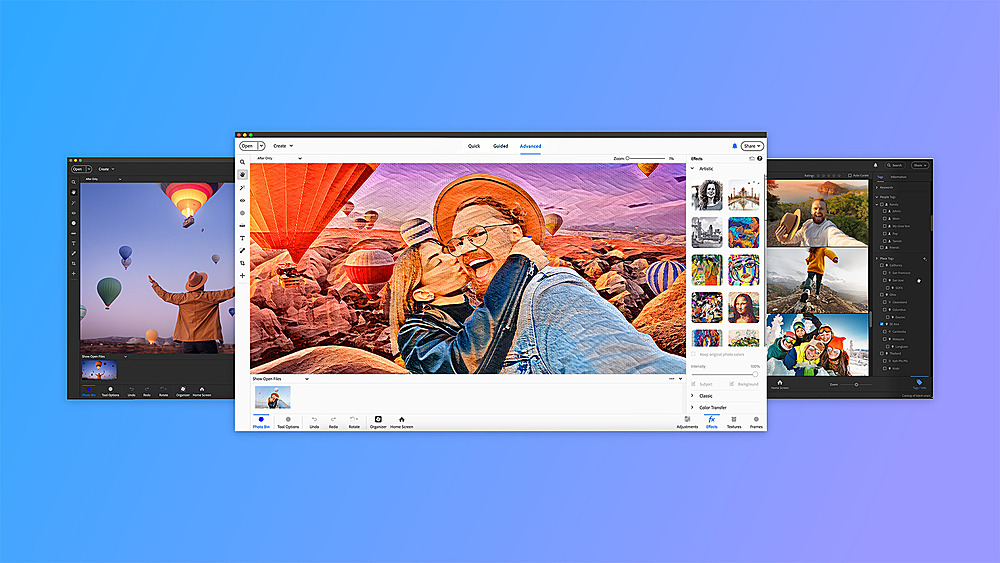
|Posted .This reviewer received promo considerations or sweepstakes entry for writing a review.I’ve been using Photoshop Elements since version 2021, so is this is my 3rd version. I also use full blown Photoshop CC, but Elements is getting better and better with each version. There are quite a few updates in this version, so let’s take a look at some of them. The first thing you will notice with Photoshop Elements 2024 is the interface. You now have an option between light and dark modes. You didn’t have a choice before. Across the top of the window, below your menu options you still have 3 modes of operation, Quick, Guided, and Advanced. (Advanced is the new name for the mode formerly called Expert.) Down the left side of the window you have the standard options for the mode you are in. You will notice that the icons are now basically black and white and are more similar to the icons in Photoshop. They are much larger than in Photoshop as is all of the text throughout the app. One of the new features includes Color Match. This effect allows you to apply the general color tones from another image, giving you a new unique look on your photo. In addition to the existing automatic subject selection, they have added automatic Sky or Background selection. Both work fairly well. They also have a new Add Blue Sky Quick Action. They have added an option to create Photo Reels from your photos. Just select the phots, arrange the order and set the time to show each photo. You can then select the proportions that you want for the reel based on where you want to post it. You can add music and adjust how the photos align with you reel proportions, so you can focus on what you want to be seen for each photo. The one issue I have with this feature is that it will create an MP4 file for you, but you cannot save it as a project to make changes to it later. You have to use Adobe Premier Elements to do that. They have added a more powerful Guided Text Edit giving you a lot more functionality and options to adding text to your project. They have added more Quick Actions, new artistic effects, and now have 88 Guided edits. They have also added Auto Sync (US Version Only) to sync your work across the Elements Organizer, the web, and mobile companion apps One of the biggest changes is the addition of access to the Adobe Stock Photos collection. You can use it for subjects, backgrounds, or however you want, all free and royalty free. This gives you access to thousands of images that you can use as you like. This addition really makes the upgrade to the 2024 version of Photoshop Elements worth the cost all by itself.
I would recommend this to a friend - Pros mentioned:Background removal
All the power you ever need (to edit pictures)
|Posted .This reviewer received promo considerations or sweepstakes entry for writing a review.As a long time user of various Adobe products, I’ve always felt a bit torn. Photoshop is TREMENDOUSLY powerful, with lots of flagship features, but with a flagship price to match those. While that’s always made sense to me from a corporate user perspective, it really didn’t from a home user point of view. I’ve tried the Elements versions (and various other “lite” versions) before but the jump down from the pro level tool was always so great that it was missing something I wanted to do with it. This left me using a hodge podge of different tools that worked well enough, but without the cohesion and polish of Photoshop. This is no longer true though - over the last few editions - and particularly with this new 2024 edition - the elements version of Photoshop has finally added enough tools to be the perfect fit for the home user and at the perfect price for the consumer and prosumer too. There’s still the full boat package if you need that, but for that vast majority of users, this is all you’ll ever need. You get powerful tools that allow you to create layers, masks, automatically remove backgrounds, intelligently remove objects, take other objects and MOVE THEM AROUND the picture, change perspectives and more. Sure, they don’t always work perfectly - it depends a lot on the source material and skill of the user, but that’s always been true. The fact that you GET these tools - and a lot more in terms of organizing a big photo gallery and creating composites and whatnot (the Organizer actually SUGGESTS composites and other things) - in the Elements package is great.’ Adobe has also done a great job here to make the tools they give you accessible, even if you’re not a professional user. You can select from basic tools in the standard interface, a guided set of tools for more advanced functionality (like the previously mentioned object removal, straightening or removing the background) or the full on advanced feature set that lets you tweak and change to your hearts’ content. And there are plenty of official and unofficial help videos if you need a bit more guidance. On the whole, with the latest edition of Photoshop Elements 2024, Adobe has done a grand job of taking just the features a home user will want from Photoshop (yes, you can do the basics still as well - things like auto enhancing the picture and red eye removal) and brought them down to a more home user friendly package and price. And that’s always welcome. So if you’re a home photographer looking to enhance your pictures, give Photoshop Elements 2024 a try - you won’t regret it!
I would recommend this to a friend - Pros mentioned:Ease of use
Photo editing for amateurs to pro's
|Posted .This reviewer received promo considerations or sweepstakes entry for writing a review.I am no expert when it comes to photo editing but since our phones can now take amazing photos I have developed an interest in photo editing. Adobe Photoshop Elements 2024 makes it easy and fun for me to edit my photos on my MacBook. Once you get your Photoshop digital copy activated you are able to import your photos into the program there are endless options for you. Since I am fairly new to editing I opted to use the guided edit options. Through this option you can open your photo file and choose one of the many guided edits where it takes you through them step by step until the edit is complete. This is a great way to learn about the many features available to you. The program also can automatically sort your photos, tag them and use facial recognition in order to help you find the right photo. There are also many automatic options that allow you to quickly enhance photos with a simple click of your mouse. One feature that I love which is currently in beta is that you can use the adobe elements web or mobile app which will automatically sync with your desktop or laptop. Whether you are a novice or a pro when it comes to photo editing you can't go wrong with Adobe Photoshop Elements 2024. The program is available for both Mac OS and Windows and you can just purchase a digital copy at Bestbuy.com and download directly to your computer
I would recommend this to a friend - Pros mentioned:Ai
Good old photoshop but automated for newbies
|Posted .This reviewer received promo considerations or sweepstakes entry for writing a review.Adobe has moved past their physical media (discs) to an all digital format, which makes sense given I can’t remember the last time I saw a new computer or laptop being sold with a disc drive. That being said, this also means there are multiple layers to Adobe products now - before, for Lightroom or PS you would just insert the disc and install. Done. Start using. Now, you have to have or create an Adobe account, which syncs all your apps and programs. To install Photoshop Elements, you log into your Adobe account and then use the redemption code. Once you’ve done so, you are now ready and able to start editing. The user interface and layout overall seems much cleaner and simpler compared to past versions. Returning users that upgraded will note a few changes, namely the previous “expert” mode is now relabeled under the “advanced” tab. Many common editing options are automated, after which you can fine tune/adjust as desired. For iPhone photography or creating our holiday cards, the default AI-produced edits worked surprisingly well. For example, removing backgrounds to create a clean image was unnoticeable from what would be produced by manually cutting and making layers. PSE 2024 is a nice easy option that will cover 90% of my day to day editing needs, and much faster too with the incorporation of AI. Amazing times.
I would recommend this to a friend - Pros mentioned:Photo editing
More powerful and creative than ever!
|Posted .This reviewer received promo considerations or sweepstakes entry for writing a review.I love the changes that Photoshop Elements brought in this year's version with the new guided edits and AI features on the PC. I have apps on my phone that do a lot of photo editing but Photoshop Elements takes that to a different level making it easy to perform tasks with the guided edits to restore photos or just improve them. Features now are headed more in a creative direction where you can add text and effects to photos with ease and do so in a more creative way than you could in the past. I absolutely love the ability to modify text and make it look more artistic and professional all with a few clicks with even more advance editing features and filters to take ordinary photos to extraordinary photos. This year I noticed a new feature to add animation/motion effects to photos so you can share on social media. I have skipped a couple years upgrades and if you're like me you'll notice many new tools to really take your creativity to a new level and far beyond just fixing photos but making them more personal by giving you more tools to really get creative. I'd recommend this software now more than ever, especially if you've been looking for tools on your phone/tablet and are disappointed with the lack flexibility/features available or that in many cases you have to do your edits in several apps to get a desired outcome.
I would recommend this to a friend - Pros mentioned:Ease of use
Upgrade from Previous versions
|Posted .This reviewer received promo considerations or sweepstakes entry for writing a review.I've used previous versions Adobe Photoshop and Premiere Elements. I've used the Adobe Elements to fix up pictures and to make video edits for last minute projects. As it is easy to use, I found myself to be a intermediate user quickly. One thing I noticed about Photoshop Elements 2024 is the Color match features where there are built-in presets (quick mode) to fine tune hue, saturation, and brightness or you can customise the photo using advanced mode. Another new feature the Photo Reel where I can create reels zip using my photos where I can add my own text, effects, and graphics. I can save them as MP4s or GIFs for social media settings. I plan to use this feature for my kids as they grow up. One feature I use a lot is the one-click photo actions where I can enhance compressed JPEGs. I have a lot of old photos that I want to make look smoother or remove the background. I notice the 2024 is geared toward photo or social media sharing. The interface make this software easy to use. I am not pro. I consider myself an amateur since I've had previous versions. The integration of AI really simplified this software. I will continue using future versions of this software. I also like the price. I really enjoy it and highly recommend!
I would recommend this to a friend Great product if bought on sale, but….
|Posted .This reviewer received promo considerations or sweepstakes entry for writing a review.Adobe Photoshop Elements 2024 (downloadable windows version) is no doubt an excellent editing software if bought on sale. The layers work well in how they can be stacked, making their functionality a very useful creative tool. The way it allows Multiple masking layers/filters on one layer is fantastic. A wide variety of tools for assortment of tasks to create different projects is available. The software is very responsive with proper hardware requirements, so you want to check your hardware to ensure a smooth, enjoyable, experience. It’s a complicated program, not suited for beginners. Just following a tutorial isn’t quite enough to learn how to use most of the program. Adobe Photoshop is best suited for those with some editing software experience. Takes a lot of trial and error with tutorials to get to a certain comfort level but even then there’s just so much prior knowledge necessary that a beginner would feel defeated. It’s easy and quick to install using the downloadable version. There’s so much that can be done using Adobe Photoshop, it’s not just for editing pictures. You can use it for Texture creation/editing/art. If you have past experience using editing softwares then you would probably fare well using Adobe Photoshop Elements. As someone who’s familiar with editing and creating art, I enjoy and recommend using Photoshop Elements, but if you’re a beginner, I certainly wouldn’t recommend to start with this software.
I would recommend this to a friend