Customer Ratings & Reviews
- Model:
- MMMQ3AM/A
- |
- SKU:
- 6276701
Customer reviews
Rating 4.7 out of 5 stars with 4577 reviews
(4,577 customer reviews)Rating by feature
- Value4.5
Rating 4.5 out of 5 stars
- Quality4.8
Rating 4.8 out of 5 stars
- Ease of Use4.7
Rating 4.7 out of 5 stars
Customers are saying
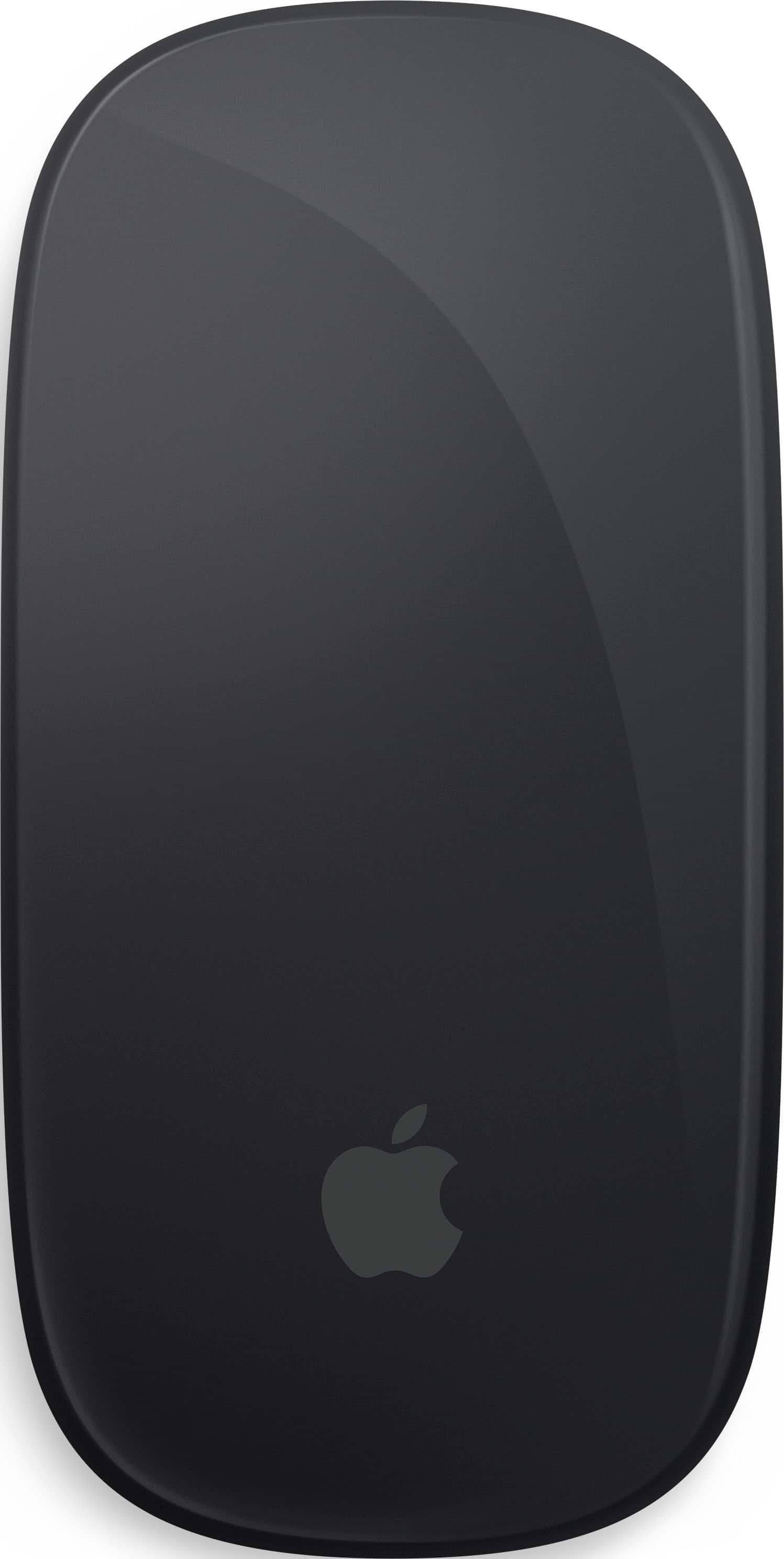
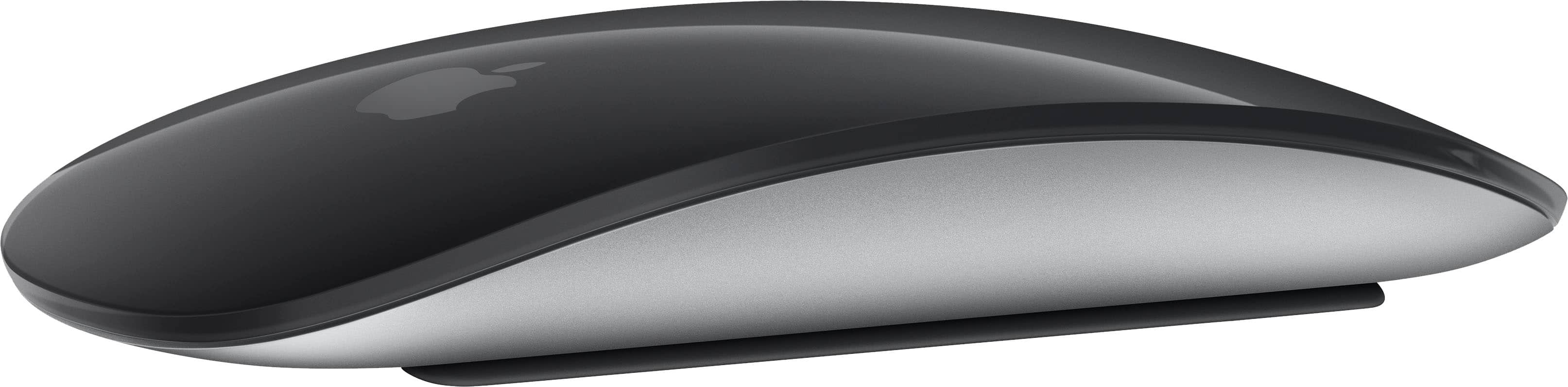
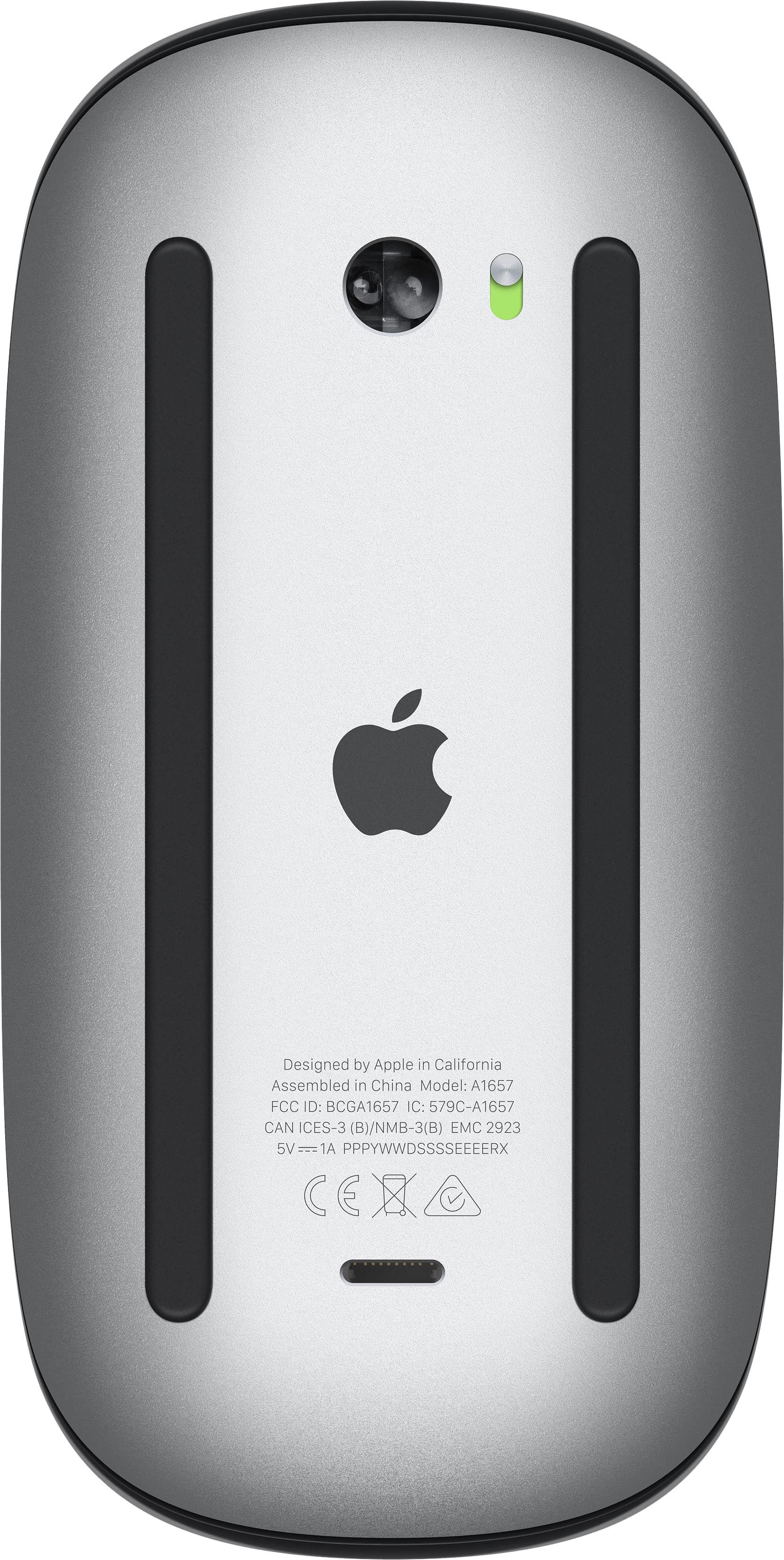
Customers value the Magic Mouse (Lightning Port) for its ease of use, long battery life, and sleek design. Users also appreciate its simple connectivity, compatibility with Apple products, and comfortable size and weight. However, some customers find the charging port placement inconvenient, and a few have noted difficulties with right-clicking.
This summary was generated by AI based on customer reviews.
- Pros mentioned:Connectivity, DesignCons mentioned:Charging port
Rated 5 out of 5 stars
It's an Apple Mouse and it just Works!
||Posted . Owned for 3 weeks when reviewed.This reviewer received promo considerations or sweepstakes entry for writing a review.I'm surprised by how much I love this little Apple Magic Mouse. It wasn't the mouse I envisioned buying. I bought a new 16" MacBook Pro M1 laptop and also purchased the Logitech - MX Master 3 mouse for it. It was actually the one marked for Mac. Only it's not compatible with the new M1 Silicone chip. So I figured Apple should have a mouse that will surely work with their newest MacBook Pro and sure enough, the Apple Magic Mouse does beautifully. As one would expect from an Apple product, the mouse is elegant and beautiful. It connects to your MacBook pro simply and easily. And it's unique to say the least. Note there is no scroll wheel. Just slide your finger like you would on a touch screen and you scroll. The mouse clicks precisely. You can swipe right and left on the mouse to go between pages on your laptop. It just all works so perfectly. Is there anything I'd change? Well, yes. The charging plug connects to the underside of the mouse, meaning it has to be charged when not in use. And it's a Lightning connector, like an iPhone, and it should be USB C instead. And it's smaller than most mice. With the sides all clad in Aluminum, it needs more grip. So I bought a Magic Mouse silicone case, which provides added protection for the mouse and grip for the sides. See the attached photo. Otherwise, this mouse is simply awesome and if paired with an Apple computer, the perfect mouse in so many ways. It's Apple and it just works.
I would recommend this to a friend - Pros mentioned:Battery life, Connectivity, Design
Rated 5 out of 5 stars
Awesome
||Posted . Owned for 2 weeks when reviewed.This reviewer received promo considerations or sweepstakes entry for writing a review.Love the seamless connectivity on my Apple devices. Sleek design is comfy in my hands. Great for on the go use. Works on pretty much any surface. Love that it’s rechargeable, no more pesky batteries!
I would recommend this to a friend - Pros mentioned:Battery life, Design
Rated 5 out of 5 stars
Great buy
||Posted . Owned for 3 weeks when reviewed.This reviewer received promo considerations or sweepstakes entry for writing a review.This light sleek mouse is amazing! I love the cool design, and how you slide your finger up and down to scroll. It doesn’t lack like other mouses. The battery life is super. I purchased this to pair with the MacBook Air
I would recommend this to a friend Rated 4 out of 5 stars
Magic, Mostly — Surface Matters
||Posted . Owned for 1.5 years when reviewed.This reviewer received promo considerations or sweepstakes entry for writing a review.Rating: ★★★★½ I’ve now owned three Magic Mice, and Apple keeps me coming back — for good reason. It’s sleek, responsive, and feels almost magical in your hand. I love how it just “remembers” what I was doing, even if it occasionally disconnects for a moment (like me wandering to another room). Why not 5 stars? Tracking can lag on certain surfaces — my Best Buy mouse pad works great, but switch to the table or a notebook cover, and it sometimes stumbles. And, of course, the charging port is on the bottom, making it awkward to use while charging. Still, a 4.5-star experience. Sleek, stylish, and mostly perfect — just fix the tracking quirks and charging design, Apple, and I’d happily give 5 stars.
This review is from Apple - Magic Mouse (Lightning Port) - Wireless - White
I would recommend this to a friend- Pros mentioned:Battery lifeCons mentioned:Charging port
Rated 5 out of 5 stars
Perfect Mouse for Mac
||Posted . Owned for 5 months when reviewed.This reviewer received promo considerations or sweepstakes entry for writing a review.The mouse was in perfect condition, works wonderfully, and is better than I expected. If there is a con, it’s Apple’s design for charging the mouse. I’ve only had to charge it 4 times in roughly 5 months of use. Also, I have 2 Logitech mice and I used both with my Mac Mini before this purchase. I found the Logitech mice had a small lag time that I do not experience with the Apple mouse. It’s worth the extra money for the Apple mouse.
I would recommend this to a friend Rated 4 out of 5 stars
Beautiful mouse, not great in function
||Posted .This reviewer received promo considerations or sweepstakes entry for writing a review.The Magic Mouse looks great with all apple computer products (Laptops, iMac, Mac Studio), I enjoy using but there are frustrations for sure. On my new Mac Studio M4 Max the mouse takes a lot longer than the apple keyboard to pair, and 1 out of 5 times when I turn on my Mac it does not pair at all and I have to reboot in hopes it finds the mouse (I do not have a busy bluetooth home or office). When Mac OS 26 came out the mouse paired a lot faster and very rare now for it not to find at startup. OK, moving on to actual use. I have a rough time right. clicking as the slippery surface when I click my finger moves and a menu item I didn't mean to click on gets activated. This is aggravating and normal left double clicking can be tricky. I love the gestures a great deal especially in Final Cut. I have used the magic mice from apple since 2009 and updated when a newer model would come out as I did with my Mac Studio. But . . after all these years I am ordering the Logitech MX 4 to make my life easier with an ergonomic mouse and one that can left and right click the way a mouse is meant to, I am kinda done with the apple Magic Mouse, even though I really like it, I just prefer the Logitech more after using their gaming mice on windows gaming PC.
I would recommend this to a friend- Pros mentioned:Battery life
Rated 5 out of 5 stars
So Happy I Purchased!
||Posted . Owned for 3 weeks when reviewed.This reviewer received promo considerations or sweepstakes entry for writing a review.This item is a must have for college students and people in business. It’s more convenient than the touch pad on the MacBook. It gives you the desktop feel. It’s lightweight and doesn’t have that loud clicky noise like other brands. It took me a short while to get use to the finger tip commands but once I got it, I fell in love. My husband edits videos on Final Cut Pro and it’s so much easier to get the job done, than dragging video clips with the track pad on the Mac. I had it for a few weeks now and It’s still working off the charge that it came with when I purchased it. Other reviews that I have read stated that they only charge their mouse once a month, which is awesome. Be sure to turn the mouse off when not in use. I love the charger cord that it comes with (USB-C to lightening cable). It’s the same sturdy material as the one that comes with the MacBook, and the cord is black so it won’t look dirty over time. I actually packed it in my bag to use it as my traveling charger cord to charge my other apple products as well. I would recommend packing a cloth ( like the glass cleaner cloth that comes with eyeglasses) because you’ll see your finger prints and smudges all over the mouse. I do have the dark colored mouse so it shows smudges more than the traditional white mouse. I would also recommend purchasing a small pouch or carrying case to protect it in your bag if you plan to use it out of the home. I’m a college student and I travel with my MacBook along with my books and material for school, so I definitely have to keep my mouse protected. It’s a great investment! I might purchase a mouse pad to have when I feel the need to use it. Preferably one with the wrist pad/cushion for when I’m doing lengthy projects in school. I’m very satisfied with this product, especially the charging wire. I wish apple made all their charger wires with this same Material.
I would recommend this to a friend Rated 5 out of 5 stars
I have one big issue but it gets 5 stars!
||Posted . Owned for 2 weeks when reviewed.This reviewer received promo considerations or sweepstakes entry for writing a review.I had a MacBook before and purchased a non-apple mouse and found it lacking in ease of use so when I had to upgrade my MacBook, I wanted to use all Apple accessories to see if there would be a difference. If it didn’t work out, I could always take them back, there there is a huge huge difference. This mouse is exceptional. Apple really did it right. It’s very easy to connect once I found the on off switch. So far the battery life seems great, but when I can’t remember, I do turn it off. It’s very easy to travel with and easy to use I’m working on the go. it has little feet on it so it doesn’t require a mouse pad but in my opinion, it does work better if you have one. I love the fact I can use the mouse, the entire mouse as a trackpad, or for those not familiar with Apple, the scroll wheel to go up down sideways without having to click anything. My one big issue is that it is not ergonomic whatsoever. As someone who works 8 to 10 hours a day it does put a lot of pressure on your wrist. I have a pad that goes under mine that helped some but I do hope Apple is working on the design of this to make it easier for those with carpal and to prevent carpal tunnel. I may even look into elevating my mouse pad to help with this deficiency. But even with this for me, it’s major I still give it five stars it’s an exceptional mouse.
This review is from Apple - Magic Mouse (Lightning Port) - Wireless - White
I would recommend this to a friend- Pros mentioned:Battery life
Rated 5 out of 5 stars
A Must Have
||Posted . Owned for less than 1 week when reviewed.This reviewer received promo considerations or sweepstakes entry for writing a review.If you're using a Mac and use the multiple full screen apps at the same time this is a must have. Allows for easy sliding between full screen apps with the flick of a finger. You can feel the quality. I use this mouse for 8 hours of work a day and only have to charge it may once in a month.
I would recommend this to a friend - Pros mentioned:Battery life, Ease of use
Rated 5 out of 5 stars
Great Mac mouse
||Posted . Owned for 3 weeks when reviewed.This reviewer received promo considerations or sweepstakes entry for writing a review.Amazing battery life! Connects easily and works great. Worth the money and being rechargeable is super nice.
I would recommend this to a friend Rated 5 out of 5 stars
Awesome Mouse
||Posted .This reviewer received promo considerations or sweepstakes entry for writing a review.I absolutely love this mouse. I didn’t realize what I was missing as my last ones had the wheels to roll the page up and down. I absolutely do not miss that feature. This is a well made product which works seamlessly with my macpro. I wish I would have purchased this mouse when I was in school before, but I’m glad I have it now. I have small hands so I love the sleek design, but I would try in store to ensure it is comfortable for anyone with larger hands.
This review is from Apple - Magic Mouse (Lightning Port) - Wireless - White
I would recommend this to a friend- Pros mentioned:Battery life
Rated 4 out of 5 stars
Apple Magic Mouse Review.
||Posted . Owned for 2 weeks when reviewed.This reviewer received promo considerations or sweepstakes entry for writing a review.I have had this product for several weeks now. There are definitely pros and cons to the product. The portability and battery life definitely make this mouse a go to. The black mouse goes really good with the Midnight color MacBook. If you have smaller hands this mouse will be a good fit for you. I DO NOT recommend this to people with larger hands. It is a slimmer mouse and is not very long. Overall a good purchase to go with a MacBook!!
I would recommend this to a friend Rated 4 out of 5 stars
Great Aesthetic designs. Lacks ergonomics.
||Posted . Owned for 1 month when reviewed.This reviewer received promo considerations or sweepstakes entry for writing a review.I’ve always used Logitech mice, but for the first time, I thought I should give this a try. There is a slight learning curve to this mouse. It’s extremely low-profile, so if you have monstrous-sized hands, this probably isn’t the mouse for you. Aesthetically, this mouse looks great, and it’s made with high quality material. I’m in front of a computer all day for work, so the different swipe features are amazing! You can go into the mouse settings and even customize different features for finger gestures, like a track pad. The mouse uses a lightning cable charger. It’s on the bottom of the mouse, so you cannot use it while charging. While some have complained about this, I think it’s a very minor flaw, considering the battery life is phenomenal. I haven’t had the need to charge it since I took it out of the box. It came out of the box at 65% and I used it for a little over 2 months, and I’m currently at 49%. Keep in mind, I use this mouse 40 hrs./week. My only complaint is how it lacks ergonomically. It doesn’t really have any grooves or curves for my fingers and palm to rest. My hands are a relatively small, so I can deal with it, but if you have long fingers, you will probably get cramps.
This review is from Apple - Magic Mouse (Lightning Port) - Wireless - White
I would recommend this to a friend- Pros mentioned:Design
Rated 5 out of 5 stars
Wonderfull
||Posted . Owned for 10 months when reviewed.This reviewer received promo considerations or sweepstakes entry for writing a review.Maravilloso , súper cómodo, súper práctico y súper bonito. Lo amé
I would recommend this to a friend Rated 4 out of 5 stars
Good Mouse Stupid Charging Design
||Posted . Owned for 1 year when reviewed.This reviewer received promo considerations or sweepstakes entry for writing a review.I like the mouse, but who was the designer who thought it would be a good idea to make it so that you have to turn it upside down to charge it? So you can't use it while it is charging, so if you forget to charge it you are out of luck.
This review is from Apple - Magic Mouse (Lightning Port) - Wireless - White
I would recommend this to a friendRated 4 out of 5 stars
Excellent Mouse,
||Posted . Owned for 3 weeks when reviewed.This reviewer received promo considerations or sweepstakes entry for writing a review.I really like this mouse. It’s very responsive and works just as it should. The only thing that I do not like about the mouse is that the charge port is on the sliding surface so if you run out of battery while you’re working, you cannot use it while it’s charging, which is a major design flaw in my opinion. So charge your mouse accordingly. Thats why only 4 stars.
I would recommend this to a friend- Pros mentioned:Compatibility, Design
Rated 5 out of 5 stars
Magical Apple Mouse
||Posted .This reviewer received promo considerations or sweepstakes entry for writing a review.this magic mouse is really magical.... if you have an apple MacBook this bluetooth mouse is the best thing to have to keep doing your work
This review is from Apple - Magic Mouse (Lightning Port) - Wireless - White
I would recommend this to a friend - Pros mentioned:Design
Rated 5 out of 5 stars
Mouse Magic
||Posted . Owned for 8 months when reviewed.This reviewer received promo considerations or sweepstakes entry for writing a review.If you're looking for an Apple mouse, I recommend the "Apple Magic Mouse 2." It's an excellent choice for Mac users due to its sleek design, Bluetooth connectivity, and a touch-sensitive surface that allows for intuitive gestures. Plus, it conveniently recharges via a Lightning port. This mouse seamlessly complements the aesthetics and functionality of Apple products.
I would recommend this to a friend Rated 5 out of 5 stars
Works great with proper mouse pad
||Posted . Owned for 1 month when reviewed.This reviewer received promo considerations or sweepstakes entry for writing a review.It works great with a precision mouse pad. It had problems with a memory foam mouse pad. I'm a graphic designer and use it all the time. It would freeze up and I kept thinking something was wrong with it until I finally put the new mouse pad on top of the foam one to keep the wrist rest. It definitely has increased productivity and speed. The double tap feature takes some getting used to but is worth it. Not having to buy batteries is great as well.
This review is from Apple - Magic Mouse (Lightning Port) - Wireless - White
I would recommend this to a friendRated 4 out of 5 stars
Great Mouse but Could Be More Comfortable
||Posted . Owned for 1.5 years when reviewed.This reviewer received promo considerations or sweepstakes entry for writing a review.The mouse works very well and looks clean and modern. The tracking is smooth, but the shape is not the most comfortable for long use. Still a great product overall.
This review is from Apple - Magic Mouse (Lightning Port) - Wireless - White
I would recommend this to a friend