Customer Ratings & Reviews


- Model:
- MX2D3AM/A
- |
- SKU:
- 10758157
Customer reviews
Rating 4.8 out of 5 stars with 4301 reviews
(4,301 customer reviews)Rating by feature
- Value4.6
Rating 4.6 out of 5 stars
- Quality4.8
Rating 4.8 out of 5 stars
- Ease of Use4.8
Rating 4.8 out of 5 stars
- Pros mentioned:Overall performance
Rated 5 out of 5 stars
Works fine
||Posted .This reviewer received promo considerations or sweepstakes entry for writing a review.Did what it was supposed to do fine. There’s nothing else to say.
This review is from Apple - Pencil Pro - White
I would recommend this to a friend - Pros mentioned:Features
Rated 5 out of 5 stars
Pencil pro
||Posted .This reviewer received promo considerations or sweepstakes entry for writing a review.I love this other than apple pencils . Useful features.
This review is from Apple - Pencil Pro - White
I would recommend this to a friend - Pros mentioned:Ease of use
Rated 5 out of 5 stars
Ecellent Accessory
||Posted . Owned for 1 week when reviewed.This reviewer received promo considerations or sweepstakes entry for writing a review.I purchased this to go with my new Ipad Air 13". The pencil adds a lot of additional functions to the Ipad. I strongly recommend getting a pencil if you buy a new Ipad.
This review is from Apple - Pencil Pro - White
I would recommend this to a friend - Pros mentioned:Ease of use
Rated 5 out of 5 stars
Apple Pencil For M4
||Posted . Owned for 3 weeks when reviewed.This reviewer received promo considerations or sweepstakes entry for writing a review.New Apple Pencil for IPad Pro M4, very nicely designed, light and works with amazing flexibility and smoothness
This review is from Apple - Pencil Pro - White
I would recommend this to a friend Rated 5 out of 5 stars
Perfect tool for creativity
||Posted . Owned for 3 weeks when reviewed.This reviewer received promo considerations or sweepstakes entry for writing a review.The Pencil Pro is a must-have for the iPad Pro. The precision is unmatched, and the new features make drawing and taking notes feel so natural. It attaches and charges easily, making it very convenient.
This review is from Apple - Pencil Pro - White
I would recommend this to a friend- Pros mentioned:Battery life, Connectivity
Rated 5 out of 5 stars
Works Great
||Posted . Owned for 2 months when reviewed.This reviewer received promo considerations or sweepstakes entry for writing a review.Keeps charge and writes smoothly on iPad. Connection remains great, no lag.
This review is from Apple - Pencil Pro - White
I would recommend this to a friend - Pros mentioned:Battery life, Ease of use
Rated 5 out of 5 stars
Amazing accessory
||Posted . Owned for 3 weeks when reviewed.This reviewer received promo considerations or sweepstakes entry for writing a review.Super easy to use and connect to iPad and stays charged while you leave it in the iPad
This review is from Apple - Pencil Pro - White
I would recommend this to a friend - Pros mentioned:Overall performance
Rated 5 out of 5 stars
Awesome ipad mini accessory
||Posted .This reviewer received promo considerations or sweepstakes entry for writing a review.This pencil with a paperlike screen protector is perfect. I use it on an ipad mini, which is also the perfect size for an ipad in my opinion.
This review is from Apple - Pencil Pro - White
I would recommend this to a friend - Pros mentioned:Overall performance
Rated 5 out of 5 stars
Apple Pencil Pro
||Posted . Owned for 2 weeks when reviewed.This reviewer received promo considerations or sweepstakes entry for writing a review.its really good for all i needed. much better than previous one. Thank you !!
This review is from Apple - Pencil Pro - White
I would recommend this to a friend Rated 5 out of 5 stars
No need to charge separately
||Posted . Owned for 1 month when reviewed.This reviewer received promo considerations or sweepstakes entry for writing a review.Very cool and precise pen and the best thing it will charge itself just by placing it in its place
This review is from Apple - Pencil Pro - White
I would recommend this to a friendRated 5 out of 5 stars
Love it
||Posted . Owned for 1 month when reviewed.This reviewer received promo considerations or sweepstakes entry for writing a review.I love it best item i purchased i would recommend to a friend it works so good
This review is from Apple - Pencil Pro - White
I would recommend this to a friend- Pros mentioned:Overall performance
Rated 5 out of 5 stars
Pencil for ipad
||Posted .This reviewer received promo considerations or sweepstakes entry for writing a review.Works great. I did not think I would like using it
This review is from Apple - Pencil Pro - White
I would recommend this to a friend - Pros mentioned:Overall performance
Rated 5 out of 5 stars
Very functional and useful device
||Posted . Owned for 9 months when reviewed.This reviewer received promo considerations or sweepstakes entry for writing a review.Great device, very helpful with taking notes on iPad.
This review is from Apple - Pencil Pro - White
I would recommend this to a friend - Pros mentioned:Ease of use
Rated 4 out of 5 stars
Made for artist
||Posted . Owned for 3 weeks when reviewed.This reviewer received promo considerations or sweepstakes entry for writing a review.This Apple Pencil is super cool and unless you are an artist, you’re not really gonna use it at all. Like me, You might say I’m going to use it for school to take notes but slowly realize that typing is much faster. I got it just because I wanted it and im gonna keep it since when i do want to make a little doodle it’s absolutely perfect.
This review is from Apple - Pencil Pro - White
I would recommend this to a friend - Pros mentioned:Ease of use
Rated 5 out of 5 stars
Apple Pencil
||Posted .This reviewer received promo considerations or sweepstakes entry for writing a review.Easy to use and has many options built in and easy to charge
This review is from Apple - Pencil Pro - White
I would recommend this to a friend - Pros mentioned:Overall performance
Rated 5 out of 5 stars
Had to Return; user error
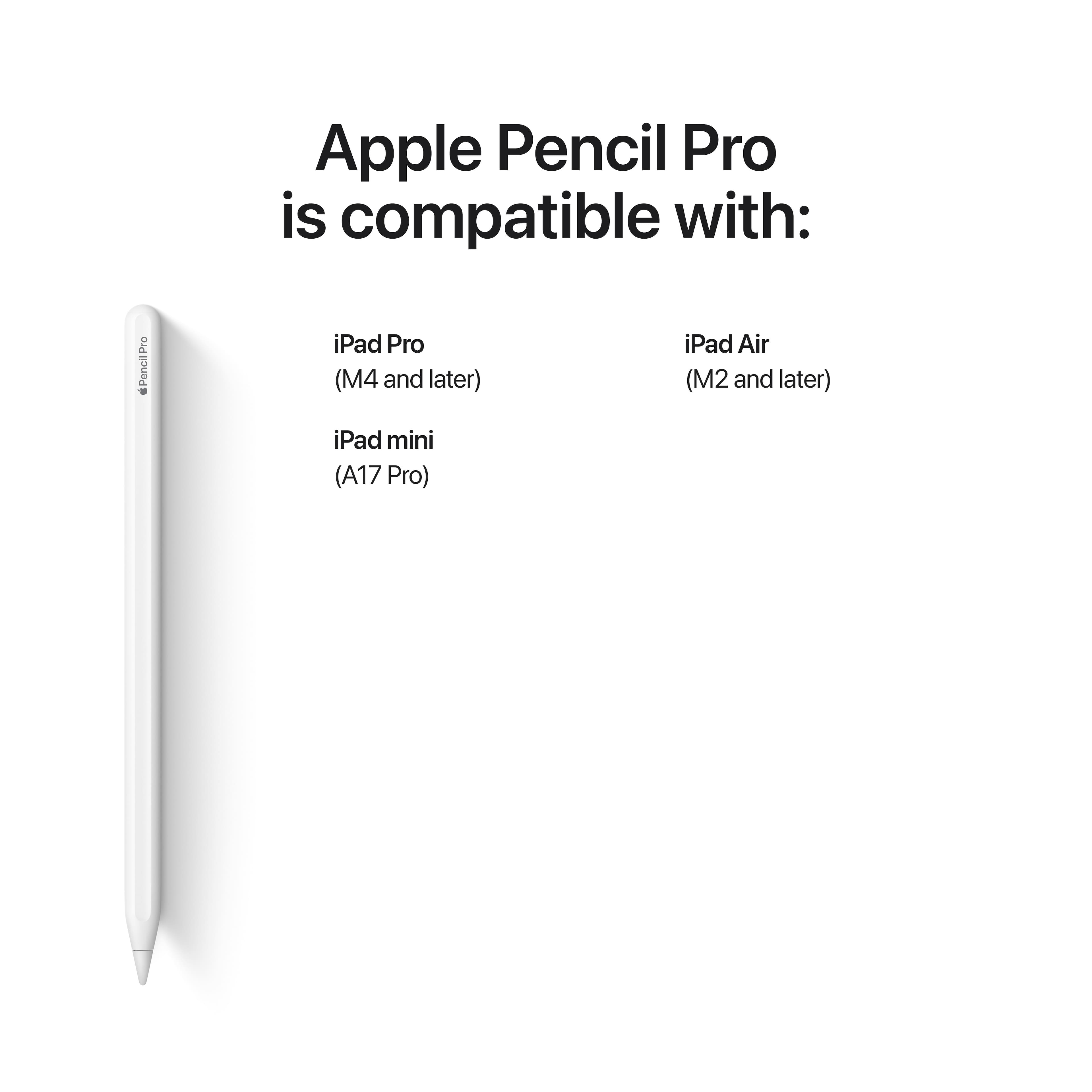
||Posted .This reviewer received promo considerations or sweepstakes entry for writing a review.I'm sure the Pencil is fantastic, the other ones have been great. I had to return the item due to having the iPad 10th gen instead of a pro or air.
This review is from Apple - Pencil Pro - White
I would recommend this to a friend - Pros mentioned:Overall performance
Rated 5 out of 5 stars
apple pencil pro
||Posted .This reviewer received promo considerations or sweepstakes entry for writing a review.literally amazing so worth it.. i say you should cop if you have the proper ipad
This review is from Apple - Pencil Pro - White
I would recommend this to a friend - Pros mentioned:Overall performance
Rated 5 out of 5 stars
The best thing
||Posted . Owned for 4 months when reviewed.This reviewer received promo considerations or sweepstakes entry for writing a review.Having my apple pencil has been the best investment for me. Not only is it fun for coloring or games on my iPad but it has helped me so much with college. I can label diagrams and draw out my models from class.
This review is from Apple - Pencil Pro - White
I would recommend this to a friend Rated 5 out of 5 stars
Great Addition
||Posted . Owned for 1 month when reviewed.This reviewer received promo considerations or sweepstakes entry for writing a review.The Apple Pencil Pro is easily one of the best styluses out there, especially if you’re into digital art or note-taking. It feels super smooth and responsive, making it almost like drawing on real paper. One of the coolest features is the squeeze gesture, which lets you quickly switch tools or colors—super handy if you're sketching or working on something detailed. The barrel roll function is another game-changer, giving you precise control over your brush strokes, almost like using a real pencil or marker. Plus, the haptic feedback makes interactions feel even more natural. And if you ever lose it (which happens!), the Find My support is a lifesaver. The only downside? It’s on the pricier side, and it only works with the newest iPads. But if you’re serious about creativity or just want the best iPad stylus experience, it’s totally worth it.
This review is from Apple - Pencil Pro - White
I would recommend this to a friendRated 5 out of 5 stars
Pencil Perfect
||Posted . Owned for 2 weeks when reviewed.This reviewer received promo considerations or sweepstakes entry for writing a review.Bought a 3rd party pencil and it was ok. My mind was blown by how well this pencil works with my ipad. Don't make the same mistake I did.
This review is from Apple - Pencil Pro - White
I would recommend this to a friend
People also viewed
- $79.99$79.99The price was $99.00
- $64.99$64.99The price was $79.00
- $124.00$124.00The price was $129.00
- $99.99$99.99The price was $129.00
- $59.99$59.99The price was $79.99
- $39.50$39.50The price was $79.00
- $65.82$65.82The price was $66.87