Customer Ratings & Reviews




- Model:
- GA05551-US
- SKU:
- 11087802
Rating by feature
- Value
Rating 4.4 out of 5 stars
- Quality
Rating 4.8 out of 5 stars
- Ease of Use
Rating 4.7 out of 5 stars
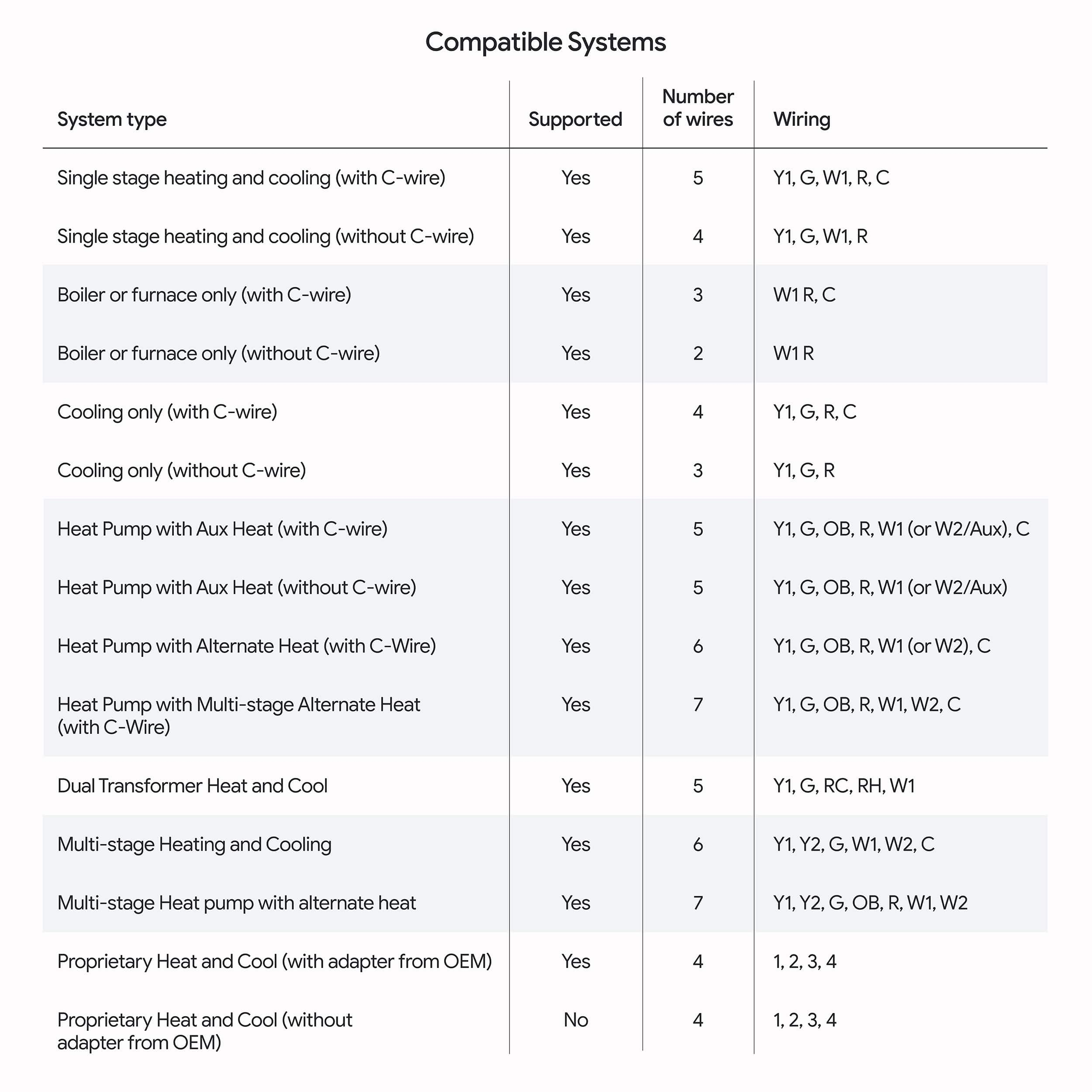
Great once installed; beware with complex systems
||Posted .This reviewer received promo considerations or sweepstakes entry for writing a review.Very difficult to get installed. Needed professional electrician and he had to talk with Google a few times. If your system is complicated with multiple zones, beware.
I would recommend this to a friendBrand response from Google Nest Support
Posted .Hey there, MVSkipjack. While we’re glad you were able to get the Nest Thermostat Gen 4 set up, we’re sorry to learn it was difficult for you. If any questions come up, we’re here to lend an extra hand: https://support.google.com/googlenest/gethelp?

Savings on energy
||Posted .This reviewer received promo considerations or sweepstakes entry for writing a review.Excellent product, stylish and a great price. Would highly recommend .
I would recommend this to a friendBrand response from Google Team
Posted .Thanks for the kind words, mightymarine55!

Effeicient
||Posted . Owned for 1 month when reviewed.This reviewer received promo considerations or sweepstakes entry for writing a review.Comfort control from your phone smart works without c wire
I would recommend this to a friendBrand response from Google Team
Posted .Getting the perfect temperature anytime, anywhere, Abiyhailu2000.
A Great Upgrade
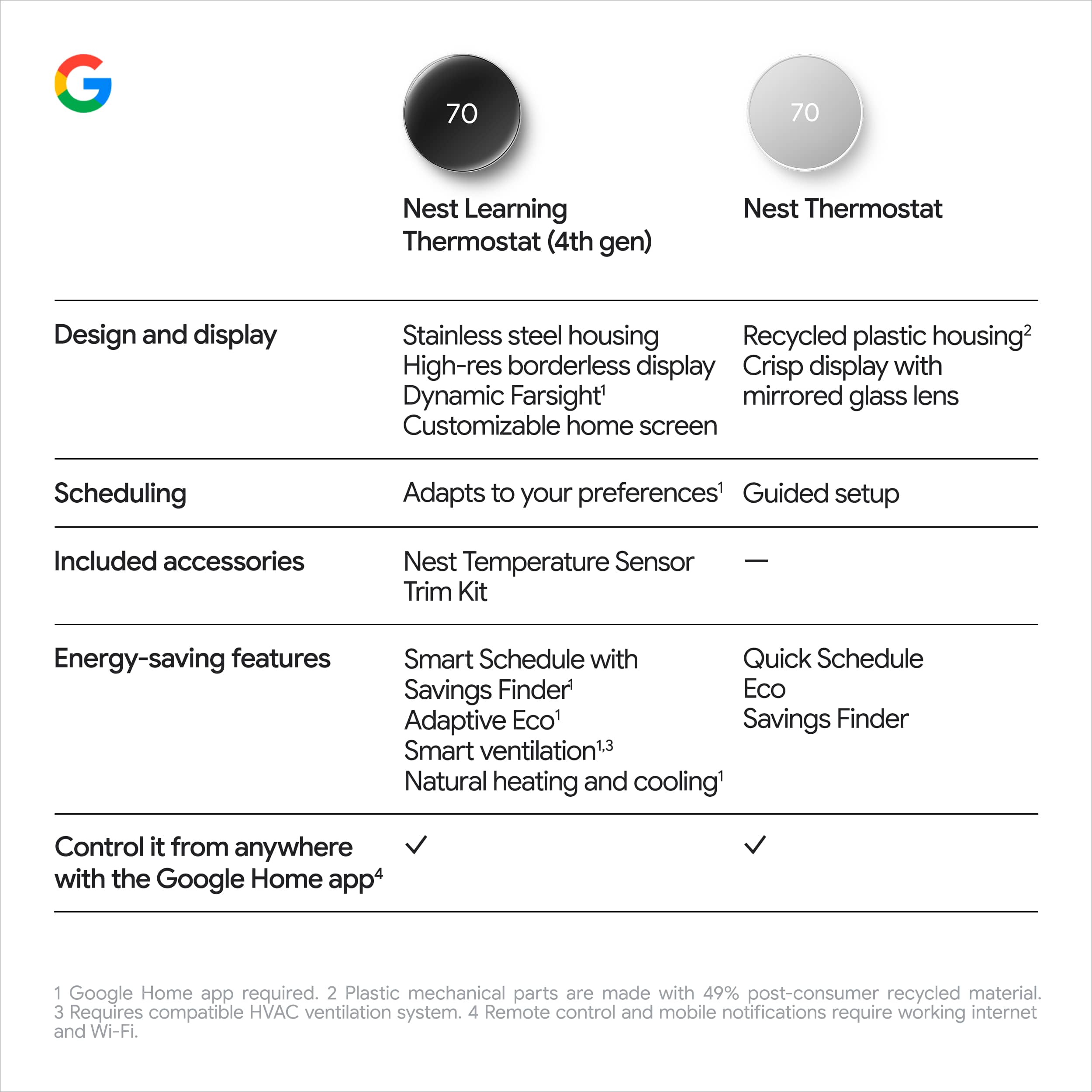
||Posted . Owned for 1 week when reviewed.This reviewer received promo considerations or sweepstakes entry for writing a review.This thermostat is great! I had the original Nest thermostat and this is such an improvement. I have also used Ecobee thermostats, but those do not integrate well with the Google Home app if you use the auto mode.
I would recommend this to a friendSave money and time
||Posted . Owned for 1 month when reviewed.This reviewer received promo considerations or sweepstakes entry for writing a review.Great products. My energy bills went down since I installed these two of thermostats in my house. I can control it anywhere even we were oversea.
I would recommend this to a friendBrand response from Google Nest Support
Posted .Happy you found your new co-pilot, Paul. Here’s to the perfect temperature no matter where you are!
Nicely done!
||Posted . Owned for 1 month when reviewed.This reviewer received promo considerations or sweepstakes entry for writing a review.This heats and cools. I am warm when it’s cold and chilled when it’s warm.
I would recommend this to a friendBrand response from Google Team
Posted .You’ve finally entered the comfort zone, Christopher. Here’s to always getting the perfect temperature!
Nest 4 gen Display
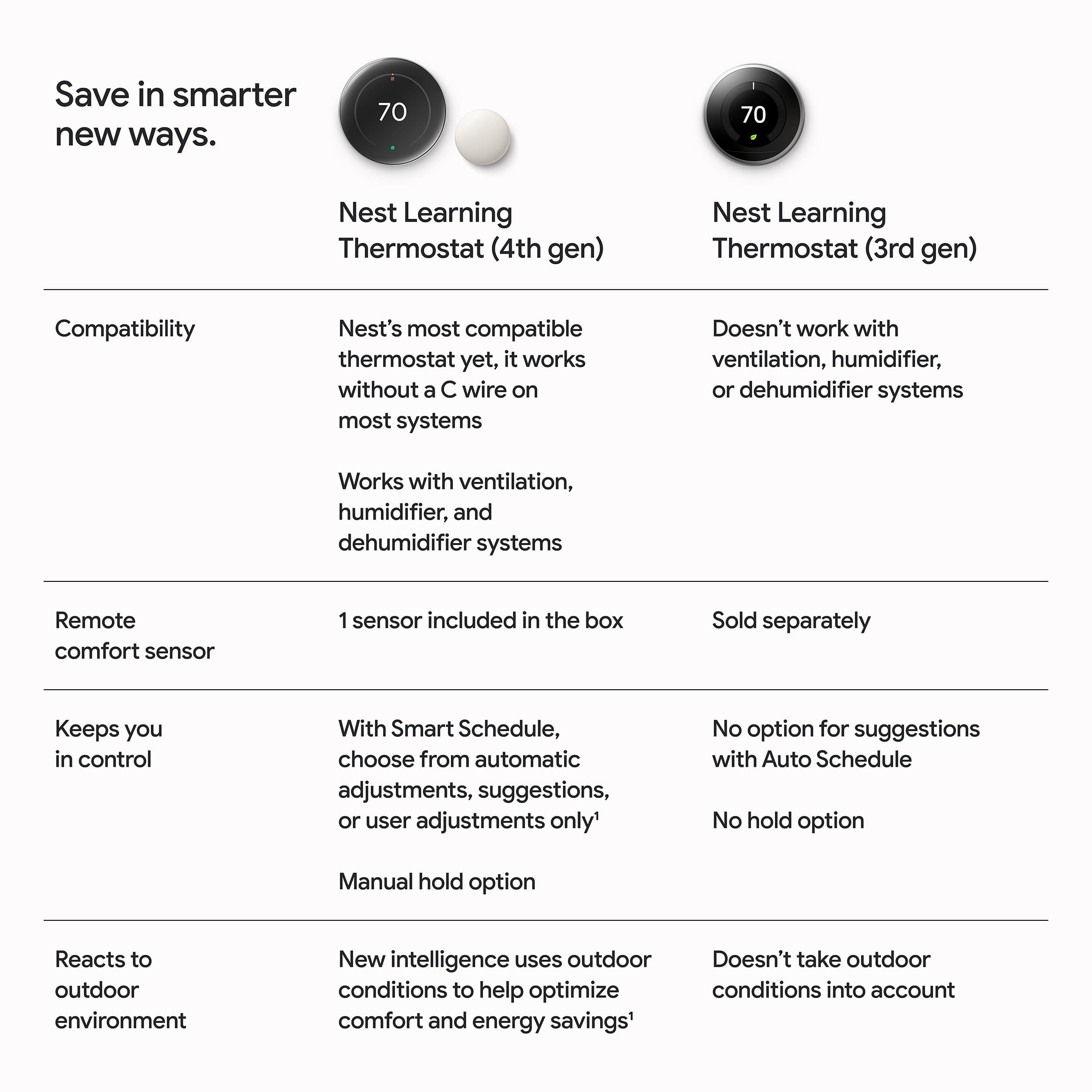
Posted .This reviewer received promo considerations or sweepstakes entry for writing a review.Better features than the previous Nest. It has a lot more smart and eco modes. As for the display, you cannot pick up the brightness as in the previous model, so the new feature of seeing the weather animation is not that bright on the screen. The brightness and how it pops out more on the wall are my dislikes.
No, I would not recommend this to a friendBrand response from Nest Support
Posted .We wanted to let you know that we’ve started to roll out a software update to optimize how your Nest Learning Thermostat (4th gen) automatically adjusts screen brightness to deliver improved readability based on your environment, learn more here: https://support.google.com/googlenest/answer/15440543
nest thermostat
||Posted . Owned for 3 weeks when reviewed.This reviewer received promo considerations or sweepstakes entry for writing a review.good product not excellent, should have bought a better one
I would recommend this to a friendBrand response from Google Team
Posted .Thanks for sharing your thoughts with us, FauziaM. We’re here anytime you need us: https://support.google.com/googlenest/gethelp?
DO NOT BUY, can't turn Eco mode off
||Posted . Owned for 11 months when reviewed.This reviewer received promo considerations or sweepstakes entry for writing a review.Do not buy for the looks. Owned multiple Nests over 4 years—this 4th gen is my fifth replacement (warranty + out-of-pocket). Same infuriating issue: Set it to 68°, runs ~15 min, then flips to Eco mode automatically. You can't turn Eco off permanently. The "learning" is useless. I got the $120 ecobee, I can set it and forget it.
No, I would not recommend this to a friendBrand response from Google Team
Posted .Hey there, BaileyJ. We're sorry to hear you're having trouble with getting the perfect temperature on the Nest Thermostat Gen 4. Here are some troubleshooting steps to help resolve the issue:
1. Disable learning for the temperature schedule: When Auto-Schedule or Smart Schedule is turned on, it learns from the adjustments you make to optimize your schedule. You can manually edit the existing schedule, create an entirely new one, or turn off these learning features.
2. Turn off or adjust Eco Temperature: Your Nest thermostat gives you a temperature range you can select from when you set an Eco Temperature. The Eco Temperature ranges you can choose from are: 40-70°F (4-21°C) for heating mode and 76-90°F (24-32°C) for cooling mode.
We’re just a click away anytime you need us: https://support.google.com/googlenest/gethelp
Google home integration
||Posted .This reviewer received promo considerations or sweepstakes entry for writing a review.The present sensors and self-adjusting feature are very cool.
I would recommend this to a friendBrand response from Google Team
Posted .A thermostat that just gets you, Electronicgeek. Thanks for the five stars!
Nice feel and look
||Posted . Owned for 2 months when reviewed.This reviewer received promo considerations or sweepstakes entry for writing a review.Looks techy. The setup was easy enough. The controls are simple and limited. The remote sensor works well and changes the fan profile.
I would recommend this to a friendBrand response from Google Nest Support
Posted .Thanks for the two thumbs up, Servin!
Excellent thermostat
||Posted . Owned for 1 month when reviewed.This reviewer received promo considerations or sweepstakes entry for writing a review.Loving this thermostat. Easy to set up with Google Home and nice features for scheduling.
I would recommend this to a friendBrand response from Google Nest Support
Posted .Thanks for being part of the Nest family, Sparky!
Nest review
||Posted .This reviewer received promo considerations or sweepstakes entry for writing a review.Useful and energy efficient product. Have recommended it to friends.
I would recommend this to a friendBrand response from Google Nest Support
Posted .Thanks for your kind words, NinaK! Happy you’re part of the Nest family.
Great product
||Posted . Owned for 4 months when reviewed.This reviewer received promo considerations or sweepstakes entry for writing a review.I have using it for past couple months. So far its amazing and loves the color
I would recommend this to a friendBrand response from Google Nest Support
Posted .Thank you for sharing with us, Jikku. Happy to have you part of the Nest fam!
Scammed
||Posted . Owned for 3 weeks when reviewed.This reviewer received promo considerations or sweepstakes entry for writing a review.Love the product. Mad brcause Best Buy knows im a member but reduces the price the next day. Smdh
I would recommend this to a friendBrand response from Google Nest Support
Posted .Appreciate you sharing with us, Smallgymhooper!
Feature rich but still a little pricey.
||Posted . Owned for 2 weeks when reviewed.This reviewer received promo considerations or sweepstakes entry for writing a review.Upgraded from the Gen3 from 2014. This is definitely and improvement on multiple levels. With more flexible sensor scheduling and nicer screen. The only reason for the 4 stars is it's price. This and 3 more sensors was quite a bit.
I would recommend this to a friendBrand response from Google Team
Posted .Hi there! It's great to hear that you're enjoying the upgrade to your Nest Thermostat Gen 4. With the enhanced sensor scheduling and screen — we're happy it's an improvement for you!
We understand the initial investment, but the long-term savings on your energy bill will make it worth it. Plus, the personalized comfort it provides is priceless!
Google nest
||Posted . Owned for 2 months when reviewed.This reviewer received promo considerations or sweepstakes entry for writing a review.Google neat works well privides good date to try to save when out of town
I would recommend this to a friendBrand response from Google Team
Posted .Here’s to getting the perfect temperature when you’re back home, Theceo2151.
Nest saves money through efficiency.
||Posted .This reviewer received promo considerations or sweepstakes entry for writing a review.Integrates really well with our Google smart network.
I would recommend this to a friendBrand response from Google Nest Support
Posted .Your home has officially entered the comfort zone, PritishS. Here's to dialing in the perfect temperature!
Simple and straightforward
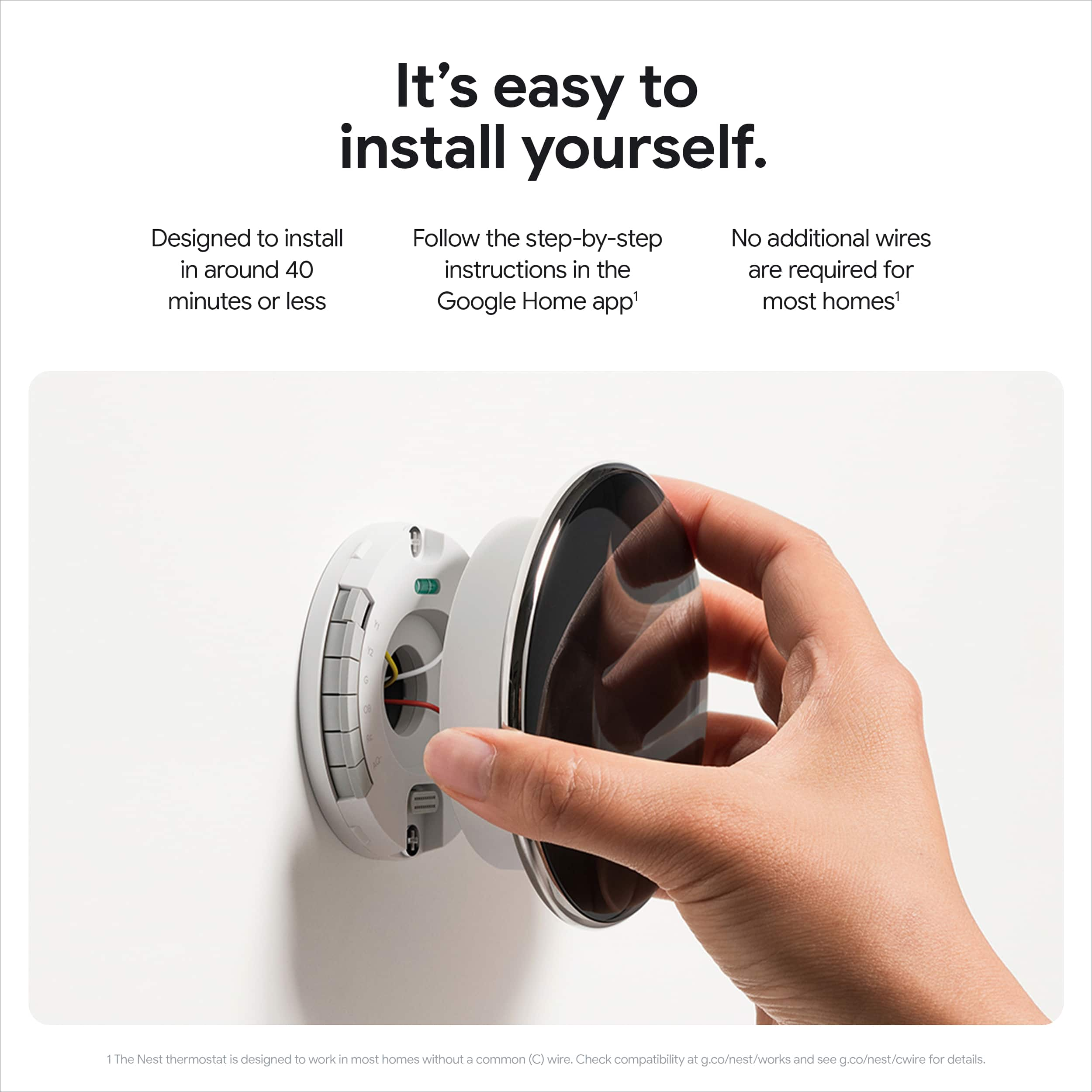
||Posted . Owned for 1 month when reviewed.This reviewer received promo considerations or sweepstakes entry for writing a review.The most simple setup ever. It navigates you through a very streamlined setup process via the Google Home app and is very easy.
I would recommend this to a friendNest
||Posted . Owned for 3 weeks when reviewed.This reviewer received promo considerations or sweepstakes entry for writing a review.Excellent product! Instillation made much smoother By using On Technology Co.
I would recommend this to a friendBrand response from Google Nest Support
Posted .Happy the set up was easy, Skiing52. Here’s to the perfect temperature!