Customer Ratings & Reviews
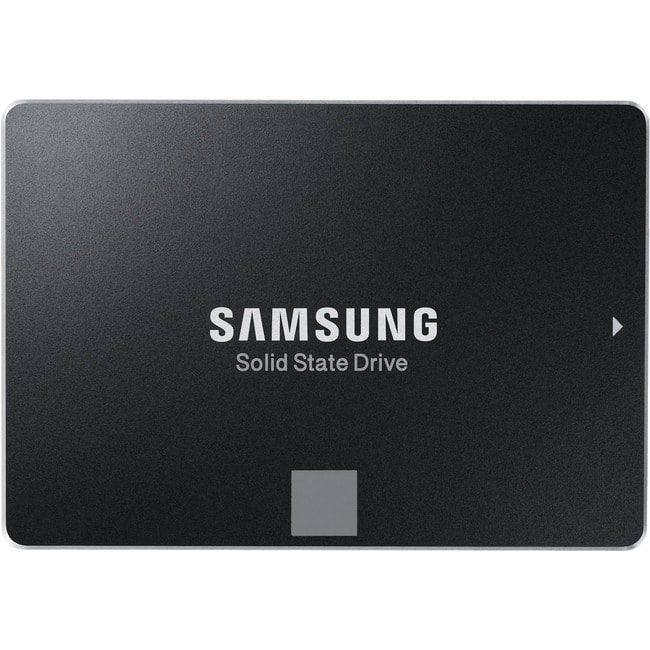
- Model:
- MZ-75E500B
- |
- SKU:
- 1662009
Customer reviews
Rating 4.9 out of 5 stars with 2771 reviews
(2,771 customer reviews)Rating by feature
- Value4.6
Rating 4.6 out of 5 stars
- Quality4.8
Rating 4.8 out of 5 stars
- Ease of Use4.7
Rating 4.7 out of 5 stars
Customers are saying
Customers are positive about the 850 EVO 500GB SSD, frequently praising its performance boost, ease of installation, and improved boot times. Many appreciate the included software for easy data transfer and the overall value for the price. The increased storage space and positive impact on battery life were also highlighted. There were no negative customer comments reported.
This summary was generated by AI based on customer reviews.
- Pros mentioned:Speed
Rated 5 out of 5 stars
Super easy upgrade for Older Desktops...
||Posted .This reviewer received promo considerations or sweepstakes entry for writing a review.I have an old HP Desktop and didn't want to shell out over a thousand bucks for a new PC. By adding a Solid State Drive, I'm amazed at how fast my PC boots, basically in about 30 seconds using windows 7. I don't use my Desktop for gaming, but it was frustrating just how slow the mechanical 7,200 rpm drive was. I did an install of Windows 7 using the back up discs and loaded everything onto the SSD. I've read that cloning a drive can be frustrating and this particular drive does not have the adapter needed for cloning. The OEM install is a long and pain staking process, but after all the updates are done, I'm pleased to report that I have no issues. Many users are against loading all of the files on the SSD, I don't plan on overly taxing the drive and if something should happen, I have a perfectly fine OS on the old hard drive. I've seen a lot of shall I say, paranoia of a failing SSD, and why one would load the OS and applications on this drive and use a separate drive for storage. Again, I use my pc for basic tasks only here. The Sales associate did not sell me an adapter to screw this into the bay, so I was a little upset, but I simply zip tied it just above where the old Hard Drive sits. This doesn't seem to be a problem since an SSD has no moving parts.
I would recommend this to a friend - Pros mentioned:Performance
Rated 5 out of 5 stars
Samsung - 850 EVO 500GB Solid State Drive
||Posted .This reviewer received promo considerations or sweepstakes entry for writing a review.I have bought several SSD drives ever since they come out. Will not specify the other brands, but I will say NONE were Samsung and I did have issues with them. What I liked the most was the good old 5 year warranty coming back from the good old days. Seems everything was going to 1 maybe 2 and if you’re lucky 3 year warranties. What sold me was not just the warranty but the reviews that I saw everywhere. Not just 1 or 2 places, I mean everywhere. Benchmarks are unbelievable and when I put the drive in the Lenovo Y520 I just bought as its second drive I’m in heaven again until technology changes again in 6 months.
I would recommend this to a friend - Pros mentioned:Boot time, Speed
Rated 5 out of 5 stars
Are you considering buying this? Stop! Just do it!
||Posted .This reviewer received promo considerations or sweepstakes entry for writing a review.Look: if you're hesitating, pondering, wondering, thinking, or otherwise getting caught up in the dreaded "paralysis of analysis," of whether you should upgrade your hard drive to a solid-state drive… Free yourself! For there are better (faster!) times ahead! Buy this now and install it and love your computing life so much more... that is, if you survive having your face ripped off by how fast your computer has become after you boot it back up post-SSD-install! My Macbook Pro (mid-2012, non-retina) was moving quite slow. I upgraded from 4GB RAM to 16GB RAM a few months back and that helped a bunch. I work hard on this machine, though, and it just wasn't enough. After hemming and hawing about upgrading to an SSD for far too long, I decided I gotta do it. I literally LOL at the thought of my former self, sitting there, waiting tens of seconds for things to happen! Nowadays, I don’t wait for nothin’. I don’t have a face, but who needs one when your laptop goes from off to cruisin’ in less than 15 seconds? Enjoy! :)
I would recommend this to a friend - Pros mentioned:Performance
Rated 5 out of 5 stars
Samsung Speed and Reliability
||Posted .This reviewer received promo considerations or sweepstakes entry for writing a review.Samsung - 850 EVO 500GB Internal Serial ATA Solid State Drive Pros: Excellent read/write speeds, comes well packaged and includes migration software, good warranty in case you should have an issue. Cons: MSRP is pricey... Wait for it to be on sale. Other Thoughts: Samsung's the top brand for SSD technology. I have a pair of these running in RAID 1 as mirrored drives... IF one of them should fail in the next five years, I can send it back and get a new one without losing my data and being without my PC. But with Samsung's reliability, I'm not at all worried that I'll need to use the warranty. Your drive is the brain of your PC, don't go cheap and buy another brand to save a few dollars, buy the Samsung, you'll be glad you did.
I would recommend this to a friend - Pros mentioned:Speed
Rated 5 out of 5 stars
Excellent SSD's
||Posted .This reviewer received promo considerations or sweepstakes entry for writing a review.Samsung - 850 EVO 500GB Internal Serial ATA Solid State Drive: Pro's: Fast, Fast, Fast and still affordable! Samsung brand is second to none in the world of SSD's. Con's: They aren't buy one get one free? Other Thoughts: I have a pair of these in RAID 1 for my OS, basic software and apps. If you're trying to decide between this one and one from another manufacturer, buy yourself the peace of mind you get with Samsung SSD's... Even if it's a little more than a comparable SSD from another maker, it's worth every single penny. Don't cheap out on the one component that runs everything else on your PC.
I would recommend this to a friend - Pros mentioned:Speed
Rated 5 out of 5 stars
great HDD replacement
||Posted .This reviewer received promo considerations or sweepstakes entry for writing a review.I have an Alienware laptop and the HDD is only 7200 rpm's, everything else is good enough to play AAA games, just the loading process is way too slow, after i installed this SDD and migrated everything with the Samsung magician software ( included ), to the new ssd and i can see the difference , windows 10 loads faster and i can use my laptop as soon as i see the desktop and all the most demanding games like battlefield 1 load way faster even on ultra settings.
I would recommend this to a friend - Pros mentioned:Performance
Rated 5 out of 5 stars
Best SDD HDD On Earth
||Posted .This reviewer received promo considerations or sweepstakes entry for writing a review.This is simply the best hard drive I have ever encountered. Samsung has simply outdone themselves. I have followed reviews for solid state hard drive for a couple of years and finally bought one. This particular drive has always remained top of the heap. I am going to get a Samsung T3 Portable SSD for my Xbox One S next as getting a solid state hard drive is like getting a major upgrade to your computer!
I would recommend this to a friend Rated 5 out of 5 stars
Drives are amazing and very efficient
||Posted .This reviewer received promo considerations or sweepstakes entry for writing a review.I buy a lot of hard drives building out NAS systems and these are by far my #1 SSD drives if I am not considering cost. They are pricey and if you don't mind spending 20 or 30 extra dollars then its a no brainer. The crucial mx300 are also very nice but tend to fade down on speed over time and with large amount of data! Actually just placed one in my 17inch MacBook Pro only complaint with that is they do not provide their magician software for macs!
I would recommend this to a friend- Pros mentioned:Performance
Rated 5 out of 5 stars
Perfection
||Posted .This reviewer received promo considerations or sweepstakes entry for writing a review.This drive turned my laptop from a slow slug to a Bugatti! I used the software that came with the drive and transferred image from old drive to new one without any issue. I would not hesitate buying again and truthfully probably one of he most noticeable differences in anything I have ever bought before. BELIEVE THE HYPE!
I would recommend this to a friend - Pros mentioned:Performance
Rated 5 out of 5 stars
Replaced iMac (2012) HD - 10x faster now!!!
||Posted .This reviewer received promo considerations or sweepstakes entry for writing a review.I replaced the factory HD in my late 2012 21.5" iMac after watching a few YouTube videos... the performance is outstanding and didn't require any special programming to make the drive compatible. Worked right out of the box!
I would recommend this to a friend Rated 5 out of 5 stars
Perfect Addition to My MSI GS63VR
||Posted .This reviewer received promo considerations or sweepstakes entry for writing a review.Installing a 5400RPM spindle speed hard drive in a 1500 dollar machine feels like a pretty shameful thing on MSI's part. I installed this and now I have an additional 500GB of high quality SSD on deck for videos, games, and pictures. One of the best things about this is that for my already sub 4 pound laptop, this lightweight SSD shaves a few more ounces off of the laptop's weight! As always, Samsung blows me away with the quality of their products!
I would recommend this to a friend- Pros mentioned:Speed
Rated 5 out of 5 stars
Fast
||Posted .This reviewer received promo considerations or sweepstakes entry for writing a review.faster than the original drive and its made by samsung-enough said
I would recommend this to a friend - Pros mentioned:Boot time, Performance, Speed
Rated 5 out of 5 stars
Almost exactly what I expected
||Posted .This reviewer received promo considerations or sweepstakes entry for writing a review.This was my first foray into SSD territory. I did my research and found that Samsungs were reliable across the board. That was most important since it was going to replace my boot drive which had started clicking and grinding. Speed wasn't a huge concern since slow SSDs still crush fast HDDs. So far it has been almost two months and I've had no issues with this drive. Win 8.1 boots in seconds and programs are a bit snappier. I say a bit because my MOBO doesn't support Sata III or AHCI. There is a noticeable performance increase even though the drive isn't at its full potential. Also I want to add something that caught me off guard for a second. When I opened the box there was an install guide that only mentioned using and external Sata to USB cable to set up the SSD. I completely ignored that and put the drive in my case then booted Windows from a flash drive. Treating this thing like a mechanical hard drive worked just fine. So while the drives speed isn't all I had hoped for, my oldish MOBO with its Nvidia chipset is at fault here. I plan to move this into a new rig later this year and I don't regret the purchase at all.
I would recommend this to a friend - Pros mentioned:Boot time
Rated 5 out of 5 stars
Great performance upgrade!
Posted .This reviewer received promo considerations or sweepstakes entry for writing a review.I have a 5 year old laptop, HP Envy 15t 1100 CTO it has a I7 1.73 GHz processor with 6GB memory and 500HD 7200 rpm with Win7 Pro SP1. Really didn't want to spend additional dollars to get new laptop but need speed improvement. It just way to slow or locks up. This upgrade dramatically gave me a boost in performance. Not just boot up but everything, including net surfing. For those do it yourself types like me, only thing I would like to pass along is 1. Remember to get the cable-connector that goes from your USB to this device or buy a SSD enclosure. 2. Your old internal HD must have flat SATA contacts versus pins on older IDE drives. I used an ANKER HHD/SSD USB 3.0 enclosure and slide the Samsung SSD into it then connected it to the USB on my laptop. No problems noted. It was somewhere around an hour to copy about 250GB from old to new SSD HD. For some reason it took longer to download Microsoft updates on my WIN & Pro operating system. I think it lost track of which ones where previously completed. It would take too long to explain why. I do not recommend a novice tackle disassemble of your laptop because there are about 20-25 or tiny screws and internal cables to keep track of. Take it to the Geek squad or someone else. If you try this yourself, keep distractions to minimum and your cats locked up/out because will try to swat tiny screws into every crack and crevice that may be nearly impossible to recover. O the joy! Hope this review helps your decision. This is really a great product; I highly recommend it!
I would recommend this to a friend - Pros mentioned:Installation, Performance, Speed
Rated 5 out of 5 stars
Fast and Reliable
||Posted .This reviewer received promo considerations or sweepstakes entry for writing a review.I bought this for an older laptop that needed upgrades. New software and even some of the original laptop software seemed to really bog the computer down. This SSD installed easily and the migration software that came with it worked flawlessly. It was simple. The computer is so fast now and fun to use again. I'm really glad I have this. It was nice to find it locally at Best Buy and to have their assistance if needed. One thing to keep in mind, if you plan to migrate your old drive to the SSD, you'll need to purchase a USB cable that will connect to the SATA ports on the drives. I happened to have one but it would have been a bummer to get all set up to do the swap and realize you're missing a cord. Best Buy sells them too.
I would recommend this to a friend - Pros mentioned:Installation, Performance, Speed
Rated 5 out of 5 stars
Best for Mac
Posted .This reviewer received promo considerations or sweepstakes entry for writing a review.I read a lot of articles and forums on the best SSD hard drives for Macs, and this one was at the top of everybody's list. Yes, there are a few that are slightly faster than this one, but for the price, the Evo 850 is the best. I was replacing the HD in a Mid 2012 MacBook Pro and I chose this one for reliability, speed, price, and Apple compatibility. Also it was a super easy install. This was my first time to change out a hard drive and it was really easy. Below are pictures of the speed increase I got. The slower speeds were taken with the MBP at 8GB RAM & 500GB HDD. Then I installed the Evo 850 500GB SSD and upgraded the RAM to 16GB. This laptop has an i7 2.3Ghz processor.
I would recommend this to a friend - Pros mentioned:Boot time, Noise level, Performance
Rated 5 out of 5 stars
Fast read and write speeds
||Posted .This reviewer received promo considerations or sweepstakes entry for writing a review.Woke my computer up. From pressing the button to turn on, until it gets to desktop is 21 seconds. My hard drive took about 1 min and 34 seconds. And it would still keep loading other programs. And it does not make any noise like a hard drive would. Very cool ssd. I actually bought a second just for games. Some ssd say laptop only but I bought it anyways. My case has mounting for 2.5" drives. If your case does not have 2.5" drive bays. All you need is 3.5" bracket to hold 2.5" drives. Note that this does not come with SATA cables.
I would recommend this to a friend - Pros mentioned:Boot time, Performance
Rated 5 out of 5 stars
Excelente SSD
||Posted .This reviewer received promo considerations or sweepstakes entry for writing a review.Excelente SSD, for the size/price relation and the super easy software to use that the box already brings to transfer it all from the old drive to the new one, in a few easy steps, assuming you have the SATA to USB adapter like a drive case that you may want to have anyway to use the old one as an external drive for like 25 dollars. My laptop improved from taking 3 mins an 34 seconds to 32 seconds to turn the laptop ON until I get Chrome up with google.com site up and ready. Worth the small investment to make your computer a lot faster than before since the overall performance of it improved a lot also just by changing to this SSD, nothing else. I had another 500GB HHD with 5400 RPM.
I would recommend this to a friend - Pros mentioned:Installation, Performance, Speed
Rated 5 out of 5 stars
Greate SSD
||Posted .This reviewer received promo considerations or sweepstakes entry for writing a review.This is the third Samsung EVO SSD I have purchased and all of them have worked very well. Replaced the HD drives in my work laptop, personal laptop, and home desktop. Was real easy using Samsungs migration software to copy over the data on the drives. Computers boot and load programs and data many times faster now. Replacing a HD with an SSD is one of the best upgrades you can do for any computer.
I would recommend this to a friend - Pros mentioned:Performance
Rated 5 out of 5 stars
Faaaast!
||Posted .This reviewer received promo considerations or sweepstakes entry for writing a review.I bought this hard drive for a 1 1/2 year old laptop that was getting slower and slower by the minute. I was expecting this hard drive to speed it up some but I blown away by just how much of a difference it made! I was so impressed with the difference, I bought another for my desk top. Package came with Samsung software to clone my current hard drive that was easy to understand and worked perfectly. I did have to purchase a SATA to USB adapter to use the cloning software but it was WELL worth it!
I would recommend this to a friend